Bumble For Friends: Meet IRL
- 875.00
- 3.2
- Installs
- 1.00M
- Price
- Free

Screenshots





Analysis by Reviewed
I used to think that making a friend after a move or a change in routine would happen naturally, but it often takes more effort than that. Bumble For Friends is aimed at people who want to turn shared interests into real-world friendships, rather than add another stream of passive social scrolling. I find that focus appealing: it gives you a reason to start a conversation and, ideally, a plan beyond the screen.
When a shared phone enters the picture
In a household where people sometimes borrow one another’s devices, this is an app I’d keep tied to one person’s account and profile. Friendship conversations can include personal details and plans, so switching between household members on a shared login would blur boundaries in a way that feels awkward. If you’re helping someone set it up, let them make their own profile and decide what they want to share; don’t treat the app as a family social account.
A practical example: after moving to a new neighborhood, I might browse for someone who also enjoys weekend walks, then suggest a public café or a short walk at a time that works for both of us. That is a more manageable first step than trying to arrange a whole evening with a stranger. I’d keep the conversation and plan on the account holder’s own device where possible, especially if other people at home use the same phone.
Setting expectations before meeting
Bumble Holding Limited makes this social app free to install, though it offers in-app purchases ranging from $1.99 to $199.99 per item. I’d start with the free experience and decide whether any paid option actually addresses a need I have, rather than paying simply because I want conversations to move faster. For a friendship app, patience and a clear profile often matter more than spending.
The app is for teens, so age context matters in a household. I wouldn’t assume that a teen and an adult should use it in the same way or share one account; each person needs to understand who they are speaking with and make choices suited to their age. If you’re a parent or guardian, a calm conversation about meeting in public, telling someone trusted about plans, and leaving if a meetup feels uncomfortable is more useful than silently managing another person’s profile.
Making a plan that survives busy schedules
Coordination is where a friendship app can earn its place. Instead of keeping a vague “we should hang out” chat alive for weeks, I’d suggest one simple activity, offer a couple of possible times, and confirm the plan before setting out. That keeps the first meetup low-pressure and helps both people see whether they actually enjoy spending time together.
For a household, the useful boundary is that a shared calendar or family chat can help with logistics only if the account holder chooses to share the plan. I would not expect a friendship app to coordinate everyone’s schedule at home. Its role is to help two people connect; the people involved still need to agree on transport, timing, and what feels comfortable.
More From Our News Desk

Clash of Clans Is Won Between the Battles

Android Auto Makes the Case for Quieter Car Software

MobiOffice: Transforming Mobile Productivity with Seamless Integration

EA SPORTS FC™ Mobile Soccer: Redefining Mobile Sports Gaming

How Microsoft OneDrive Became a Mobile Productivity Giant

How Google Translate Breaks Language Barriers Effortlessly
Get to Know Bumble For Friends
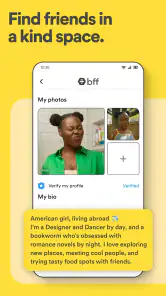
So, what’s the deal with Bumble For Friends? Well, it’s like the sibling of the popular dating app, Bumble, but with a friendly twist. It’s designed to help you find friends rather than dates. When you first hop onto the app, you’re greeted with a clean, intuitive interface that makes setting up your profile a breeze. You can customize your profile with your interests, favorite activities, and even a quirky bio that screams “This is me!”
How It Works
Once you’re all set up, it’s time to start swiping. Much like its dating counterpart, you swipe right if you’re interested in hanging out with someone, and left if you think maybe not. But here’s where it gets interesting: the app focuses on group meetups and events. You can join existing groups or create your own, inviting others to join in on the fun. Whether you’re into hiking, book clubs, or just grabbing a coffee, there’s a group for everyone.
One of the coolest features is the ability to link up your Spotify and Instagram accounts. This means you can find friends who jam to the same tunes or vibe with your insta-aesthetic. Talk about making connections on a deeper level!
The Social Butterfly Effect
Now, let’s chat about the real magic of this app – the offline meetups. In our digital age, it’s easy to forget how refreshing it is to meet someone in person. Bumble For Friends encourages you to take the plunge and meet your new pals face-to-face. The app’s calendar feature is a lifesaver, allowing you to schedule meetups without the endless back-and-forth texting. Plus, the app provides suggestions for safe and fun meeting spots, which is a thoughtful touch.
Another thing that stands out is the emphasis on creating a safe space. Bumble has always been about empowering its users, and this app is no different. There are robust safety features in place, such as photo verification and the ability to block and report users, ensuring that your friend-making journey is both fun and secure.
Finding the right rhythm
I wouldn’t judge the experience by how many matches appear in one sitting. A profile that says what you genuinely enjoy doing gives a potential friend a concrete opening: “I also like that trail” is easier to answer than a generic greeting. I’d mention the sort of activity I’d actually make time for, and keep the first message specific enough to invite a reply without turning it into an interview.
That also explains who may get the most from the app. It suits someone new to an area, someone whose old friends have moved into different routines, or a person who wants company for an existing hobby. It is less compelling if you already meet plenty of people through work, clubs, or neighbors, or if you mainly want a broad public feed to follow. A local community group or an interest-based forum may be better when the goal is discussion rather than one-to-one connection and an eventual meetup.
Trust, pace, and practical limits
For a first meeting, I’d keep the plan easy to change: choose a public place, set a reasonable time limit, and arrange my own way there and back. Shared interests are a useful starting point, not proof that someone will be a good friend. If the conversation feels pushy or the plan stops feeling comfortable, I’d pause rather than treat an in-app match as an obligation. Features such as blocking and reporting can help with unwanted contact, but good judgment still matters.
There is also a trade-off between a focused friendship app and the alternatives people already use. Dating apps can expose users to people who are primarily looking for romance, while general social networks are often better for keeping up with people already known. Bumble For Friends puts friendship first, which can make intentions clearer, but it still asks you to initiate, chat, and follow through. It cannot make a quiet local pool feel lively or turn a weak conversation into a connection by itself.
The app has a 3.2 average from around 6,400 ratings, with about 875 written reviews, and has passed 1 million installs. I take that as a reminder to keep expectations realistic: it has found an audience, but it won’t be equally useful in every area or for every personality. It is free, rated Teen, and Bumble Holding Limited’s current version is 5.439.0; the listed minimum operating system is 7.1. Those details make it worth checking compatibility before installing on an older device, while the age rating is a prompt to think carefully about who in the household is using it.
A low-pressure way to test the fit
If I were trying it after a move, I wouldn’t begin by treating the app as a project to find a whole new circle. I’d choose one interest I already make time for, write a profile that gives someone a natural conversation starter, and look for a modest first plan. For example, a short coffee after a weekend class is easier to commit to than a full day out. If the first exchange goes nowhere, I’d adjust the opener or activity rather than assume that friendship itself is out of reach.
That small approach also answers a practical question: do you need to be outgoing to use it? Not necessarily, but you do need to be willing to initiate and respond. Someone who prefers meeting through repeated, unplanned contact may find a recurring class, volunteer group, or neighborhood activity more comfortable. Those settings offer conversation in context; the app is more useful when you want to identify people nearby who are open to making a connection and can take the next step yourself.
What to expect from the first conversation
I’d treat a match as an invitation to see whether a conversation feels easy, not as a promise that a friendship will follow. Asking about the shared activity on someone’s profile gives both people somewhere to begin. If replies are sporadic, I wouldn’t keep sending messages just to maintain a connection that isn’t developing. One clear suggestion can reveal more than a long stretch of chat, while leaving room for the other person to decline or propose something different.
There is a useful balance here between moving things offline and not rushing. A quick public meetup can prevent weeks of vague messaging, but meeting immediately is not right for everyone. I’d exchange enough messages to establish a basic sense of comfort, agree on a simple plan, and tell someone I trust where I’ll be. The app can help start the interaction; deciding how much to share and when to meet remains a personal choice.
Keeping household boundaries clear
On a shared device, I’d also think about ordinary privacy habits before signing in: use the account holder’s own profile, avoid leaving personal conversations open for another person to browse, and make sure everyone knows whose account is active. That is not a special household feature; it is simply a sensible way to keep friendship plans and messages from being mistaken for someone else’s. If a person cannot use a device privately, they may prefer to wait until they can.
For adults and teens living together, I’d keep support separate from surveillance. A parent can discuss how to choose a public place and how to get home independently without writing messages or arranging meetups on the teen’s behalf. That leaves the young person responsible for their own boundaries while making it easier to ask for help if something feels wrong. Anyone uncomfortable with that level of independence should consider whether an app-based first meeting is suitable at this point.
Why You Should Give It a Try
If you’ve ever felt the struggle of making friends as an adult, then you know it’s not always a walk in the park. But with Bumble For Friends, it’s like having a friendly nudge that says, “Hey, it’s okay to put yourself out there.” The app’s community is vibrant and welcoming, making it easier to step out of your comfort zone and meet people who could become lifelong friends.
In conclusion, Bumble For Friends is more than just an app; it’s a movement towards genuine human connection. Whether you’re new in town, looking to expand your social circle, or just keen to try something new, this app has got you covered. So why not take a leap and see what friendships await you in the real world?
Bumble For Friends: Meet IRL Frequently Asked Questions
Who develops Bumble For Friends: Meet IRL?
Bumble For Friends: Meet IRL is a social app developed by Bumble Holding Limited. It focuses on helping people chat, meet others nearby, and build friendships in real life. If you already know Bumble, the familiar name may make the app easier to recognize, while its purpose here is specifically centered on making friends rather than dating.
What is Bumble For Friends: Meet IRL and how does it work?
Bumble For Friends: Meet IRL is a social networking app designed to help users find and meet new friends in real life. The app leverages location-based technology to connect users with people nearby who share similar interests. Users can create a profile, browse potential matches, and initiate conversations to arrange meetups. It’s a user-friendly platform that emphasizes safety and authentic connections.
Is Bumble For Friends: Meet IRL safe to use?
Yes, Bumble For Friends takes user safety seriously. The app includes various safety features, such as profile verification, to ensure genuine interactions. Users can report or block anyone who makes them uncomfortable. Additionally, Bumble encourages users to meet in public places and share their plans with friends or family. Safety guidelines are provided to help users make informed decisions.
What age group is Bumble For Friends: Meet IRL suitable for?
Bumble For Friends is designed for adults aged 18 and over who are interested in expanding their social circles. It caters to a diverse audience, offering an inclusive environment for users from different backgrounds and interests. Whether you’re new to a city, looking to meet like-minded individuals, or simply want to enlarge your network, this app can be a great tool.
Are there any costs associated with using Bumble For Friends: Meet IRL?
Bumble For Friends can be downloaded and used for free. However, there are in-app purchases and premium features available for users who want to enhance their experience. These features might include the ability to see who likes you, unlimited swipes, and more visibility. It’s optional to purchase them, and the free version provides ample opportunities to connect with new people.
Pros
- Easy to navigate user interface
- Connects with people having similar interests
- Robust privacy controls
- Free to use with optional in-app purchases
- Seamless integration with social media
Cons
- Limited features in free version
- Requires constant internet access
- Can be time-consuming
- Occasional bugs and crashes
- Profile verification can be slow
- Category
- Social
- Version
- 5.439.0