Buffalo Wild Wings Ordering
- 26.35K
- 4.7
- Installs
- 5.00M
- Price
- Free

Screenshots
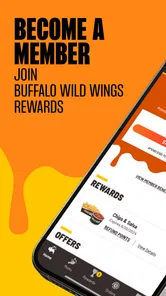

Analysis by Reviewed
When I want wings but don’t want to coordinate a restaurant trip, I start by deciding whether I need food brought to me or can pick it up. That choice shapes the whole order: delivery is convenient when everyone is settled at home, while takeout can make more sense if I’m already passing a Buffalo Wild Wings. The free Buffalo Wild Wings Ordering app, made by Buffalo Wild Wings, Inc., is built around that specific craving rather than browsing restaurants in general. I’d reach for it when I already know I want the chain’s food, not when I’m comparing every nearby place for the best meal.
Starting with a craving, not a restaurant search
For a game night, the useful first step is to agree on the basics before opening the menu: traditional or boneless wings, how much heat people can handle, and whether the group wants anything beyond wings. That small bit of planning helps avoid a familiar group-order snag: one person wants a fiery sauce while another would rather keep dinner mild. I also find it easier to look at the menu with a rough plan than to scroll while everyone calls out ideas from the couch.
This is a Food & Drink app focused on Buffalo Wild Wings orders, so it has a narrower purpose than a general delivery marketplace. That focus is handy if the group has already chosen the restaurant; a marketplace is the better starting point if you’re still weighing cuisine, distance, or other restaurants. The app is rated for Everyone, and its 4.5 average comes from around 191,000 ratings. Those figures suggest plenty of people use it, but they don’t guarantee that every location or order will feel equally smooth.
A useful way to decide whether to open it is to separate the restaurant decision from the order decision. If everyone has already settled on Buffalo Wild Wings, the dedicated app puts the task in one place. If people are still debating pizza, burgers, or wings, starting in a marketplace keeps those choices visible together. I’d also consider the occasion: for a planned meal at home, delivery can save a trip; if I’m already near the restaurant, pickup may be the more direct handoff.
The User Experience
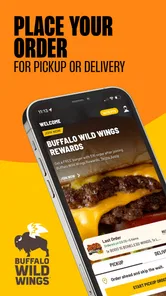
First off, let's talk about the user interface. The Buffalo Wild Wings Ordering app is incredibly intuitive. From the moment you open it, the layout is clean and straightforward, which is a huge plus for someone like me who isn't tech-savvy. The menu is right up front, and everything is categorized neatly, making it easy to find what you're in the mood for. Whether it's classic wings, boneless, or even a salad for those feeling a bit health-conscious, it's all just a swipe away.
For an everyday example, picture getting home late with no appetite for a grocery run, but still wanting a familiar dinner. I’d decide first whether I can wait for delivery or would rather collect the food on the way home, then build the order around that choice. That simple sequence matters because choosing the wrong handoff can undo the convenience of a quick menu. I would not treat the app as a meal-planning tool for the whole week; its strength is getting a specific restaurant order organized when the craving is already settled.
Customization is Key
One of the features I absolutely love about this app is the level of customization it offers. You can choose your preferred type of wings, the sauce (and oh, there are so many to choose from), and even the level of spiciness. It's like having a personal wing chef at your fingertips. I usually go for the traditional wings with the honey BBQ sauce, and being able to adjust the spiciness is just the cherry on top.
More From Our News Desk

Weather by Xiaomi Review: Clear at a Glance, Less Clear Up Close

X Under Pressure: Can It Recover When Posting Goes Wrong?

Clash of Clans Is Won Between the Battles

Android Auto Makes the Case for Quieter Car Software

MobiOffice: Transforming Mobile Productivity with Seamless Integration

EA SPORTS FC™ Mobile Soccer: Redefining Mobile Sports Gaming
For a mixed group, I’d treat those choices as a way to keep preferences separate rather than trying to find one sauce everyone will tolerate. Decide which portions need to stay mild, then customize the rest for people who want more heat. Before checkout, I’d review each item individually; that’s the moment to catch a sauce or wing-style mismatch before the order leaves the screen. Customization makes the order more personal, but it also gives you more decisions to double-check.
One practical tip is to assign each customized item to the person who asked for it before placing the order. That makes it easier to spot a mismatch between wing style and sauce, especially when several portions look similar once they are packed. I’d also avoid making last-minute changes based on shouted instructions while someone else is checking out. A short pause to read back the choices is less exciting than choosing sauces, but it can prevent the most avoidable group-order confusion.
The menu’s range can also be a reason to bring in someone who does not want wings. The original order can still center on wings while adding a different kind of meal for that person, rather than making the whole group switch restaurants. I’d think of that as a useful compromise, not a guarantee that every preference is covered: if someone has strict dietary needs or wants to compare a wide range of restaurant menus, a broader service or direct discussion with the restaurant may be more suitable than relying on a single ordering screen.
Order Tracking and Convenience
The app doesn't just stop at ordering; it takes it a notch higher with real-time order tracking. You know exactly when your wings are being prepared, when they're out for delivery, and when they're at your doorstep. This feature has saved me from impatiently staring out the window more times than I can count. Plus, the app also offers multiple payment options, including Apple Pay, making the checkout process super smooth.
The handoff is where I’d keep expectations practical. Tracking can help me follow the order, but it doesn’t remove the need to be ready to collect it or answer the door. For takeout, I’d check the selected option and timing carefully before placing the order so I don’t arrive expecting a delivery or vice versa. If dinner is for a group, I’d also make sure someone is responsible for pickup and that the order details are easy to share; a smooth checkout still depends on a clear plan outside the app.
For a shared meal, I’d decide who is in charge of the final handoff before anyone starts ordering. One person can place the order, while another handles pickup or watches for the delivery, but the plan should be explicit rather than assumed. This is especially useful when the person paying is not the person meeting the driver or going to the restaurant. The app can organize the order and show its progress; the group still needs to coordinate who receives it and gets it to the table.
A common question is whether tracking means I can time dinner precisely. I’d use it as a helpful status update, not a promise that every part of the meal will land at an exact moment. If people are arriving at different times, it may be smarter to place the order when the group is reasonably ready instead of ordering far ahead and expecting the food to wait in ideal condition. For pickup, I’d likewise plan the trip around the selected order details rather than assuming the food will be ready simply because I have started heading over.
Rewards and Offers
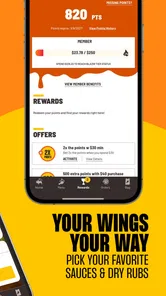
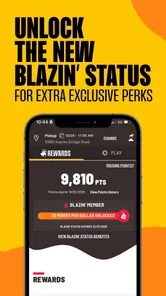
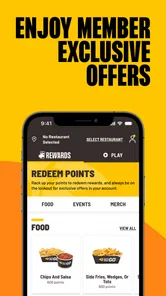
Who doesn't love a good deal? The app regularly updates with offers and rewards, which is fantastic for frequent customers. I've scored some free wings and discounts just by using the app, and honestly, it feels great to get rewarded for indulging in something you love.
Rewards are most useful when you already intend to order from Buffalo Wild Wings. I wouldn’t make them the reason to choose a meal if another option suits the occasion better, and I’d check the offer details in the app before building an order around a discount. For occasional customers, the main value is the ordering flow; regular visitors have more reason to keep an eye on available offers. Buffalo Wild Wings has more than five million installs, but reach alone won’t tell you whether the menu or ordering style fits your routine.
My practical approach would be to check for an offer before settling on the final order, then make sure the meal still makes sense without it. That keeps a promotion from steering the group toward extra food or a restaurant choice nobody wanted. Offers can be a pleasant bonus for someone who orders there often, but they are not a substitute for comparing the total meal and convenience with other options. If I’m deciding between restaurants, I’d compare the food and the handoff first, then treat any reward as a secondary consideration.
Someone who orders only once in a while may reasonably ask whether rewards justify keeping a dedicated restaurant app. I’d say the answer depends on whether the ordering convenience itself is useful to you; a one-off customer can simply use the app for that occasion without making rewards the main attraction. Frequent visitors have more reason to check the offers as part of their ordering routine. Either way, I’d read the conditions before counting on a deal, since an offer should be treated as something to verify while building the order, not as an automatic reduction I can assume will apply.
Where the flow can break
The biggest trade-off is the app’s single-restaurant focus. If you want to compare delivery fees, menus, or arrival estimates across different restaurants, a broader delivery service is a more natural tool. If you’re already at the restaurant, ordering in person may also be simpler than setting up a digital order. And if you’re ordering for a group with complicated preferences, the customization is helpful but can make the final review more important: check every item and option before paying rather than assuming the group’s choices were captured correctly.
I’d also keep the app current and make sure the device can run it. The current version is 7.41.2, and it requires iOS 11 or later. It was released on September 14, 2015, and its established presence is reassuring, though what matters most in practice is whether the ordering flow works for your chosen location and meal. I wouldn’t assume a particular offer, payment method, or delivery arrangement will suit every order just because it worked on a previous one.
There are a few situations where I’d choose another route without hesitation. If I want to compare several restaurants side by side, a delivery marketplace is more useful because the choice is not limited to one chain. If I am already inside Buffalo Wild Wings and want to ask a question before ordering, speaking to staff may be more efficient than moving through an app. And if a group has not agreed on the restaurant or meal, I’d settle that first instead of expecting the ordering screen to resolve a disagreement about dinner.
People may also wonder whether a dedicated ordering app is worthwhile when they already use a general delivery service. For me, it makes most sense when Buffalo Wild Wings is already the answer and I want to work directly through its ordering experience. A marketplace is better for broad discovery and comparison; the restaurant’s app is the more focused choice for a known craving. Neither approach is automatically superior: the right one depends on whether your priority is restaurant choice or a direct route to the meal you have in mind.
The app is free, which makes trying it for a planned order an easy decision, but free does not mean every order will be effortless. The menu may be simple to navigate while the real-world details still depend on your chosen restaurant, the order, and whether delivery or pickup fits your day. I’d use it when convenience and a familiar menu matter, while keeping a backup plan if timing is tight or the group changes its mind. That is a more realistic expectation than treating any ordering app as a guarantee that dinner will arrive exactly as imagined.
Overall, whether you're a die-hard wing fan or just someone looking for a convenient way to order some tasty food, the Buffalo Wild Wings Ordering app has got you covered. It's user-friendly, offers great customization, and even rewards you for your loyalty. So next time those wing cravings hit, you know exactly what to do. Happy munching!
Buffalo Wild Wings Ordering Frequently Asked Questions
Does Buffalo Wild Wings Ordering let me choose pickup or delivery?
Yes. Buffalo Wild Wings Ordering is designed for ordering your favorites for takeout and delivery, so you can select the option that suits your plans. It is useful whether you are arranging a meal to pick up or want it delivered. The app brings those ordering choices to your phone, giving you a convenient way to place an order.
Do I need an account to place an order in Buffalo Wild Wings Ordering?
The app is centered on ordering Buffalo Wild Wings favorites for takeout and delivery, and it also includes account-linked loyalty features. An account can be useful for keeping track of loyalty points and applying eligible rewards to future orders. Before downloading, consider whether you want to use those features alongside the basic convenience of ordering from your phone.
Is Buffalo Wild Wings Ordering free, and what devices can run it?
Buffalo Wild Wings Ordering is free to download and is designed for Android and iOS devices. Before installing, check that your phone meets the minimum operating-system requirement: version 11. The app is listed for everyone, so its content rating is suitable for a broad audience. It is a Food & Drink app from Buffalo Wild Wings, Inc.
What can I use Buffalo Wild Wings Ordering for?
The app is built for ordering Buffalo Wild Wings favorites for takeout and delivery. It can be useful when you want to place an order from your phone rather than ordering in person, whether you are planning a pickup or having food delivered. Its focus is straightforward: bringing the ordering process into an app, so you can choose the option that fits your meal plans.
What features does the Buffalo Wild Wings Ordering app offer?
The Buffalo Wild Wings Ordering app allows users to easily browse the menu, customize orders, and find nearby restaurants. It also offers features like exclusive offers, loyalty points tracking, and a seamless online payment process. The app aims to enhance the user experience by simplifying the ordering process and providing quick access to favorite items.
Pros
- User-friendly interface
- Fast order processing
- Wide variety of menu items
- Customizable orders
- Real-time order tracking
Cons
- Limited payment options
- Occasional app crashes
- Requires constant internet
- High data usage
- Limited delivery areas











