Budget App — PocketGuard
- 1.16K
- 4.5
- Installs
- 100.00K
- Price
- Free

Screenshots

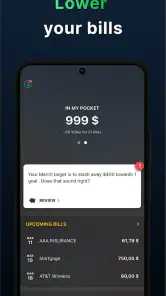
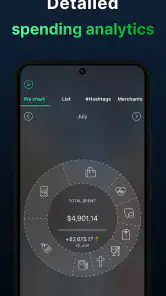
Analysis by Reviewed
I usually judge a budgeting app by a simple question: does it help me make a better decision before I spend, or does it merely show me what I already spent? PocketGuard sits closer to the first group. It is a finance app built around tracking spending, organizing income, controlling expenses, and making saving feel more visible in everyday life. After using it as a practical budgeting companion, I found its biggest appeal in reducing the amount of manual work between opening the app and understanding my available money.
That matters because most people do not abandon a budget because they dislike the idea of one. They abandon it because maintaining categories, entering transactions, and checking several accounts becomes another chore. PocketGuard, developed by PocketGuard, Inc., is designed for someone who wants a clearer view of personal cash flow without turning every purchase into a spreadsheet exercise. I would recommend trying it if you want a straightforward financial overview, but I would not treat it as a complete replacement for careful account checking or a detailed planning system.
How I Decided Whether PocketGuard Was the Right Fit
My first decision criterion was effort. A useful budgeting tool has to fit into the way I already handle money. If it requires constant typing, I am likely to stop using it after an enthusiastic first week. PocketGuard makes more sense for people who want to observe spending patterns and keep an eye on what remains after regular commitments. Its purpose is less about building an elaborate financial model and more about turning scattered money information into a view I can act on.
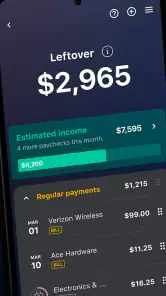
The second criterion was clarity. A budget can contain plenty of information and still leave me unsure whether I can afford dinner, a purchase, or an unexpected bill. PocketGuard’s central idea is useful here: income and expenses should be considered together rather than viewed as isolated transactions. That approach encourages me to think in terms of usable money instead of focusing only on a bank balance that may already include money needed for upcoming obligations.
I also looked at how well the app could support different routines. Someone paid on a regular schedule may use it to plan the space between bills and discretionary spending. Someone with irregular income may need to be more cautious, because a simple available-money view cannot replace their own forecasting. The app can still help in that situation, but I would use it as one layer of the process rather than the only source of truth.
Another practical consideration is accessibility. PocketGuard is free to download, is suitable for Everyone, and supports devices running Android 8.0 or later. Its current version is 5.19.3. The free entry point lowers the risk of testing the workflow, while in-app purchases ranging from $0.99 to $149.99 per item mean I would pay attention to which functions require an upgrade before making it part of a long-term routine.
Its public reception also suggests that it has found an audience: the app holds a 4.5 average from around 2.9 thousand ratings, with more than 100 thousand installs. I see those figures as a sign of interest rather than a guarantee that it will suit everyone. Finance apps are personal; a person who wants automatic simplicity may love the approach, while someone who wants detailed control may find it too restrained.
The everyday problem it solves best
Imagine I receive my income, pay rent, cover utilities, and make a few routine purchases during the week. My bank balance may look healthy, but that number does not tell me how much is genuinely available after upcoming commitments. With PocketGuard, I can use the app as a checkpoint before spending: review the money coming in, consider the expenses already expected, and decide whether a nonessential purchase fits the month.
The useful habit is not checking the app once and forgetting it. I would check it at three moments: after income arrives, before a larger discretionary purchase, and near the end of the billing cycle. Each check answers a different question. The first is about planning, the second is about permission, and the third is about correcting my assumptions before the next cycle begins.
A less obvious benefit is that this routine can expose timing problems. I might not actually be overspending overall; I might simply be spending too early in the month. Seeing income and expenses together helps me notice that distinction. The solution may be moving a purchase later rather than cutting the budget everywhere. That is the kind of practical insight a basic transaction list often fails to provide.
Where PocketGuard feels strongest
The app’s strongest quality is its focus on a usable financial picture. Instead of asking me to become a full-time budget administrator, it encourages a quick reading of my position. That makes it approachable for a first budgeting attempt and convenient for someone who already understands money but wants fewer steps in their routine.
I also like the way its purpose connects tracking with action. Merely labeling a restaurant purchase as dining does not automatically improve my finances. A useful budgeting experience should help me connect that purchase with the money remaining for the rest of the period. PocketGuard’s emphasis on expense control and saving gives the information a practical destination.
It is particularly well suited to people who struggle with invisible small expenses. A coffee, delivery fee, app renewal, or unplanned shop may not look serious alone, but several of them can quietly reduce the room left for essentials. Reviewing those patterns in one place makes it easier to choose one behavior to change instead of making a vague promise to “spend less.”
Another strength is the low barrier to experimentation. Since the app is free to start, I can test whether its view of budgeting matches my habits before committing money or rebuilding my entire financial system. That is important because the best budgeting method is the one I will continue using. A sophisticated tool that I avoid is less valuable than a simpler one that becomes part of my weekly routine.
Small workflows that make it more useful
My preferred workflow is to create a short personal review around recurring commitments. I first look at the expenses that must be covered, then separate flexible spending from obligations, and finally decide on one saving target for the period. The point is not to create a perfect forecast. The point is to prevent flexible purchases from consuming money that already has a job.
I would also use PocketGuard to investigate categories rather than judge individual transactions. If spending feels high, I would look for the category that repeatedly expands, then compare it with the occasions when I spent more than planned. This is more useful than reacting emotionally to one expensive day. It turns the app into a tool for finding habits, not a source of guilt.
A third tactic is to use it before changing the budget itself. When the available amount looks uncomfortable, I would ask whether the issue comes from a genuine income problem, an upcoming bill, or a temporary cluster of purchases. That pause prevents an overly aggressive cut that I cannot maintain. In my experience, sustainable adjustments usually come from understanding the cause first.
For couples or households, I would be careful about treating the app as a shared agreement automatically. One person may view a category as essential while another sees it as optional. PocketGuard can support the conversation by giving both people a common financial picture, but the app cannot resolve disagreements about priorities. The best result comes when the household decides in advance which expenses are fixed, flexible, or shared.
Where a different budgeting category may fit better
PocketGuard is not the obvious choice for everyone. If I wanted envelope-style budgeting, where every unit of income is assigned a specific job before I spend it, I would look at an app built around that philosophy. PocketGuard’s more streamlined overview may feel too broad for someone who enjoys assigning and adjusting detailed allocations.
It may also be a weaker fit for a person who wants extensive manual control. Some budgeters prefer entering every transaction themselves, creating highly customized categories, and reconciling each account line by line. That process can be valuable when precision is the main goal. PocketGuard is more attractive when reducing friction matters more than building a deeply granular record.
People managing irregular freelance income should think carefully before relying on a single available-money figure. Their planning may need separate tax reserves, invoice timing, business costs, and conservative income assumptions. PocketGuard can still be useful for observing personal spending, but a dedicated spreadsheet or a more flexible planning tool may be better for forecasting uneven cash flow.
Likewise, someone focused on debt payoff may want a system that places repayment schedules, interest details, and payoff milestones at the center. PocketGuard can help reveal how much room exists for extra payments, but I would not choose it solely because I expect it to replace a specialized debt strategy. The right alternative depends on whether the main problem is spending visibility, allocation discipline, or repayment planning.
For investment tracking, the same distinction applies. A spending-focused finance app is useful for protecting cash flow, while an investment platform is designed for holdings, performance, and portfolio decisions. I would not confuse the two. PocketGuard makes more sense as the everyday money layer around those other financial tools.
What the free start does and does not mean
The free price is a genuine advantage for testing the experience, but I would not assume that every useful capability remains free forever. The presence of optional purchases means I would inspect the upgrade screen carefully and decide whether the additional functions solve a problem I actually have. Paying for a budgeting tool can be reasonable if it saves time or improves consistency; paying simply because a premium label sounds more complete is not a good financial decision.
I would also consider the cost of switching from an existing system. If I already maintain a spreadsheet, changing tools may create a short period of duplicated work. I would not abandon the old method immediately. Instead, I would run PocketGuard alongside it for one complete budgeting cycle, compare the totals, and note which decisions became easier. This test reveals whether the app reduces effort or merely adds another place to look.
That comparison is especially important for users with carefully maintained historical records. A simple overview may be excellent for current decisions but less satisfying if I need years of custom notes and detailed category history. Switching is worthwhile when the new workflow improves regular behavior, not just when the interface looks cleaner on the first day.
Privacy and account security should also be part of the decision before connecting financial information. I would use a strong device passcode, review the app’s access prompts, and avoid treating any financial dashboard as infallible. I would still verify important transactions in the original account and keep essential records elsewhere. Convenience is valuable, but it should not remove basic financial caution.
The app has been available since March 16, 2016, which gives it a longer presence than a brand-new budgeting experiment. I see that history as reassuring in terms of maturity, but it does not eliminate the need to check whether the current experience suits my device and habits. The practical test remains simple: can I open it regularly, understand what I see, and make a better choice because of it?
Who should install it first
I would point PocketGuard toward someone who checks a bank balance but still feels surprised by the end of the month. That person may not need a complex financial education program. They need a repeatable way to connect income, commitments, spending, and saving. The app’s focus makes it a reasonable first step for building that awareness.
I would also recommend it to a busy user who has tried manual budgeting and stopped. The reduced emphasis on constant entry may make the habit easier to maintain. The key is to use it actively: review the picture, identify one pressure point, and make a small decision. If I only open it after overspending, it becomes a report card rather than a planning aid.
Families and couples may find value in using it as a discussion starter, especially when arguments come from different interpretations of “available money.” I would still agree on household rules outside the app. A shared view can improve the conversation, but it cannot replace agreement about priorities, responsibilities, and limits.
Who should skip it or use it alongside something else
I would skip PocketGuard as a primary tool if I enjoy detailed zero-based planning and want to control every category manually. A more structured alternative may give me the precision I want. I would also look elsewhere if my central need is investment analysis, complex business cash flow, or a specialized debt payoff plan.
I would use it alongside another method if my income changes substantially from month to month. In that case, I would keep a conservative forecast for taxes and irregular obligations, then use PocketGuard to monitor personal spending against the amount I can safely use. That combination is more sensible than expecting one simplified view to handle every financial complication.
Finally, I would not choose it for someone who refuses to review transactions or question spending habits. No app can create discipline without participation. PocketGuard can make information easier to read, but the actual benefit comes from acting on what the information reveals.
My recommendation after using the full workflow
PocketGuard is best understood as a decision aid for everyday cash flow, not as a universal financial command center. I like its approachable purpose, its emphasis on what remains after expenses, and its potential to turn vague money anxiety into a few concrete choices. The free starting point makes it easy to test, and its Everyone age rating keeps the basic invitation broad.
My recommendation is positive for people who want less manual budgeting and more awareness before spending. I would install it, use it through one complete income-and-expense cycle, and judge it by whether I make fewer reactive purchases or save more consistently. I would not upgrade automatically; I would first identify the exact friction I want the paid option to remove.
If I wanted detailed allocations, irregular-income forecasting, investment management, or debt-specific planning, I would choose a more specialized alternative or pair one with PocketGuard. That is not a failure of the app. It is simply a reminder that budgeting tools reflect different philosophies. PocketGuard favors a clear, practical overview, and for the right user, that simplicity is precisely what makes it worth keeping.
After that trial, the decision becomes straightforward. If I can check the app quickly, understand my real spending room, and adjust one habit without feeling buried in administration, it has earned a place in my routine. If I still need to recreate everything manually or constantly cross-check several systems, another category of budgeting app will probably serve me better. For a reader who wants a friendly first move toward controlling expenses and saving with more intention, PocketGuard is a sensible place to begin.
Pros
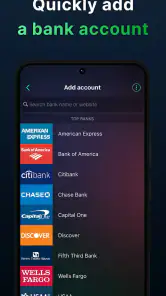
- Connects bank and credit accounts for automatic spending updates.
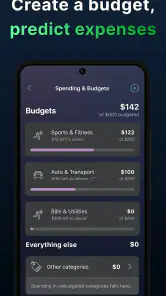
- Clear spending limits help prevent overspending before bills are due.
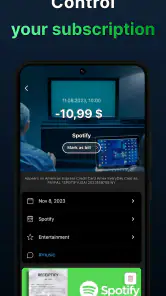
- Recurring bill tracking makes upcoming obligations easier to remember.
- Simple interface is approachable for users new to budgeting apps.
- Useful reports reveal patterns in everyday spending over time.
Cons
- Many useful features require a paid PocketGuard Plus subscription.
- Bank connections may occasionally fail or need to be refreshed.
- Limited customization may frustrate users with complex budgeting systems.
- Automatic categorization can sometimes place transactions in the wrong group.
- Some users may hesitate to share sensitive financial account information.

- Category
- Finance
- Version
- 5.19.3











