Brickit
- 398.00
- 4.1
- Installs
- 1.00M
- Price
- Free

Screenshots




Analysis by Reviewed
I’d think of Brickit as a way to get unstuck when a pile of Lego bricks is sitting unused, not as a tool that can precisely document every piece you own. Its main appeal is simple: spread out some bricks, let the app scan them, and use a suggested build to turn a vague idea into a first step. That makes it approachable for a first-time user, especially if the challenge is choosing what to build rather than learning how to snap bricks together.
What a first session is really for
Brickit is an entertainment app from developer Brickit, built around turning a scattered collection of Lego pieces into ideas for something new. It is free to install, with in-app purchases ranging from $0.29 to $99.99 per item, so I’d treat optional spending as a separate decision rather than something needed to try the basic idea. Its Everyone age rating also makes the concept easy to share with children, though an adult may still want to help younger builders arrange the pieces and follow instructions.
The app has a 4.1 average from around 14,000 ratings and has been installed over a million times. Those figures suggest it has found a substantial audience, but they do not tell you whether your particular pile will scan smoothly. I’d go in expecting a clever starting point, not a perfect inventory system: its appeal is helping you get from “I have a lot of bricks” to “here’s something I could make.”
If you have never used a brick-scanning app, the key adjustment is to treat the camera result as a suggestion, not a verdict. You still choose which idea is worth trying, search for the parts, and decide what to do when a piece is difficult to locate. In my view, that keeps the app’s role clear: it can reduce the blank-page problem, but it does not remove the hands-on work that makes building satisfying.
Getting Started with Brickit
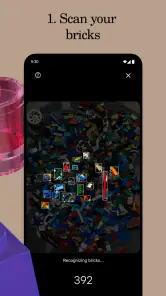
First things first, let me tell you how easy it is to get rolling with the Brickit app. After downloading it, I was prompted to spread out my pile of Lego bricks on a flat surface. The app uses your phone's camera to scan the bricks and, like magic, it identifies each piece and suggests cool builds you can create with them. It's like having a personal Lego assistant who knows exactly what you've got and what you can make with it.
Prepare a useful first scan
For a first attempt, I’d use a small, well-spread selection rather than emptying an entire mixed box onto a crowded table. Give pieces space and avoid stacking them; when bricks overlap, the camera has less to work with, and the results can be harder to use. Good, even light and a plain surface make the visual task easier too. This isn’t a complicated setup, but a little tidying before scanning can save more time than repeatedly retaking a messy image.
A practical first session could be a rainy afternoon with a child who has lost interest in building from memory. Spread out a manageable handful, scan it, choose one suggestion that looks achievable, and keep the phone nearby while you build. The win is not producing an elaborate model on the first try; it’s getting a real object finished and making the box feel inviting again.
More From Our News Desk

Weather by Xiaomi Review: Clear at a Glance, Less Clear Up Close

X Under Pressure: Can It Recover When Posting Goes Wrong?

Clash of Clans Is Won Between the Battles

Android Auto Makes the Case for Quieter Car Software

MobiOffice: Transforming Mobile Productivity with Seamless Integration

EA SPORTS FC™ Mobile Soccer: Redefining Mobile Sports Gaming
It also helps to decide in advance what counts as a successful first try. I would not judge the app by whether it finds an ideal model from every brick in a large, mixed collection. Instead, aim for one suggestion that gives you a buildable direction. A small set of pieces is easier to inspect and makes it simpler to notice which parts are genuinely useful, which are hard to find, and whether the instructions suit the person building.
Follow the suggested build without losing the pieces
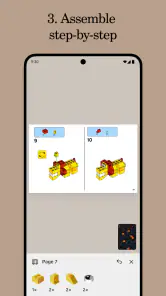
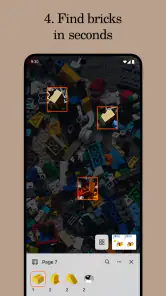
The interface is super user-friendly, which makes the whole experience fun and engaging. I love how the app highlights each brick you need in real-time, showing you where to find it in your pile. It's like a treasure hunt, but instead of gold, you're finding that elusive red 2x2 brick. Plus, the step-by-step building instructions are clear and easy to follow, even for a Lego newbie like myself.
One useful habit is to collect the highlighted pieces before beginning a step instead of searching for each one as you go. That turns the scan into a small picking list and keeps construction from stalling every few seconds. If you cannot spot a suggested part immediately, check beneath nearby pieces and look carefully at similar shapes; the app can guide your search, but it cannot make a crowded pile easier to inspect. I’d also keep the pieces you have already found in a separate little area so they do not get mixed back into the larger spread.
That small staging area is more than a neatness trick. It gives you a quick way to notice when a piece has been mistaken for a similar one, and it stops completed steps from becoming a second search pile. With children, I’d let them hunt for the highlighted parts while an adult keeps the found pieces together. The app then supports the shared activity rather than turning one person into the permanent screen operator.
When camera results need a second look
Camera-based identification is convenient, but I would not treat a suggested build as a guarantee that every piece will be recognized or easy to locate. Similar colours, unusual angles, and pieces partly hidden by other bricks can make a scan less useful. If the first results do not fit what you have in front of you, rearrange the pieces and try again rather than forcing a build that depends on a part you cannot find.
This is also where Brickit differs from the usual alternatives. A printed set booklet assumes you are building one specific model from a known collection; free-building asks you to invent the next step yourself. Brickit sits between those approaches: it offers a prompt based on the pieces you spread out, while still leaving you to judge whether the idea suits your actual pile. That makes it especially useful for restarting play, but less suitable if you want a precise catalogue of every brick or a guaranteed match to a particular set.
If a suggested model seems to call for something that is not obvious in the spread, I’d pause and check the pile before committing. The app is most helpful when the suggested parts are easy enough to gather; repeatedly searching for one elusive piece can turn a playful prompt into a chore. You can also choose a different suggestion rather than treating the first option as the only valid route. That flexibility is a practical advantage over a printed instruction booklet, which is tied to its specific model.
There is a useful trade-off here: a scan can make a loose collection feel more manageable, but it cannot replace sorting if you want to know exactly what you own. If your goal is to locate a particular rare piece, organize a collection for later, or reproduce a precise model, I’d sort by shape or colour and use a more deliberate method. Brickit is better when you want to make something from what is readily available than when you need a reliable record of every component.
Choose an idea, then make it your own
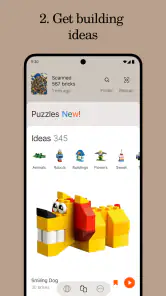
One of the things I absolutely adore about Brickit is how it sparks creativity. It doesn't just give you one set of instructions; it offers multiple build options based on the bricks you have. Whether you're in the mood for a spaceship, a cute little duck, or something entirely abstract, this app has you covered. It's like having an endless source of inspiration right at your fingertips.
I’d use those options as a way to choose a direction, not as a reason to abandon your own ideas. If a suggested model is close but not quite right, you can borrow its shape or building sequence and make a small change with whatever pieces remain. That open-ended use is a real strength for families and casual builders: the app can break the “I don’t know what to make” pause without turning play into a rigid checklist. If you mainly want to design freely from scratch, though, your own imagination or a dedicated digital building tool may feel less constrained.
This makes the app particularly useful for a short, low-pressure building break. If a child has time before dinner, for example, a manageable scan and a compact model can give the activity a natural beginning and end. For a solo builder, it can also be a way to test a shape or technique before deciding whether to expand it. I would not use it as a substitute for a long-term design plan; I’d use it to get moving, then follow the idea wherever the available bricks allow.
When sharing is useful—and when to put the phone away
Once you've completed a build, Brickit lets you snap a photo and share your masterpiece with the world. I found myself eagerly posting my creations on social media, and it was satisfying to see my friends' reactions. It's a great way to connect with other Lego enthusiasts and maybe even inspire someone else to dive into their own pile of bricks.
Sharing is a nice finish, but it is not the part I would rely on to get value from the app. The stronger everyday use is the loop of spreading out pieces, choosing a build, finding parts, and then putting the phone aside while you assemble. Someone who does not want to use a camera or prefers quiet, screen-free building may be happier with a familiar set booklet or a simple sorting session instead. For a child, I’d keep the phone with the adult and make the scanning a short planning step, rather than letting the device take over the whole activity.
A practical way to keep the phone from taking over is to finish the scan and gather the pieces before starting the build. Then the screen has a clear job—helping you choose and locate parts—while the actual construction remains a hands-on activity. If you are building with someone who gets frustrated by interruptions, consider taking turns: one person checks the next instruction while the other sorts, then both focus on assembling. That makes the process feel more like playing together than following a device.
Who it suits, and who may prefer another method
Brickit is a good fit if you already have assorted bricks, build casually, or want a low-pressure way to get a child started without choosing a full set first. It is also handy when you have a short stretch of free time and want a concrete project rather than a long search through old instructions. Builders who care about exact part inventories, need every model to use only confirmed pieces, or prefer to plan complex designs in detail should keep their usual methods; this app is better as a source of practical inspiration than as a substitute for careful sorting and planning.
I’d also think twice if your main reason for opening an app is to avoid handling or arranging the pieces. The scan depends on laying bricks out where the camera can see them, so it is not the easiest choice when the collection is still in a deep box or scattered across a room. A set booklet is more direct when you already know which model you want to build, and building entirely from imagination is better when you do not want a suggested design to guide you. Brickit earns its place in between those choices, for the moment when you want a nudge but still want to do the building yourself.
For a first-time user, I’d keep expectations modest and the work area manageable. Start with a handful of pieces, choose an idea that seems simple to gather, and treat a difficult scan as a cue to rearrange or switch suggestions—not as proof that the whole approach has failed. The app is most rewarding when the goal is a quick, satisfying build rather than a flawless reading of a large collection.
What to do after the first build
The current version is 4.90.7, and the app’s listed release date is October 24, 2022. I’d keep the first session simple: use a clear surface, scan a modest spread, pick a build that looks fun, and adjust if a piece is hard to find. That gives you the fairest sense of whether its camera-led approach suits your collection, without expecting a single scan to solve every building problem.
Once you have finished one model, the next useful step is to change just one part of the routine. Try a different group of bricks, or choose a suggestion that uses a shape you did not use the first time. That helps you learn whether the app works best with your collection when pieces are separated by type, spread in a smaller area, or simply arranged with more space. Keeping the rest of the process familiar makes it easier to see what actually improved the experience.
It is also worth deciding what to do with the pieces after building. If you plan to try another idea, keep the leftover bricks separate from the pieces used in the model so the next scan is not harder to manage. If you are done, take a moment to return everything to your usual storage system rather than leaving a new mixed pile behind. Brickit can make starting easier, but a quick reset is what makes it easy to come back to the collection later.
Overall, if you're a Lego fan, the Brickit app is a must-have. It's a delightful blend of technology and creativity that brings a new dimension to playing with Lego bricks. Whether you're a seasoned builder or just starting out, this app will ignite your imagination and help you rediscover the joy of building. So, go ahead, give it a try, and let your inner child run wild!
Brickit Frequently Asked Questions
Does Brickit need a camera to scan LEGO pieces?
Yes. Brickit uses your phone’s camera to scan a pile of LEGO pieces and suggest builds based on what it sees. This camera-led approach is central to the app, so you’ll need a device with a working camera to use its scanning feature. For clearer results, spread the pieces out and make sure they are visible in good lighting.
Do I need an internet connection to use Brickit?
Brickit’s main experience involves scanning pieces and receiving suggested builds through the app. If you plan to use it while sorting or building away from home, it is sensible to make sure the app is ready to use before you go. The app is designed around helping you turn a pile of bricks into possible projects, so having your phone available during the building session is useful.
Can Brickit help me build something with the LEGO pieces I already own?
That is Brickit’s central appeal: it scans a pile of LEGO pieces and suggests projects you may be able to make from them. Rather than beginning with a fixed set of instructions, you can use the scan as a prompt for choosing a build from the pieces at hand. The suggestions can help spark ideas, though the result depends on what your collection contains.
Is Brickit suitable for children and family building sessions?
Brickit is an entertainment app rated Everyone, so it can be considered for a broad audience, including families. Its central idea is to help LEGO enthusiasts turn a pile of pieces into possible building projects, making it a handy prompt for shared creative time. Adults can help younger builders scan pieces and choose an idea to try.
What is Brickit and how does it work?
Brickit is an innovative app designed to help LEGO enthusiasts organize and utilize their LEGO bricks more efficiently. By using your phone's camera, Brickit scans your pile of LEGO pieces and suggests various builds you can create with them. This app not only inspires creativity but also helps in managing and maximizing the use of your LEGO collection.
Pros
- Innovative way to repurpose old LEGO bricks.
- User-friendly interface with easy navigation.
- Provides creative building ideas.
- Scans bricks quickly and accurately.
- Enhances creativity and problem-solving skills.
Cons
- Requires a large flat surface for scanning.
- Not all LEGO sets are recognized.
- Occasional app crashes.
- Limited offline functionality.
- May not appeal to non-LEGO users.
- Category
- Entertainment
- Version
- 4.90.7