Booksy Biz: For Businesses
- 2.92K
- 4.6
- Installs
- 1.00M
- Price
- Free

Screenshots



Analysis by Reviewed
I’d consider Booksy Biz when appointment management is a regular part of running your beauty or personal-care business, not just an occasional chore. It is a business-facing app from Booksy International sp. z o.o., and its purpose is different from a customer booking app: the focus is on helping a provider handle the working day from a phone. That makes it most relevant to independent professionals and small teams who want their schedule close at hand, though the value depends on whether its workflow fits the way they already run the business.
Who benefits from keeping the schedule on a phone
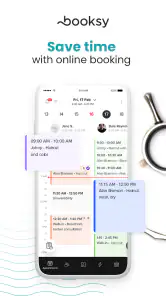
A practical use case is a stylist or other appointment-based provider who moves between a treatment room, reception, and errands instead of sitting at a desk. Being able to check the day’s bookings on a phone can make it easier to spot a gap or a tight transition before it becomes a problem. I’d also see a benefit for someone who handles bookings personally and wants one place to manage the business schedule rather than relying on messages and a paper diary.
There is a trade-off, though: a mobile-first routine is not automatically better for every business. If several staff members need to coordinate complex availability, or if the owner does most planning at a computer, a desktop-oriented system may feel more comfortable for the main setup work. I’d use the phone app for quick schedule checks and everyday changes, while judging any larger workflow by how well it supports the whole team.
A realistic day-to-day workflow
Picture a busy morning when a client asks to move an appointment while you are preparing for the next service. Rather than trying to remember the request until later, a business scheduling tool can help keep the day’s plan visible and reduce the chance that a change gets lost in a chat thread. The useful habit is to check the schedule at the start of the day, then again around natural breaks; that gives you a chance to catch awkward gaps or overlapping commitments before they disrupt work.
For a solo provider, the key question is whether managing bookings on the same device used for personal messages feels clear or distracting. I’d keep business communication and appointment details deliberate: update the schedule as soon as a change is agreed, and avoid treating an informal message as a confirmed booking until the calendar reflects it. That is not a special feature claim; it is a sensible way to get value from a scheduling app without creating two competing records.
How it fits among the alternatives
The usual alternatives are a paper diary, a general calendar, or a broader business-management platform. A paper diary is simple and works offline, but it can be harder to share or review remotely. A personal calendar is familiar, yet it may not be built around the needs of a service business. Booksy Biz is the more focused option for businesses that want a dedicated tool, while a larger platform can be preferable when scheduling is only one part of a more involved operation.
I would not switch solely because a dedicated app sounds more professional. If your current calendar is reliable and your booking volume is low, changing systems adds setup and routine changes without necessarily saving meaningful time. On the other hand, when appointments are central to the workday, having a business-focused schedule on mobile can be more useful than piecing together personal calendar entries and client messages.
More From Our News Desk

Weather by Xiaomi Review: Clear at a Glance, Less Clear Up Close

X Under Pressure: Can It Recover When Posting Goes Wrong?

Clash of Clans Is Won Between the Battles

Android Auto Makes the Case for Quieter Car Software

MobiOffice: Transforming Mobile Productivity with Seamless Integration

EA SPORTS FC™ Mobile Soccer: Redefining Mobile Sports Gaming
Choosing a sensible trial routine
When I evaluate a booking tool, I try to recreate the awkward moments rather than just browse its screens: a late change, a gap between appointments, and a client who needs a detail checked while I’m occupied. With Booksy Biz, I’d begin by using it for a limited stretch of the schedule and compare the time and effort against the existing method. That shows whether it genuinely reduces friction instead of simply moving the same admin to a different place.
One useful test is to note where appointment information currently lives. If bookings arrive through several channels, decide which record becomes authoritative before switching; otherwise, the app can sit alongside messages and a diary without replacing either. For a small team, a shared rule about who confirms changes is just as important as the software. The practical benefit comes from a consistent process, not from having another icon on the phone.
Getting Started with Booksy Biz
Have you ever found yourself swimming in a sea of appointment schedules, reminders, and client data? Well, welcome to the modern world where apps like Booksy Biz: For Businesses come to the rescue. This app is like having a personal assistant right in your pocket, specifically tailored for service-oriented businesses. Let me take you through my experience with it.
First off, downloading and setting up Booksy Biz was a breeze. Available for both Android and iOS, you can grab it from the respective app stores and dive right in. Once you fire it up, you're greeted with an intuitive interface that doesn't require a degree in rocket science to understand. Everything is neatly organized, and the app guides you through the initial setup seamlessly.
Features That Stand Out
What truly makes Booksy Biz a game-changer are its robust features designed for business efficiency. Imagine having a tool that not only manages appointments but also syncs them with your calendar, sends automatic reminders to clients, and even processes payments. Yes, you heard that right. This app turns your smartphone into a full-fledged business management suite.
One feature I found particularly handy is the client management system. You can keep track of client preferences, history, and even send them personalized messages. This feature alone can significantly boost customer satisfaction and retention. Plus, the app's analytics tool provides insights into your business performance, helping you make informed decisions.
Using it in a working day
Booksy Biz is free to download, with in-app purchases listed from around twenty-five to three hundred ten dollars per item. That range makes it worth checking the current terms before committing to paid options, especially if you are comparing it with a basic calendar that costs nothing. For a business, the useful comparison is not simply free versus paid: consider how much time you spend coordinating appointments and whether a dedicated workflow justifies an ongoing expense.
The app is rated for Teen users, and it has an average rating of 4.6 from around twenty-eight thousand ratings, with about 2.9 thousand written reviews and over one million installs. Those figures suggest it has found a substantial audience, but they cannot tell you whether it suits your particular booking habits. I would treat them as context, then test the day-to-day fit with the way your own business handles clients and schedule changes.
Booksy Biz first appeared on May 22, 2014, and its current version is 3.40.1_710, with Android 8.0 as the minimum operating-system requirement. A long-running product can be reassuring when you want a tool that has had time to mature, but a version number alone does not explain which changes matter or guarantee that every workflow will feel right. I’d focus on whether the current app remains comfortable on your device and whether the parts you rely on are easy to reach during a busy shift.
What I would check before relying on it
Before moving a full client schedule into any new business app, I’d try it with a small, representative slice of the workweek. Check how quickly you can find a client’s booking, correct a change, and return to the day view without losing your place. If more than one person handles appointments, agree on who makes the final schedule update; that simple rule prevents an app from becoming another place where conflicting versions of the day can appear.
It is also worth deciding what you need the app to do versus what you expect from separate tools. A dedicated appointment manager may be a better fit than a generic calendar for a beauty professional, but it will not automatically solve every business task. If your main concern is bookkeeping, inventory, or staff planning, compare options around those needs rather than assuming a scheduling-focused tool covers the entire operation.
User Experience
Using Booksy Biz feels like having a personal business concierge. The user interface is sleek and modern, with everything accessible at your fingertips. The app's performance is smooth, with no noticeable lags or crashes during my use. It's designed to be user-friendly, catering to both tech-savvy individuals and those who might be less familiar with digital tools.
One thing I always appreciate in a business app is support, and Booksy Biz doesn’t disappoint. They offer 24/7 customer support, ensuring that any hiccups you encounter are promptly addressed. It's like having a safety net, knowing that help is just a tap away.
Where the fit can fall short
The biggest reason I would skip a dedicated booking app is not a flaw in the idea; it is a mismatch in working style. Someone with only occasional appointments may find a simple calendar easier to maintain, while a larger operation may need a system centered on team coordination or wider administrative tasks. Likewise, if the phone is a distraction during services, relying on it for frequent schedule management may be less convenient than a shared workstation or a paper backup.
I would also be cautious about assuming that client records and reminders will remove the need for clear communication. A client can still misunderstand a change, and staff can still overlook a detail if the process is inconsistent. The app is most helpful when it supports a reliable routine: make changes promptly, review the day, and keep the business record aligned with what has actually been agreed.
Making client details useful without overcomplicating the day
Client history is most valuable when it helps with a real service decision, not when it becomes another record to maintain for its own sake. I’d keep notes focused on details that will matter at the next appointment, and make them easy to interpret when time is short. That approach can make repeat visits feel more considered while avoiding a long, cluttered record that slows down a quick lookup.
There is a privacy and attention trade-off in keeping business details on a phone, particularly if it is also used for personal communication. I’d make a habit of opening client information only when needed and avoiding casual, hurried updates that could attach a note to the wrong appointment. These are sensible habits for any digital client-management workflow, but they matter most when the same device follows you through the whole workday.
Final Thoughts
In the ever-evolving world of business, staying organized and efficient is key. Booksy Biz: For Businesses offers a comprehensive solution that helps streamline operations and enhance customer satisfaction. Whether you're a solo entrepreneur or managing a bustling salon, this app is worth every megabyte of storage on your device. Its blend of functionality and ease of use makes it a must-have tool in your business arsenal.
So, if you're ready to take your business management to the next level, why not give Booksy Biz a try? Trust me, you won't regret it!
What to keep in mind as it evolves
For an existing user, the practical question with any new release is whether the parts used every day remain dependable and easy to locate, rather than whether the version number has changed. I’d make a quick check of the schedule and the workflows that matter after updating, especially if the app is central to bookings. That is a sensible precaution, not a claim that a particular recent update changed a specific feature.
Overall, I’d recommend giving Booksy Biz a serious look if your beauty business runs on appointments and you want to manage the schedule from a mobile device. It is less compelling when a basic calendar already handles your needs or when you need a broader operations platform. The strongest reason to try it is the chance to bring booking-related work into a dedicated business routine; the deciding factor should be whether that routine actually saves you effort once you use it with real clients.
What I would watch as the business grows
If your appointment book grows from a solo routine into a busier salon, I’d reassess the app against the new shape of the work rather than assume that a tool that suited one person will automatically suit a team. Look at the handoffs: who answers booking requests, who changes the calendar, and how the rest of the team knows what is confirmed. If those responsibilities become difficult to coordinate, compare a larger platform with Booksy Biz on that specific need instead of choosing based only on familiarity.
For a new user, the practical questions are straightforward: can you maintain the schedule comfortably from your phone, do the paid options make sense for your business, and does the app fit the way you handle client communication? I’d start with those questions and let a normal workweek answer them. If the routine feels lighter and the schedule stays accurate, that is a better reason to keep using it than any headline feature or version number.
Booksy Biz: For Businesses Frequently Asked Questions
Can I use Booksy Biz to manage my schedule while I’m away from the business?
Yes. Booksy Biz is intended to help businesses manage their schedule on the go, so it can be useful when you are away from a desk or handling other parts of your working day. The app is business-focused, and its main appeal is having scheduling management available on a mobile device rather than relying only on a computer.
Is Booksy Biz meant for business owners or for people booking beauty appointments?
Booksy Biz is the business-facing app, intended for businesses that want to manage their schedule and related work on the go. It is different in purpose from an app designed primarily for customers searching for and booking services. If you run a beauty or service business and need a mobile way to handle scheduling, this is the version to consider.
Who makes Booksy Biz, and is it widely used?
Booksy Biz is developed by Booksy International sp. z o.o. It has over 1 million installs and an average rating of 4.6 from around 28,000 ratings, giving prospective users a useful sense of its reach and reception. It is a business-focused app in the beauty category, intended for owners and professionals who manage appointments on the go.
What Android version does Booksy Biz require?
Booksy Biz requires Android 8.0 or later. Check your device’s Android version before downloading to make sure it meets that minimum. If it does, the app is designed to support businesses that want to manage their schedule while away from a desk, making a compatible phone or tablet useful for handling work on the go.
Is Booksy Biz free to download, and are there additional costs?
Booksy Biz is free to download, so you can get started without paying for the app itself. It also offers in-app purchases, with listed items ranging from around $25 to $310. Before committing to a plan or purchase, consider which tools your business needs and review the options shown in the app so you can choose what fits your budget.
Pros
- User-friendly interface simplifies bookings
- Efficient customer management tools
- Real-time appointment updates
- Integrated payment processing
- Customizable business profiles
Cons
- Limited offline functionality
- Occasional sync issues
- Subscription required for full features
- Steep learning curve for new users
- Limited customer support hours
- Category
- Beauty
- Version
- 3.40.1_710












