Bojangles
- 2.45K
- 3.9
- Installs
- 1.00M
- Price
- Free

Screenshots
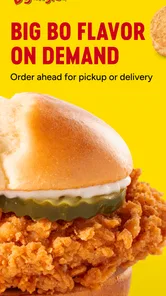
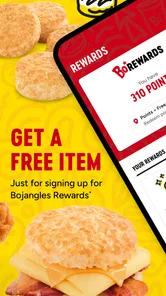
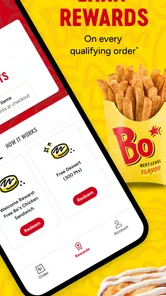
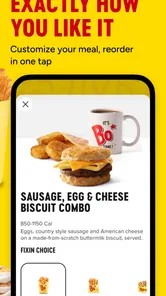
Analysis by Reviewed
For me, the useful question with a restaurant app is not whether it can replace the counter, but whether it makes a familiar meal easier to plan and collect. The Bojangles app is aimed at that practical moment: choosing food from Bojangles and placing an order without starting the process in person. I’d consider it most useful when I already know what I want and would rather spend the wait doing something else.
Quick ordering works best when the plan is simple
The app is free, and Bojangles OpCo, LLC makes it for people who want a direct route to ordering from the chain. I would use it for a predictable lunch, a family pickup, or a stop on the way home, rather than as a place to discover every possible dining option. That distinction matters: a restaurant’s own app is usually more focused than a general delivery service, but it is only useful when Bojangles fits the meal you have in mind.
A small practical tip is to decide the pickup timing and check the order details before submitting, especially if you are coordinating for more than one person. That gives you a moment to catch a missing side or an unintended choice before you are committed. For a group order, I’d gather everyone’s choices first instead of passing a phone around while people decide; it makes the ordering step calmer and reduces the chance of having to revisit the menu.
Where it fits among food-ordering options
Compared with browsing a broad restaurant or delivery app, a brand-specific ordering app has a narrower purpose: it keeps the experience centered on Bojangles. That can be convenient if the chain is already your choice, while a general-purpose alternative is more helpful when you want to compare several nearby restaurants or decide based on delivery options. I would not install this expecting it to solve every meal-planning problem; its appeal depends on how often Bojangles is a realistic option for you.
It may suit regular customers and people who pass a Bojangles location during an existing commute. It is less compelling if you rarely eat there, prefer choosing from a wide range of restaurants, or need to make a decision before knowing whether a convenient location is available to you. For someone trying the chain for the first time, looking at the menu before choosing an ordering route can help decide whether the app is worth keeping after that first meal.
Getting to Know the Bojangles App
Alright, folks, let's dive into the Bojangles app, which is shaking up the way we enjoy our favorite Southern eats. If you're a fan of crispy fried chicken and fluffy biscuits, this app could be your new best friend. Designed to keep you connected with all things Bojangles, it promises to enhance your dining experience with convenience right at your fingertips.
First Impressions and User Interface
First things first, the app's user interface is clean and straightforward. It greets you with a warm, Southern charm, much like stepping into one of their restaurants. The navigation is intuitive, making it easy for even the least tech-savvy among us to place an order or find the nearest location. With just a few taps, you can browse the menu, check out the latest promotions, and even customize your meal to suit your taste buds.
More From Our News Desk

Weather by Xiaomi Review: Clear at a Glance, Less Clear Up Close

X Under Pressure: Can It Recover When Posting Goes Wrong?

Clash of Clans Is Won Between the Battles

Android Auto Makes the Case for Quieter Car Software

MobiOffice: Transforming Mobile Productivity with Seamless Integration

EA SPORTS FC™ Mobile Soccer: Redefining Mobile Sports Gaming
Features that Stand Out
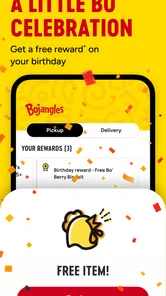
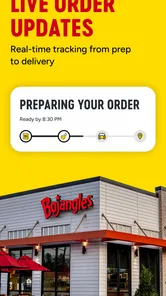
One of the standout features of the Bojangles app is the ordering system. It's efficient and, dare I say, a game-changer for those busy lunch breaks or lazy weekend afternoons. You can schedule an order for pickup or delivery, saving time and ensuring your food is fresh and hot when you want it. Plus, the app's loyalty program is a sweet bonus. Who doesn't love earning rewards while indulging in their favorite comfort food?
Performance and Reliability
For a real-world test, imagine deciding on lunch during a short break: opening the app before leaving, choosing the meal, and placing the order so the pickup fits the route rather than interrupting it. That is where speed matters most. A streamlined ordering flow can save effort, but I would still leave a little breathing room instead of assuming every order will be ready at an exact minute, particularly when the restaurant is busy. The app helps organize the request; the kitchen and pickup conditions still shape the wait.
When you are ordering for several people, check the final selections together before sending the order. This is a more useful habit than rushing through the last screen, because one overlooked item can turn a convenient pickup into a second stop. Likewise, if your plans change, open the order status and follow the options presented there rather than placing a duplicate order in a hurry. For any restaurant app, avoiding duplicate submissions is a sensible recovery step when a screen takes longer than expected.
In terms of performance, the app runs smoothly, with minimal glitches or crashes. It seems the developers have put in the work to ensure a seamless user experience, which is a big plus in my book. Whether you're ordering during peak hours or checking out the menu in your downtime, the app handles it all like a pro.
Device fit and everyday reliability
The current version is 2.2.22, and the listed minimum operating-system requirement is 7.1, so it is not limited to only the newest devices. I still think the practical test is whether it behaves comfortably on your own phone: can you open the menu, review an order, and complete the steps without fighting a small screen or an older device that feels sluggish? Keeping the app and operating system in good working order is a sensible starting point if you encounter trouble. I would also avoid beginning an order when connectivity is unreliable, since a pause during checkout can make it unclear whether the request went through.
There is a useful distinction between app reliability and order reliability. The interface may feel steady, but restaurant availability, preparation pace, and the details of a particular pickup can vary. If timing is critical, I would build in a buffer and confirm the order information on screen rather than treating an estimated schedule as a guarantee. For a casual meal with flexible timing, that trade-off is easier to accept; for a tightly timed stop, ordering earlier or choosing a more predictable option may be wiser.
The app is rated for Everyone, and its average rating is 4.2 from around 17,000 ratings, with roughly 2,300 written reviews. It has passed 500,000 installs. Those figures suggest that it has found an audience, though they cannot tell me whether it will be convenient at the specific location I plan to visit. I would treat it as a handy ordering channel, not a promise that every trip will be friction-free.
Making a pickup fit a real day
One useful way to decide whether this app belongs in your routine is to think about the handoff, not just the checkout. If I were leaving work and passing a Bojangles on my route, I could use a quiet moment beforehand to settle the order, then keep the phone away while driving and check the details once parked. That makes the app a planning aid rather than something to operate in a hurry. If the restaurant is not on the route, the saved ordering steps may not make the extra detour worthwhile.
For a family meal, I would separate choosing from submitting. Ask everyone what they want before opening the final checkout steps, then review the basket once as a group. This is especially helpful when one person is collecting food for several people: the app may make placing the request convenient, but it cannot prevent a mismatch if choices are still changing as you tap through. A quick verbal check can be more valuable than trying to remember each person’s request from a long conversation.
Another sensible habit is to treat the on-screen order details as the reference point after submitting. If the screen pauses, I would first check whether the order appears before tapping again. That small pause helps avoid accidental duplicates, which is a frustrating possibility with any ordering app when a connection is slow. If the order is not clearly confirmed, I would use the options shown in the app or ask the restaurant rather than guessing that it went through.
Who will get the most from it
I think this is easiest to recommend to someone who already knows what they like at Bojangles and has a location that fits their usual errands. A regular customer can benefit from keeping the menu and ordering process close at hand, especially when lunch breaks are short or a pickup needs to fit around work and family plans. Its focused scope is a strength in that situation: there is less reason to browse unrelated restaurants when the decision has already been made.
It is a weaker match for someone who eats at the chain only occasionally, wants to compare many restaurants before choosing, or depends on a delivery option as the deciding factor. A broad food-ordering service is often the better first stop when selection is the priority. I would also skip installing it just for a single meal if I am unsure whether I will return; using the usual in-person route can be simpler than setting up another app for a one-off visit.
For a first-time customer, I would look at the menu and decide whether the food itself appeals before treating the app as a reason to choose the restaurant. The ordering channel can make a familiar choice easier, but it does not make the menu broader or replace the value of comparing alternatives. That is the key trade-off: convenience once the restaurant is chosen, rather than help choosing among restaurants.
Final Thoughts
In conclusion, the Bojangles app is a must-have for any fan of the restaurant. It brings the convenience of modern technology to the delicious, comforting flavors we all know and love. With its user-friendly interface, efficient ordering system, and rewarding loyalty program, it's an app that certainly earns its place on my home screen. So, if you haven't given it a whirl yet, what are you waiting for? Your next meal is just a tap away!
My verdict is more measured: I’d keep it if Bojangles is part of my routine, because having a direct ordering option can make a familiar stop easier to coordinate. If I only visit occasionally, or if I want to compare menus across restaurants, I’d use a broader option instead and avoid adding an app I may rarely open. The app is free, so trying it is low-commitment, but the real value comes from matching its focused purpose to your habits.
For regular customers, the best use is straightforward: check the menu when you have a moment, place an order with enough time for pickup, and review the details before confirming. That small bit of planning is more valuable than expecting the app to remove every wait or uncertainty. I’d recommend it to someone who already likes Bojangles and wants a simpler way to arrange a meal, while anyone seeking a wide restaurant selection or a guaranteed rush-hour shortcut should temper expectations.
Bojangles Frequently Asked Questions
Who develops the Bojangles app, and is it free to download?
The Bojangles app is developed by Bojangles OpCo, LLC, and it is free to download. That makes it easy to try the app without paying for the download itself. It is a Food & Drink app focused on ordering from Bojangles, so it may suit you if you would like to start an order from your phone rather than begin with an in-person visit.
What age group is the Bojangles app suitable for?
The app has an Everyone content rating, so its age classification is suitable for a broad audience. Parents and other users can consider that rating when deciding whether it is appropriate for their household. The app’s purpose is ordering food from Bojangles, making it a practical option for people who want to use a mobile device to get started with an order.
How many people have downloaded or reviewed Bojangles?
Bojangles has over 500,000 installs, an average rating of 4.2 from around 17,000 ratings, and about 2,300 written reviews. These figures offer a general sense of how widely it has been used and received. As with any restaurant-ordering app, individual experiences may vary depending on what someone expects and how they use it.
What does the Bojangles app let me do before placing an order?
Bojangles is a Food & Drink app built around fast, easy ordering. Its store summary invites users to get Bo Time anytime, and the app provides a way to begin an order from a mobile device. It may be useful if you want to use Bojangles’ app rather than start with an in-person visit.
Is the Bojangles app free, and what devices can I use it on?
The Bojangles app is free to download, so you can install it without paying for the app itself. It is available for Android and iOS, and its minimum operating-system requirement is 7.1. Before downloading, check that your device runs a compatible system version. The app is rated for Everyone, making its age classification suitable for a broad audience.
Pros
- User-friendly interface with intuitive navigation.
- Wide variety of menu items catering to all tastes.
- Loyalty rewards program for frequent customers.
- Convenient online ordering and payment options.
- Fast and reliable delivery service.
Cons
- Limited customization options for orders.
- Inconsistent app performance across devices.
- Occasional issues with location services.
- Menu prices slightly higher than competitors.
- Limited availability in some regions.











