Bobby Approved
- 2.61K
- 4.8
- Installs
- 1.00M
- Price
- Free

Screenshots
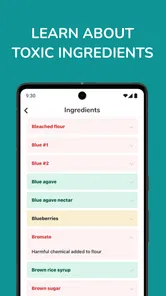
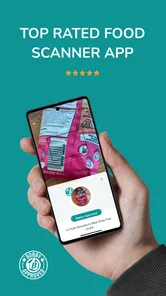
Analysis by Reviewed
On a first grocery run with Bobby Approved, I’d keep the goal modest: choose one unfamiliar packaged item and use the app to help make sense of it. This Food & Drink app from BA GLOBAL HOLDINGS, LLC is free, rated for Everyone, and built around checking products rather than tracking meals or planning a full diet. Its appeal is practical: when a label feels confusing, it can give you a quick second opinion while you shop.
What to expect from your first check
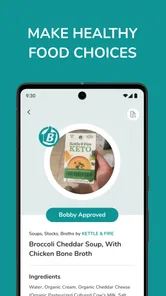
The app lets you scan a barcode, search for a product, or browse products, then see whether it meets its Bobby Approved standard. That makes it different from a calorie counter, where the main task is logging what you eat, and from a nutrition database that leaves every interpretation to you. Here, the verdict is meant to be simple. I find that useful when I’m comparing several packaged choices and don’t want to spend the whole trip decoding ingredient lists.
That simplicity has a trade-off: a yes-or-no verdict is a starting point, not a complete account of whether a food suits your needs. “Approved” shouldn’t replace advice tailored to allergies, medical conditions, or personal dietary priorities. I’d still read the package, especially for allergens and serving details, and treat the app as a shopping aid rather than a health authority.
Getting started without overthinking it
After installing it, I’d open the app before heading down the aisle and try a product I already know. That small test helps me learn where the scan and search options are without the pressure of deciding on a new purchase. If the barcode scan doesn’t get me to a useful result, I’d switch to searching by product name or browsing instead of assuming the item cannot be checked.
It’s also worth approaching the first result with a little curiosity. If a product gets a verdict I didn’t expect, I’d compare it with the label and use that moment to notice which ingredients or nutrition details matter to me. That turns the app from a digital thumbs-up into a prompt for learning. I wouldn’t change an entire grocery routine based on one scan; checking a few comparable items is a more grounded way to see whether its guidance fits my priorities.
A useful routine for real shopping
Imagine I’m picking cereal for a household where people have different tastes. I can check a familiar box, compare it with another option, and then decide whether the app’s assessment changes my choice. For a busy shopper, that quick comparison is the real advantage: it brings the check into the aisle, when it can still influence what goes in the basket. It can also help when a product’s front-of-package claims sound persuasive but don’t tell the whole story.
I’d use it selectively rather than scan every item. Packaged foods I buy often, products with long ingredient lists, and unfamiliar alternatives are better targets than fresh produce that has no barcode to check. If I shop for someone else, I’d confirm their own dietary needs first; a broad approval label can’t know an individual’s restrictions unless I account for them myself.
More From Our News Desk

Weather by Xiaomi Review: Clear at a Glance, Less Clear Up Close

X Under Pressure: Can It Recover When Posting Goes Wrong?

Clash of Clans Is Won Between the Battles

Android Auto Makes the Case for Quieter Car Software

MobiOffice: Transforming Mobile Productivity with Seamless Integration

EA SPORTS FC™ Mobile Soccer: Redefining Mobile Sports Gaming
Where its simple verdict needs context
The app’s approach is most helpful when I want a quick filter, but less so when I need detailed nutrient comparisons or a personalized meal plan. In those cases, the package label or a nutrition-tracking tool may offer a better fit. Product information can also be hard to use if an item isn’t readily discoverable through scanning, search, or browsing, so having more than one way to look is a sensible habit.
Another useful habit is to compare like with like. Checking two similar snacks or breakfast foods makes the result easier to act on than scanning unrelated items and collecting verdicts without a decision in mind. I’d also avoid treating a single result as a reason to throw out food already at home; the app is more useful for guiding the next purchase than for creating unnecessary waste or anxiety.
For a first-time user, the path to a meaningful result is simple: pick a packaged product, scan it, and, if needed, try its name through search or browse the available products. Then check the package yourself and decide whether the verdict matches what matters to you. That gives you a practical feel for the app without requiring a complete diet overhaul, and makes the next grocery comparison easier.
What is Bobby Approved?
The app is all about simplifying the way we shop for food. With Bobby Approved, you can scan product barcodes while shopping and get instant feedback on whether an item is considered “Bobby Approved” or not. This takes the guesswork out of choosing the healthy option and saves a ton of time. It’s like having a trusted friend guiding you through each aisle.
How Does It Work?
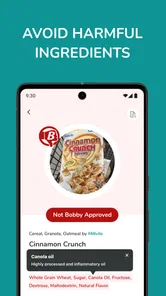
Using the app is straightforward. You download it, and once you're in a store, you open the app and start scanning barcodes. The app then provides a simple yes or no answer on whether the product is approved. This decision is based on the nutritional content of the product, factoring in things like sugar levels, additives, and overall nutrient density. It’s a straightforward way to keep your health in check without needing a degree in nutrition.
Why I Love Using It
I was initially skeptical about how much I would actually use Bobby Approved. However, after a few trips to the store, I found myself relying on it more and more. The best part? It’s not just a tool for the health-conscious; it’s perfect for anyone looking to learn more about what they’re eating. It’s incredibly educational, and I’ve found myself making better choices without even realizing it.
Some Features Worth Mentioning
One of the standout features of this app is its user-friendly design. Even if you're not tech-savvy, you’ll find it easy to navigate. It doesn’t bombard you with information, just straightforward answers that help you make informed decisions. Plus, it updates regularly to include new products and stay current with nutritional guidelines.
Another cool aspect is the community feature. Here, users can share tips and favorite products that are Bobby Approved. It’s a neat way to connect with others who are also on a health journey, picking up extra tips and tricks along the way.
Making product checks more useful
One practical way to get more out of a quick verdict is to decide what question you want answered before opening the app. If I’m choosing between two similar crackers, for example, I’m looking for a useful comparison, not a universal declaration that one food is right for everyone. I’d scan both, then check their labels for the details that matter in my household. This keeps the result tied to a real choice instead of turning a shopping trip into a string of disconnected scans.
There’s also a small but helpful distinction between finding a product and deciding what to do with the result. Search or browsing can be a sensible fallback when a barcode is awkward to scan, but locating an item is only the first step. I’d still make sure the package in my hand is the same product I found, especially when there are several varieties with similar names. Flavors and formulations can differ, so I wouldn’t assume a result for one version applies to every box from the same brand.
If I’m shopping with a short list, I’d use the app for the items where I’m genuinely undecided rather than stopping for every familiar staple. That makes it more likely to save time instead of adding another task. I might check a new snack, a breakfast option with a crowded label, or a packaged food I’m buying for someone else, then move on once I have enough information to make a choice.
Who will get the most from it
I can see this being especially useful for a first-time label reader who wants a low-pressure way to compare packaged foods. The app can help turn a vague concern about ingredients into a practical shopping question: should I take a closer look at this item, or compare it with another one? People who already have a short list of products they like may also find it handy when a store is out of a usual choice and they need to consider an alternative.
It may be less suitable for someone who needs exact nutrient totals, meal logging, or a tailored plan for a medical condition. A food-logging app is more appropriate when the goal is to track intake over time, while the nutrition panel is essential when a specific number or ingredient matters. I’d also skip relying on this kind of general verdict as the sole filter for a serious allergy. In that situation, I’d read the current packaging every time and follow the person’s established guidance.
How it fits alongside other shopping tools
Compared with the usual approach of reading every panel from scratch, this app offers a faster first filter. Compared with a barcode database that presents facts for you to interpret, it puts a judgment at the center. That can be reassuring when I’m tired or shopping in a hurry, but the simplicity also means I may need another source for the reasoning or detail behind a decision. I wouldn’t expect it to replace the label; I’d use it to decide where a closer look is worthwhile.
For someone who enjoys comparing numbers, a nutrition tracker or a detailed database may feel more informative because it leaves room to weigh different nutrients directly. For someone who wants a quick aisle-side nudge, Bobby Approved is a more focused choice. Neither method automatically makes a better purchase: the best fit depends on whether I need a quick screen, a detailed comparison, or a record of what I eat. Knowing that distinction before downloading saves frustration.
A few sensible checks before trusting a result
Packaged products can have multiple sizes, flavors, or versions, so I’d match the result to the exact item in my hand rather than relying on a familiar brand name alone. When the result surprises me, I’d pause and inspect the package instead of assuming the app or my first impression must be right. That pause is useful in both directions: it can prevent me from dismissing a food I would otherwise choose, and it can stop a positive verdict from overriding an important personal restriction.
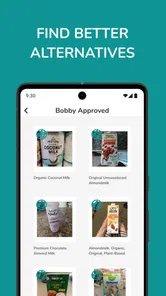
I’d also treat browsing as a discovery aid, not a shopping list that dictates what I should buy. A result can help me learn about alternatives, but availability, price, taste, and what my household will actually eat remain part of the decision. If the suggested choice doesn’t suit the people I’m shopping for, there’s no benefit in bringing it home just because it received a favorable assessment.
Worth trying, with a clear role
For frequent shoppers, the app has a more practical role than simply settling a one-off debate. I’d use it to notice recurring patterns across the packaged foods I buy: which kinds of snacks tend to get a positive result, and which ingredients prompt me to pause and read more closely. I would keep those observations personal rather than turning them into rigid rules. A product score can help narrow choices, but taste, budget, household preferences, and dietary requirements still shape what makes sense in a real basket.
It may be a particularly comfortable starting point for someone who feels lost among health claims on packaging but doesn’t want to begin with detailed nutrition tracking. Conversely, if you already compare nutrition panels confidently, or need precise control over macros and meal records, the app’s quick verdict may feel too limited. I’d choose the tool that answers the actual question I have, rather than expecting one shopping app to cover every part of eating well.
The app has a 4.7 average from around 15,000 ratings, and it has passed 500,000 installs. Those figures suggest that many shoppers find the basic idea useful, but they don’t tell me whether a particular product will suit my needs. I’d treat them as a reason to consider trying it, not as a substitute for checking how its judgments line up with my own priorities over a few shopping trips.
It’s free, and its Everyone age rating makes it approachable for a broad range of shoppers; it runs on iOS 7.0 or later, with version 1.2.8 as the current release. I’d begin by checking a familiar packaged item at home or during a quiet shop, then try a second product that presents a genuine choice. That gives me a low-stakes way to learn whether its quick guidance is useful before I depend on it in a busy aisle.
In a world where we’re often overwhelmed with choices, Bobby Approved provides clarity. It empowers you to shop smarter and eat healthier, without the stress. Whether you’re a health enthusiast or just starting to make healthier choices, this app can be a valuable companion on your journey. Go ahead, give it a try, and watch how it transforms your shopping trips!
Bobby Approved Frequently Asked Questions
Can I use Bobby Approved while shopping in a grocery store?
Yes. Bobby Approved is designed for product discovery, so you can use it while shopping to check whether products are Bobby Approved. Scan an item when you have it in front of you, or search and browse products in the app. That flexibility makes it useful for comparing options in the aisle as well as planning what to buy beforehand.
Is Bobby Approved free to download?
Bobby Approved is free to download. Its Food & Drink focus is helping users scan, search, or browse products to find out whether they are Bobby Approved. If you are interested in that kind of product discovery, you can try the app without paying to download it and see whether its approach fits your shopping routine.
What age group is Bobby Approved intended for?
Bobby Approved has an Everyone content rating, so it is presented as suitable for a broad audience. It is a Food & Drink app centered on finding out whether products are Bobby Approved. Families and individual shoppers can explore its product-discovery purpose, while keeping in mind that the app is intended to help users check products rather than provide entertainment.
Can I browse for products without scanning a barcode?
Yes. Bobby Approved lets you scan, search, or browse products, so you can explore options even when you do not have a package in front of you. The app is focused on helping you find out whether products are Bobby Approved, making it useful both while shopping and when planning what to buy.
Who develops Bobby Approved, and is it suitable for all ages?
Bobby Approved is developed by BA GLOBAL HOLDINGS, LLC, and its content rating is Everyone. It is a Food & Drink app centered on product discovery, so its purpose is to help people check products rather than provide entertainment. The app is free to download, which makes it straightforward for interested users to try its core product-finding experience.
Pros
- Intuitive user interface
- easy to navigate.
- Wide range of categories for approvals.
- Fast and efficient performance.
- Regular updates with new features.
- Highly secure with encryption.
Cons
- Limited offline functionality.
- Requires premium subscription for full features.
- Occasional bugs in update releases.
- Not available on all devices.
- Customer support response time varies.











