Blaze Pizza
- 3.21K
- 4.7
- Installs
- 1.00M
- Price
- Free

Screenshots
Analysis by Reviewed
If you’re trying Blaze Pizza for the first time, I’d treat it as a convenient way to build and place an order with the restaurant, rather than as a general food-delivery app. I found the most useful approach is to decide what you want before you start customizing: the choices are more enjoyable when you have a rough idea of the crust and toppings, instead of adding ingredients just because they’re on screen. Blaze Pizza is free, and its focus is simple: help you order a custom pizza ahead and make repeat visits easier.
What to expect from a restaurant-specific app
This is a Food & Drink app from Blaze Pizza, not a directory for comparing restaurants or browsing every kind of meal. That focus can be a plus if Blaze is already where you want to eat; it puts customization and ordering in one place. If you usually choose a restaurant based on broad delivery-app listings, fees, or a wide range of cuisines, a marketplace may suit you better. I’d use this app when the restaurant is the decision, not when I’m still deciding what kind of food sounds good.
It has a 4.6 average from around 28,000 ratings, and more than a million installs. Those figures suggest it has reached plenty of customers, but they don’t guarantee that every visit will feel equally smooth: the usefulness still depends on whether ordering through the app fits your plans and the available options at the location you choose. The app is rated for Everyone, and Blaze Pizza is the developer.
A calmer first setup
After installing it, I’d take a moment to get oriented before placing an order. Check that you’re working with the restaurant you intend to visit, then browse the pizza-building choices without rushing to checkout. If you’re ordering for more than yourself, decide on the group’s preferences first; that makes it easier to avoid a last-minute debate over toppings while you’re trying to submit the order.
The app’s current version is 47.1.2, and it requires Android 8.0 or later. For a first-time user, the practical point is to check that your device can run it before planning to rely on it for a quick pickup. I’d also keep the first order uncomplicated: it gives you a clear sense of the ordering flow before you try to coordinate several different pizzas or use a saved choice.
Create Your Culinary Masterpiece
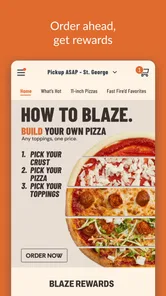
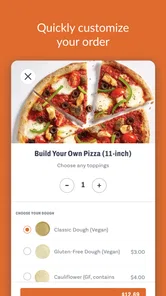
First things first, let’s talk about what makes Blaze Pizza stand out from the crowd. The app offers an incredibly user-friendly interface where you can customize your pizza to your heart's content. From the crust to the toppings, everything is at your fingertips. Ever fancied a half-and-half pizza with different toppings on each side? Yep, that’s totally doable here!
One of my favorite features is the drag and drop function for toppings. Not only does it make the process intuitive, but it’s also surprisingly fun! You can mix and match ingredients until you find that perfect combination that makes your taste buds dance. Plus, the app updates in real-time, so you know exactly how your pizza will look before you hit the order button.
More From Our News Desk

Weather by Xiaomi Review: Clear at a Glance, Less Clear Up Close

X Under Pressure: Can It Recover When Posting Goes Wrong?

Clash of Clans Is Won Between the Battles

Android Auto Makes the Case for Quieter Car Software

MobiOffice: Transforming Mobile Productivity with Seamless Integration

EA SPORTS FC™ Mobile Soccer: Redefining Mobile Sports Gaming
Make the first order work for you
For a realistic first run, I’d build one pizza slowly, review the topping layout, and only then move to checkout. That small pause matters with a highly customizable order: it’s easier to catch an accidental extra ingredient or a topping arrangement you didn’t intend before sending it through. If you’re ordering for a group, use the visual preview as a conversation aid, but settle each person’s choices before you start tapping. It keeps the app from becoming the place where everyone changes their mind at once.
Half-and-half customization is especially useful when two people want different flavors but would rather share one pizza. It can also be a trade-off: if everyone wants a fully distinct combination, separate orders may be clearer than trying to compromise on one. I’d treat the preview as a way to check the arrangement, not as a substitute for reading the selected ingredients carefully.
Fast and Furious Ordering
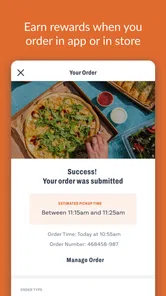
Now, I know what you’re thinking – "Sure, customization is great, but I want my pizza fast!" Fear not, because Blaze Pizza has got you covered. The app is designed to make the ordering process as swift as possible. Whether you’re at home or on the go, you can place an order in just a few taps. And the best part? You can track your order every step of the way, from the oven to your doorstep.
For a weekday lunch, I’d place the order before leaving home or work, then use the order status to help decide when to head over. That’s more practical than opening the app only when you arrive hungry and hoping the timing lines up. Still, order-ahead convenience is not the same as a guaranteed arrival time, so I wouldn’t build a tight schedule around it. If you’re already near the restaurant and the timing is uncertain, asking staff in person may be the more sensible option.
Use saved choices without losing flexibility
For those who are always in a rush, the app offers a brilliant feature: the option to save your favorite orders. This means you can reorder your go-to pizza without having to start from scratch. Talk about a time saver!
I’d save a reliable regular order only after checking it carefully once. That gives you a baseline for busy evenings, while still leaving room to make a fresh choice when you’re ordering for someone else. A saved favorite is most useful when your preferences are stable; it is less helpful if you often change toppings or are placing an order for a group with different tastes. Before confirming a repeat order, take a quick look at what you selected rather than assuming the old combination suits today’s meal.
Deals, gifts, and sensible expectations
Let’s not forget the irresistible deals and discounts that pop up regularly on the app. Whether it’s a buy-one-get-one-free offer or a discount on your favorite toppings, Blaze Pizza knows how to keep its customers happy. I’ve scored some sweet deals that made my wallet as happy as my tummy!
Promotions can make a planned order feel like better value, but I wouldn’t choose extra food just to chase an offer. Check the terms shown in the app before building your order around a deal, and compare the final choice with what you actually intended to buy. That simple habit helps avoid the common confusion of assuming a promotion applies automatically to every combination or situation.
Also, for those who love to share the love, the app lets you send gift cards to friends and family. So, next time you’re struggling to find a gift, why not treat someone to a pizza party?
Gift cards make more sense when you already know the recipient enjoys Blaze; they’re less personal than choosing a particular meal, but easier when you don’t know someone’s topping preferences. If you’re mainly looking for broad restaurant choice, a general dining or delivery alternative will be more flexible. If you return to Blaze for the custom-pizza experience, having the restaurant’s own ordering app is the more direct route.
Who I’d recommend it to
I’d recommend this app to people who already like ordering Blaze pizzas, want to customize ingredients at their own pace, or have a familiar order they place repeatedly. It is also handy when one person is coordinating lunch for a small group and wants to settle the choices before going to the restaurant. I’d skip it if you rarely eat at Blaze, prefer to compare many restaurants in one place, or would rather order face-to-face and ask questions as you go.
Blaze Pizza has been available since January 25, 2016, and its current version is 47.1.2. Those details are useful context, but what matters day to day is whether the app’s ordering style matches yours: it works best when you know you want Blaze and value control over the build. For a first successful order, keep the choices manageable, inspect the pizza preview, and confirm the final selection before submitting.
Making a group order less stressful
When I’m ordering for a few people, I’d collect everyone’s choices before opening the builder rather than passing one phone around while the order is in progress. That is a small change, but it helps separate the fun part—choosing toppings—from the confusing part of trying to remember who asked for what. I’d also repeat each person’s combination back before adding it, especially if two orders look similar at a glance.
If one person is paying and everyone else is contributing opinions, the app is useful as a shared decision-making tool, but it doesn’t remove the need to agree on the final order. A quick note with names and chosen ingredients can prevent mix-ups when there are several pizzas. For a solo meal, that extra planning is unnecessary; for a group, it can save more time than tapping through the builder quickly.
When another ordering route is better
The choice between this app and a general delivery marketplace depends on what you need that day. I’d choose the Blaze app when I already want Blaze and care about building a specific pizza or repeating a familiar order. A marketplace is more useful when I’m comparing nearby restaurants, looking for a different type of meal, or trying to make one order that includes options from multiple places. The restaurant-specific focus is a strength only when it matches the decision I’ve already made.
I’d also consider ordering in person if I had a question that needed a conversation before I committed, or if I was already at the restaurant and didn’t want to manage another screen. The app is most reassuring when my choices are clear and I can check the details myself. For someone who prefers staff guidance while deciding, face-to-face ordering may be simpler than exploring customization options alone.
Final Thoughts
In conclusion, if you’re a pizza lover looking for a seamless, fun, and fast way to get your pizza fix, then Blaze Pizza is an app you definitely need to check out. With its easy customization, quick ordering, and mouth-watering deals, it’s no wonder so many people are raving about it. So, go ahead and give it a try. Your perfect pizza is just a few taps away!
Blaze Pizza Frequently Asked Questions
What is the Blaze Pizza app’s rating, and how widely is it used?
Blaze Pizza is a Food & Drink app from Blaze Pizza, with an average rating of 4.6 from around 28,000 ratings. It has over 1 million installs, giving prospective users a sense of its reach among people ordering from the brand. Ratings and popularity can be useful context, though your experience will depend on your device and how you use the app.
What does the Blaze Pizza app let me do before visiting a restaurant?
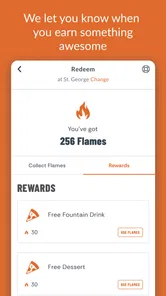
The app is designed for ordering Blaze Pizza’s fast-fired custom pizzas. You can use it to make choices for your order and arrange it ahead, which may be helpful when you want to plan a pickup rather than decide everything at the counter. Its focus is the Blaze Pizza ordering experience, with rewards also available through the app.
Is the Blaze Pizza app free to download, and what devices can run it?
The Blaze Pizza app is free to download and is intended for Android and iOS users. Its minimum operating-system requirement is version 8.0, so check your device’s software before installing. The app focuses on ordering Blaze Pizza and using its related features from a phone, making it useful for customers who want to arrange an order without placing it in person.
What is Blaze Pizza App and what features does it offer?
Blaze Pizza App is a mobile application designed to enhance your pizza ordering experience. It offers features like easy online ordering, customization of pizza with your choice of toppings, access to exclusive deals and promotions, and a rewards program to earn points on every purchase. Additionally, the app provides location services to find the nearest Blaze Pizza outlet, making it convenient to order and pick up your favorite pizza.
Is the Blaze Pizza App available for both Android and iOS devices?
Yes, the Blaze Pizza App is available for download on both Android and iOS platforms. Users can find the app on the Google Play Store for Android devices and the Apple App Store for iOS devices. The app is designed to provide a seamless experience across both platforms, allowing users to easily order their favorite pizzas from the comfort of their smartphones.
Pros
- Customizable pizza options.
- Fast and efficient service.
- High-quality
- fresh ingredients.
- Affordable pricing.
- Multiple dietary options available.
Cons
- Limited dessert menu.
- Crowded during peak hours.
- Occasional order mix-ups.
- No delivery options available.
- Limited seating in some locations.











