BIBIBOP Rewards
- 824.00
- 4.5
- Installs
- 100.00K
- Price
- Free

Screenshots
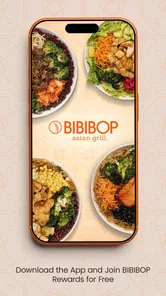
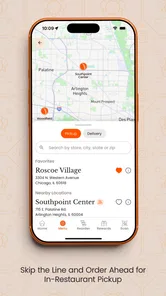
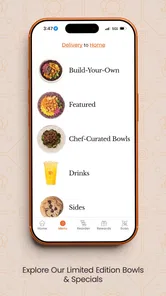
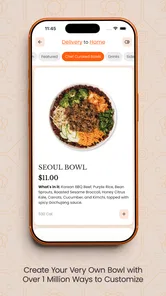
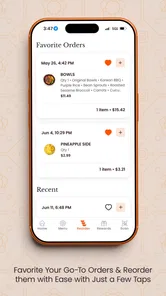
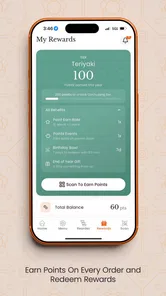
Analysis by Reviewed
I approached BIBIBOP Rewards as a practical question rather than a simple download: is it worth keeping a restaurant rewards app on my phone, or would I be better off using the usual alternatives, such as a browser, email offers, or a payment wallet? After spending time with it, my answer is fairly clear. This is a focused Food & Drink app for people who already choose BIBIBOP often enough to care about member offers. It is free, rated for Everyone, and made by Gosh Enterprises, so the barrier to trying it is low. The real decision is whether the convenience of a dedicated rewards experience matches how frequently you visit.
The app’s purpose is narrow, and that is part of its appeal. It is built around BIBIBOP Rewards rather than trying to become a general restaurant discovery tool, recipe service, delivery marketplace, or budgeting app. I found that focus useful because it keeps the reason for opening it obvious: check what is available, keep an eye on rewards activity, and use the app when I am ready to order or visit. If you want one place for every restaurant loyalty program, this will not replace a broader solution. If BIBIBOP is already part of your routine, the smaller scope feels intentional rather than incomplete.
What I would consider before installing it
I’d use this section to weigh the small commitment behind a restaurant-specific rewards app against how often BIBIBOP already fits into my routine. I’d also consider whether I’m comfortable checking an account before ordering, since a few seconds of preparation can matter more than the novelty of a new app.
Start with visit frequency, not the headline offer
The first question I would ask a friend is how often they actually eat at BIBIBOP. A rewards app earns its place when it supports a habit you already have. If you stop by regularly for lunch, pick it for quick dinners, or visit with family, a dedicated account can make more sense than trying to remember promotions from scattered messages. If you only go once every few months, the app may become another icon you ignore, and any benefit will be harder to notice.
I also look at how much attention an app demands. A useful rewards tool should reduce mental effort, not create another routine to manage. With this one, I would make a quick check before deciding where to eat rather than opening it repeatedly throughout the day. That approach keeps the app in its proper role: a small aid for an existing restaurant choice, not a reason to make unnecessary purchases.
Think about the moment you will use it
There are two different situations here. You might browse offers at home before heading out, or you might need to identify and use a reward while standing in line. Those situations place different demands on a rewards app. At home, I have time to read the details and decide whether an offer suits my plans. In a busy restaurant, I want the account and available benefit to be easy to reach without searching through unrelated screens.
My practical advice is to open the app once before your next visit, while you are not rushed. Learn where your rewards and offers appear, sign in if necessary, and make sure you understand the steps you need at checkout. That small preparation matters more than installing it at the counter and hoping everything will be obvious. It also helps you avoid choosing a meal based on an offer you have not yet checked carefully.
More From Our News Desk

Weather by Xiaomi Review: Clear at a Glance, Less Clear Up Close

X Under Pressure: Can It Recover When Posting Goes Wrong?

Clash of Clans Is Won Between the Battles

Android Auto Makes the Case for Quieter Car Software

MobiOffice: Transforming Mobile Productivity with Seamless Integration

EA SPORTS FC™ Mobile Soccer: Redefining Mobile Sports Gaming
Separate rewards value from restaurant value
An offer can make a visit feel better, but it should not persuade me to spend money I would not otherwise spend. I treat the app as a way to improve a BIBIBOP purchase I was already considering. That distinction is especially important with food rewards, where a small discount or bonus can disappear if it encourages an extra trip, an unnecessary side, or a larger order than planned.
The strongest use case is therefore simple: I already want BIBIBOP, I check the app, and I choose an eligible offer that fits the meal. The weaker use case is opening the app only because something is available and then creating a purchase around it. That is not a flaw unique to this product, but it is a trade-off worth recognizing before joining any restaurant loyalty program.
What the app’s adoption tells me
The app has passed one hundred thousand installs and holds a 4.5 average from about four thousand ratings, with more than eight hundred written reviews. Those figures suggest that it has found a substantial audience and that many users consider it worthwhile. I would still treat ratings as a starting point, not a promise that every visit will feel effortless. Restaurant apps are judged in real situations, and the quality of the experience can depend on timing, account status, and how clearly an offer applies to a particular order.
It was released on January 14, 2020, and the current version is 6.1.2. For me, that combination signals an established product rather than a brand-new experiment. The minimum requirement is Android 7.0, which keeps it accessible to many older Android phones. I would still check that my device is running normally and that I have enough space for regular app updates, but compatibility should not be a major obstacle for most Android users.
Where BIBIBOP Rewards is most useful
This section looks at the moments when a dedicated BIBIBOP rewards tool can earn its place: planning a meal before leaving, checking an offer without digging through email, and making a considered choice before checkout. I’d focus on how those habits help regular customers while recognizing that occasional visitors may find a broader coupon service or no rewards app at all more convenient.
A dedicated home for BIBIBOP-related benefits
The biggest strength is clarity of purpose. Instead of searching email for a promotion or trying to remember whether a message is still relevant, I can begin with one BIBIBOP-specific destination. That makes the app easier to understand than a general coupon application filled with offers from restaurants I never visit. The narrower design also helps me decide quickly whether there is anything worth using today.
I particularly like this kind of setup for planned meals. Suppose I am leaving work and need a quick dinner. I can check the app before I walk into the restaurant, compare the available reward with what I already intended to order, and avoid holding up the people behind me while I figure it out. That is a small improvement, but it is exactly the sort of everyday convenience a loyalty app should provide.
A better routine for regular customers
For a frequent customer, the app can become a lightweight pre-visit check. I would use it alongside my normal meal planning: decide whether BIBIBOP fits the day, open the rewards area, read the offer conditions, and then choose whether to use it. This workflow is more reliable than assuming every promotion applies automatically. It also prevents the common mistake of remembering the attractive part of an offer while forgetting its actual requirements.
One useful habit is to check before ordering rather than after paying. Once a transaction is complete, it may be too late to change how a reward is applied. I would also keep the phone ready when approaching the register or placing an order, while still taking a moment to read the screen. Speed is helpful, but a rushed tap is not a saving if it selects the wrong option.
Useful for households with different ordering habits
The app can make sense for a household where one person usually handles restaurant decisions but several people eat the meal. In that situation, the person placing the order can check the available benefit before leaving home and make a choice that suits the group. This is more practical than forwarding individual messages and asking everyone to search for the latest promotion.
There is a trade-off, though. A shared household routine works best when everyone understands which account is being used and who is responsible for checking it. I would not assume that installing the app on several phones automatically creates one coordinated system. Keeping one clear account workflow is less confusing than having multiple people claim to manage the same rewards activity.
Small details that improve the experience
My first non-obvious tip is to treat the app as a planning tool, not merely a checkout screen. Checking it while deciding between lunch options gives me time to read the offer and change plans calmly. Opening it only after arriving creates pressure and makes the experience feel less dependable, even when the app itself is working normally.
My second tip is to compare the reward with the order I would place without it. If the offer only becomes useful after adding items I did not want, I would skip it. This protects the value of the loyalty program instead of letting the promotion dictate the meal.
My third tip is to build a quick pre-visit checklist: open the app, review the current benefit, confirm the account is accessible, and keep the phone available when ordering. That sequence takes little effort, but it reduces the most likely friction points. It is also a good reason not to wait until the final moment to install or sign in.
The limits of a focused rewards app
The same focus that makes BIBIBOP Rewards easy to understand also limits its usefulness. It is not the right tool for comparing several restaurants, finding broad local deals, planning recipes, or tracking food spending across different businesses. I would not install it expecting a replacement for a general coupon app or a wallet that organizes many loyalty cards.
There is also a behavioral limitation: the value depends on remembering to check it. A reward that stays unseen is not much help, and a promotion that does not match your order may have little practical value. I prefer apps that fit naturally into a routine, so I would only keep this one prominent on my phone if BIBIBOP visits are common enough to justify that habit.
How it compares with the usual alternatives
The most basic alternative is doing nothing and paying normally. That is the simplest option for occasional visitors, and it avoids account management entirely. The downside is that I would have to accept missing member-focused opportunities and would have no dedicated place to review them before a visit.
Email is another familiar option. It can be convenient because promotions arrive in a channel I may already check, but restaurant messages can become buried among work, shopping, and personal mail. BIBIBOP Rewards is more direct when I want BIBIBOP information specifically. Email may be better for someone who dislikes installing single-brand apps, while the app is better for someone who wants a deliberate pre-order check.
A general coupon service offers breadth, which is useful if I choose restaurants based on whichever deal is available. It is less focused, however, and I may need to filter through irrelevant offers. A payment wallet can also be convenient for storing multiple loyalty cards, but it usually does not provide the same brand-specific browsing experience. In my view, those alternatives are better when variety matters more than depth with one restaurant.
What switching really costs
Moving from casual BIBIBOP visits to the app does not require changing how I eat, but it does add a small administrative step. I need to install it, create or access an account, remember to check it, and understand how to present or apply a reward. That is a modest cost, but it is still a cost. People who want the absolute fewest accounts on their phone may reasonably decide that ordinary ordering is preferable.
The cost is lower for someone already receiving BIBIBOP communications or already interested in its offers. In that case, the app gives those interactions a more focused home. The cost is higher for someone who rarely visits, dislikes notifications, or already has a reliable system for tracking restaurant promotions. I would not switch just because every restaurant seems to have an app; I would switch because this particular restaurant appears often enough in my routine.
Another consideration is phone attention. Even a useful app can become clutter if I keep every restaurant program installed. I would periodically ask whether I have actually used the benefits recently. If not, removing the app is reasonable; reinstalling later is easier than allowing unused loyalty programs to take up mental space. That is a healthier approach than treating every download as a permanent commitment.
Who should use it and who should skip it
I would recommend BIBIBOP Rewards to regular BIBIBOP customers who want a straightforward way to review exclusive offers before ordering. It is especially suitable for people who prefer a dedicated restaurant app over searching email or a broad coupon feed. The free price makes experimenting easy, and the Everyone rating means it is positioned for a general audience rather than a narrowly defined group.
I would suggest skipping it if BIBIBOP is an occasional stop, if you already manage all loyalty activity through another system, or if you strongly prefer not to maintain single-restaurant accounts. I would also skip it as a general food-deal solution: its value is tied to BIBIBOP, not to discovering the best offer across the entire local restaurant scene.
My final recommendation
After weighing the alternatives, I see BIBIBOP Rewards as a sensible specialist app rather than an essential download for everyone. Its strongest argument is convenience for people who already visit BIBIBOP and want a focused place to check rewards and deals. The experience makes the most sense when I check before a planned meal, read the conditions, and use an offer only when it matches what I intended to order anyway.
For that audience, I would recommend trying it. It is free, established, and focused enough to understand quickly. I would not promise that it will transform occasional dining or replace a multi-brand rewards system, because that is not where it fits best. My honest verdict is install it if BIBIBOP is part of your regular food routine; skip it if you are looking for broad restaurant savings. Used with that expectation, it can make a familiar meal-planning habit a little easier without asking much in return.
BIBIBOP Rewards Frequently Asked Questions
Is BIBIBOP Rewards available for my phone?
BIBIBOP Rewards is a Food & Drink app for Android and iOS. Its current version is 6.1.2, and the Android version requires Android 7.0 or later. The app is free to download and is rated for Everyone, making it suitable for a broad audience. Check that your device meets the platform requirements before installing.
Who makes BIBIBOP Rewards, and what do people think of it?
BIBIBOP Rewards is developed by Gosh Enterprises and is designed around BIBIBOP Asian Grill’s customer loyalty program. It has a 4.5 average rating from around 4,100 ratings, with more than 800 written reviews. Those figures offer a useful snapshot of user feedback, though your experience may depend on how you use the program and whether its features suit your needs.
What is BIBIBOP Rewards?
BIBIBOP Rewards is the loyalty program for BIBIBOP Asian Grill customers. After creating an account and joining the program, you can earn points from qualifying purchases and use available rewards on future orders. The app or participating ordering channels may also provide access to member offers, account details, order history, and other promotional benefits, depending on your location and current program rules.
How do I earn points with BIBIBOP Rewards?
You generally earn points by identifying your BIBIBOP Rewards account when placing an eligible order, either through the app, online ordering, or at a participating restaurant. Make sure you are signed in or provide the required account information before completing the purchase. Points, qualifying items, exclusions, and earning rates can change, so check the current terms shown in the app or on the official BIBIBOP website.
How can I redeem BIBIBOP Rewards points?
Once you have accumulated enough points, eligible rewards should appear in your BIBIBOP Rewards account and can typically be applied to a qualifying purchase. Before ordering, review the reward’s value, expiration date, minimum purchase requirements, and any excluded products. Some rewards may need to be activated first, and only one reward or promotion may be usable per transaction, depending on the applicable terms.
Pros
- Earn points automatically when ordering through the app.
- Exclusive member offers can make regular visits more affordable.
- Digital rewards are easier to track than paper coupons.
- Restaurant locations and menus are convenient to access.
- Simple account setup makes joining the loyalty program quick.
Cons
- Rewards may be limited to participating BIBIBOP locations.
- Points and offers can have expiration dates or usage restrictions.
- The app is less useful if you rarely eat at BIBIBOP.
- Some promotions may require minimum purchases or specific items.
- Account or location issues could prevent rewards from appearing immediately.











