Beyond Menu - Food Delivery
- 36.61K
- 4.7
- Installs
- 1.00M
- Price
- Free

Screenshots


Analysis by Reviewed
I find Beyond Menu - Food Delivery most useful on evenings when several people are hungry but nobody wants to take charge of cooking. It gives me a way to browse nearby restaurant options and place an order without turning dinner into a long group debate. For a household, that convenience matters: one person can look through the choices while everyone else weighs in, as long as the group keeps clear about whose account and payment details are being used.
Making a shared order work
A practical approach is to agree on the restaurant first, then check each person’s choices before placing the order. That small pause can prevent a familiar mix-up: someone assumes a note or extra item applies to the whole order when it was meant for just one dish. I’d use the cart as a final checklist, especially when ordering for people with different preferences. The app can help with the mechanics, but the group still needs to communicate clearly.
Beyond Menu is a free food and drink app from BeyondMenu, and its straightforward restaurant-browsing focus makes it easier to understand than apps that surround ordering with lots of unrelated features. It has a 4.7 average from around 117,000 ratings, with over a million installs. Those figures suggest it has found an audience, though they don’t guarantee that every restaurant or ordering experience will be equally smooth in every area.
Accounts, devices, and household boundaries
If a phone or tablet is shared, I would treat the account as belonging to the person who set it up rather than as a household profile. Before letting someone else browse or order, check that they understand which account is active and who will be responsible for the checkout. This is particularly important when a device has saved payment information. I wouldn’t hand over an unlocked device and assume the app itself will manage those boundaries for me.
The app is rated for Everyone, but that describes its content category, not whether a child should be allowed to place an order independently. I’d keep an adult involved in choosing the restaurant, confirming the cart, and completing payment. That is sensible for any ordering app, and it avoids treating an age label as a substitute for household rules.
Discovering Culinary Delights
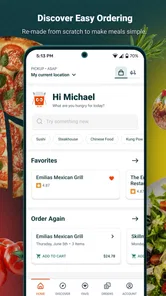
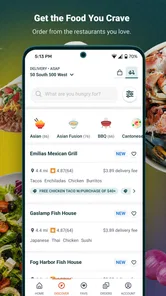
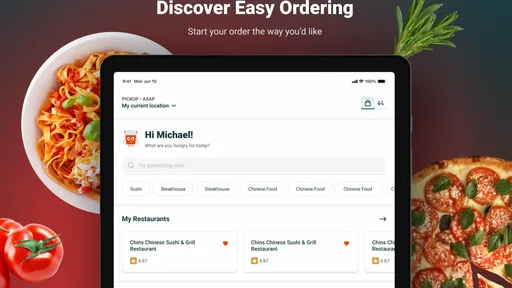
The first thing that struck me about Beyond Menu is its user-friendly interface. Upon launching the app, I was greeted by a clean and intuitive home screen that made navigation a breeze. The search functionality is quite robust, allowing you to filter restaurants by cuisine, rating, and even distance. It felt like having my own personal food advisor right in my pocket.
Ordering Made Easy
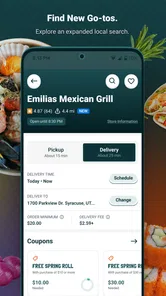
I decided to test the app by ordering from a local Thai restaurant I hadn’t tried before. The menu was well-organized with detailed descriptions and photos of each dish, making it easy to decide what to order. Adding items to the cart was seamless, and I appreciated the ability to customize my order with special requests. The checkout process was straightforward, with multiple payment options including credit card and PayPal.
More From Our News Desk

Weather by Xiaomi Review: Clear at a Glance, Less Clear Up Close

X Under Pressure: Can It Recover When Posting Goes Wrong?

Clash of Clans Is Won Between the Battles

Android Auto Makes the Case for Quieter Car Software

MobiOffice: Transforming Mobile Productivity with Seamless Integration

EA SPORTS FC™ Mobile Soccer: Redefining Mobile Sports Gaming
One of the standout features is the real-time tracking. Once my order was confirmed, I could see exactly when it was being prepared, picked up, and on its way. It’s a game-changer for impatient folks like me who constantly wonder, "Where’s my food?"
Customer Experience
Beyond Menu doesn’t just stop at food delivery; it aims to enhance the overall dining experience. I had a minor issue with my order (they forgot to include the extra spicy sauce I requested), but the customer support was prompt and courteous. They resolved the issue quickly, earning my trust and appreciation.
I also love the reward system they have in place. With every order, you earn points that can be redeemed for discounts on future purchases. It's a nice little perk that keeps me coming back for more.
A Few Final Thoughts
In a world bustling with food delivery apps, Beyond Menu - Food Delivery stands out with its simplicity and efficiency. The app is easy to navigate, offers a wide range of restaurant choices, and provides excellent customer service. Whether you’re craving sushi, pizza, or a hearty burger, Beyond Menu has you covered. So, the next time you’re pondering over what to eat, give Beyond Menu a try. You might just discover your new favorite restaurant!
Choosing it for the right kind of order
I’d reach for Beyond Menu when I want to compare local options and get dinner moving, especially if I already know the kind of food the group wants. A useful trick is to browse by cuisine before settling on a restaurant, then look closely at item descriptions and any available photos rather than choosing only by a dish name. When ordering for a mixed group, check each customized item in the cart separately; a special request is only helpful if it is attached to the right dish.
For a realistic weeknight example, imagine getting home late with two other people and no shared plan. I can search nearby choices, narrow the decision to a cuisine, and let everyone pick from one menu. If pickup suits the evening better than waiting for a courier, the app’s local ordering focus also fits that choice. Still, I would compare the displayed menu with the restaurant’s own information when an ingredient or preparation detail is essential, and contact the restaurant directly if the answer affects an allergy or other serious dietary need.
Where other options may suit better
Compared with searching the web, Beyond Menu puts restaurant discovery and the order flow together, which can save a few steps when I’m ready to buy. A restaurant’s own ordering channel may be the better choice if I want to confirm a particular dish directly or already have a preferred place in mind. Likewise, if the restaurants I want are not available in the app where I live, a different service or a phone call is simply more useful. Local coverage is the deciding factor; a polished search screen cannot make an unavailable restaurant appear.
I also wouldn’t choose any delivery app as a substitute for planning a large or time-sensitive meal. Tracking can help me follow an order after confirmation, but it doesn’t remove the uncertainty of a busy restaurant or guarantee an exact arrival time. For a group gathering, I’d order early, keep the confirmation details handy, and have a backup plan rather than making guests depend on a last-minute delivery.
What to check before tapping checkout
Before paying, I’d review the restaurant, item variations, special requests, and the final order summary instead of relying on memory. That is especially worthwhile when several people have added dishes or when an order includes substitutions. If an item is unclear, I’d choose a simpler option or ask the restaurant rather than assume a note will be interpreted exactly as intended. These little checks are more useful than rushing through checkout and trying to fix a misunderstanding afterward.
The app is aimed at everyday convenience, not at replacing careful judgment. Beyond Menu is free, rated for Everyone, and its current version is 4.37; it was released on November 25, 2013, and requires Android 7.0 or later. For my household, the best fit is an adult managing the order while others help choose. If you value a quick route from local restaurant browsing to pickup or delivery, it is worth trying; if you need guaranteed coverage, detailed dietary assurance, or a shared family account with built-in controls, I’d look elsewhere or contact the restaurant directly.
When a shared device changes the routine
A shared tablet can make browsing comfortable because several people can look at the same menu without passing a phone around. I’d still keep the actual checkout with the account holder. One simple household habit is to have everyone call out their choices, then let one person enter and review them. That reduces the chance of accidental taps, makes it easier to notice duplicate items, and avoids confusion about who is authorizing the purchase.
If someone is only helping choose, there is no need to give them control of the full ordering process. The person placing the order can show the restaurant and menu, gather preferences, and keep the device while confirming the final details. This is especially practical when children are involved or when a guest is unfamiliar with the app. It keeps participation open without implying that the app offers separate family roles or purchase approvals.
Small coordination choices that save time
For a household with different schedules, I find it useful to decide whether the order is for pickup or delivery before browsing too deeply. That narrows the practical options and prevents the group from getting attached to a restaurant that does not suit the plan. If people are contributing to one order, ask each person to state the exact dish and any change once, then read the cart back before checkout. It may sound overly careful, but it is faster than sorting out whose meal is missing after the order is placed.
Another useful trade-off is to keep the group’s first pass broad and the final selection specific. Start by agreeing on a cuisine or a general kind of meal, then compare only a few restaurants. Endless browsing can make a quick dinner decision harder, particularly when everyone is hungry. I’d use the app to get the choice down to a manageable shortlist, not as a reason to inspect every nearby menu.
Choosing between convenience and certainty
Beyond Menu is most useful when the household is flexible about which local restaurant to choose and values having browsing and ordering in one place. If the meal depends on precise ingredient information, a restaurant’s direct channel is the safer route because I can ask a clear question before ordering. If the order needs to arrive at a tightly planned moment, calling the restaurant or choosing a more predictable meal may be wiser than relying on any app’s progress updates.
That distinction matters for more than allergies. A guest may avoid an ingredient, a child may only eat a familiar preparation, or a group may need to coordinate food around a short break. In those situations, the app can help identify possibilities, but it cannot replace a direct conversation when a detail must be certain. I’d treat menu descriptions as useful guidance rather than a guarantee about preparation or cross-contact.
Who will get the most from it
I’d recommend trying it if you regularly decide between nearby restaurants, especially when pickup and delivery are both possibilities and a household wants to browse together. It also makes sense for someone who likes discovering a place through its menu rather than starting with a restaurant name. The combination of local browsing and a direct route into an order is the main practical appeal I see.
It is less compelling if you already order from one restaurant and prefer dealing with that business directly, or if you need a particular restaurant that is not shown in your area. People who want extensive household account management should also be cautious: shared browsing can be organized by your own routine, but the app should not be mistaken for a family-control tool. In those cases, a direct restaurant order or a service that better matches the specific need is a more sensible choice.
For my household, the best approach is to make Beyond Menu the place we explore options, while keeping payment and final confirmation with one responsible adult. That gives everyone a say without blurring account boundaries. Used that way, it can take some of the friction out of an ordinary meal decision, while leaving the family—not the app—in charge of trust, timing, and the final call.
Beyond Menu - Food Delivery Frequently Asked Questions
Can I search for restaurants by location in Beyond Menu?
Yes. Beyond Menu is built around finding food from local restaurants near you, so your location helps shape the options you see. Browse the restaurants available in your area and compare what they offer before choosing. The selection may differ from one place to another, so the app is most useful when you check the listings for the location where you plan to order.
Can I use Beyond Menu to order food for pickup, or is it delivery-only?
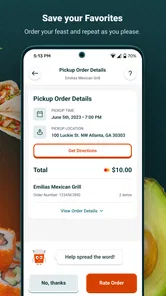
Beyond Menu is designed for finding food from nearby restaurants for either pickup or delivery. This makes it useful when you want to collect a meal yourself as well as when you would rather have it brought to your door. The available choice depends on the restaurants shown for your location, so check each restaurant’s options before placing an order.
Is Beyond Menu free to download, and what devices can run it?
Beyond Menu is free to download and is intended for users of all ages. It runs on devices with Android 7.0 or later, so it is worth checking your device’s operating system before installing. Although downloading the app does not cost anything, the total for a meal can depend on the restaurant and order, so review the checkout details before confirming.
What is Beyond Menu and how does it work?
Beyond Menu is a food delivery app that connects users with a variety of local restaurants, allowing them to browse menus, place orders, and enjoy meals delivered straight to their doorsteps. The app features a user-friendly interface where you can search for restaurants based on your location, cuisine preferences, or specific dish cravings. Once you've selected your meals, you can place an order directly through the app and track its delivery progress in real-time.
Is Beyond Menu available in my area?
Beyond Menu operates in numerous locations across the United States, but availability can vary depending on your specific area. To find out if Beyond Menu is available where you live, you can download the app and enter your address or zip code. The app will then display the list of participating restaurants and delivery options available to you. If Beyond Menu is not available in your area, it may be worth checking back periodically as the service continues to expand.
Pros
- User-friendly interface for easy navigation.
- Wide variety of cuisines available.
- Quick and easy order process.
- Secure payment options.
- Real-time order tracking.
Cons
- Limited delivery areas.
- Occasional app crashes.
- No option to customize orders.
- Slow customer service response.
- Limited restaurant reviews.











