BenefitHub
- 151.00
- 4.6
- Installs
- 100.00K
- Price
- Free

Screenshots
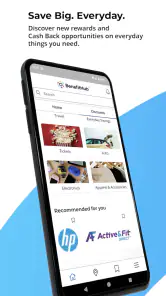
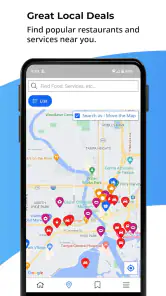
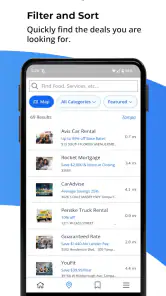
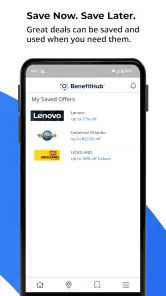
Analysis by Reviewed
BenefitHub is the kind of shopping app I would approach with a specific purpose rather than open casually every day. Developed by BenefitHub, it brings benefits and rewards into one place, so its value depends heavily on what offers are available through your own access and how often you remember to check them. I found the idea more useful than a normal coupon browser because the focus is on benefits connected to the user, not simply a giant public list of promotions.
As a free shopping app for Everyone, it is easy to try without making a financial commitment. It has been available since January 6, 2020, and the Android version currently shown is 15.13.49, with support beginning at Android 7.0. Those details matter because this is not a new experiment that appeared overnight; it has had time to become an established part of the benefits-app space. Its average rating is 4.6 from around 1.2 thousand ratings, while the app has passed 100 thousand installs.
How BenefitHub feels in everyday use
My first expectation with a benefits platform would be a quick path from opening the app to finding something genuinely relevant. BenefitHub is strongest when I already know what I am looking for: a way to reduce the cost of a purchase, browse available rewards, or check whether a benefit might apply before spending money. That makes the app feel more like a personal savings cabinet than a conventional shopping marketplace.
The speed I would expect from it is therefore less about demanding visual effects and more about how quickly I can move through benefit categories and reach a useful offer. A shopping app built around rewards does not need to perform like a game, but it does need to avoid making a simple search feel like administrative work. In practical terms, I would open it before buying something planned, rather than browse it aimlessly while waiting in line.
One useful habit is to check BenefitHub before the purchase decision is final. If I am arranging a trip, replacing an appliance, or planning a larger household order, I would first look through the available benefits and then compare the result with my usual retailer. This workflow is more sensible than assuming every listed reward is automatically the best deal. The app can help surface an opportunity, but I would still compare the final cost, delivery terms, and convenience elsewhere.
Where the app can save time
The main time-saving idea is centralization. Instead of remembering several benefit programs or searching the web for scattered discounts, I can begin in one dedicated place. That is especially convenient for someone whose employer or organization already uses BenefitHub as part of its rewards offering. The app becomes a starting point for shopping decisions rather than another general-purpose store competing with established retailers.
A realistic example would be a user preparing for a family event. Before buying clothes, booking an activity, or ordering gifts, I would open the app and scan the relevant benefit area. I would note the options that appear useful, then check whether the saving still makes sense after any restrictions or extra steps. This approach avoids the common mistake of choosing an offer just because it looks attractive at first glance.
More From Our News Desk

Clash of Clans Is Won Between the Battles

Android Auto Makes the Case for Quieter Car Software

MobiOffice: Transforming Mobile Productivity with Seamless Integration

EA SPORTS FC™ Mobile Soccer: Redefining Mobile Sports Gaming

How Microsoft OneDrive Became a Mobile Productivity Giant

How Google Translate Breaks Language Barriers Effortlessly
There is also a practical advantage in separating discovery from checkout. I would use the app to identify a possible reward, read the conditions carefully, and only then decide whether to continue. That small pause is important because a benefit may be valuable for one type of purchase but irrelevant for another. The best result comes from treating BenefitHub as a decision aid, not as proof that every purchase should go through it.
What happens during heavier use
Heavy use for this app is not the same as heavy use for a video or social platform. The demanding moments are more likely to come from browsing many offers, moving between categories, revisiting details, and switching back to a retailer or payment process. I would expect the experience to feel more resource-conscious than an entertainment app because its purpose is primarily information and shopping access.
Still, a long browsing session can become tiring if I open too many possibilities without a clear plan. My advice is to begin with a purchase category or a specific goal. Looking for travel-related savings is more efficient than scrolling through every reward available. The same applies to seasonal shopping: decide whether the purpose is clothing, dining, entertainment, or a household purchase before opening the app.
Another useful workflow is to keep a short mental shortlist instead of repeatedly reopening every offer. I would compare only the few benefits that fit the purchase, then leave the app once I had enough information to make a decision. This reduces unnecessary back-and-forth and makes the platform feel faster, even when the real challenge is choosing between several possibilities.
For users with limited storage or older phones, the app's minimum Android requirement of 7.0 is reassuring because it does not target only recent devices. That does not guarantee identical performance on every phone, but it does make BenefitHub accessible to a wider range of Android users. I would still keep expectations realistic on an older handset: switching between the app, a browser, and a retailer may feel less fluid than on newer hardware.
Stability and recovering from interruptions
Reliability matters more in a benefits app than flashy presentation. If I am checking an offer while shopping, an interruption can be frustrating because I may not remember where I was or which conditions I had just read. My preferred way to use BenefitHub would be to pause at important points, note the relevant details, and avoid relying on a screen remaining open throughout an entire purchase.
The app's long availability and current version suggest an actively maintained product rather than a forgotten utility. I would interpret that as a positive sign for continued compatibility, especially for people using Android 7.0 or later. Even so, an app update does not remove the need for sensible recovery habits. If the app closes or I switch away from it, I would reopen the specific benefit and review its terms again before completing the purchase.
This is one area where BenefitHub is different from a simple price-comparison tool. A comparison site may be enough when I only want the lowest visible price. A benefits platform can be more useful when the saving is tied to an eligible user or a reward arrangement, but that also means I should pay closer attention to the path from discovery to completion. The extra context is potentially valuable, yet it may require more patience than a quick web search.
I would not use the app as my only record of a planned purchase. For an expensive order or a time-sensitive booking, I would keep the important offer information visible in my notes or remember the exact route I followed. That is not a criticism unique to BenefitHub; it is simply good practice whenever a discount depends on a particular process. It also makes recovery easier if I need to return to the app later.
Resource demands and device fit
BenefitHub should appeal most to people who want a focused shopping-benefits tool without paying for access. Because it is free, the barrier to testing it is low. I could install it, explore whether the available rewards match my needs, and decide from actual usefulness rather than guessing from the name alone.
The bigger constraint is not likely to be raw hardware power but relevance. A modern phone with plenty of storage does not make an empty or unhelpful benefits selection more valuable. Someone who rarely shops through rewards programs may gain little from keeping the app installed. In that case, a normal retailer app, a browser search, or a direct loyalty program could be simpler.
On the other hand, a user who regularly checks workplace or membership benefits may find the modest device requirement helpful. The support for Android 7.0 means the app is not limited to the newest phones, which is useful for households that keep older devices as daily handsets. I would be more cautious only if the phone already struggles with switching between apps, since shopping often involves comparing BenefitHub with another service.
For iPhone users, the important practical question is whether the relevant version and access route are available through their usual platform. I would not choose a device solely for this app. The decision should begin with whether BenefitHub is part of the benefits arrangement I can actually use, followed by whether my phone handles ordinary shopping apps comfortably.
Who will get the most from it
I think BenefitHub is a good fit for people who receive organized benefits and want a single place to explore them. It is also suitable for shoppers who are willing to compare a reward with ordinary prices instead of assuming the reward is automatically superior. The free price makes experimentation sensible, particularly before a planned purchase where even a modest saving could justify the few minutes spent checking.
It is less suitable for someone who wants a broad marketplace with a huge product catalog, detailed seller comparisons, or a completely frictionless checkout from search to payment. BenefitHub's role is different. I see it as a gateway to rewards and benefits, not a replacement for every retailer, price tracker, or loyalty app.
I would also skip it if I prefer not to manage several steps around a promotion. Some shoppers value simplicity above possible savings and would rather buy directly from a familiar store. That is a reasonable choice. The app is most worthwhile for users who are comfortable checking eligibility, comparing the final value, and following the route that makes a benefit usable.
Small habits that improve the experience
My first tip is to open BenefitHub before browsing a retailer, not after placing an order. Once money has already been spent, the opportunity to use a benefit may be gone. Making the app part of the planning stage gives it a fair chance to influence the decision.
My second tip is to judge the complete transaction rather than the headline saving. I would consider the final price, convenience, timing, and any extra effort. A smaller benefit that fits a purchase I already planned may be better than a larger-looking reward that pushes me toward something unnecessary.
Third, I would use it selectively instead of checking every category. A targeted visit for travel, gifts, dining, or a major household purchase is easier to manage than constant browsing. This also helps me notice whether the app is genuinely useful for my routine or merely interesting during the first few days after installation.
Finally, I would revisit the app when my shopping needs change. A benefit that seems irrelevant during a quiet month may become useful before a trip or a seasonal event. That makes occasional checking more sensible than expecting daily value from a platform whose usefulness depends on what I need to buy.
My performance verdict
After looking at BenefitHub through the lens of speed, stability, and device demands, I see a practical rather than exciting app. Its performance expectations are reasonable for a shopping-and-rewards service, and its support for Android 7.0 broadens its device reach. The strongest experience comes from short, purposeful sessions: open it, find a relevant benefit, inspect the conditions, compare the real value, and continue with the purchase only if it makes sense.
The app is not the right answer for every shopping task. A retailer app is usually better when I already know exactly what I want and care about fast direct checkout. A price-comparison service is better when the only question is which public listing is cheapest. BenefitHub earns its place when the user has access to its rewards ecosystem and wants to check benefits before committing to a purchase.
My final recommendation is cautiously positive. I would suggest trying it to anyone who can use BenefitHub through their organization or benefits arrangement, especially if they make planned purchases and do not mind comparing the complete deal. I would not promise constant savings or install it simply because it is free. Its real strength is more specific: it gives eligible shoppers a focused place to look before spending, while remaining accessible to older Android devices and free to test.
BenefitHub is worth keeping when it changes how you plan a purchase, not merely when it adds another icon to your phone. That distinction sums up my experience: the app can be genuinely useful in the right shopping routine, but its value depends on relevant benefits, careful comparison, and a willingness to use it before—not after—the buying decision.
BenefitHub Frequently Asked Questions
What devices and operating systems can run BenefitHub?
BenefitHub is a shopping app for Android and iOS, designed to give eligible users access to a benefits and rewards platform. On Android, the listed minimum operating system is version 7.0, so check your device’s software version before downloading. Keeping your operating system and app updated can also help with compatibility and security.
Is BenefitHub suitable for all ages, and who develops it?
BenefitHub has an Everyone content rating, so it is classified as suitable for a general audience. The app is developed by BenefitHub and focuses on benefits, rewards, and shopping offers. Individual promotions may still have their own terms or age restrictions, so review the details of an offer before using it, particularly when it involves travel, events, or other services.
What is BenefitHub, and what can I use it for?
BenefitHub is an employee discount and rewards platform that gives eligible users access to offers from participating retailers, travel providers, entertainment services, local businesses, and other brands. After signing in through an employer or organization, you can browse categories, search for deals, compare available discounts, and follow the instructions to redeem online promotions, tickets, gift cards, or other benefits.
Who can access BenefitHub, and how do I create an account?
Access to BenefitHub is generally provided through an employer, school, association, or other participating organization rather than through completely independent registration. During sign-up, you may need to verify your work email, enter an organization-specific access code, or use an invitation link. If your employer is not listed or verification fails, you will usually need to contact your benefits or human resources department.
Are the discounts on BenefitHub available everywhere, and do they expire?
The availability of BenefitHub offers depends on your location, organization, and the individual merchant. Some promotions are valid nationwide, while others are limited to specific cities, stores, websites, or participating venues. Deals can also have expiration dates, blackout periods, quantity limits, or changing terms. Always review the offer details, restrictions, and redemption instructions before making a purchase.
Pros
- Exclusive employee discounts can reduce costs on everyday purchases.
- Offers cover travel
- entertainment
- dining
- electronics
- and other categories.
- The platform is useful for comparing deals from multiple participating brands.
- Digital coupons and promotional codes are convenient to access on mobile.
- A free service for eligible employees and members of participating organizations.
Cons
- Access depends on your employer or organization offering BenefitHub.
- Some discounts may be limited by location
- availability
- or membership status.
- Deals and promotional codes can expire or change without much notice.
- Savings may vary
- so advertised discounts are not always the lowest prices.
- The app may feel less useful if your preferred brands are not included.
- Category
- Shopping
- Version
- 15.13.49











