

BeFriend: make friends nearby
- 4.25K
- 4.4
- Installs
- 5.00M
- Price
- Free

Screenshots





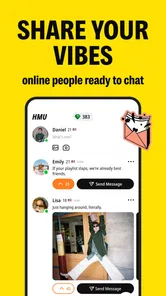

Analysis by Reviewed
When a nearby suggestion appears but the first message feels awkward, the trouble is often less about finding a clever line than making the profile and invitation easy to respond to. I judge BeFriend by whether it can help turn a local introduction into a comfortable conversation and, if both people want one, a real-world friendship. It is a social app for meeting people, especially appealing if you have moved somewhere new or want to meet beyond your existing circle.
It is free to download, with optional in-app purchases priced from $0.99 to $84.99 per item. Its Teen age rating is worth considering for younger users and families. ORBITECH PTE. LTD. develops the app, which has a 4.3 average from around 71,000 ratings and over a million installs. That points to an established audience, but it cannot tell me whether people near you share your interests or are active at the same time.
Getting Started with BeFriend
Installing BeFriend is a breeze. Available for both Android and iOS, the app boasts a user-friendly interface that ensures you don’t need to be a tech whiz to navigate it. Once you download and install it, setting up your profile is as easy as pie. Just add a few details about yourself, upload a friendly picture, and you’re good to go! The app uses your location to suggest potential friends in your vicinity, making it super convenient to find and connect with people nearby.
Where setup and first conversations can snag
Easy setup does not automatically make a useful profile. I would write a couple of specific details about how I actually spend my free time rather than a string of broad labels; “looking for someone to try weekend hikes with” gives a nearby person more to work with than simply saying I like the outdoors. A clear, current photo can also make an introduction feel less uncertain. These small choices matter because matching only opens the door: the other person still needs a reason to start talking.
If nearby suggestions seem thin, I would first check the simple things: whether location access is available to the app, whether the phone’s location setting is on, and whether the profile is complete enough to represent me. I would also try again from a place where my location can be read reliably. These checks are more useful than repeatedly reinstalling the app before knowing whether the issue is a setting, an incomplete profile, or simply the number of people around me.
Making a match easier to act on
One practical question is how much effort to put in before deciding whether the app suits me. I would treat the first week as a low-pressure trial: finish the profile, check suggestions when I have time to reply, and notice whether the people shown feel relevant. That is more useful than opening the app repeatedly for a quick glance, since a match has little value if I do not have the energy to follow up.
I would also be deliberate about what I reveal in a profile. A few interests and a general idea of the kind of friendship I want can help someone start a conversation without putting my routine, workplace, or exact daily schedule on display. That balance is especially useful when meeting strangers nearby: give people enough to connect over, but let trust grow through conversation rather than sharing personal details too early.
More From Our News Desk

 Gmail
GmailGmail in a Busy Inbox: Who Benefits Most?
From first account to crowded workday, Gmail earns its place through dependable search and flexible sorting—but its best fit depends on how much inbox maintenance you can tolerate.

 Prime Video
Switching to Prime Video: What Changes in Your Viewing Routine
Prime Video can make a compelling second home for streaming, but switching means learning a different catalog, rental layer, and route from browsing to playback.

 Universal TV Remote Control
Universal TV Remote Control Works Best as a Reliable Backup
A phone remote earns its place through quick setup and reliable habits. Here is how to get more from Universal TV Remote Control—and where its limits show.

 Weather - By Xiaomi
Weather by Xiaomi Review: Clear at a Glance, Less Clear Up Close
Xiaomi’s weather app makes everyday forecasts quick to scan, but its calm surface can leave useful details and recovery paths harder to find than they should be.

 X
XX Under Pressure: Can It Recover When Posting Goes Wrong?
A resilience-focused review of X, examining setup, mistaken posts, interruptions, weak connections, and the gaps that matter when recovery needs to be dependable.

 Clash of Clans
Clash of Clans Is Won Between the Battles
Its raids are quick; its community is a long-term project of coordination, teaching, rivalry, and shared responsibility—with all the friction that entails.
Latest News



Features that Stand Out
One of the coolest features of the app is its interest-based matching system. Whether you’re into hiking, cooking, or even bird-watching, BeFriend ensures you meet people who resonate with your hobbies. It’s almost like the app knows just what you need! Plus, the chat feature is integrated seamlessly, so you can start conversations without any hiccups.
I would treat shared interests as an opening, not proof that a friendship will click. For a more natural first message, mention one detail from the person’s profile and ask a question that is easy to answer. If a chat goes quiet, one friendly follow-up is reasonable; sending a string of messages is unlikely to make the connection feel more comfortable. You can also suggest a low-pressure public activity tied to a shared interest, rather than jumping straight to a long or highly personal meetup.
From a quiet chat to a workable plan
A useful workflow is to give a conversation a small, clear next step. If we have both mentioned liking coffee, I might ask whether they would be interested in meeting at a public café sometime that week, rather than writing a vague “we should hang out.” A specific invitation is easier to accept, decline, or reschedule. If the answer is uncertain, I would leave room for the other person to respond instead of treating silence as a cue to keep pushing.
For anyone wondering whether a match guarantees a reply, it does not. Matching is only a starting point, and people may be busy, lose interest, or use the app at different times. I would send one thoughtful opener, allow time, and then move on if there is no response. That keeps the process manageable and avoids investing too much in a connection before it has become a real conversation.
Safety, pace, and practical expectations
Safety is a top priority with BeFriend. The app includes various safety measures such as profile verification and the ability to report suspicious behavior. So, you can rest assured knowing that your experience is as secure as it is enjoyable.
I would still use ordinary judgment when moving a new connection offline. Keep early plans in a public place, tell someone you trust where you are going, and do not share sensitive personal details just because a chat feels friendly. Verification and reporting can be reassuring tools, but they do not replace your own boundaries. If someone pressures you, behaves inconsistently, or makes you uncomfortable, it is fine to stop replying and use the reporting option.
Who will get the most from it?
Imagine walking into your local coffee shop and seeing familiar faces, all thanks to the connections you’ve made on BeFriend. It’s not just about making friends; it’s about creating a community. The app encourages offline meetups and group activities, which is fantastic for those who prefer face-to-face interactions over digital chats.
A realistic use case is arriving in a new neighborhood with a free Saturday and wanting company for a casual walk or coffee. I would set up a profile that makes that intention clear, look for people with a compatible interest, and keep the first invitation specific and easy to decline. That workflow gives a match a practical next step without treating every conversation as a promise of instant friendship.
The app is a better fit for someone who wants to meet people locally and is willing to initiate plans than for someone who mainly wants a large online discussion about a niche hobby. In that second case, interest-based groups on a broader social network may offer more ongoing conversation; for keeping up with people I already know, an ordinary messaging app is simpler. The difference is the local discovery angle, but the trade-off is dependence on the people available nearby and their willingness to chat.
It may also suit someone who prefers one-to-one introductions before joining a bigger social setting. If I am new to a city and would rather meet one person for a short public coffee than walk into an unfamiliar group event, a local match can feel like a manageable first step. Someone who dislikes initiating conversations, wants a guaranteed reply, or is not comfortable meeting strangers should probably choose a different way to make connections—or take time to decide what boundaries would make this approach feel safe.
When a problem may be outside the app
Not every stalled match or empty-looking search is a technical failure. Someone may not check the app often, and a location-based service naturally has less to draw on where fewer people nearby are using it. Before changing several settings at once, I would check the phone’s connection, confirm location is enabled, and reopen the app. If the app itself will not run, checking for an available update is a sensible first step; the current version is 10.8.19 and it requires Android 8.0 or later.
If the app opens but suggestions still look limited, I would change one thing at a time. Confirm the phone can determine its location, try again after moving to a place with a clearer signal, and check whether the profile is complete. If those basics are in order, the likely explanation may simply be a small or quiet local pool. Reinstalling repeatedly will not create more nearby people, so I would give the app a reasonable try and then decide whether its audience fits where I live.
The app was released on November 7, 2020, and has around 3,800 written reviews. I would not treat either its age or its review count as a guarantee of the experience in my own area. A better test is to complete a thoughtful profile, give the nearby suggestions a fair try, and see whether conversations lead to plans that suit me. I would also look at any purchase prompt carefully before spending: the basic app is free, while optional items can cost from $0.99 to $84.99 each.
Why You’ll Love It
If you’re worried about being stuck in awkward situations, fear not! The app provides conversation starters and ice-breaker suggestions that can get the ball rolling. It’s like having a little social assistant in your pocket.
That can help when I know I want to reach out but cannot think of a first line, though a prompt works best when I make it personal rather than sending it unchanged. I would use it as a nudge, then add a question connected to the other person’s interests. The trade-off is that any matching app still asks for effort: I need to present myself clearly, be patient with replies, and decide which conversations are worth taking offline.
There is also a practical difference between trying the free app and paying for an optional item: I would first see whether the basic experience produces conversations I actually want. A purchase is not a substitute for a clear profile, compatible people nearby, or mutual interest. If a prompt appears while I am still figuring out whether the app fits, I would read the price and what is being offered carefully, then decide without assuming that paying will solve a quiet local feed.
For a teenager or parent weighing the age rating, I would consider not just the rating but the real-world nature of the app: it is meant to connect people, and those conversations can lead to meeting in person. A young user should have an age-appropriate discussion with a trusted adult about privacy, boundaries, and public meetups before using a service like this. The same common-sense caution applies to adults, too; a friendly profile is not a substitute for taking time to build trust.
In conclusion, BeFriend is more than just a social app; it’s a gateway to building meaningful relationships right where you live. So, if you’re ready to turn acquaintances into friends and explore the beauty of companionship, give BeFriend a try. Who knows? Your next best friend could just be a click away!
My practical verdict is that BeFriend is worth trying if you want nearby friendships and are comfortable initiating a chat, while it is a weaker fit if you expect instant matches, dependable replies, or a busy local scene everywhere. I would start with the free experience, make my profile specific, and judge it by the quality of actual conversations rather than the promise of a match. That keeps expectations realistic and gives the app a fair chance to show whether it fits my routine.
BeFriend: make friends nearby Frequently Asked Questions
Do I need an account to use BeFriend?
BeFriend is designed around connecting with people, so expect to create a profile and use the app’s social features to interact. A profile helps other users understand who they may be chatting with, and it is worth choosing carefully what personal details and photos you share. Keep your information limited to what you are comfortable showing to people you have not met.
Can I use BeFriend to meet people nearby in person?
BeFriend’s name and social focus may appeal to people hoping to connect with others nearby, while its summary highlights swiping, matching, meeting, and chatting. Treat an online match as someone you are still getting to know, rather than assuming you already know them well. If you decide to meet in person, use sensible precautions and let someone you trust know your plans.
Is BeFriend intended for teenagers, adults, or both?
BeFriend is a social app with a Teen content rating, and its store summary presents it as a teen-focused way to find friends. Anyone considering a download should keep that audience in mind and follow the age and safety guidance shown in their app store. As with any social platform, users should think carefully about what they share and whom they choose to contact.
What is BeFriend: make friends nearby?
BeFriend is a social networking app designed to help users connect with new people in their local area. It offers a platform for meeting like-minded individuals, making new friends, and engaging in shared activities. The app emphasizes safety and privacy, ensuring that users can interact in a secure environment.
How does BeFriend ensure user privacy and safety?
BeFriend incorporates several features to maintain user privacy and safety. These include profile verification, customizable privacy settings, and the ability to block or report suspicious accounts. Additionally, location sharing is optional and can be controlled by the user, ensuring a safe way to meet new friends without compromising personal information.
Pros
- Easy to use interface
- Connects with nearby users
- Strong privacy settings
- Variety of interest groups
- Real-time chat feature
Cons
- Limited to local connections only
- Occasional bugs in chat feature
- Requires GPS access
- Limited free features
- Ads can be intrusive











