Baskin-Robbins
- 2.15K
- 3.2
- Installs
- 1.00M
- Price
- Free

Screenshots

Analysis by Reviewed
My most useful way to think about the Baskin-Robbins app is as a flavor-and-offer companion: it can help me decide what to order before I reach the counter, then point me toward a nearby shop. That focus suits a treat that is often an impulse purchase, but it also means the app is most helpful when I already have Baskin-Robbins in mind. It is a free Food & Drink app from Baskin Robbins Mobile, rated for Everyone, and its central appeal is practical: browse the menu, check what is available in the app, and make a sweeter stop easier to plan.
Why browsing flavors changes the decision
Choosing ice cream sounds simple until a group has different tastes or you are deciding between a familiar scoop and something less predictable. The app’s flavor browsing gives me a calmer way to consider those options than trying to choose quickly at a display. Descriptions can help narrow the shortlist, especially when I am picking for someone else or want to avoid ordering the same thing every visit. I would still treat the menu as a starting point rather than a guarantee of what a particular shop has ready.
That distinction matters when planning for a family or a small gathering. I can use the menu to settle on a few likely choices before leaving, then keep a backup flavor in mind in case my first pick is not available at the location. This is a small but useful habit: it prevents the app from turning a quick dessert run into a rigid plan. For allergy-sensitive choices, I would confirm details with the shop rather than rely on a flavor name or description alone.
When a quick look saves time
The flavor-first approach is most useful when I have a destination in mind but have not settled on an order. It lets me do the thinking at home, on the way to meet friends, or while someone else is driving, instead of making everyone wait while I read the display. I can narrow the choice to two or three possibilities and then decide based on what the shop has when I arrive.
There is a practical limit to that convenience: browsing a menu is not the same as checking live stock. I would not promise a specific flavor to a child or plan a special dessert around one choice until the shop confirms it. The app is better at helping me arrive prepared than at eliminating every last-minute adjustment.
Discover the World of Flavors
First things first, let’s talk about the heart of the app – the flavors. Baskin-Robbins is renowned for its variety, and the app doesn't disappoint. With just a few taps, you can explore a myriad of ice cream flavors, from classic vanilla to exotic creations like Cotton Candy and Jamoca Almond Fudge. The app even offers a flavor of the month feature, so there’s always something new to try. Personally, I found myself drooling over the descriptions, which are detailed enough to make you feel like you’re practically tasting the ice cream.
User-Friendly Interface
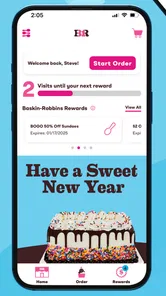
Navigating the app is as smooth as a well-churned ice cream. Its user-friendly interface ensures that even the least tech-savvy among us can easily find what we’re looking for. The main screen provides quick access to the menu, locations, and special offers. I particularly appreciated the search functionality that allowed me to quickly locate the nearest Baskin-Robbins store. Plus, the app’s vibrant colors and playful design perfectly capture the brand’s fun and friendly vibe.
More From Our News Desk

Weather by Xiaomi Review: Clear at a Glance, Less Clear Up Close

X Under Pressure: Can It Recover When Posting Goes Wrong?

Clash of Clans Is Won Between the Battles

Android Auto Makes the Case for Quieter Car Software

MobiOffice: Transforming Mobile Productivity with Seamless Integration

EA SPORTS FC™ Mobile Soccer: Redefining Mobile Sports Gaming
For a realistic use case, imagine I am heading home and want to bring dessert for everyone without holding up dinner. I can check the flavors first, use the location search to find a convenient shop, and arrive with a rough order already in mind. If I am deciding between this app and a general map or search app, the latter may be faster for comparing nearby businesses across brands. But when I have settled on Baskin-Robbins, keeping flavor discovery and store-finding together is a more focused workflow.
A practical routine for group orders
For a group, I would use the app in two passes rather than trying to complete every decision in one go. First, I would ask people what kinds of flavors they like and use the menu to build a short list. Then I would check the nearby location and keep a fallback choice for anyone who is particular. This prevents the common problem of arriving with a confident plan that depends on one flavor being available.
It also helps to separate preferences from dietary needs. A person may say they want a nutty flavor, for example, but that preference is not the same as an allergy check. I would use the app to explore and discuss choices, then ask the shop for ingredient or handling details when the decision has safety implications. That extra step is less convenient, but it is the sensible trade-off for anyone who cannot rely on a general flavor description.
Sweet Deals and Offers
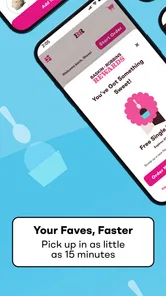
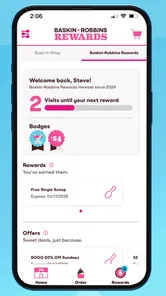
If you’re someone who loves a good deal (and who doesn’t?), the Baskin-Robbins app has you covered. The app regularly updates with new promotions and discounts. I was thrilled to stumble upon offers like Buy One, Get One Free and discounts on sundae kits. These deals are perfect for those days when you want to treat yourself and a friend without breaking the bank.
Offers are most useful when I check them before ordering, not after I have already chosen a treat. I would compare the promotion with what I actually planned to buy: a deal that encourages an extra item is not automatically a saving if I only wanted one scoop. The same goes for loyalty. The published article describes membership points, but I would make sure the current app displays the terms and eligible purchases before counting on a reward. That quick check keeps a tempting offer from becoming a surprise at checkout.
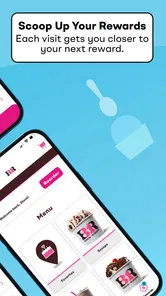
Additionally, the app rewards loyalty with its membership program. By signing up, you earn points with every purchase, which can later be redeemed for free treats. It’s a sweet incentive to keep coming back for more!
Making offers work for your plans
I would treat a promotion as a prompt to compare, not as a reason to buy more by default. If I am already meeting a friend for dessert, an offer that suits two people may fit naturally. If I am stopping alone for a small treat, a deal built around multiple items could leave me spending more or carrying more than I wanted. Checking the wording before setting off is a simple way to avoid that mismatch.
For someone who visits occasionally, the app’s value may come more from finding a suitable offer than from building a routine around points. Frequent customers have more reason to check whether a reward program fits their habits; occasional visitors can simply look for a promotion that matches a visit they were already planning. Either way, I would make the decision based on the total order I actually want, rather than the excitement of seeing a discount.
Customization at Your Fingertips
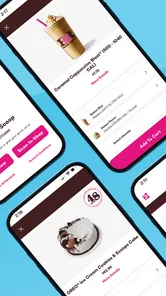
One of my favorite features of the app is the ability to customize my orders. Whether you’re in the mood for a sundae, milkshake, or ice cream cake, the app lets you tailor your treat just the way you like it. You can choose your flavors, add toppings, and even specify how you want your ice cream packaged. It’s like having your very own ice cream parlor in your pocket.
Customization is especially handy when I am ordering for several people, since I can decide on flavor-and-topping combinations before facing the usual back-and-forth of a group order. I would still review every selection before submitting it: small choices like toppings or packaging can change what someone expects to receive. If I need a highly specific cake or have a time-sensitive pickup in mind, I would confirm the details with the shop rather than assume that every option is available at every location.
Where planning meets reality
The useful trade-off is that more choices can make an order easier to personalize but also easier to get wrong. When a group has several toppings, flavors, and packaging preferences, I would take a moment to read the final selections back to everyone before placing the order. That is especially worthwhile when one person is collecting for the rest: a quick confirmation is less awkward than discovering a missing topping after the treats are home.
I would also distinguish a straightforward customized treat from a special request. The app can make choices easier to organize, but a complex cake request or a pickup that must happen at an exact time deserves a direct check with the shop. For a simple scoop, that extra confirmation is unnecessary; for a celebration where the dessert is central, it is a sensible safeguard.
Where it fits—and where it doesn’t
The app has a 3.4 average from around 4.8 thousand ratings, with about 2.1 thousand written reviews, and more than a million installs. Those figures suggest it has reached plenty of dessert fans, while the middling average is a reason to keep expectations practical: I see it as a useful brand-specific tool, not a flawless ordering system. It is on version 4.13.0 and supports Android 8.0 or later, so compatibility is worth checking if you use an older device.
Compared with a general map app, this one is more relevant once I have chosen the chain: I can look at flavors and offers alongside store search rather than switching between unrelated searches. A map or local search is still better if I have not decided where to go and want to compare independent ice cream shops, bakeries, or other dessert options. The difference is focus. This app helps me plan a Baskin-Robbins visit; it is not a broad guide to every place serving dessert nearby.
The rating also encourages me to keep the app’s role modest. I would use it for discovery and preparation, then rely on the shop for any detail that needs to be exact. That approach makes the app useful without expecting it to replace a conversation with staff or guarantee that a particular order will be available as imagined.
I would recommend it most to people who visit Baskin-Robbins often, like checking flavors before choosing, or want to keep promotions and store search in one place. Someone who rarely buys from the chain, prefers comparing every nearby dessert option, or simply wants a quick scoop without planning may be better served by a map app or by choosing in person. The app is free, but its value still depends on whether those brand-specific tools fit your routine.
Who gets the most from it
The strongest fit is someone who already knows the chain and wants to make a visit more deliberate: a parent coordinating different preferences, a fan who enjoys trying flavors, or a regular customer who likes checking offers before ordering. It can also help someone bringing dessert to a casual get-together, because they can think through choices before the group is standing at the counter.
I would skip it if I only want the nearest dessert place regardless of brand, if I prefer to browse a physical display with no advance planning, or if my order depends on exact availability that has not been confirmed. People with serious food sensitivities should use the app for ideas, not as their only source of ingredient assurance. In those cases, a direct conversation with the shop matters more than a polished menu screen.
For an ordinary visit, I would start by checking the flavors, shortlist a couple of options, look for an offer that fits the order I already want, and then use store search to plan the stop. That sequence keeps the app from turning a spontaneous treat into unnecessary research. It answers the practical questions I would have before leaving—what might I choose, where can I go, and is there an offer worth considering—while leaving final availability and special requests to the shop.
In conclusion, the Baskin-Robbins app is a delightful addition to the smartphone of any ice cream lover. With its extensive flavor options, user-friendly design, and fantastic deals, it’s a must-have for anyone looking to satisfy their sweet tooth. So go ahead, download the app and let your taste buds embark on a delicious adventure!
Baskin-Robbins Frequently Asked Questions
Is the Baskin-Robbins app free to download, and what devices can run it?
The Baskin-Robbins app is free to download and is available for Android and iOS. Its listed minimum operating-system requirement is version 8.0, so check your device’s software before installing. The app is in the Food & Drink category and is intended for everyone. Once installed, it offers a mobile way to explore Baskin-Robbins treats and related offers.
What features does the Baskin-Robbins app offer?
The Baskin-Robbins app provides a range of features to enhance your ice cream experience. Users can find nearby Baskin-Robbins locations, browse the menu, and place orders directly through the app for pickup or delivery. Additionally, the app offers exclusive deals, promotions, and a rewards program where users can accumulate points for discounts on future purchases.
How does the Baskin-Robbins rewards program work?
Baskin-Robbins' rewards program allows users to earn points with every purchase made through the app. For every dollar spent, you earn a certain amount of points, which can be redeemed for discounts on future orders. The app also occasionally offers bonus points and special promotions to help you earn rewards faster.
Is the Baskin-Robbins app available on both Android and iOS devices?
Yes, the Baskin-Robbins app is available for download on both Android and iOS devices. You can find it on the Google Play Store for Android users and the Apple App Store for iOS users. The app is designed to provide a seamless user experience across both platforms.
Are there any special promotions or discounts available exclusively through the Baskin-Robbins app?
The Baskin-Robbins app frequently offers exclusive promotions and discounts that are only available to app users. These can include limited-time offers, special discounts on select menu items, and app-only deals. By enabling notifications, users can stay updated on the latest promotions and never miss an opportunity to save.
Pros
- User-friendly interface enhances experience.
- Wide variety of flavors to explore.
- Exclusive deals and offers available.
- Easy navigation and ordering process.
- Efficient customer support system.
Cons
- Requires stable internet connection.
- Limited payment options available.
- App crashes occasionally.
- Inconsistent delivery times.
- Frequent updates needed.











