

AXS Tickets
- 11.09K
- 4.7
- Installs
- 10.00M
- Price
- Free

Screenshots


Analysis by Reviewed
When plans turn into an actual night out, the stressful part is often not choosing the event but keeping the ticket details straight. I find AXS Tickets most useful when I already have a venue or performer in mind and want one place to look for event information and handle a ticket purchase. It is a free entertainment app from AXS, LLC, and its focus is practical: helping people move from browsing to making plans.
Before you start searching
The app makes the most sense when there is already a reason to open it: a performer someone mentioned, a venue you like, or a date you are trying to fill. If you are starting with no particular idea, it can still help you look around, but I would not treat it as a complete guide to everything happening nearby. A venue’s own calendar or a broad local-events guide may show options outside the ticketing service you happen to be using.
One useful habit is to search using more than one clue when an event name is common. Try the performer or show name, then check the city and venue on the result before proceeding. This is a small but practical safeguard when similar listings appear, and it is more reliable than trusting a familiar title at a glance.
What to expect when browsing
Search is a sensible starting point if you know an artist, event, or venue. If you are undecided, browsing events can help you spot options in your area or in a city you expect to visit. I would treat that discovery view as a way to build a shortlist, then check the event details carefully before committing: the date, venue, and seating information matter more than a quick glance at a listing.
That distinction is especially useful when comparing events with similar names or planning around travel. Before buying, I would confirm that the city and venue match the outing I have in mind, then discuss the date with anyone coming along. An event app can make the search easier, but it cannot make a ticket the right choice if the group has not settled on a plan.
Discovering the World of Events
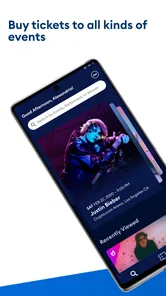
First off, let’s talk about the sheer variety of events that AXS Tickets offers. Whether you’re into music concerts, theater performances, or sporting events, this app has got you covered. Imagine being able to scroll through a curated list of events happening around you or even in different cities. It’s like having your personal events planner right in your pocket!
User-Friendly Interface
The app is super user-friendly. Navigating through the app is as smooth as butter. You have a search bar at the top where you can type in the event or artist you’re interested in, and boom, all the relevant results pop up. Plus, the event listings come with detailed information—think dates, venues, and even seating charts. This makes planning your outing a breeze.
More From Our News Desk

 Gmail
Gmail in a Busy Inbox: Who Benefits Most?
From first account to crowded workday, Gmail earns its place through dependable search and flexible sorting—but its best fit depends on how much inbox maintenance you can tolerate.

 Prime Video
Switching to Prime Video: What Changes in Your Viewing Routine
Prime Video can make a compelling second home for streaming, but switching means learning a different catalog, rental layer, and route from browsing to playback.

 Universal TV Remote Control
 Works Best as a Reliable Backup
A phone remote earns its place through quick setup and reliable habits. Here is how to get more from Universal TV Remote Control—and where its limits show.

 Weather - By Xiaomi
Weather by Xiaomi Review: Clear at a Glance, Less Clear Up Close
Xiaomi’s weather app makes everyday forecasts quick to scan, but its calm surface can leave useful details and recovery paths harder to find than they should be.

 X
X Under Pressure: Can It Recover When Posting Goes Wrong?
A resilience-focused review of X, examining setup, mistaken posts, interruptions, weak connections, and the gaps that matter when recovery needs to be dependable.

 Clash of Clans
 Is Won Between the Battles
Its raids are quick; its community is a long-term project of coordination, teaching, rivalry, and shared responsibility—with all the friction that entails.
Latest News



For a low-friction workflow, I would search the event first, compare the listed date and venue, and only then move on to the seating choices. If I am organizing a group outing, I would share the key details with friends before purchasing rather than assuming everyone can make the same date. That small pause is more useful than rushing through a booking screen and discovering later that the plan does not work for someone.
Speed during a busy ticket search
Ticket searches can feel more pressured when an event is popular and several people are trying to decide at once. I would keep the app focused on the specific event rather than repeatedly jumping between unrelated listings, and have the date and seating preference in mind before starting. That is a planning tip, not a promise that every search or purchase will be instant: connection quality, demand, and the details of an event can all affect how smooth the process feels.
For someone who mainly wants a broad calendar of local activities, a general events or venue-discovery app may be a better first stop. AXS is more appealing when its event listings are relevant to the plans you are making and you want ticketing in the same experience. The trade-off is that one focused ticketing app is convenient, while checking another source can still help if you are comparing venues or looking for a wider range of events.
Planning around a group
For a realistic weeknight example, suppose a friend shares a show they want to attend and the group has not picked a date yet. I would use the app to identify the relevant listing, send the venue and date details to everyone, and wait for a clear answer before choosing seats. That order helps avoid the common mistake of treating a ticket search as if it were already a group decision.
If people are coming from different parts of town, the event listing is only one piece of the plan. I would separately check how the venue fits the group’s travel arrangements and agree on a meeting point. Keeping those logistics outside the purchase decision also makes it easier to compare another event or source without losing track of what the group actually agreed to.
Secure and Swift Ticket Purchases
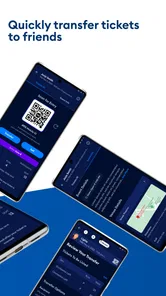
Now, let’s get to the nitty-gritty: buying tickets. One of the things I love about AXS Tickets is how secure and fast the purchasing process is. You don’t have to worry about your information being compromised. Also, they offer different payment methods, so you can choose what suits you best. And the best part? You get your tickets almost instantly, ready to be scanned at the venue.
On a normal evening, I might use it after a friend sends me the name of a show: I search for it, check the date and seating details, and then decide whether the timing fits. Before leaving for the venue, I would open the app and make sure I can reach the ticket rather than waiting until I am at the entrance. This is a simple habit that reduces last-minute fumbling, especially when coordinating with a group.
For the same reason, I would not rely on a single app as my only record of an outing. Keep the event details somewhere you can refer to while making plans, and allow time to open the ticket before you reach the queue. Those are sensible precautions for any mobile ticket, not evidence that the app is unreliable.
Handling the rush without assuming instant results
When several people are weighing options at the same time, a little preparation can make the experience feel less hurried. I would settle the date range first, decide whether the group cares more about a particular section or staying together, and then compare the available seating shown for the event. That prevents repeated back-and-forth between listings while everyone tries to make up their mind.
Speed is difficult to judge from one visit because searches, connectivity, and event demand vary. I would expect ordinary browsing to be more straightforward than a high-pressure purchase moment, when many buyers may be trying to act quickly. If a screen seems slow, I would pause long enough to see whether it responds before tapping repeatedly; duplicate actions can make an already tense checkout harder to follow.
Reliability, resale, and changing plans
How dependable does it feel in day-to-day use? The interface is straightforward, but ticket access still depends on having a usable phone and being able to open the app when needed. I would check the ticket before setting off and avoid leaving the first sign-in or purchase step until the venue entrance. If something takes longer than expected, returning to the event screen and checking the details is a more useful recovery step than repeatedly starting over.
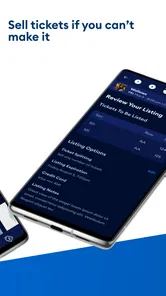
We all know plans can change last minute, and sometimes you’re stuck with tickets you can’t use. No worries! With AXS Official Resale, you can sell your tickets safely within the app. It’s straightforward, and you’re assured of secure transactions. So, whether you’re buying or selling, you’re in good hands.
Resale is a useful option when a change of plans makes a ticket unusable, but I would not buy on the assumption that every ticket can be resold or that a sale is guaranteed. Check the options shown for the particular event and ticket before counting on resale as a backup. If flexibility is the main priority, settle the group’s availability first and treat resale as a possible route, not a substitute for planning.
Keeping the ticket easy to reach
A practical check before leaving is to open the event in a calm setting and confirm that you can get back to the ticket. That gives you time to notice an account or device issue before you are in a queue, rather than trying to troubleshoot while other people are waiting. I would also make sure the phone has enough charge for the journey and entry, since convenient mobile access is only useful if the device stays available.
If you change phones or are setting up the app shortly before an event, do not make the entrance your first test. Sign in and inspect the relevant event in advance, then keep the device accessible on the day. This is not a guarantee against every interruption; it is simply a sensible way to avoid combining a first-time setup with the busiest moment of the outing.
Device fit and who should choose it
The app is rated for Everyone, and its current version is 6.23.2; it runs on iOS 7.1 or later. Its average rating is 4.7 from around 79,000 ratings, with roughly 9,600 written reviews and over 5 million installs. Those figures suggest it has found a substantial audience, though they cannot tell me whether a particular event or phone will suit you. I would keep the app updated and make sure the device has enough battery for the trip and entry process.
Because this is a ticket-focused app, its value depends on whether the events you want are available through it. It is a good fit for people who attend concerts, theater, or sports and want event search and ticket handling together. If you rarely go out, prefer browsing every possible local listing, or need a different ticket source for a specific event, another option may be more useful. The app is free to download, so it is easy to try when an event you care about appears, but I would still compare the event details before deciding where to buy.
Resource use is hard to assess from a single session, and I would not assume that any ticket app has no effect on an older or heavily used phone. The practical question is whether your device can comfortably run the app alongside the other things you rely on during an outing. If your phone is short on storage, battery, or responsiveness, install and test the app before event day rather than discovering a device constraint at the door.
The minimum operating-system requirement is 7.1, which gives people with older compatible devices a point to check before installing. Compatibility alone does not guarantee the same experience across every phone, though. If your device is slow or the operating system is out of date, using a newer device or another ticket option may be the less stressful choice for a time-sensitive event.
Where it fits among ticketing options
Compared with searching the web and then moving between a venue page and a separate ticketing service, keeping event discovery and ticket purchase together can save a few steps. That convenience matters most when you already know what you want to see. A broad search engine or local events guide may be better for discovering unfamiliar venues, while the venue’s own information can be helpful when you want to double-check logistics. I see AXS as a focused companion for finding and handling relevant tickets, not a replacement for every source of event information.
For a particular event, the best alternative is often whichever official seller or venue source actually handles that listing. I would compare the event name, location, date, and seating details across sources rather than assume that a familiar ticketing app has every option. AXS is most useful when it has the event you want and its combined search-and-ticket workflow suits you; it is not the right tool simply because it is already on your phone.
AXS Tickets has been available since August 27, 2013, and its appeal is still easiest to understand in a concrete situation: I hear about a show, check the listing, confirm the date with friends, and use the ticketing flow if the plan fits. The most important question before installing it is not whether it can replace every event app, but whether it covers the events you are considering. If it does, the combined search and ticket workflow is convenient; if it does not, another seller or a broader discovery tool is the better choice.
My performance verdict
I would judge the app less by the promise of speed and more by whether it keeps the event details and ticket process manageable when I need them. Its focused purpose is an advantage if I know what I am looking for, while broad discovery and last-minute group decisions are where extra checking is still worthwhile. Preparing the event choice, checking access in advance, and keeping the phone ready are simple steps that make the experience more dependable without pretending every device or busy sale will behave identically.
All in all, AXS Tickets is a must-have for anyone who loves attending events. It’s easy to use, offers a wide range of events, and ensures a secure and seamless ticketing experience. So, next time you hear about an event you’d love to attend, give AXS Tickets a try. You might never go back to the old ways of ticket hunting!
AXS Tickets Frequently Asked Questions
Does AXS Tickets help me discover events, or is it only for buying tickets?
AXS Tickets is intended for both finding events and handling ticket purchases. You can browse available events and explore options before deciding what interests you, then continue to seat selection and purchase if you choose. AXS describes the app as a way to find your next event anytime, anywhere, making event discovery useful even before you have decided what to attend.
Is AXS Tickets free to download, and are tickets free too?
AXS Tickets is free to download, so you can install the app and explore its event listings without paying for the app itself. Ticket purchases are separate: the cost depends on the event and the tickets you select, and additional fees or taxes may apply. Review the full amount shown during checkout before confirming a purchase.
Who can use AXS Tickets, and what devices does it support?
AXS Tickets is an entertainment app developed by AXS, LLC, and its content rating is Everyone. It is available for Android and iOS devices, making it an option for users across both major smartphone platforms. Before downloading, check that your device meets the platform’s requirements; the listed minimum operating system is 7.1.
What is AXS Tickets and how does it work?
AXS Tickets is a mobile application designed for purchasing tickets to various events, including concerts, sports, and theater performances. Users can browse events, select seats, and purchase tickets directly through the app. It also offers features like mobile ticket delivery and event updates, making it convenient for users to manage their event attendance seamlessly.
Is AXS Tickets available for both Android and iOS devices?
Yes, AXS Tickets is available for download on both Android and iOS platforms. Users can find the app on the Google Play Store for Android devices and the Apple App Store for iOS devices. This ensures a wide accessibility for users regardless of their smartphone choice, allowing them to enjoy a streamlined ticket purchasing experience.
Pros
- User-friendly interface for easy navigation.
- Real-time updates on ticket availability.
- Secure payment options for peace of mind.
- Wide range of events covered globally.
- Mobile ticketing for convenience.
Cons
- Service fees can be quite high.
- Limited customer support availability.
- Occasional app crashes reported.
- Not all events offer digital tickets.
- Some users find seat selection tricky.











