Autopilot - Investment App
- 1.10K
- 4.7
- Installs
- 1.00M
- Price
- Free

Screenshots


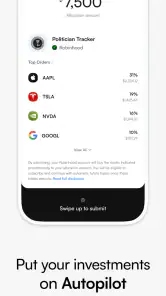
Analysis by Reviewed
Investing can feel unnecessarily complicated when all you want is a clearer way to put money to work. Autopilot is a finance app from Autopilot Holdings Corporation that aims to make that process feel more approachable. I found its appeal less in the promise of instant results and more in the way it presents itself as a modern investing companion rather than a traditional, paperwork-heavy financial service.
That distinction matters. An investing app should not be judged like a budgeting tool or a stock-market game. Your decisions can affect real money, so convenience has to be balanced with understanding, risk awareness, and patience. In my experience, Autopilot is most interesting for people who want a simpler starting point, but it is not a substitute for learning what they own or why a particular approach suits them.
How Autopilot feels in its current state
The app sits in the finance category and is free to download, which makes trying it less intimidating than beginning with a service that immediately feels expensive or overly formal. It is available for users aged Everyone, and the current release is version 1.19.23 with a minimum operating-system requirement of 10. That combination suggests a product designed for a broad mobile audience rather than only experienced investors with specialized devices.
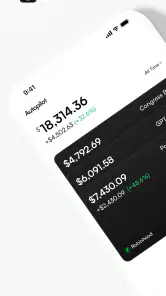
What I like about the concept is the reduction of friction. Instead of treating investing as a separate project requiring spreadsheets, several websites, and constant checking, Autopilot is built around the idea that the phone can become the main place to follow an investing routine. The benefit is psychological as much as practical: a less intimidating interface can make it easier to start with a plan and stick to it.
Still, a clean experience does not make investment risk disappear. A polished screen can make a decision feel safer than it really is. I would use the app as a tool for organizing and following an investment approach, not as a source of guaranteed outcomes. Anyone opening it should be ready to accept that markets move unpredictably and that a convenient workflow can still lead to poor results if the underlying choices are misunderstood.
The app has built a noticeable audience, with more than a million installs and a 4.7 average from roughly seven thousand ratings. Those figures tell me that many people find the overall experience approachable, although popularity alone is not proof that it will match every investor’s needs. The most useful question is whether its style fits the way you prefer to make financial decisions.
A practical fit for people who want less daily maintenance
I see Autopilot working best for someone who has decided to invest but does not want to spend every evening watching financial news. A busy worker, for example, might review the app during a quiet commute, check whether the chosen plan still makes sense, and then return to normal life instead of constantly reacting to market movement.
That workflow can be healthier than opening a brokerage account repeatedly and making emotional changes after every headline. The key is to set a personal rule before using the app: decide how often you will review your choices, what level of risk you can tolerate, and which goals matter most. Autopilot can make the routine easier to follow, but it cannot make those decisions for you in a meaningful personal sense.
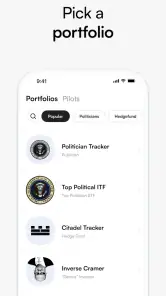
It is also suitable for people who find conventional investing platforms visually dense. Traditional brokerages often combine charts, order types, research pages, watchlists, and account details on screens that reward experience. That depth is valuable for active investors, but it can overwhelm a beginner. Autopilot’s modern presentation is more likely to appeal to someone who wants a focused path rather than a full trading workstation.
On the other hand, I would not choose it as my first recommendation for a person who wants detailed control over every trade, advanced market analysis, or a broad set of professional tools. In those situations, a conventional brokerage may be the better option even if its interface takes longer to learn. Simplicity is helpful only when it does not remove information you genuinely need.
What the version and release history tell me
Autopilot was released on November 15, 2023, and its current version is 1.19.23. I read that progression as evidence of an app that has continued moving beyond its initial launch rather than remaining frozen after release. A sequence of updates can matter in finance because users need confidence that the product is being maintained as mobile systems, security expectations, and account workflows evolve.
That said, a version number by itself does not explain the quality of every change. I would pay attention to whether updates make navigation clearer, reduce unnecessary steps, improve the explanation of investment choices, and make account activity easier to understand. Those improvements would have a direct effect on trust. New visual touches are less important than knowing what an action does before confirming it.
For an existing user, the practical lesson is simple: keep the app updated, but do not assume every update changes the investment experience in a major way. Some releases may refine compatibility or fix small problems that are invisible when everything works correctly. Others may alter a screen or workflow enough that it is worth slowing down and rereading the information before proceeding.
I would also avoid treating the latest version as a reason to change a long-term plan. Product evolution and investment evolution are different things. The app can improve while your original strategy remains appropriate, and a new interface should not encourage unnecessary buying, selling, or switching.
How it compares with familiar investing alternatives
The clearest comparison is with a standard brokerage app. A brokerage usually wins on control: users may receive more detailed market information, more order choices, and a wider range of ways to manage a portfolio. That can be important for experienced investors or anyone with a specific trading method. The trade-off is that the extra control often means extra responsibility and a steeper learning curve.
Autopilot’s advantage is the opposite. Its identity is centered on reducing the mental load around investing. If your main problem is that traditional platforms make you hesitate, lose focus, or overreact, a more guided environment may help you stay consistent. If your main problem is a need for precise research and execution, the same simplicity may feel restrictive.
It also differs from a budgeting app. A budget helps you understand income, spending, and available cash; Autopilot belongs to the investing side of the financial picture. I would use budgeting tools to decide how much money can safely be set aside, then use an investing app only after building a reasonable cash buffer. Mixing those purposes can lead to investing money that should remain available for everyday needs.
Compared with a savings account, the app is aimed at growth through investment rather than predictable access to cash. That makes it unsuitable for emergency funds or money needed soon. A savings product may be less exciting, but stability and accessibility are more important than potential returns when the purpose of the money is immediate security.
Small habits that make the experience more useful
My first practical tip is to write down the reason for using Autopilot before making any investment decision. “I want to build long-term wealth” is more useful than “I want to make money quickly,” because it gives you a standard for judging future temptation. When markets become noisy, that note can prevent a short-term mood from replacing your original plan.
Second, separate app convenience from financial confidence. A fast confirmation screen is not the same as a well-researched decision. Before accepting an action, I would ask what is being bought or changed, how long I expect to hold it, and what would make me reconsider. This pause is especially valuable for newcomers who might otherwise confuse a smooth interface with a low-risk opportunity.
Third, create a review schedule instead of checking randomly. A weekly or monthly habit can be more informative than repeated glances throughout the day. Constant checking encourages emotional reactions, while a scheduled review gives you a chance to compare progress with your goal and decide whether anything truly needs attention.
A fourth useful workflow is to keep a separate record of your personal reasoning. The app may show account information, but your own short notes can explain why you selected a particular approach and what risks you accepted. Months later, that record helps you distinguish a genuine change in circumstances from simple impatience.
Finally, treat updates as a reason to inspect the workflow, not as a reason to increase activity. After an app update, I would check the screens related to account status and actions carefully, then return to the same investment discipline. This keeps product changes from quietly changing your behavior.
Where the experience can still fall short
The biggest limitation is inherent in a simplified investing product: people may want the app to remove uncertainty, but no interface can do that. If Autopilot makes the process feel effortless, beginners may need to make an extra effort to learn about risk, diversification, time horizons, and the difference between a temporary decline and a failed plan.
Another possible source of friction is the tension between guidance and control. A guided experience can be reassuring when you are starting out, but eventually you may want more detail than the app’s streamlined approach provides. Reaching that point does not mean the app has failed; it may simply mean your needs have grown beyond its intended level of complexity.
I would also be cautious if you need highly specific financial planning. Someone managing several goals, tax considerations, income sources, or complex account arrangements may need advice and tools that go well beyond a mobile investing workflow. In that situation, Autopilot could still be convenient for a limited purpose, but it should not become the only place you make important financial decisions.
People who need immediate access to their money should skip investing altogether for that portion of their finances. The app’s free price removes a download barrier, not the financial risks associated with investing. Before using it, make sure the money involved is genuinely available for the time horizon you have chosen.
Questions I would consider before installing it
If you are wondering whether Autopilot is appropriate for a beginner, my answer is yes, provided that “beginner-friendly” does not mean “risk-free” in your mind. Its accessible style may help you take the first step, but you should still understand the basic purpose of your investment and avoid committing money you may soon need.
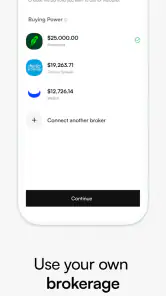
If you already use a brokerage, the decision depends on what frustrates you about that service. Autopilot may be worth considering if you want a simpler, more focused routine. It is less compelling if you rely on detailed research, direct control, or specialized trading features, because a traditional platform may serve those needs better.
If you are concerned about the app’s age or ongoing development, the release date and current version show that it is a relatively recent product with continued version progression. I would still judge future updates by their usefulness: clearer explanations, dependable account handling, and transparent workflows matter more to me than frequent cosmetic changes.
If you are asking whether the free download means investing itself is free, keep the distinction clear. The app costs nothing to download, but investing always involves the possibility of losing money and may involve financial conditions that you should understand before acting. The absence of a download charge should never be treated as a promise of cost-free investing.
And if you want a tool for emergency savings, short-term spending, or guaranteed access to cash, I would choose a different financial product. Autopilot makes more sense for money assigned to a considered investment goal, not for the funds that protect you from an unexpected bill.
What I would watch as the product develops
For future releases, I would watch how clearly the app explains changes to an investment plan and whether existing users can understand the effect before confirming anything. In finance, transparency is a feature in its own right. A small improvement that makes an action easier to interpret can be more valuable than a large redesign.
I would also look for a stronger balance between simplicity and education. The best version of a modern investing app should not merely shorten the path to a decision; it should help users become more capable decision-makers over time. Clear context, understandable risk language, and useful records of past choices would support that goal without turning the app into a complicated trading terminal.
Existing users should watch their own behavior as closely as they watch the application. If the convenience encourages frequent checking or impulsive changes, the right response may be to reduce notifications, establish a review schedule, or move part of the process back to written planning. The app should serve your discipline, not replace it.
After spending time with Autopilot, I see a focused finance app with a strong appeal for people who want investing to feel less intimidating and less demanding day to day. Its free entry point, broad availability, and modern direction make it easy to consider, while its limitations become clearer when you need professional-level control or detailed financial planning.
My honest recommendation is to use Autopilot as a structured investing companion, not as an automatic answer to every money question. It can help turn good intentions into a repeatable routine, especially for a newcomer who would otherwise avoid investing altogether. Just keep your goals, risk tolerance, and need for access to cash in charge of the decisions. When that balance is in place, the app has a sensible role; when it is not, a savings product, a traditional brokerage, or qualified financial guidance may be the wiser choice.
Pros
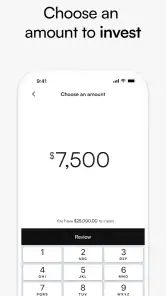
- Automates recurring investments based on your chosen schedule.
- Simple interface makes portfolio monitoring easy for beginners.
- Supports disciplined investing without constant market checking.
- Clear performance tracking helps review investment progress over time.
- Useful alerts can keep you informed about portfolio activity.
Cons
- Investment options may be limited compared with full-service brokerages.
- Automation does not eliminate the risk of losing money in the market.
- Fees or spreads may reduce returns
- depending on the selected plan.
- Advanced charting and research tools may feel insufficient for experts.
- Account setup may require identity verification and financial information.

- Category
- Finance
- Version
- 1.19.23











