Auntie Anne’s Rewards
- 2.88K
- 4.5
- Installs
- 1.00M
- Price
- Free

Screenshots
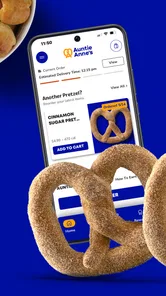
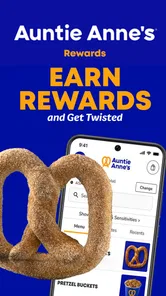
Analysis by Reviewed
When I’m deciding whether to stop for a snack while I’m already out, a dedicated brand app can save a little time—but only if I use it before I reach the counter. That is the practical way I’d approach Auntie Anne’s Rewards: as a phone companion for checking rewards and finding a shop, rather than as a replacement for a wallet or a general-purpose restaurant guide. Its usefulness is clearest when I already have Auntie Anne’s in mind.
Plan around the moments that need a connection
This is a Food & Drink app from Auntie Anne’s, and its appeal is specific: it brings the brand’s rewards and location tools onto your phone. That focus is useful when I already know I want an Auntie Anne’s snack, but it matters that the useful moments involve a connection. Checking an account balance, looking for a nearby shop, or bringing up an offer while you are out are all easier when mobile data or Wi-Fi is working.
I would treat it as a companion for planning and checking in, not as something to rely on at the counter if my signal is unreliable. Before leaving home, I’d check the information I need; at a busy food court, I’d avoid waiting until the last second to open the app. That small habit reduces the chance of holding up a queue while a page loads, and it is a practical distinction from simply paying with cash or a bank card.
Choose the right moment to use the finder
The location finder is most useful when I have a destination or route in mind and want to see whether an Auntie Anne’s stop fits naturally into it. For example, before meeting someone at a shopping center, I could look for a nearby location while I still have time to decide where to enter or where to take a break. Doing that at home or during a pause is more comfortable than standing in a crowded corridor and trying to make a decision with one hand.
I would not use a brand finder as my only tool for a day of unfamiliar travel. A general maps app is better for comparing several food options, planning a longer route, or deciding based on what is closest rather than on a particular snack. The app’s advantage is narrower: it keeps Auntie Anne’s locations and rewards together, which can be convenient if the brand is already part of the plan.
Small habits that make rewards easier to use
Before ordering, I’d take a moment to check the balance and any available offers instead of assuming that every visit earns or redeems value in the same way. That is especially worthwhile if I visit often enough to have rewards to keep track of. If I’m only stopping in once during a trip, I would not let the possibility of a reward complicate a simple snack purchase; I’d choose what I want and move on.
There is also a useful trade-off in keeping a dedicated loyalty app on a phone. It can make brand-specific information easier to find than searching through messages or trying to remember an account detail, but it adds another app to maintain and another screen to check. I’d keep it if I return to Auntie Anne’s regularly; if I rarely go, paying normally and using a general map when needed may be less fuss.
More From Our News Desk

Weather by Xiaomi Review: Clear at a Glance, Less Clear Up Close

X Under Pressure: Can It Recover When Posting Goes Wrong?

Clash of Clans Is Won Between the Battles

Android Auto Makes the Case for Quieter Car Software

MobiOffice: Transforming Mobile Productivity with Seamless Integration

EA SPORTS FC™ Mobile Soccer: Redefining Mobile Sports Gaming
The Pretzel Perks You Can't Resist
First things first, let's talk about what the Auntie Anne’s Rewards app brings to the table. This app is designed to reward you every time you indulge in one of their delicious pretzels. The more you snack, the more rewards you rack up. It’s like a win-win situation for your taste buds and your wallet.
Easy Navigation and User-Friendly Interface
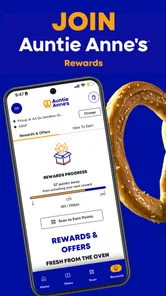
The moment I downloaded the app, I was pleasantly surprised by its clean and intuitive interface. Navigating through the app is as easy as pie, or should I say, as easy as a pretzel twist? All the features are neatly organized, making it a breeze to find exactly what you're looking for. Whether you're checking your rewards balance or searching for the nearest Auntie Anne’s location, everything is just a tap away.
That straightforward layout matters most when I’m using the app in a short break rather than sitting down to explore it. I’d open the screen I need, check the relevant detail, and then put the phone away before ordering. A focused visit is also a sensible way to avoid tapping around repeatedly when a connection is slow. The app is built around one brand, so I would expect it to feel more direct for that task than a broad food app full of unrelated restaurants and offers.
Rewards and Offers That Keep You Coming Back
One of the standout features of the app is the plethora of rewards and offers. Every purchase accumulates points that can be redeemed for free pretzels and other treats. Plus, they frequently update their offers, so there's always something new to look forward to. I mean, who doesn't love a surprise pretzel deal?
A useful way to make the rewards side work for you is to check your balance and available offers before deciding what to order, rather than assuming every purchase earns the same benefit. If you visit only occasionally, the app may be less compelling than paying normally and choosing whichever nearby snack suits you. Regular customers are more likely to get value from keeping track of rewards; occasional visitors should consider whether remembering another account is worth the effort.
Fit the app to an ordinary day out
Imagine I’m walking through a mall with a short break before meeting a friend. I already want a pretzel, but I don’t know whether a shop is close enough to fit into the break. I can use the location tool while I’m still somewhere comfortable, decide whether the detour makes sense, and check rewards before I join a line. If the app takes time to load, I can change plans before I’m holding up anyone behind me.
That scenario also shows who is likely to appreciate the app most: someone who visits the chain repeatedly, likes keeping track of loyalty rewards, or often wants to locate a familiar snack while traveling around town. It is less useful for someone who chooses food based on whichever independent café or restaurant is nearby, or who does not want another account-based service on their phone. In those cases, a general map and ordinary payment are simpler.
Location Finder for On-the-Go Snacking
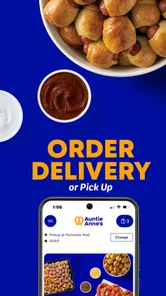
Traveling and craving a pretzel fix? The app's location finder feature has got you covered. It quickly locates the nearest Auntie Anne’s, so you can satisfy your cravings no matter where you are. It's a handy tool for those spontaneous pretzel cravings that hit when you're out and about.
For a realistic use case, I’d open the finder while planning a mall stop or choosing where to take a break on a day out, then check the route before heading over. It is particularly helpful when the brand is already the destination; a general maps app is a better choice if I want to compare several food brands, see a wider range of nearby options, or choose based on something other than Auntie Anne’s. The app’s strength is its brand-specific convenience, not broad restaurant discovery.
Keep expectations sensible when reception is poor
If a rewards screen or location search does not load, I would first check whether my connection is stable, then try again once I have a stronger signal. I would not count on an offer or account detail being available without a working connection, so checking before joining a queue is the safer approach. If the app remains unresponsive, the straightforward fallback is to ask staff what options are available and pay by another method; that keeps a technical hiccup from holding up the people behind you.
For a connection problem, I’d keep the recovery steps simple: wait until I have a steadier signal, reopen the screen I need, and avoid repeatedly refreshing while reception is weak. If I’m in a hurry, I would stop troubleshooting and use another way to pay rather than let the app dictate whether I can finish the purchase. This is a small but important distinction: loyalty tools are helpful when they cooperate, but they should not become a condition for enjoying a quick snack.
Use mobile data deliberately
When I’m away from Wi-Fi, I’d open only the parts of the app relevant to that visit—perhaps the location finder before travelling, then the rewards or offer screen before ordering. This is less about assuming the app uses a particular amount of data and more about avoiding unnecessary reloads when the signal is patchy. If I’m planning a route, I can also use my usual map separately rather than repeatedly switching between several screens while walking.
For anyone wondering whether they can depend on it in a dead zone, I would plan as though account and location information may need a working connection. Checking at home or before entering a place with weak reception is the safer workflow. If I know I will be offline, I’d bring a normal payment option and treat any loyalty benefit as a bonus rather than something essential to the purchase.
It is free to download, rated for Everyone, and has a 3.9 average from around 10,000 ratings, with more than a million installs. It launched in 2013, and version 8.4 requires iOS 11 or later. Those details make it easy to consider, though they do not guarantee that every visit will feel seamless. I would also keep data use in mind when browsing away from Wi-Fi: open only the screens I need, and avoid repeatedly refreshing them if reception is poor.
Who should keep it—and who can skip it
I’d recommend giving the app a try if Auntie Anne’s is already a regular stop for you and you want a convenient way to check rewards or look for a location. It is also a reasonable choice for a traveler who knows they want the brand and would rather start with its own finder than search from scratch. Since it is free, the decision is mainly about whether those focused tools are useful enough to justify keeping the app installed.
I would skip it if my visits are rare, if I prefer choosing among many nearby food places, or if I need a dependable way to pay regardless of connectivity. A bank card or cash is a better fallback at the counter, and a general maps app is more flexible for comparing destinations. The loyalty app does not need to replace either one; it works best as a supporting tool for people who already enjoy the chain.
In conclusion, if you're a fan of Auntie Anne’s, downloading this app is a no-brainer. With its easy-to-use interface, rewarding system, and handy location finder, it enhances your pretzel experience tenfold. So, next time you're in the mood for a snack, let the Auntie Anne’s Rewards app lead the way to your next delicious pretzel.
Auntie Anne’s Rewards Frequently Asked Questions
What devices can I use Auntie Anne’s Rewards on?
Auntie Anne’s Rewards is a Food & Drink app for Android and iOS. The current version is 8.4 and requires iOS 11 or later on Apple devices. Before downloading, check that your device meets the operating-system requirement so the app can install and run as expected. The app is free, and its content rating is Everyone.
Who makes Auntie Anne’s Rewards, and is it a popular app?
The app is developed by Auntie Anne’s and is focused on its brand’s rewards and customer experience. It has been available since November 23, 2013, and has over one million installs. Its average rating is 3.9 from around ten thousand ratings, with approximately 2.7 thousand written reviews. Those figures offer a broad sense of its reach, though individual experiences can vary.
What is Auntie Anne’s Rewards app?
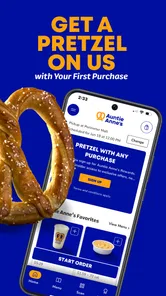
Auntie Anne’s Rewards app is a loyalty program application designed to reward customers for their purchases at Auntie Anne’s locations. By downloading the app, users can earn points for each purchase, receive exclusive offers, and redeem rewards for free products. It’s a convenient way to keep track of your purchases and enjoy perks at Auntie Anne’s.
How do I earn and redeem rewards with Auntie Anne’s Rewards app?
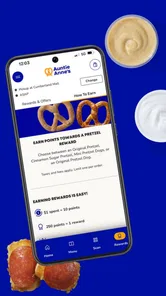
To earn rewards, simply make purchases at participating Auntie Anne’s stores and scan your receipt or use the app at checkout. Points are automatically added to your account. Once you've accumulated enough points, you can redeem them for free pretzels, drinks, and other treats offered by Auntie Anne’s. The app provides an easy way to manage your points and rewards.
Is Auntie Anne’s Rewards app free to use?
Yes, Auntie Anne’s Rewards app is completely free to download and use. There are no hidden fees or subscription costs involved. Simply download the app from the Google Play Store or Apple App Store, create an account, and start earning rewards on your purchases at Auntie Anne’s. The app is designed to provide value without any additional cost.
Pros
- User-friendly interface for easy navigation.
- Generous reward point system for loyal users.
- Exclusive in-app offers and discounts.
- Quick access to store locations and hours.
- Secure payment options integrated.
Cons
- Limited to Auntie Anne's locations only.
- Requires internet connection for updates.
- Occasional app crashes reported by users.
- Some features may be region-specific.
- Reward points expire after a period.











