

Atom - Movie Tickets & Times
- 8.01K
- 4.2
- Installs
- 1.00M
- Price
- Free

Screenshots



Analysis by Reviewed
For me, the real test of a movie-ticket app is what happens when plans are still moving: a friend is late, the group changes its mind, or I need to check a showtime while I’m already on the way. Atom - Movie Tickets & Times is built around choosing a film and arranging tickets, so it can be handy when I want those decisions in one place. The catch is that browsing current listings and completing a booking depend on being able to connect, which makes a little planning worthwhile.
When the connection matters
A quick look at showtimes can help me compare screenings before the group settles on a plan, but I wouldn’t leave the search until I’m standing outside the cinema with a weak signal. I’d check the film, location, and timing while I have a reliable connection, then finish the purchase before heading out. That small habit reduces the chance of having to troubleshoot while everyone waits.
For a last-minute decision, the app’s convenience is most useful when the connection is stable: I can move from choosing a screening to booking without switching between a cinema’s separate pages and messages with friends. If the network is sluggish, though, any delay in loading current options or completing checkout can make a direct cinema option or a quick call feel simpler. I treat it as a planning shortcut, not a guarantee that every step will be instant.
Useful on the move, with a little preparation
A realistic use for me is deciding on a film during lunch, choosing a screening that leaves enough time after work, and sorting tickets before I commute. That is more comfortable than trying to compare options on a crowded train. I also like the idea of checking trailers before committing: it gives a group a shared reference when people are split between two films, rather than turning the chat into a long exchange of guesses.
The app is aimed at cinema outings, not at replacing every part of a movie fan’s routine. I’d use it when I already know I want to see a film in a theater and need help coordinating the booking. If I’m only browsing cinema news, or I prefer to buy in person and avoid doing checkout on my phone, a cinema’s own service or the box office may suit me better. Local availability and the screenings shown can shape how useful it is, so I’d check my area before making it my default.
Small choices that make group plans easier
For a group, I’d settle the film and showtime before sending invitations, then give everyone a clear moment to respond. That avoids making a booking around a vague “maybe” and helps the group notice if seats are becoming hard to coordinate. The friend-planning tools described in the app can reduce the awkwardness of collecting money, but they don’t remove the need to agree on the plan first. I’d also decide in advance whether concessions are part of the shared order; splitting snacks is convenient only if everyone is comfortable with that arrangement.
One practical trade-off is that a single app can make coordination easier while also concentrating the process in one place. If a friend doesn’t want to use it, I’d keep the film, theater, time, and meeting point in a regular message so nobody is left out. And if a booking step appears to stall, I would pause before tapping repeatedly: check whether the purchase went through first, then retry only when I know I haven’t created a duplicate order. That’s sensible checkout behavior for any ticket purchase, especially when a connection drops at an inconvenient moment.
More From Our News Desk

 Gmail
GmailGmail in a Busy Inbox: Who Benefits Most?
From first account to crowded workday, Gmail earns its place through dependable search and flexible sorting—but its best fit depends on how much inbox maintenance you can tolerate.

 Prime Video
Switching to Prime Video: What Changes in Your Viewing Routine
Prime Video can make a compelling second home for streaming, but switching means learning a different catalog, rental layer, and route from browsing to playback.

 Universal TV Remote Control
Universal TV Remote Control Works Best as a Reliable Backup
A phone remote earns its place through quick setup and reliable habits. Here is how to get more from Universal TV Remote Control—and where its limits show.

 Weather - By Xiaomi
Weather by Xiaomi Review: Clear at a Glance, Less Clear Up Close
Xiaomi’s weather app makes everyday forecasts quick to scan, but its calm surface can leave useful details and recovery paths harder to find than they should be.

 X
XX Under Pressure: Can It Recover When Posting Goes Wrong?
A resilience-focused review of X, examining setup, mistaken posts, interruptions, weak connections, and the gaps that matter when recovery needs to be dependable.

 Clash of Clans
Clash of Clans Is Won Between the Battles
Its raids are quick; its community is a long-term project of coordination, teaching, rivalry, and shared responsibility—with all the friction that entails.
Latest News



Booking Made Easy
First off, the whole process of booking tickets is as smooth as butter. You can browse through the latest movies, check out showtimes, and book your tickets in just a few taps. It’s like having the box office right in your pocket. The app’s interface is super intuitive, so even if you’re not the tech-savvy type, you’ll find it easy to navigate. Plus, the option to choose your seats in advance is a godsend, especially for those big releases where every seat counts.
Seamless Experience with Friends
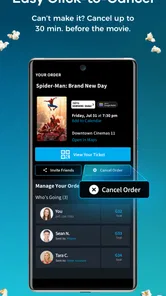
One of the standout features of Atom - Movie Tickets & Times is how it makes planning a movie night with friends a breeze. You can send invites directly through the app, and everyone can pay for their own tickets. No more Venmo awkwardness or IOUs! It even lets you split concessions, so you can share that jumbo popcorn without worrying about who owes what.
Special Offers and Loyalty Perks
If you love a good deal (who doesn’t?), you’ll appreciate the special offers that pop up on the app regularly. From discounted tickets to loyalty rewards, Atom knows how to keep its users happy. I’ve grabbed some sweet deals on blockbuster nights, which makes the movie-going experience even more enjoyable.
And here’s a little secret: the app sometimes offers exclusive screenings. That’s right! You could be among the first to catch that much-anticipated film before it hits the theaters for everyone else.
Making the most of bookings, offers, and snacks
For a busy evening, I’d decide on the theater and showtime before inviting the group, then use the booking flow to settle seats while everyone is still available to respond. This order matters: selecting a screening first gives friends something concrete to approve, while trying to coordinate every detail at once can turn a simple outing into a long chat. If someone needs to arrive late, sharing the theater and time in a regular message also keeps the plan visible outside the app.
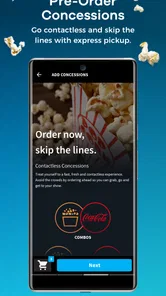
Pre-ordering snacks can be useful when I already know what the group wants and would rather avoid deciding at the counter. It is less helpful when tastes, appetites, or arrival times are uncertain. I’d treat concessions as a separate choice from the tickets rather than assume everyone wants to share one order. That keeps the convenience of planning ahead without making one person responsible for guessing what the whole group will eat.
Offers and loyalty perks are worth a quick look before checkout, but I wouldn’t build the evening around a deal I have not checked in the moment. A promotion can make a planned screening more attractive; it should not be the reason I choose an inconvenient time or theater. The same goes for an exclusive screening: it may suit someone eager to see a film early, while a group that needs flexible timing may be better off choosing a regular showing that fits everyone.
Limits, version, and who I’d recommend it to
There’s a useful distinction between a feature being available and it being useful for every outing. Seat choice matters most when a group wants to sit together or a popular screening may fill up; for a quiet weekday show, buying ahead may be less important. Offers and loyalty perks are worth checking, but I wouldn’t choose a film solely because a promotion appears. The right screening and a convenient theater should still come first.
Atom Tickets, LLC develops this free entertainment app. It has a 4.2 average from around 24,000 ratings, with more than a million installs, and it is rated Teen. Version 5.9.0 requires Android 10 or later. Those details make it easy to see whether the app fits your phone and comfort level, but the practical question is still whether it serves cinemas you actually visit. For an iPhone user, I’d check the current listing and device requirements on the relevant store before installing.
The app is most appealing to people who go to cinemas often enough to value comparing showtimes, arranging tickets, and keeping a group’s plan organized in one flow. It is also a sensible fit for someone who prefers to choose seats before arriving rather than leave that decision until the box office. On the other hand, if you mainly buy tickets for one cinema and its own service already fits your routine, using a separate booking app may not save much effort. For occasional moviegoers who enjoy deciding at the last minute, buying in person can be simpler than managing a phone checkout.
In practical terms, I’d use it like this: check the film and screening at home or during a break, confirm that the time works for the group, and complete the booking while the connection is dependable. Then send the meeting details in the chat everyone already uses. This approach makes the app useful without assuming every friend wants to join the same service, and it leaves less to sort out while walking to the theater.
When another option makes more sense
Compared with a cinema’s own booking service, Atom is appealing when I want a single place to explore films and coordinate a night out. A theater’s direct channel may be the better choice if I already know exactly where I’m going, or if I want to deal with that cinema’s own information and checkout flow. The box office remains a straightforward alternative when I prefer to pay in person or want to make the decision after arriving. Each route trades some convenience for familiarity or flexibility.
Connectivity is the main practical boundary. I would not rely on a live search or unfinished checkout when I know I may lose service, and I’d avoid repeated taps if a screen seems stuck. First I’d allow the step to finish and check the booking status; only then would I consider trying again. That little pause can prevent confusion and is more useful than assuming a slow response means the purchase failed.
Final Thoughts
In a nutshell, if you’re someone who loves the movies, the Atom - Movie Tickets & Times app is a must-have. It’s not just about booking tickets; it’s about enhancing your overall movie experience. From the convenience of booking to the joy of sharing a movie night with friends, this app has got it all covered. So, why wait? Give it a try and see for yourself how it transforms your trips to the cinema.
My short recommendation is to try it if you regularly book cinema tickets, value choosing seats ahead, or often organize outings with friends. Keep another way to share the plan in mind if someone in the group doesn’t use the app, and handle checkout before you’re in a rush. If you rarely go to theaters or your local cinema’s own booking route is simpler, this may add an extra step rather than save one.
Atom - Movie Tickets & Times Frequently Asked Questions
What can I check before choosing a movie in Atom?
Atom is an entertainment app for browsing movie options, checking showtimes, and watching trailers. Its store summary also highlights buying tickets and pre-ordering snacks. You can use these tools to explore what is playing and plan a theater visit, then review the options shown for the movie and screening you are considering before proceeding.
Who is Atom intended for, and what is its age rating?
Atom is rated Teen, so its age guidance is worth considering before installing it for a younger user. The app focuses on moviegoing tasks such as exploring films, checking showtimes, purchasing tickets, and pre-ordering snacks. Parents or guardians can take the rating into account alongside the app’s features when deciding whether it is suitable for someone in their care.
Is Atom - Movie Tickets & Times free to download?
Yes. Atom is free to download and is designed to help you browse movie options, check showtimes, watch trailers, buy tickets, and pre-order snacks. Keep in mind that buying tickets or snacks may involve charges shown during checkout. The app is rated Teen, so it may be worth checking that age guidance before installing it for a younger user.
What is Atom - Movie Tickets & Times?
Atom is a mobile application that provides a convenient platform for users to purchase movie tickets in advance. It offers real-time showtimes, seat selection, and secure payment options. The app also allows users to browse movie trailers, read reviews, and invite friends to join them for a movie, making the entire movie-going experience seamless and enjoyable.
How do I buy movie tickets using Atom?
Purchasing movie tickets through Atom is simple and user-friendly. First, you need to download the app and create an account. Once logged in, select your desired movie, date, and showtime. Choose your seats from the interactive seating chart, then proceed to payment. Atom supports various payment methods, including credit/debit cards and digital wallets. After purchase, you’ll receive a digital ticket that can be scanned at the theater.
Pros
- User-friendly interface for easy navigation.
- Quick and easy booking process.
- Exclusive movie offers and discounts.
- Real-time seat availability updates.
- Secure payment options available.
Cons
- Limited availability in some regions.
- App occasionally crashes on older devices.
- Requires a stable internet connection.
- Some features locked behind registration.
- Limited support for foreign languages.











