ARI (Auto Repair Software)
- 332.00
- 4.3
- Installs
- 100.00K
- Price
- Free

Screenshots

Analysis by Reviewed
Running an auto repair business usually means jumping between diagnosis notes, customer details, estimates, invoices, and follow-up work. ARI is built around that complete workflow rather than treating repair-shop administration as a collection of unrelated tasks. I found its strongest appeal in that central idea: keeping the path from a vehicle problem to a finished bill in one place. It is a free Auto & Vehicles app from uMob LTD, and it is available for Everyone, which makes it approachable for independent mechanics as well as small teams.
My overall impression is that ARI is most useful when you want a practical business workspace on a phone or tablet, not when you are simply looking for a vehicle-maintenance reminder. The app’s store summary focuses on managing an auto repair business from diagnosis to invoicing, and that focus shapes the experience. It feels aimed at people who need to turn workshop activity into organized customer records and payable work, especially when they are away from a desk.
How ARI feels during real repair-shop work
Starting with a job instead of starting with paperwork
The most sensible way to use ARI is to begin with the vehicle or customer job and build the record as the work develops. In a realistic situation, a customer arrives with an unfamiliar noise. Rather than relying on a loose note and trying to reconstruct the visit later, I would use the app as the place to capture the diagnosis, keep the work connected to the vehicle, and move toward an invoice when the repair is complete.
That workflow matters because repair jobs rarely stay perfectly linear. A first inspection can reveal another issue, a customer may approve only part of the recommended work, and the final amount can change as the technician understands the problem. A repair-management app is valuable when it preserves that context. ARI’s purpose is not just to record a final payment; it is to support the chain of decisions that leads there.
For a one-person garage, this can reduce the mental load of remembering which customer is waiting for an update and which vehicle is ready to collect. For a small workshop, it offers a shared structure for moving from technical findings to administrative completion. I would still establish a consistent naming and note-taking habit from the first day, because any business app becomes difficult to trust when every employee records the same information in a different way.
Speed expectations on a mobile device
ARI is currently listed as version 16322.0.0 and requires Android 6.0 or later. Those details suggest a broad Android compatibility range, but they do not guarantee the same feel on every handset. In my view, the app should be judged less like a graphics-heavy product and more like a work tool: the important question is whether moving between a job, its diagnosis, and its billing information feels direct enough during a busy day.
For quick tasks, I would expect the best experience from keeping entries focused. A short diagnosis note, a clear customer record, and a well-organized invoice are easier to review than a long block of mixed comments. This is also a useful speed tip: prepare a simple internal format for notes, such as symptom, inspection, action, and result. The app cannot make messy workshop information clear by itself, but a repeatable structure makes every later lookup faster.
ARI’s mobile format is particularly convenient when a mechanic needs to record information beside the vehicle rather than return to a computer. That convenience has a trade-off. A phone is excellent for capturing a quick observation or checking a job status, but less comfortable for entering a large amount of detailed text. If your operation produces lengthy technical reports, a larger screen or a desktop-centered system may be a better primary workspace, with mobile access used only for updates.
What happens during heavy-use moments
The demanding part of this kind of app is not a single complicated action. It is the accumulation of small actions during a rush: opening one job, checking a vehicle detail, recording a finding, revising the work, and preparing the customer’s bill. That is where organization becomes more important than visual polish. ARI makes the most sense when it gives those actions a common home instead of forcing the shop to combine separate notes, spreadsheets, and invoicing tools.
A realistic busy-day example would be a workshop with several cars at different stages. One vehicle is waiting for diagnosis, another needs an approved repair, and a third is ready for invoicing. I would use separate, clearly updated records rather than trying to remember the status of each car from memory. The practical benefit is not merely saving typing; it is reducing the chance of charging for unfinished work, overlooking an approved task, or calling the wrong customer.
There is also a less obvious trade-off here. Centralizing everything can make the app more valuable, but it also makes accurate updates more important. If a technician postpones entering a finding until the end of the day, the record may no longer reflect the exact sequence of the repair. My advice is to treat the app as part of the workshop routine, not as an evening filing cabinet. Enter the key result immediately, then fill in less urgent detail when the bay is quiet.
Stability and recovery in everyday use
For business software, reliability means more than simply opening successfully. It means being able to return to a job without losing the thread of what was done, especially when work is interrupted by a phone call, a customer question, or a change of task. ARI’s value depends on that continuity because diagnosis and invoicing are connected stages of the same business process.
I would approach the app with sensible operational discipline. Before closing a job, review the customer, vehicle, diagnosis, and invoice details as a single chain. That quick check is useful even when an app behaves perfectly, and it gives you a recovery habit if you are interrupted. For a small shop, it is also wise to decide who is responsible for finalizing a record. Multiple people making partial changes without a clear handoff can create confusion in any system.
The app’s free entry point makes it easy to test this routine without committing money immediately. However, free does not mean every business will find the full workflow cost-free in practice. ARI includes in-app purchases ranging from $3.99 to $399.99 per item, so I would review the available purchase options carefully before moving an entire operation into it. The important question is not just the initial download cost, but which capabilities your shop needs as its record volume and staff responsibilities grow.
That pricing range also means I would avoid assuming that a casual trial and a permanent business rollout are the same decision. Start with a small set of real jobs, test how comfortably the team handles diagnosis and invoicing, and only then decide whether paid options fit the business. This is one of the more important practical precautions because changing systems after customer and vehicle records have accumulated is more disruptive than testing early.
Device limits and resource expectations
Because ARI supports Android devices running version 6.0 or later, it can suit older phones that are still dependable for basic shop work. That is useful for a garage that does not want to replace every device simply to introduce digital records. At the same time, an older operating system does not tell you how responsive a particular phone will be. Hardware age, available storage, and the condition of the device can all affect the feel of a business app.
I would use a phone with a readable screen and enough battery for a full working period, especially if technicians enter information beside vehicles. A small, dim, or damaged display turns simple form entry into a source of mistakes. For front-desk work, a tablet may be more comfortable because customer details and invoice information have more room to breathe. The app’s usefulness is therefore tied not only to its software but also to how the shop positions the device.
Resource demands are best considered in practical terms. ARI is not the sort of product I would choose for entertainment or visual effects; its job is structured business information. That generally makes it more suitable for modest hardware than a demanding media app, but I would not promise identical performance across all devices. If your current phone already struggles with ordinary business applications, test ARI on that exact device before making it the foundation of your workflow.
Older Android support can be an advantage, yet it should not encourage a shop to ignore device maintenance. Keep the phone charged, protect it from workshop dirt and accidental drops, and avoid using a device that is constantly switching between unrelated tasks. A dedicated or mostly dedicated work phone often feels faster simply because it is less cluttered and easier for everyone to use consistently.
Where it fits beside the usual alternatives
The usual alternative for a small repair business is a mixture of paper forms, a spreadsheet, messaging apps, and a separate invoicing method. That combination can be inexpensive and familiar, but it scatters information. A diagnosis may live on paper, the customer’s contact details in a phone, and the final amount in a spreadsheet. ARI is more attractive when the cost of that fragmentation is missed context and repeated data entry.
A general accounting app can be stronger for broad financial management, while a generic notes app may be quicker for unstructured observations. Neither is necessarily designed around the movement from vehicle diagnosis to repair billing. ARI’s advantage is its narrower purpose. If your main need is shop workflow rather than full accounting, that specialization can be more useful than a larger but less focused tool.
On the other hand, a mature desktop garage-management platform may be preferable for a larger operation with complex staff permissions, extensive reporting, or a deeply established office process. I would not choose ARI solely because it is on a phone. Mobile access is valuable, but a bigger system can be the better investment when the business needs sophisticated controls beyond the core repair journey.
There is a useful middle ground for independent mechanics: use ARI as the operational record for jobs and invoices, while keeping any specialist accounting or tax process that the business already trusts. That approach avoids forcing one app to solve every administrative problem. It also lets you judge whether ARI improves the workshop’s day-to-day flow before replacing tools that serve a different purpose.
Who will benefit most from ARI
I think ARI is a strong candidate for independent mechanics, mobile repair professionals, and small garages that want to move away from scattered paperwork. It is especially relevant if you personally handle both the technical work and the customer-facing administration. In that situation, having diagnosis and invoicing connected can save attention at exactly the point when interruptions are most common.
It can also help a workshop owner create a repeatable process for less experienced staff. A clear sequence—identify the job, record the diagnosis, update the work, and prepare the invoice—gives employees a practical framework. The app does not replace training or judgment, but it can make the expected handoff easier to understand.
The audience size is encouraging without being a guarantee: ARI has passed one hundred thousand installs, with an average rating of 4.3 from around 1.4 thousand ratings. I read that as evidence of meaningful interest and generally positive reception, not as proof that every repair business will fit the app. A product can be well received and still be the wrong choice for a shop with highly specialized administrative requirements.
Who should choose something else
I would look elsewhere if your business needs a comprehensive enterprise system with advanced accounting, detailed inventory control, complex employee permissions, or extensive integrations. ARI’s clear identity is its repair-business workflow, and that focus is a benefit until your requirements extend far beyond it. In those cases, a larger garage-management or accounting platform may justify its extra complexity.
I would also hesitate if your team dislikes entering information on mobile devices. The app can organize a process, but it cannot overcome a staff that consistently postpones updates or records incomplete diagnoses. A simpler paper routine may actually be more reliable for a very small operation that does only occasional work and has no interest in maintaining digital customer histories.
Finally, inspect the purchase structure before inviting several employees into the system. The free download is a low-risk starting point, but the in-app purchase range means the long-term cost deserves attention. A trial with representative jobs is more informative than a quick glance at the first screen.
My performance verdict for a working garage
After looking at ARI as a daily work tool rather than a simple vehicle app, I see its main strength in continuity. It is designed to keep diagnosis, repair activity, and invoicing connected, which directly addresses the administrative gaps that appear when a shop relies on paper and disconnected tools. Its mobile nature also makes it practical for recording information close to the vehicle.
My performance expectations are measured rather than exaggerated. The broad Android requirement makes it approachable on older devices, but I would test the exact phone or tablet used by the team. Keep entries structured, update jobs as work happens, and give the final invoice a deliberate review. Those habits will have as much impact on the experience as the app itself.
ARI is free to download, rated for Everyone, and developed by uMob LTD. With its 4.3 average and more than one hundred thousand installs, it is a credible option to investigate for a small auto repair business. I would recommend starting with a controlled trial of live jobs, checking the paid options, and comparing the workflow with the tools you already use.
My recommendation is straightforward: choose ARI if your biggest problem is keeping repair records and billing connected while working from a mobile device. Skip it in favor of a broader system if your shop needs deep accounting or enterprise administration. For the independent mechanic who wants a more disciplined path from diagnosis to invoice without beginning with an expensive rollout, ARI is worth a careful, hands-on test.
Used consistently, it can become the workshop’s practical memory: not a replacement for mechanical expertise, but a way to make sure the important details of that expertise reach the customer record and the final bill.
ARI (Auto Repair Software) Frequently Asked Questions
What devices can run ARI (Auto Repair Software)?
ARI is an auto and vehicle business app for managing repair-shop operations. Before downloading, check that your phone or tablet runs Android 6.0 or later, the stated minimum operating-system requirement. Also consider whether the device you use at the shop is comfortable for entering customer, vehicle, and repair details. A larger screen may make administrative work easier, while a phone can be useful when you need to check information on the move.
Who develops ARI, and is it intended for vehicle owners or repair businesses?
ARI is developed by uMob LTD and is designed around managing an auto repair business, rather than serving as a general-purpose vehicle maintenance app for individual drivers. Its focus is shop administration, including the records and paperwork connected with repair work. If you run a garage or provide repair services independently, its intended purpose may fit your needs; a driver looking only for reminders or personal vehicle logs may want a more narrowly focused app.
What is ARI (Auto Repair Software) used for?
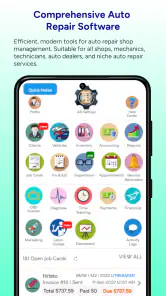
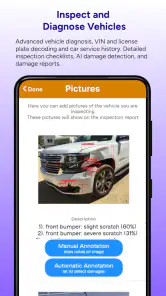
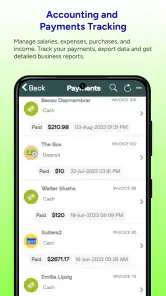
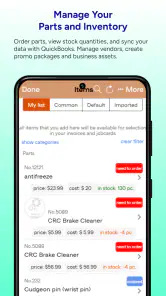
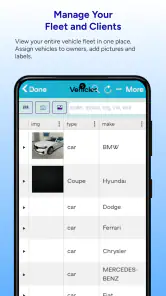
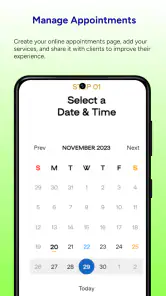
ARI is designed to help auto repair shops manage their daily operations from one place. After reviewing its main tools, the platform can be used for customer and vehicle records, estimates, invoices, work orders, appointments, inspections, inventory, and payment tracking. It is aimed primarily at professional repair businesses rather than casual vehicle owners, so its usefulness depends on how much shop management your business needs.
Is ARI suitable for small auto repair shops and mobile mechanics?
Yes, ARI can be useful for small garages, independent mechanics, and mobile repair professionals who want to replace paper records or several separate apps. Its centralized customer, vehicle, scheduling, and billing features make routine administration easier. However, users should compare the available plan limits, supported workflows, and pricing before downloading or subscribing, especially if they only need basic invoicing or have a very small number of customers.
Can ARI create estimates, invoices, and digital work orders?
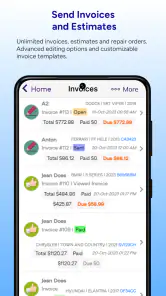
One of ARI’s most practical features is the ability to organize the paperwork connected with a repair job. Users can generally prepare estimates, convert approved work into repair orders, and create invoices when the service is completed. Depending on the selected version or subscription, the software may also support customer communication, digital approvals, inspection reports, and payment-related tools. Shops should verify which features are included in their plan.
Pros
- Centralizes customer
- vehicle
- and repair-order information.
- Helps organize appointments
- estimates
- invoices
- and work orders.
- Can improve communication between technicians and front-desk staff.
- Useful for tracking service history and recurring maintenance needs.
- May reduce paperwork and duplicate data entry in busy repair shops.
Cons
- The interface may take time for new staff to learn.
- Advanced features can require a paid plan or additional setup.
- Data accuracy depends on consistent updates by the shop team.
- Some workflows may feel too complex for very small garages.
- Internet or system availability may affect access to shop information.

- Category
- Auto & Vehicles
- Version
- 16322.0.0











