Arby’s - Pickup or Delivery
- 26.20K
- 4.6
- Installs
- 5.00M
- Price
- Free

Screenshots
Analysis by Reviewed
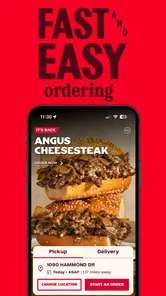
When I decide where to order lunch, convenience matters, but so does knowing what I’m agreeing to along the way. Arby’s mobile ordering app is built around a focused task: browsing the restaurant’s food and placing an order for pickup or delivery. I see it as most useful when I already want Arby’s, rather than as a general-purpose way to compare restaurants or discover every nearby dining option.
A restaurant app, not a restaurant marketplace
That distinction shapes the experience. Compared with delivery marketplaces, a restaurant’s own app can keep the menu and ordering flow centered on one chain; the trade-off is that it won’t help me weigh Arby’s against other local choices in one place. If I’m set on a roast beef sandwich, staying in the Arby’s app makes sense. If I’m still deciding what kind of food I want, a broader service may be more useful.
The app is free, made by Arby’s Restaurant Group, Inc., and sits in the Food & Drink category. It has a 4.7 average from around 256,000 ratings and over 5 million installs, which gives a useful sense of its reach, though popularity alone can’t tell me whether a particular order will go smoothly. It is rated for Everyone, and the current version is 4.43.7 for devices running OS 11 or later.
Trust starts with what the app lets me see
For me, trust is less about assuming an app is private or secure and more about paying attention to the choices it actually presents. Ordering involves decisions such as what I want, where I want it, and whether I’m arranging pickup or delivery. I try to review those details carefully before placing an order, especially when ordering for someone else or sending food to a different location.
I also avoid treating a quick checkout as a reason to rush. I check the selected items, quantities, and fulfillment choice before confirming, and I’m cautious about saving anything I don’t need for a one-time meal. These are simple habits, but they help keep the order under my control without relying on assumptions about account settings or data practices.
When this app earns a place on my phone
A practical use case is planning lunch during a busy workday: I can look over Arby’s options before leaving, decide whether pickup or delivery fits the day, and avoid making the whole choice while hungry and short on time. It is especially handy for a repeat customer who already knows the menu and wants a direct route to an order. Someone who rarely eats at Arby’s, prefers to compare multiple restaurants, or does not want to order through a phone app may be better served by another approach.
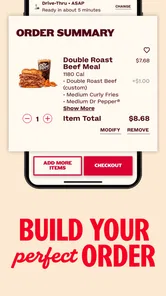
One small but useful habit is to make the important decisions before checkout: settle on the meal, check the destination or pickup plan, and read the final order summary rather than tapping through on autopilot. For a shared meal, I’d confirm everyone’s choices before sending the order, since correcting a wrong item after submission is less convenient than catching it in the cart. The app’s value is strongest when it shortens a decision you have already made, not when you expect it to make that decision for you.
More From Our News Desk

Weather by Xiaomi Review: Clear at a Glance, Less Clear Up Close

X Under Pressure: Can It Recover When Posting Goes Wrong?

Clash of Clans Is Won Between the Battles

Android Auto Makes the Case for Quieter Car Software

MobiOffice: Transforming Mobile Productivity with Seamless Integration

EA SPORTS FC™ Mobile Soccer: Redefining Mobile Sports Gaming
Have you ever craved a hearty sandwich that hits just the right spot? That's exactly what Arby's Fast Food Sandwiches aims to deliver. As someone who loves a good sandwich, I decided to dive into this app to see if it really brings that fast-food experience right to your fingertips.
Exploring the Menu
First things first, the app presents a variety of sandwiches that Arby’s is known for. From their classic Roast Beef Sandwich to the Beef ‘n Cheddar, you can easily scroll through their extensive menu. I was pleasantly surprised by the detailed descriptions and high-quality images that made each item look incredibly tempting. If you’re someone who likes to explore new flavors, this app won’t disappoint as it also features seasonal specials and limited-time offers.
User-Friendly Navigation
One of the things I loved about the Arby's Fast Food Sandwiches app is its user-friendly interface. It’s straightforward and makes ordering a breeze. With just a few taps, you can customize your sandwich, add your favorite sides, and even choose a drink to complete your meal. The app also allows you to save your favorite orders, which is a lifesaver for those days when you just want to click and eat.
Order and Payment Process
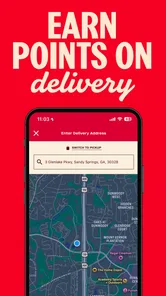
Ordering through the app is seamless. After selecting your items, you can choose between pick-up or delivery, depending on your convenience. The payment process is secure, and the app accepts various payment methods, including credit cards and mobile payment options like Apple Pay. I found this feature particularly handy, as it makes the checkout process quick and hassle-free.
Deals and Rewards
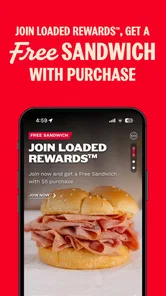
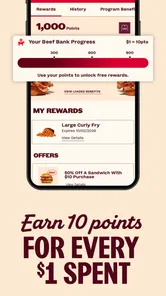
Who doesn’t love a good deal? The app offers exclusive deals and rewards that you can’t find anywhere else. As a frequent user, you can accumulate points with every purchase, which can be redeemed for discounts or free items in future orders. This rewards system is a fantastic way to keep customers coming back for more.
In conclusion, my experience with the Arby's Fast Food Sandwiches app has been overwhelmingly positive. Whether you’re a long-time fan of Arby’s or a newcomer eager to try their offerings, this app makes the entire process of ordering your favorite sandwiches convenient and enjoyable. With its intuitive design, exclusive deals, and delicious menu options, it's an app worth having on your phone for those days when you're craving something meaty and satisfying.
So, next time you’re in the mood for a hearty sandwich, give this app a try. Trust me, your taste buds will thank you!
Making a group order less error-prone
For a family lunch or a small office order, I find it helpful to treat the cart as a checklist rather than simply a last stop before payment. Add each person’s meal separately, then pause to check the sandwich, sides, drink, and quantity against what they actually asked for. That extra pass matters more when several similar-looking meals are involved. A saved favorite can speed up a repeat order, but I would still inspect it each time; a shortcut is useful only if it has not carried forward a choice that no longer fits.
There is also a practical difference between ordering for myself and ordering for someone else. If I am sending food to another person, I would settle the destination and delivery choice before browsing deeply, then verify the final details before confirming. That reduces the chance of building a carefully chosen meal around the wrong fulfillment plan. For pickup, I would make sure the selected restaurant works for the route I am already taking rather than assuming the closest-looking option is the most convenient one.
Choosing pickup or delivery with a clear plan
The pickup-and-delivery choice is more than a checkout detail: it changes what “convenient” means. Pickup can suit a commute or an errand when I can collect the order myself; delivery is more appealing when leaving would disrupt work or a meal at home. I would not choose delivery automatically just because it is available, especially if I am already near a restaurant or coordinating a tight schedule. The best option depends on the day, the destination, and whether I can be available when the food arrives.
A realistic example is a work lunch with a short break. I can decide in advance whether I have time to collect the meal, browse the menu before stepping away, and check the order summary while I am not rushing. If my schedule changes, I should reconsider the fulfillment choice before placing the order rather than assume the app can solve a last-minute timing problem. The app helps organize the decision; it cannot remove the need to make sure the plan fits the day.
What the focused menu does well—and what it cannot do
Against a general delivery service, the strongest reason to use Arby’s own app is focus. I can start with the chain’s sandwiches and build around that choice instead of searching through unrelated restaurants. The downside is equally straightforward: if I want to compare several nearby places, menus, or cuisines, I would have to leave this focused experience and use another method. I see the app as a direct ordering route, not a discovery tool.
That focus also makes it a better fit for people who already have a likely order in mind than for someone who wants help deciding what to eat. A first-time visitor may appreciate browsing the menu, but should still take time to read item details and review selections instead of relying on photographs alone. Images can make browsing inviting; the useful decision is whether the described food matches what I actually want today.
Small checks that make repeat orders safer
Saving a favorite order is convenient when I tend to choose the same meal, but I treat it as a starting point rather than a substitute for checking the cart. For a quick repeat, I verify the quantity and any custom choices before moving on. If I am ordering for a group, I avoid using one saved combination as a template for everyone unless their preferences genuinely match. This keeps the speed benefit without turning a shortcut into an easy source of mistakes.
I also find it sensible to separate menu browsing from the final commitment. I can look through options, decide what belongs in the meal, and then review the complete order with a fresh eye. That is especially useful when I have added sides or drinks, since it is easy to focus on the main sandwich and overlook the rest. A brief pause at the summary stage is a low-effort way to catch an unintended extra or missing item.
How I think about checkout and personal choices
Any food order can involve choices about location, payment, and whether an order is for me or someone else. I prefer to provide only what is needed to complete the meal and to pay attention to the screens where those choices appear. I would not assume that a familiar brand or a fast checkout tells me everything about data handling. My practical approach is to read what is on screen, avoid rushing through optional prompts, and make a deliberate decision about any information I am asked to enter.
If I use an account or save an order, I would consider whether the convenience is worth keeping that choice available for later. For an occasional meal, entering details when needed may feel more appropriate than preserving a shortcut; for a regular customer, a saved preference may make repeat ordering easier. Either way, I would look for the relevant controls in the app rather than assume a particular account setting exists or behaves in a certain way. That keeps the decision grounded in what I can actually see and manage.
Who should use it, and who may prefer another route
I would recommend trying it if Arby’s is already part of your routine and you want to arrange pickup or delivery without browsing a broad marketplace. It can also suit someone choosing lunch ahead of time, or a household member coordinating a straightforward meal for others. The app is free, so the main question is not whether to pay for the download but whether a dedicated Arby’s ordering path fits how often you eat there and how you like to plan.
I would skip it as my main food-ordering tool if I rarely choose Arby’s, want one screen for comparing local restaurants, or prefer to decide after seeing a wider range of cuisines. Someone who dislikes placing orders on a phone may also prefer ordering in person or using another familiar route. And if a specific meal depends on detailed dietary requirements, I would read the item information carefully and confirm that the choices shown meet those needs rather than relying on a general impression from the menu.
A measured recommendation
Arby’s mobile app is most convincing when I know what I want from the chain and value a direct path from menu to order. Its focused approach, pickup and delivery options, and saved-order convenience can make a familiar lunch easier to arrange. The trade-off is that convenience depends on careful choices: I still need to check the meal, fulfillment plan, and final summary, and the app is not designed to replace a broader restaurant comparison.
My recommendation is therefore conditional but positive. If you are a repeat Arby’s customer, it is a practical option to keep available, particularly when planning ahead or repeating a familiar order. If you are still deciding where to eat, want a wider view of local options, or have concerns that require answers beyond the choices visibly presented during checkout, another route may suit you better. I would use it for the convenience it offers, while keeping the final order and the information I share firmly in my own hands.
Arby’s - Pickup or Delivery Frequently Asked Questions
What should I know about the app before installing it?
Arby’s Fast Food Sandwiches is a Food & Drink app from Arby’s Restaurant Group, Inc. It focuses on ordering from Arby’s on a phone, with pickup and delivery among its main options. The app is free to download and is intended for a general audience. If you want to arrange an Arby’s meal digitally, its core purpose is straightforward.
Can I place an order for pickup or delivery with the Arby’s app?
Yes. Arby’s Fast Food Sandwiches is designed to let you order for pickup and delivery from your phone. You can browse available menu options and put together an order in the app, then choose the ordering option that fits your plans. It’s a practical choice when you want to arrange a meal before heading to a restaurant or having it delivered.
What is Arby's Fast Food Sandwiches app about?
Arby’s Fast Food Sandwiches app is a convenient tool for ordering your favorite Arby’s menu items directly from your smartphone. It allows you to browse the full menu, customize your orders, find nearby locations, and even access exclusive offers and discounts. The app is designed to enhance the overall customer experience by providing easy access to Arby’s delicious sandwiches and other menu options.
Can I use the Arby’s app to find nearby locations?
Yes, the Arby’s app includes a location finder feature that allows you to easily locate the nearest Arby’s restaurant. By enabling location services on your device, the app will show you the closest Arby’s locations, their distance from your current position, and even provide directions. This feature makes it convenient to find and visit Arby’s wherever you are.
Are there any exclusive offers available through the Arby’s app?
Absolutely! The Arby’s app provides users with access to exclusive offers and promotions that are not available elsewhere. By downloading the app, you can take advantage of special deals, discounts, and limited-time offers. These promotions are updated regularly, so it’s a great way to save money while enjoying your favorite Arby’s meals.
Pros
- Easy-to-use interface
- Fast delivery options
- Customizable orders
- Nutritional info available
- Wide variety of sandwiches
Cons
- Limited vegetarian options
- App occasionally crashes
- Inconsistent delivery times
- No loyalty rewards program
- High delivery fees











