Applebee's
- 12.74K
- 4.1
- Installs
- 1.00M
- Price
- Free

Screenshots
Analysis by Reviewed
I judge a restaurant app less by how polished its screens look than by whether it helps me make a clear choice before I’m hungry and in a hurry. The Applebee's app is a free Food & Drink app from Applebee’s, and its main appeal is bringing menu browsing and ordering into one place. I’d consider it most useful when I already know I want Applebee’s; if I’m deciding between several restaurants, a general delivery or maps app may be a better starting point.
What trust looks like in a restaurant app
Restaurant ordering involves practical decisions: choosing a location, reviewing a basket, and entering payment details. I try to separate what an app visibly lets me do from assumptions about privacy or security. The app is rated for Everyone, and its current version is 4.5.23, but those details alone don’t tell me how every data practice works. I’d read any permission prompts and checkout wording carefully, and grant access only when it makes sense for the task at hand.
That cautious approach matters most when I’m ordering for someone else or using a shared phone. Before submitting, I would check the selected restaurant, order type, items, customizations, and total on the review screen. It’s a simple habit, but it helps catch a wrong location or an overlooked change before the order is placed. If I don’t want to save details for another visit, I’d look for an available account or checkout choice rather than assume the app handles that preference automatically.
Getting Started with the App
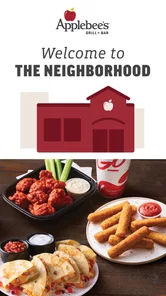
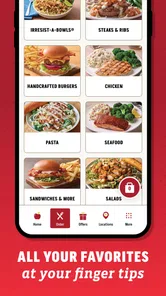
First things first, downloading the Applebee's app is a breeze. Available on both Android and iOS, it’s a free download that barely takes up any space on your phone. Once installed, you’ll quickly notice the sleek and user-friendly design. The interface is intuitive, making navigation a piece of cake even for the least tech-savvy among us. You’re greeted with vibrant images of mouth-watering dishes and catchy offers that make you want to jump right into ordering.
Choosing the right order route
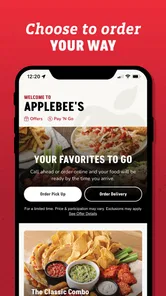
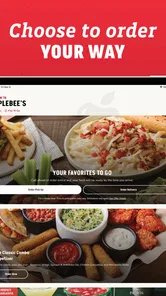
A useful way to approach the app is to decide what you need before browsing: a quick pickup, a meal delivered, or simply a look at the menu. That keeps the ordering flow from turning into an unplanned browse through offers and add-ons. If I’m ordering for a group, I’d settle on the restaurant and order type first, then gather everyone’s choices before building the basket. This reduces the chance of switching locations or rebuilding the order after people have weighed in.
For a solo meal, browsing first and ordering later can be more comfortable than treating the first screen as a prompt to check out. I can use the menu to narrow down what sounds good, then review the basket when I’m ready to commit. The trade-off is that availability and the final choices belong to the selected restaurant and order flow, so I would make the location decision early rather than assume every nearby branch offers the same options.
Features Galore
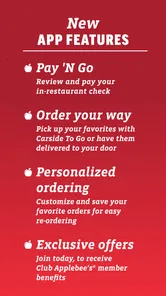
Now, let’s talk about the features, because this is where the app really shines. One of the most useful features is the ability to place an order for pickup or delivery. Whether you’re craving some boneless wings or a classic burger, you can order directly through the app and track your order in real-time. Plus, for those of us who are always on the hunt for a good deal, the app offers exclusive promotions and discounts that aren’t available anywhere else. It’s like having a little secret menu in the palm of your hand!
More From Our News Desk

Weather by Xiaomi Review: Clear at a Glance, Less Clear Up Close

X Under Pressure: Can It Recover When Posting Goes Wrong?

Clash of Clans Is Won Between the Battles

Android Auto Makes the Case for Quieter Car Software

MobiOffice: Transforming Mobile Productivity with Seamless Integration

EA SPORTS FC™ Mobile Soccer: Redefining Mobile Sports Gaming
Another noteworthy feature is the integration of the Applebee's rewards program. Every time you dine with them, you earn points that can be redeemed for discounts on future visits. It’s a fantastic way to save some bucks while enjoying your favorite meals. And let's not forget about the restaurant locator. If you’re ever in an unfamiliar area and craving some Applebee’s goodness, this feature will guide you to the nearest location effortlessly.
Making the order fit the moment
For a realistic weeknight use, I’d open the menu before leaving work, check the available choices, and build an order while I still have time to review it. For a family meal, I’d treat customization as a final checklist: confirm each person’s selections and scan the basket together so a swap or extra doesn’t get missed. If timing matters, pickup can be the more predictable option than delivery because it avoids waiting at home for a handoff; I’d still check the order details and timing shown in the app before setting off.
The best reason to use a restaurant’s own app rather than a broad delivery service is focus: the menu, ordering flow, and restaurant locator are all centered on Applebee’s. A general service can be more useful when I want to compare several restaurants or place a mixed order. I also wouldn’t rely on a promotion until I’ve checked its terms in the app and seen how it applies to my basket. A deal is only helpful if it suits the meal I actually want.
When a restaurant app beats a general service
The choice between ordering directly and using a delivery marketplace is less about which route is universally better and more about what I’m trying to do. When Applebee’s is already the decision, a dedicated app keeps the task focused on that restaurant and can make its rewards relevant. When I’m undecided, a multi-restaurant service is better for scanning alternatives in one place. I wouldn’t install this app expecting it to replace a broad restaurant finder; its value is strongest after I’ve already chosen where to eat.
There’s also a practical difference between planning and convenience. If I want to compare prices, menus, or delivery options across restaurants, I’d rather begin with a service built for that comparison. If I know what I want from Applebee’s, going directly to its app avoids turning a simple order into a wider search. For someone who orders there only rarely, that distinction may determine whether keeping the app installed is worthwhile.
User Experience
In terms of performance, the app is quite reliable. I didn’t encounter any major bugs or crashes during my time using it, which is always a plus. The app updates are regular, ensuring that users get the best experience with fresh content and improved functionalities. And can we talk about the speed? Everything loads quickly, so you won’t be left hanging when you’re trying to place an order.
I also appreciate the little details that make using the app a joy. For example, the personalized recommendations based on your previous orders are spot on. It’s like the app just gets me, you know? Plus, the payment process is secure and straightforward, giving you peace of mind when entering your details.
Small habits that prevent ordering mistakes
One useful habit is to treat the final basket as a separate task rather than a last glance. I’d check each item against the person who requested it, confirm any changes, and then verify the pickup or delivery selection before submitting. When several people are contributing, it helps to have one person read the assembled order aloud; that catches duplicate items and forgotten customizations better than relying on everyone to remember what they said earlier.
I’d also keep the app’s role clear when plans are uncertain. If I’m not sure which location is convenient, I’d use the locator before building the basket. If I’m still deciding between restaurant brands, I’d postpone the order and compare elsewhere. These steps may sound basic, but they prevent the common frustration of spending time customizing a meal and then discovering that I need to start over because I chose the wrong ordering route.
Useful checks before tapping order
If I’m new to the app, I’d first browse without rushing into checkout, then decide whether creating or using an account is worthwhile for the way I order. For someone who visits occasionally, a quick one-off order may matter more than collecting rewards; a regular diner may find reward tracking more compelling. I’d also review the app’s visible account settings when I want to change saved details or preferences, rather than count on a particular control being in the same place after an update.
There are limits to what a restaurant-specific app can solve. It’s not the best tool for comparing menus across brands, and it won’t make a busy restaurant’s preparation or delivery timing certain. People who prefer to avoid entering payment information into restaurant apps may be happier ordering another way. The app is most useful when its convenience outweighs those trade-offs and the chosen location supports the order you have in mind.
Account choices and information-sensitive moments
My trust judgment stays deliberately practical: I can assess the choices presented on screen, but I wouldn’t treat a smooth checkout as proof of how information is stored or handled. When the app asks for access or details, I’d pause to consider whether they are needed for the task I’m doing. For example, I would not grant a permission simply because it appears during setup; I’d decide based on the prompt and whether I want the related function.
Likewise, I’d be careful on a shared device. Before handing the phone to someone else, I would avoid leaving an order or payment screen open, and I’d check the account area for controls that fit my preferences. If I’m using the app only once, I’d weigh whether signing in is useful for that visit instead of assuming an account is necessary. These are sensible checks, not a claim that the app offers a particular privacy setting or checkout mode.
Who will get the most from it
I’d recommend trying it to someone who already likes Applebee’s, orders often enough to value a direct route, or wants the restaurant locator when away from home. A regular customer may also appreciate having rewards and past preferences within the restaurant’s own experience. The app is less compelling for someone who rarely eats there, wants to compare multiple chains, or prefers not to manage another restaurant account on a phone.
For a family or a group, it can be useful as a shared planning tool, but I’d still have one person take responsibility for the final review. That keeps customizations and the selected location from getting muddled as people make requests. For a spontaneous dinner where everyone is still choosing, a general food-ordering app or a quick conversation before opening this one may be more efficient than browsing the Applebee’s menu without a plan.
Final Thoughts
All in all, the Applebee's app is a must-have for anyone who loves good food and convenience. It’s packed with features that make ordering your favorite meals a cinch, and the exclusive deals are just the cherry on top. Whether you’re a regular diner or someone just looking to try something new, this app has got you covered. So, go ahead, give it a try, and thank me later for the awesome recommendation!
I’d put that recommendation more narrowly: it makes sense for people who already choose Applebee’s and want a direct route to browsing, ordering, rewards, and finding a restaurant. Its 4.2 average from around 41,000 ratings and more than a million installs suggest it has a substantial audience, but those figures don’t guarantee that every order or location will be equally smooth. It was released in 2015, and the current version is 4.5.23; I’d keep it updated and judge it by the experience at the location I actually use.
My practical verdict is to install it if Applebee’s is already part of your routine, then take a moment to inspect the checkout and account choices before making the app your default. If you’re only curious about the menu, or your priority is comparing restaurants, you can skip the download and use a broader option. For a familiar meal ordered directly from Applebee’s, though, it offers a convenient path without requiring me to turn every dinner decision into a search across several services.
Applebee's Frequently Asked Questions
Can I browse the Applebee’s menu before placing an order?
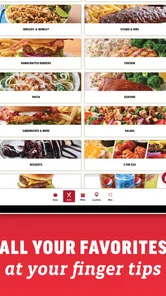
Yes. The Applebee’s app lets you explore menu items before deciding what to order, which is useful when you want to compare options at your own pace. You can also use its ordering features to make choices and customize an order. Browsing first can help you get familiar with the app before you are ready to complete a purchase.
Can the Applebee’s app help me find a nearby restaurant?
The app includes a feature for finding the nearest Applebee’s location, making it useful when you want to plan a visit or place an order. You can check the available location information in the app and decide which restaurant works for your plans. It brings restaurant discovery together with the app’s menu and ordering tools.
Does the Applebee’s app support pickup or paying without contact?
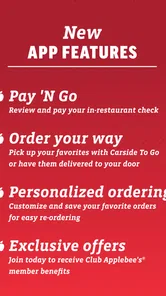
Yes. The app offers mobile ordering, curbside pickup, and contactless payment options. These tools can make ordering more convenient if you prefer to arrange your meal on your phone or limit steps at the restaurant. Availability and the options shown may depend on the location and the order, so check the choices presented in the app.
Is the Applebee’s app free to download, and what devices can use it?
The Applebee’s app is free to download and is intended for mobile use. It requires iOS 7.0 or later on Apple devices, so it is worth checking your device’s software before installing. Once downloaded, you can use it to explore the app’s food-ordering features and guest experience tools. The app is listed for everyone, making its content rating suitable for a broad audience.
What features does the Applebee's app offer to enhance the dining experience?
The Applebee's app provides a seamless dining experience by offering features such as mobile ordering, curbside pick-up, and contactless payment options. Users can also access exclusive offers, explore menu items, and find the nearest Applebee's location with ease. The app ensures you have all essential information at your fingertips, enhancing your dining convenience.
Pros
- User-friendly interface
- Wide range of menu items
- Easy online ordering
- Loyalty rewards program
- Fast delivery options
Cons
- Limited customization options
- Occasional app crashes
- Inconsistent delivery times
- Requires account creation
- Lack of nutritional information











