

Angel: TV & Movies
- 85.00
- 3.7
- Installs
- 1.00M
- Price
- Free

Screenshots

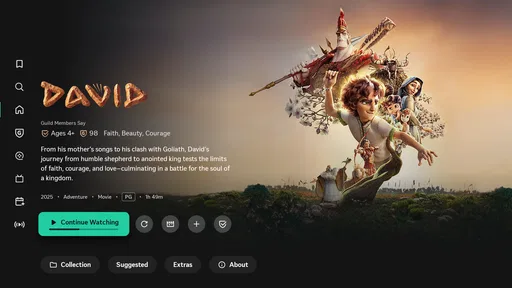
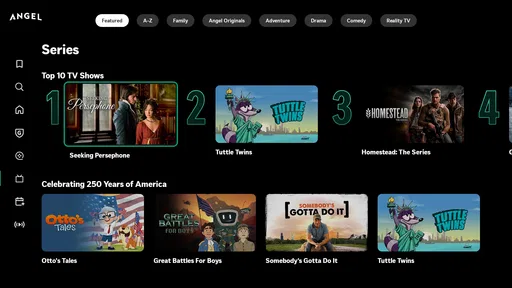

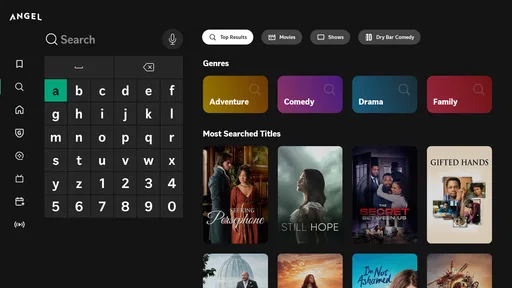
Analysis by Reviewed
When I try a new entertainment app, I look beyond the promise of finding something to watch. I want to know how clearly it explains its choices, how much control it gives me, and whether the viewing experience feels worth adding to my phone. Angel: TV & Movies takes a distinctive approach to streaming and entertainment discovery, and I found that its appeal depends heavily on what you expect from a service built around a particular creative identity.
Developed by Angel Studios, Inc., this free entertainment app is available for Android devices running version 7.0 or later. It is aimed at a Teen audience, has passed the one-million-install mark, and holds an average rating of 3.8 from roughly eight hundred ratings. Those figures suggest a service with a meaningful audience, but also one that produces mixed reactions rather than universal approval.
I would not describe it as a simple replacement for every major streaming platform. Instead, I see it as a complementary option for people who want to explore Angel’s catalog and decide for themselves whether its programming fits their household. The app’s central message is about changing entertainment, but the more useful question is practical: does it give you enough control and clarity to make that choice comfortably?
What the app feels like in everyday use
The first thing I noticed is that Angel: TV & Movies is better understood as a destination than as a neutral search tool for all available entertainment. Its identity is visible throughout the experience, so the app makes most sense when you are already curious about Angel’s productions or want a focused alternative to services that mix together thousands of unrelated titles.
That focus can be helpful. On a crowded streaming service, I often spend longer browsing than watching because the catalog is too broad. A more defined destination can reduce that decision fatigue. If I am looking for something aligned with the type of storytelling associated with Angel, I can begin with a clearer expectation instead of sorting through every genre and trend at once.
At the same time, that focus is also the main limitation. Someone who expects the breadth of a general-purpose service may find the selection narrower or less immediately familiar. I would install it with a specific reason in mind, such as following Angel content, exploring a particular series, or adding another source of family viewing, rather than assuming it will replace a broad subscription service.
The app is free to install, which makes trying it relatively low-risk. It also includes in-app purchases priced from about twelve dollars to nearly one hundred eighty dollars per item. That range matters because “free” describes the download, not necessarily every way the service may offer access or support. I would pay attention to each purchase screen and avoid treating the free installation as a guarantee that all content or options are included at no cost.
More From Our News Desk

 Gmail
GmailGmail in a Busy Inbox: Who Benefits Most?
From first account to crowded workday, Gmail earns its place through dependable search and flexible sorting—but its best fit depends on how much inbox maintenance you can tolerate.

 Prime Video
Switching to Prime Video: What Changes in Your Viewing Routine
Prime Video can make a compelling second home for streaming, but switching means learning a different catalog, rental layer, and route from browsing to playback.

 Universal TV Remote Control
Universal TV Remote Control Works Best as a Reliable Backup
A phone remote earns its place through quick setup and reliable habits. Here is how to get more from Universal TV Remote Control—and where its limits show.

 Weather - By Xiaomi
Weather by Xiaomi Review: Clear at a Glance, Less Clear Up Close
Xiaomi’s weather app makes everyday forecasts quick to scan, but its calm surface can leave useful details and recovery paths harder to find than they should be.

 X
XX Under Pressure: Can It Recover When Posting Goes Wrong?
A resilience-focused review of X, examining setup, mistaken posts, interruptions, weak connections, and the gaps that matter when recovery needs to be dependable.

 Clash of Clans
Clash of Clans Is Won Between the Battles
Its raids are quick; its community is a long-term project of coordination, teaching, rivalry, and shared responsibility—with all the friction that entails.
Latest News



Why the developer and audience matter
Angel Studios, Inc. is not an anonymous publisher in this context; the developer’s identity is part of the product’s appeal and helps explain why the app feels more curated than a generic video player. If you are interested in the studio’s approach to entertainment, that direct connection is useful. If you prefer a platform with a completely neutral catalog, it may feel more specialized than you want.
The Teen content rating is another detail I would take seriously. It does not mean every title will suit every teenager or every family situation. I would still check the description and context of an individual program before handing the phone to a younger viewer, especially when several types of stories are gathered in one place.
For an everyday example, imagine a parent looking for something to watch after dinner without committing to another large streaming subscription. Angel can be worth checking because the installation is free and the catalog has a recognizable point of view. The sensible routine would be to browse together, review the title information, and decide whether a particular program fits the evening. I would not leave the app to make that judgment automatically.
Reading the experience through trust
Trust in an entertainment app is not only about whether a video plays. It also comes from knowing what I am choosing, what a purchase means, and how much control I retain over my account. With Angel, I recommend approaching the app deliberately: read prompts before accepting them, review any account or payment step, and use the device’s normal controls for purchases and permissions rather than tapping through quickly.
I avoid making assumptions about privacy practices from the app’s appearance alone. A polished interface does not prove that data collection is minimal, and a free download does not explain every data-sensitive decision. The safest habit is to inspect the permission requests and privacy information shown on your device and in the app’s account areas, then grant only what makes sense for the way you plan to use it.
This is particularly important if several people share a phone or tablet. A family member may browse, sign in, or encounter a purchase prompt without realizing which account is active. I would confirm the account before starting any transaction and use the operating system’s purchase authentication where available. That small pause gives you more agency than relying on memory or trusting that the app has selected the right profile.
Account choices and personal control
Before settling into regular use, I would identify how the app handles sign-in, account access, and content decisions on my device. The exact controls visible to you can depend on the current app version and operating system, so I would use the settings that are actually presented rather than assuming every account feature works the same way for everyone.
A useful workflow is to separate casual browsing from committed viewing. First, explore the catalog without rushing into a purchase. Next, note which titles genuinely interest you. Finally, return to the relevant title and read the purchase or access wording carefully. This avoids the common streaming mistake of making a payment simply because a button appears next to something you want to watch.
I would also review notifications and device permissions after installation. Entertainment apps can become noisy if alerts are left on by default, and unnecessary notifications make it harder to notice the messages that actually matter, such as account or payment information. Turning off anything you do not want is a simple way to keep the app in a supporting role instead of letting it dictate your attention.
If you decide the service is not for you, remove the account or app through the controls available on your device and within the service. Uninstalling an app and managing an account are not always the same action, so I would check both areas when leaving. That distinction is easy to overlook and is one of the most practical trust questions for any app that involves viewing history, profiles, or purchases.
Moments that deserve extra attention
The most sensitive moment is not usually pressing play; it is moving from discovery to payment. Because individual in-app items can range from around twelve dollars to nearly one hundred eighty dollars, I would never approve a transaction without checking the title, amount, account, and purchase confirmation. If a child uses the same device, I would make sure authentication is required before any charge can be completed.
Another sensitive moment is granting access during setup. I prefer to deny a permission when I cannot connect it to a clear function I need. If the app still works without it, that tells me I can keep the experience more limited. If a feature later requires access, I can make that decision at the moment it becomes relevant instead of approving everything in advance.
Signing in on a shared or borrowed device also deserves care. I would avoid leaving an account active where another person can use it, especially if payment details or viewing controls are connected to that account. Signing out afterward is a small step, but it prevents a simple viewing session from becoming an account-management problem.
For privacy-conscious viewers, I would make a habit of checking the app’s current privacy and account information directly rather than relying on assumptions based on the developer’s reputation or the app’s rating. The rating reflects user experience, not a complete privacy audit. That distinction helps keep expectations realistic.
How it compares with familiar alternatives
Compared with a general streaming platform, Angel: TV & Movies offers a more defined identity and potentially a less overwhelming starting point. A broad service is better when I want maximum variety, established mainstream hits, or one subscription that serves many different tastes. Angel is more attractive when I want to investigate a particular studio-led catalog and do not mind that the experience is more specialized.
Compared with free video platforms supported by a huge mix of creators, Angel feels more intentional in its presentation. The trade-off is that those open platforms may offer more spontaneous variety, while Angel’s value depends on whether its selection matches your interests. I would choose the open platform for casual discovery and Angel when I want to explore its specific entertainment direction.
Compared with renting or buying individual titles through a digital store, the free installation makes browsing easier before committing. However, the presence of in-app purchases means I would still compare the final access terms with the alternatives available on my device. A familiar store may be better if you want a single, clearly itemized transaction and do not plan to use a dedicated entertainment app regularly.
Angel is also not the best choice for someone who wants a completely hands-off family solution. The Teen rating and the possibility of paid items make active supervision sensible. I would prefer a platform with stronger household controls if my top priority were managing several children’s access from one central dashboard.
Practical habits that improve the experience
My first tip is to treat the app as a catalog to evaluate, not a commitment to make immediately. Install it, inspect the available titles, and see whether the selection gives you a reason to return. This is especially useful because the app is free to download, while some individual items can involve substantial spending.
My second tip is to create a viewing shortlist outside the purchase flow. I might write down a few titles or keep track of them in a personal note, then return later when I have time to compare them. This separates curiosity from payment and reduces impulse decisions caused by browsing late at night or while distracted.
My third tip is to use a shared-device routine: confirm the active account, check purchase authentication, review notifications, and sign out when appropriate. These are not flashy features, but they make a meaningful difference in a household where several people use the same screen.
My fourth tip is to revisit settings after the first week. Once I know whether I want alerts, account synchronization, or particular access choices, I can adjust them with more confidence. A setup that seemed convenient on the first launch may feel excessive after regular use, and changing it later is usually easier than trying to predict everything beforehand.
Who should try it, and who should skip it
I think Angel is worth trying for viewers interested in the developer’s distinctive entertainment catalog, people who want a focused alternative to a huge streaming library, and households willing to make viewing decisions together. The free entry point makes exploration straightforward, provided you remember that optional or individual items may cost extra.
I would be more cautious if you need a wide, all-purpose replacement for several entertainment services. The app’s focused identity is a strength only when it matches your interests. If you mainly want the largest possible selection, the usual broad streaming alternatives are likely to serve you better.
I would also skip it if you are uncomfortable reviewing purchase prompts, account settings, and permissions yourself. That is not a criticism unique to Angel; it is simply the wrong kind of app experience for someone who wants every decision handled invisibly. The best results come from paying attention at the moments where the service asks you to choose.
My cautious verdict
After looking at Angel: TV & Movies as both an entertainment product and an account-based service, I see a worthwhile but specific option. Its free installation, recognizable developer, and focused catalog make it easy to investigate. Its Teen rating and broad in-app purchase range mean I would use it with more awareness than I would bring to a simple free video player.
The app’s average rating of 3.8 shows that the experience is not universally loved, and I think that is a fair warning to keep expectations measured. I would not install it because of the promise of changing entertainment alone. I would install it because I have a genuine interest in what Angel offers, then judge the catalog, controls, and costs through my own use.
My recommendation is cautious rather than automatic: try it if its creative focus appeals to you, keep payment and permission choices under your control, and compare it with broader services before treating it as your main entertainment platform. For the right viewer, it can be a useful addition. For everyone else, its specialized identity may be a reason to pass rather than a reason to subscribe.
Angel: TV & Movies Frequently Asked Questions
Is Angel: TV & Movies suitable for younger viewers?
Angel: TV & Movies has a Teen content rating, so parents and guardians should consider whether the app is appropriate for a particular child. The rating is a useful starting point, but individual films and shows can differ in themes and suitability. Check the information shown for each title and use any available device or account-level parental controls before letting younger viewers watch independently.
Which devices and operating systems can run Angel: TV & Movies?
Angel: TV & Movies is available for mobile devices running compatible software, with support beginning at Android 7.0. Check your device’s operating system before downloading, since an older version may prevent installation or affect playback. Features can also differ by device, so confirm that the app works as expected on the phone or tablet you plan to use.
What is Angel: TV & Movies, and what can I watch with it?
Angel: TV & Movies is an entertainment app designed to help users discover and watch television content and films in one place. Its catalog, available titles, genres, and viewing options may vary depending on your country, device, and current licensing agreements. Before downloading, check the app’s listing and in-app catalog to confirm that the shows, movies, languages, and subtitles you want are available in your region.
Is Angel: TV & Movies free to download and use?
The app is free to download, but that does not necessarily mean every title or feature is free to watch. In-app purchases are available, and some content can require a subscription, rental, purchase, account registration, or may include advertising. Pricing and access conditions can change, so review the payment information shown inside the app before starting a trial or confirming a purchase. Also check renewal terms carefully.
Does Angel: TV & Movies require an account or subscription?
Depending on the version and the content you want to access, Angel: TV & Movies may allow limited browsing without an account while requiring sign-in for streaming, saving favorites, or synchronizing viewing activity. Premium programming may also be restricted to subscribers or customers in supported locations. Read the registration and subscription screens carefully, especially if a free trial is offered, because trials can automatically convert into paid plans unless canceled.
Pros
- Large catalog of live TV channels and on-demand movies
- Simple interface makes browsing content quick and intuitive
- Supports personalized recommendations based on viewing habits
- Useful search tools help find channels
- shows
- and films faster
- Provides convenient entertainment access from mobile devices
Cons
- Content availability may vary depending on your country or region
- Some features or titles may require a paid subscription
- Streaming quality depends heavily on your internet connection
- Advertisements can interrupt viewing on supported plans
- The app may use significant mobile data during HD streaming












