Allstate Motor Club
- 500.00
- 3.4
- Installs
- 100.00K
- Price
- Free

Screenshots
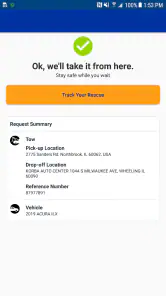
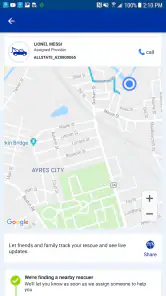
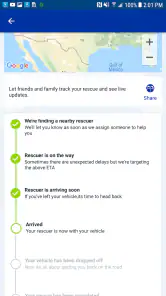
Analysis by Reviewed
When I think about roadside assistance, I usually want one thing above all: a simple way to get help when driving has suddenly become stressful. Allstate Motor Club is built for that exact situation. It is a free Auto & Vehicles app from Allstate Enterprises, LLC, and its purpose is to give drivers a mobile point of contact for motor club support rather than making them search for a number or manage everything through a browser.
After spending time with it, I see it less as an app I would open every day and more as a preparedness tool. Its value appears when a car will not start, a tire problem interrupts a trip, or another roadside issue leaves you unsure about the next step. That makes the decision slightly different from choosing a navigation, fuel-price, or vehicle-maintenance app. The important question is not whether it offers constant entertainment or daily utility, but whether having Allstate Motor Club ready on the phone makes sense for the way you drive.
What I would consider before choosing it
The first decision is whether you already have a relationship with Allstate Motor Club or are considering roadside assistance as a separate service. The application is most meaningful when it connects with the assistance arrangement you intend to use. If you only want a general driving toolbox, this is probably too narrow. If your priority is knowing where to turn during a roadside emergency, its focused purpose is easier to appreciate.
I would also consider how often you travel, who uses your vehicle, and how comfortable you are handling an unexpected breakdown without preparation. A person who drives short distances in a familiar area may rarely need the app. Someone who regularly takes long trips, drives at night, carries children, or shares a car with less experienced drivers may find it worthwhile simply because it keeps the assistance route close at hand.
The app is free to download and has an Everyone content rating, so there is no financial barrier to installing it for a closer look. It requires Android 6.0 or later, which covers many older Android phones. That compatibility is useful for drivers who keep an older handset in the car, although I would still install and test it before an important journey rather than assuming an old device will behave perfectly when an emergency occurs.
Its public reception is mixed rather than universally enthusiastic: it holds a 3.4 average from around 780 ratings, with more than 500 written reviews. I read that as a reason to test the experience personally, not as an automatic rejection. Roadside apps can feel excellent when a request goes smoothly and frustrating when a driver needs help immediately, so reliability, clarity, and account readiness matter more here than visual polish alone.
The preparation step most people skip
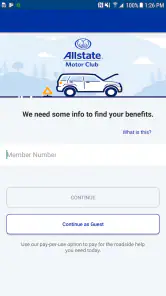
My strongest practical advice is to open the app before you need it. Check whether you can reach the relevant account or motor club area, make sure your phone can determine your location, and become familiar with the path for requesting help. This takes only a few minutes, but it removes the worst kind of friction: trying to learn an unfamiliar interface while standing beside a disabled vehicle.
I would also keep the app signed in only if that matches your own security habits. A shared family car creates a useful trade-off. Leaving access ready may help another driver request assistance quickly, but a personal device may be better protected by signing in only when needed. The right choice depends on who uses the phone and how much convenience you want to exchange for account privacy.
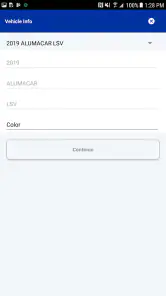
Another overlooked step is checking the information associated with the vehicle and the person who may request help. I would not wait until a breakdown to discover that a phone number is outdated or that a family member does not know which account to use. The app cannot remove every roadside complication, but preparation can prevent an avoidable account problem from becoming part of the emergency.
How it fits an ordinary roadside problem
Imagine leaving work on a rainy evening and finding that the car will not start. In that moment, I would first move to a safe location, turn on the hazard lights when appropriate, and then use the phone to contact assistance. The value of this app is not that it repairs the vehicle; it gives me a dedicated route toward the motor club service instead of forcing me to remember where I stored a membership card or search through old messages.
That distinction is important. A roadside assistance app is not a substitute for basic safety decisions. It does not make it safe to stand beside a vehicle in fast traffic, and it does not replace emergency services when there is an immediate danger or collision. I would use it as the service-access layer after dealing with personal safety, location, and urgent medical concerns.
For a long-distance trip, I would open it before departure and make sure the phone is charged. I would also keep a backup way to contact help, such as knowing how to reach the relevant service through ordinary phone functions. This is not because the app is useless; it is because depending on a single device, signal, or login during a breakdown creates its own risk. A good roadside workflow has a primary method and a fallback.
Where Allstate Motor Club makes the most sense
The app’s clearest advantage is focus. It is not trying to be a complete driving dashboard filled with fuel tools, trip statistics, vehicle diagnostics, or social features. For me, that narrow purpose makes it easier to understand why it is installed. When I need motor club assistance, I do not want to browse through unrelated features first.
It also offers a more practical alternative to keeping a paper membership card in the glove compartment. Paper can be misplaced, and a phone is usually already in the driver’s hand or pocket. Having the service connection available digitally can be especially helpful for people who travel between vehicles or who share driving responsibilities with a partner or family member.
The app has also accumulated over 100 thousand installs, which suggests that it is not an obscure experiment with no real audience. That does not guarantee a perfect experience for every driver, but it does make the product feel established enough to evaluate seriously. I would still judge it by whether it works on my phone and matches my assistance needs, rather than treating install volume as proof of quality.
A useful role for families and occasional drivers
I think the app is particularly sensible for households where several people may need roadside help but only one person normally manages the membership. A young driver, visiting relative, or partner may not know the details of the motor club arrangement. Installing the app and explaining the basic process in advance can turn a vague benefit into something usable.
There is a subtle trade-off here: the app improves access only when the person holding the phone knows how to use it. I would show another driver the essential steps instead of assuming they will learn during a flat tire. I would also explain what information to provide, such as the vehicle’s location and a clear description of the problem. That preparation is a genuine advantage of having a dedicated app, but it requires a little household organization.
For frequent travelers, the benefit is psychological as much as technical. I find it easier to drive confidently when I know the assistance path is already prepared. That does not mean I expect to use the app often. In fact, the best outcome may be never needing it. Its role is similar to keeping a flashlight or first-aid kit available: quiet reassurance until an unusual problem makes it valuable.
What the current version tells me about maintenance
The current version is 21.1.0, so the app is not frozen in an early release state. I appreciate that because service apps need ongoing maintenance, especially when they handle account access and time-sensitive requests. Still, a version number alone cannot tell me how well every device or network condition will behave. I would update it before a major trip and avoid postponing updates indefinitely.
The release history began on August 30, 2016, giving the product a long presence in the mobile category. That history is useful context: this is a mature roadside-assistance concept rather than a brand-new idea. At the same time, longevity does not automatically mean the interface will feel modern. My expectation would be functional access to motor club support, not the smoothness or breadth of a premium travel platform.
Where a different category may fit better
Allstate Motor Club is not the right choice for every driver. If your main need is navigation, a dedicated maps app will be more useful during ordinary journeys. If you want maintenance reminders, fuel tracking, or a record of repairs, a vehicle-management app is a better match. If you are looking for live traffic, route planning, or parking information, this app’s roadside focus will feel limited.
There is also a difference between a motor club app and assistance included through a vehicle manufacturer, insurer, dealership, or another membership organization. I would compare the service relationship before changing anything. A driver may already have roadside coverage elsewhere, and adding another route can create confusion about which service to call first. In that situation, the best app is often the one tied to the coverage you actually intend to use.
Some people may prefer a phone number because it works with less app navigation and can be easier for a passenger to use. Others may prefer an app because it keeps the process organized on the device they already carry. Neither choice is universally superior. I see this application as a convenience layer, not a replacement for every traditional contact method.
When I would skip it
I would skip it if I had no reason to use Allstate Motor Club and only wanted a general-purpose driving companion. Installing a narrowly focused assistance app without a matching need adds clutter without solving a real problem. I would also hesitate if my phone is too old for Android 6.0, has very little storage, or is unreliable on the road. In an emergency, a dependable device matters more than having one extra app installed.
I would be cautious if another roadside service already covers my household and everyone knows how to reach it. Switching simply because this app is free may not improve anything. The relevant comparison is not download price; it is the total effort of understanding coverage, keeping account details current, and teaching other drivers which service to use.
Finally, drivers who expect detailed vehicle diagnostics or a broad set of trip tools should look elsewhere. The focused design is a strength for assistance access, but it is also the reason the app may feel sparse to someone expecting an all-in-one motoring suite. I would rather see that limitation clearly than install it with the wrong expectations.
What switching really involves
Moving from a paper card or saved phone number to the app is fairly simple in principle, but I would treat it as a workflow change rather than a one-tap improvement. First, install it and confirm that the account path works. Next, make sure the drivers who may use the vehicle understand where to find it. Then keep a backup contact method available until you have tested the app under normal conditions.
The biggest cost is attention. You need to remember the app, keep it updated, and make sure the phone is charged and connected when assistance is needed. A paper card has no battery requirement, while an app may be quicker to access but more dependent on the device. I prefer the digital option, but I would never discard the backup completely.
There is also a learning cost for households. If one person handles all vehicle administration, installing the app may not help the person who is actually stranded unless that person has practiced the process. I would spend a few minutes explaining it and storing the vehicle information in a way that is easy to find. That small investment is more valuable than simply placing the icon on a home screen.
For someone moving from a competing roadside-assistance app, I would not switch during a trip or immediately after a breakdown. I would compare which service the vehicle is actually covered by, test the new login, and confirm that every regular driver understands the change. The app itself may be free, but confusion about the underlying service is the real switching cost.
Privacy and phone habits I would keep in mind
Because this is a service-access app rather than a game or casual utility, I would pay attention to the account and location choices presented during setup. Location can make a roadside request easier, but I would prefer to grant only what is necessary for the task and review the phone’s settings afterward. I would also avoid sharing account credentials casually, even in a family setting.
These are not reasons to avoid the product. They are sensible habits for any app connected with vehicle assistance. The convenience is strongest when the phone is ready, the account is protected, and the driver understands what information will be needed. A little control at setup time can prevent both privacy discomfort and emergency confusion later.
My recommendation for different drivers
I recommend Allstate Motor Club to drivers who want a dedicated mobile route to their motor club support, especially people who travel regularly, share a vehicle, or prefer not to rely on a paper card. The free price makes it easy to test, and the Everyone rating makes it suitable for a broad household audience. I would install it, open it before a trip, and teach the other likely users how to reach assistance.
My recommendation is more qualified for people who already have another roadside service. In that case, I would choose the app connected to the coverage I understand best and use most confidently. Having several similar apps does not necessarily create better protection; it can make a stressful decision harder. One tested primary option plus a backup contact is a cleaner arrangement.
The 3.4 average means I would not describe the experience as flawless. Some drivers may encounter friction related to account access, device compatibility, or the difference between expecting a full driving suite and receiving a focused motor club tool. That is why my advice is to test it while the car is working, not wait for the first emergency to become the product trial.
Overall, I see this app as a practical piece of roadside preparation rather than an essential daily companion. It wins through focus and convenience, not through a large collection of driving features. If that is exactly what you need, keeping it ready on your phone is a sensible decision. If you want navigation, maintenance management, or broad vehicle information, another category will serve you better. Install it before you need it, verify that your access works, and keep a simple backup contact method nearby.
Allstate Motor Club Frequently Asked Questions
Is Allstate Motor Club free to download, and does that include roadside assistance?
The app is free to download, but that does not mean roadside assistance is included without a membership. Allstate Motor Club is a roadside assistance service, and the help available depends on the membership you select. Before enrolling, review the plan terms and benefits so you understand what the app can help you access and what membership arrangements apply.
What devices can run the Allstate Motor Club app?
Allstate Motor Club is available for Android devices running version 6.0 or later. Before downloading, check your phone’s operating system and make sure it meets that requirement. The app is intended to help members manage roadside assistance while traveling, so a compatible device and an internet connection can be useful when you need to sign in or submit a request.
What is Allstate Motor Club, and what services does it provide?
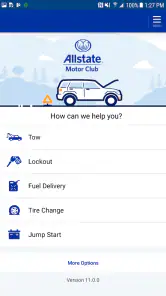
Allstate Motor Club is a roadside assistance service designed to help drivers when they experience common vehicle problems. Depending on the selected membership and location, services may include towing, jump-starts, flat-tire assistance, fuel delivery, lockout assistance, and winching. The app can help members request assistance, review membership details, and access support while traveling, although exact benefits vary by plan.
Do I need to be an Allstate insurance customer to use Allstate Motor Club?
Not necessarily. Allstate Motor Club memberships may be available to drivers who do not have an Allstate auto insurance policy, although eligibility, pricing, and available plans can differ by state and region. Before downloading or subscribing, users should review the membership terms carefully. Some features may require signing in with an Allstate account or entering an active membership number.
How do I request roadside assistance through the app?
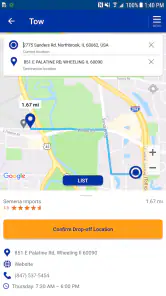
After signing in, members can generally request help by selecting the type of problem, confirming their location, and providing vehicle details. The app may use location services to identify where assistance is needed and can display request information or status updates. Users should keep their phone charged, remain in a safe location, and make sure the address or GPS position is accurate before submitting a request.
Pros
- 24/7 roadside assistance is available when you need help.
- Multiple membership plans suit different driving and budget needs.
- Coverage can apply to various vehicles
- not only the member’s car.
- The app helps request assistance and track service progress.
- Members may receive discounts on travel
- dining
- and everyday purchases.
Cons
- Some benefits and limits vary by state and membership plan.
- Roadside service may involve extra fees beyond included coverage.
- Response times can be longer during severe weather or peak demand.
- Automatic renewal may require attention when managing the subscription.
- The app’s usefulness depends on reliable mobile data and location access.

- Category
- Auto & Vehicles
- Version
- 21.1.0











