

Aeropostale: Teen Clothing
- 112.00
- 4.8
- Installs
- 100.00K
- Price
- Free

Screenshots



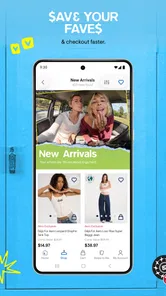

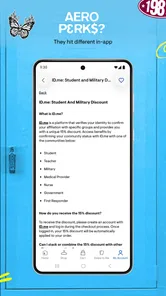


Analysis by Reviewed
I approached Aeropostale: Teen Clothing as a practical shopping companion rather than a full fashion-planning tool. It is a free shopping app from SPARC Group LLC, focused on Aeropostale’s casual clothing for teens and anyone who likes that relaxed style. After using it, my main impression is that its value depends on how you shop: it is useful when you already have an idea of what you want, less useful when you expect a broad marketplace or detailed styling advice.
The app is aimed at people who prefer browsing a single clothing brand from a phone. That sounds simple, but the distinction matters. You are not comparing dozens of retailers in one place; you are exploring Aeropostale’s own selection, looking for everyday pieces, seasonal clothing, and casual outfits. I found that focused approach easier than jumping between unrelated stores, although it also means the app cannot replace a general shopping platform when variety across brands is your priority.
How Aeropostale works when your connection is strong
The most important part of the experience is the network connection. Product browsing, images, product details, and the movement between shopping screens all rely on the app being able to reach its online service. With a stable connection, the experience feels direct: open the app, browse the available clothing, narrow your attention to items that match your needs, and inspect them before deciding whether to continue toward purchase.
I would not treat it like a catalog that is equally useful everywhere. In a strong home connection, browsing feels much more comfortable because clothing shopping depends heavily on images. You need to see colors, cuts, prints, and the general shape of a garment before the written details become meaningful. A weak connection changes that rhythm. Images may take longer to appear, and repeatedly opening product pages can become irritating when you are comparing several possibilities.
This makes the app particularly suitable for deliberate shopping sessions. If I know I need a casual top for school, a relaxed weekend outfit, or a gift for someone who already likes Aeropostale, I can use the app with a clear goal. If I am only passing time and hoping to discover something quickly, connection delays make the process feel less rewarding than scrolling through a platform designed mainly for visual inspiration.
One useful habit is to avoid making a decision from the first image alone. I prefer to wait until the product page has fully loaded, then check the available information and review the item again before moving on. That small pause is worthwhile because a clothing purchase is more sensitive to fit, color, and material expectations than many other types of mobile shopping.
The app’s store presence is strong for a relatively focused retailer. It has passed 100 thousand installs and holds a 4.8 average rating from roughly 1.9 thousand ratings. Those figures suggest that the basic shopping flow is working well for many users, but they should not be read as a guarantee that every phone, connection, or shopping trip will feel identical. My own view is that the app succeeds most when the network gets out of the way and lets the clothing remain the focus.
More From Our News Desk

 Instagram
Instagram’s Power Comes From Its Place in Your Phone
A close look at how Instagram turns Meta’s reach, recommendation systems and everyday camera habits into durable platform power—and what that costs users.

 Gmail
GmailGmail in a Busy Inbox: Who Benefits Most?
From first account to crowded workday, Gmail earns its place through dependable search and flexible sorting—but its best fit depends on how much inbox maintenance you can tolerate.

 Prime Video
Switching to Prime Video: What Changes in Your Viewing Routine
Prime Video can make a compelling second home for streaming, but switching means learning a different catalog, rental layer, and route from browsing to playback.

 Universal TV Remote Control
Universal TV Remote Control Works Best as a Reliable Backup
A phone remote earns its place through quick setup and reliable habits. Here is how to get more from Universal TV Remote Control—and where its limits show.

 Weather - By Xiaomi
Weather by Xiaomi Review: Clear at a Glance, Less Clear Up Close
Xiaomi’s weather app makes everyday forecasts quick to scan, but its calm surface can leave useful details and recovery paths harder to find than they should be.

 X
XX Under Pressure: Can It Recover When Posting Goes Wrong?
A resilience-focused review of X, examining setup, mistaken posts, interruptions, weak connections, and the gaps that matter when recovery needs to be dependable.
Latest News



Browsing is better with a specific shopping plan
Aeropostale’s casual positioning makes it easy to understand what kind of shopping trip fits the app. I would use it for everyday wardrobe updates rather than formalwear, technical sports equipment, or a broad search for the lowest price across every retailer. The focused catalog is a strength when you already trust the brand’s general look, because you spend less time filtering out products that were never relevant to you.
It is also useful for family shopping. A parent can browse with a teenager, compare a few choices, and let the person who will wear the clothes have a say without visiting several unrelated websites. The same applies to gift shopping when you know the recipient likes casual teen fashion. The trade-off is that the app cannot solve uncertainty about personal taste by itself. If you do not know the recipient’s preferred colors, fit, or style, a general marketplace with more categories may offer better inspiration.
My practical advice is to decide what problem you are solving before opening the app. “I need a few casual basics” leads to a more efficient session than “show me something interesting.” The latter can still work, but it is more dependent on fast loading, attractive images, and patience while you explore.
What changes on a phone compared with ordinary shopping
On mobile, the biggest benefit is convenience rather than complexity. I can look through clothing while sitting at home, waiting for an appointment, or discussing options with someone else. That is especially helpful when I want to revisit a product after thinking about it instead of making a rushed choice in a physical store.
At the same time, a phone screen limits how much information I can comfortably compare at once. A desktop browser may make side-by-side checking easier, while an in-person visit lets me judge fabric and fit directly. The app is therefore strongest in the middle: it is faster than traveling to a store for initial browsing, but it cannot reproduce the physical certainty of trying something on.
A realistic example is a student preparing for a new school term. They might open the app at home, look through casual pieces, show a parent several options, and return later after checking what is already in the wardrobe. That workflow is more useful than buying impulsively from a single image. It also shows why a phone can be a good planning tool even when the final decision still requires careful attention to size and personal fit.
I would be cautious about browsing in a crowded place or while walking. Clothing pages need attention, and an unstable public connection can make the experience unnecessarily slow. A short session in a quiet place with a reliable signal is usually better than trying to complete the entire process during a few distracted minutes.
The app is free to install and is marked for Everyone, which makes it approachable for households where more than one person may use the same shopping device. It requires Android 8.0 or later, so owners of very old Android phones should check compatibility before planning around it. The current version is 2025.AW-0.0.7, and the app was released on October 10, 2024.
Handling slow loading, interruptions, and failed attempts
Connectivity problems are not just a technical nuisance in a clothing app; they can affect confidence in a purchase. If a product image appears late, a page stalls, or a transition fails, I am less comfortable assuming that the information I need has loaded completely. My approach is to stop and retry rather than repeatedly tapping buttons. Repeated taps can make it harder to tell whether the app is still working or whether an action was registered.
When a page fails to load, I would return to the previous screen and reopen it after checking the connection. If the problem continues, closing and reopening the app is a sensible recovery step. I would also avoid treating a half-loaded page as final evidence about an item. For clothing, missing images or incomplete details can lead to a poor decision even when the checkout process itself appears available.
This is one area where the app is less forgiving than a saved paper list or a local photo album. Its usefulness is tied to live access, so I would not rely on it as the only plan for a time-sensitive purchase while traveling. Before leaving home, I prefer to decide which items deserve closer attention and make sure I have enough time to recover if the connection becomes unreliable.
Another practical point is patience during checkout-related steps. A slow response does not automatically mean that an action failed. I would wait, look for a clear change on screen, and check the current state before trying again. That habit is especially important when an app is communicating with an online shopping service, because uncertainty can lead to duplicate actions or unnecessary frustration.
I do not see this as a reason to avoid the app. It is simply the main limitation to remember: the experience is not equally dependable in every network environment. Users with a reliable home connection will probably notice this less, while commuters and shoppers using inconsistent mobile data may find the app more demanding.
Using mobile data without wasting a shopping session
Because clothing shopping is image-heavy, I would use the app thoughtfully on mobile data. The most efficient approach is to browse with a purpose, avoid reopening the same pages repeatedly, and leave detailed comparison for a moment when the connection is stable. This is not about refusing to shop away from home; it is about reducing the number of unnecessary loads when every product view may consume time and data.
A good workflow is to begin with a short discovery pass, note the items that genuinely interest you, and then inspect those choices more carefully. That is better than opening every product in sequence and trying to remember which ones stood out. It also helps prevent a common mobile-shopping problem: spending more energy waiting for pages than evaluating the clothes themselves.
If I were helping a teenager shop, I would use the phone for shared decision-making rather than handing over the entire process without discussion. We could look at a small group of options, talk about how each would work with existing clothes, and avoid turning fast scrolling into an accidental purchase. The app supports that kind of conversation well because its focus remains on one brand’s casual selection.
Users who are especially careful about data should also remember that visual browsing is the central activity here. A text-only shopping experience would be easier on a limited connection, but it would not provide the same confidence for judging clothing. In my opinion, the right compromise is fewer, more intentional product views rather than trying to inspect the whole catalog in one mobile session.
This is also where Aeropostale compares differently with the usual alternatives. A general marketplace may offer more brands and more ways to compare prices, but it can require more loading, filtering, and decision-making. A retailer’s mobile website may feel familiar and convenient in a browser, while this dedicated app is better suited to someone who wants the brand’s shopping experience kept in one place. A physical store remains superior for immediate fit checks and tactile judgment, but it costs more time and does not offer the same easy return to a considered choice from the sofa.
Who will appreciate it, and who should choose something else
I think this app is a good match for shoppers who already like Aeropostale’s casual teen-oriented style, want a focused brand catalog, and usually shop from a dependable connection. It is also a reasonable choice for parents and teens making clothing decisions together, or for anyone who prefers browsing before visiting a store or committing to a purchase.
I would skip it as a primary shopping tool if your goal is to compare many brands, find specialized clothing, or receive highly personalized styling guidance. It is not the right answer for someone who needs to feel fabric and test fit before deciding. In those cases, a general shopping service or a physical retailer will probably be more useful.
I would also hesitate to depend on it during a rushed trip with unreliable connectivity. The app can be convenient in short mobile moments, but convenience disappears when pages repeatedly stall. For that kind of situation, preparing a shortlist in advance or using a shopping option with easier in-person confirmation may be the better choice.
The free price removes an obvious barrier to trying it, and the age rating makes it broadly accessible. Still, free access does not remove the need for sensible shopping habits. I would check the item information carefully, think about whether it fits the intended wardrobe, and avoid letting a smooth visual experience replace judgment about size or usefulness.
My connectivity verdict after using the app
My final opinion is positive but specific. Aeropostale works best as a focused, connected shopping app for casual clothing, not as a universal fashion marketplace. Its strongest quality is the ability to keep a brand-centered browsing session simple: I can explore the style I came for without sorting through unrelated retailers. Its main weakness is equally clear: the experience depends on live loading, and a poor connection quickly turns relaxed browsing into friction.
For a dependable home network, I would recommend giving it a try, especially if Aeropostale is already a familiar brand in your household. For limited data, I would use a shortlist-based approach and avoid aimless browsing. For uncertain sizing or a need to compare brands, I would combine the app with another shopping method rather than expecting it to answer every question.
The app has earned a strong user response, with around 112 reviews represented in its store presence, and its focused purpose is easy to understand. My recommendation comes less from the headline numbers than from the fit between the tool and the shopper: if you want casual Aeropostale clothing and have a stable connection, it is a convenient way to browse. If you need broad comparison, offline certainty, or hands-on fitting, another option will serve you better.
The best way to use Aeropostale is as a deliberate mobile storefront: browse with a goal, wait for pages to load fully, compare thoughtfully, and treat connectivity as part of the shopping experience. Used that way, it feels practical and approachable rather than overcomplicated. I would keep it installed for brand-specific shopping, while still choosing a general marketplace or physical store whenever the situation calls for wider choice or more confidence about fit.
Aeropostale: Teen Clothing Frequently Asked Questions
Is Aeropostale: Teen Clothing available for my device?
Aeropostale: Teen Clothing is a shopping app from SPARC Group LLC, and its current version is 2025.AW-0.0.7. It supports Android devices running version 8.0 or later. The app is rated for Everyone, so it is suitable for a broad audience, although the products and shopping experience are focused on casual teen clothing.
What is Aeropostale: Teen Clothing, and what can I find in the app?
Aeropostale: Teen Clothing is the official shopping app for browsing and purchasing Aéropostale fashion. It typically features clothing, accessories, jeans, basics, seasonal collections, and sale items for teens and young adults. From the app, you can explore product photos, select sizes and colors, read item details, add products to your bag, and complete an order from your mobile device.
Is the Aeropostale shopping app free to download and use?
Yes, the Aeropostale: Teen Clothing app is free to download and use. You do not usually pay a separate fee simply for browsing products or creating an account. However, purchases, delivery charges, taxes, and any optional services are billed according to the checkout information. Availability and app support may vary by country or region.
Can I use the app to find discounts, promotions, or clearance items?
The app commonly includes promotional offers, seasonal sales, clearance products, and special pricing on selected items. You can often find these deals through banners, sale categories, or promotional sections while shopping. Some discounts may require a code, minimum purchase, membership, or specific payment conditions, so it is important to review the offer terms before placing your order.
Can I track orders and manage returns through the Aeropostale app?
After placing an order, you may be able to view its status and shipment details through your account or order confirmation information. The exact tracking and return features can depend on the current app version, your location, and the retailer’s policies. Before purchasing, check the return window, eligible items, shipping fees, and refund conditions, especially for sale or final-sale products.
Pros
- Frequent discounts make trendy items more affordable.
- Wide selection of casual basics
- denim
- and seasonal styles.
- Size and color options are clearly displayed on product pages.
- Wishlist feature helps save items for later.
- Order tracking keeps delivery updates easy to follow.
Cons
- Some popular sizes and colors sell out quickly.
- Product availability can vary between the app and stores.
- Shipping fees may reduce the value of smaller orders.
- Promotional offers often include specific terms and exclusions.
- Returns may require extra time for processing and refunds.











