ABC7 Chicago
- 3.74K
- 4.1
- Installs
- 500.00K
- Price
- Free

Screenshots

Analysis by Reviewed
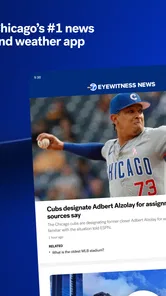
When it comes to keeping up with the latest news, ABC7 Chicago is your go-to app for staying informed with everything happening in the Windy City and beyond. Whether you’re a local or just have a keen interest in Chicago news, this app has got you covered with its comprehensive coverage and user-friendly interface.
How it earns a place in your first week
For a Chicago resident, the appeal is easy to understand: one place to check local coverage, weather, and breaking alerts instead of opening several sources. I’d start by choosing only the alerts I genuinely need. A focused setup makes the first few days useful without letting every headline compete for attention. If you’re new to the area, the local emphasis can also help you follow stories that a national news app may treat as a brief mention.
A practical routine is to open the app when planning the day, scan the latest local stories, then check weather before deciding whether to walk, drive, or bring an extra layer. During a developing local story, alerts can bring a timely nudge; I’d still open the article or stream for context rather than treating a notification as the whole story. That distinction matters when a short alert leaves out the details that affect your plans.
What a useful first week looks like
I’d judge the early experience by whether it helps with a real decision, not by how many times I open it. For example, if I’m visiting Chicago, I can check local headlines before heading out, then return to weather coverage when plans depend on conditions. A resident might instead use a morning check to spot neighborhood or citywide developments. These routines give the app a job; browsing without a purpose can make even relevant coverage feel like one more feed to clear.
One practical habit is to separate urgent alerts from stories I can read later. If a notification arrives while I’m driving, working, or in a conversation, I don’t need to act on it immediately unless it changes something I’m doing. I can make a note to check the app at a natural pause. That keeps timely coverage available without turning every phone buzz into an obligation.
A Comprehensive News Source
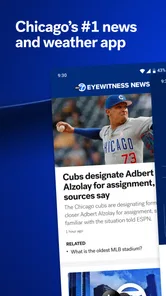
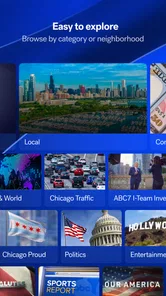
The first thing I noticed about the ABC7 Chicago app is how well-organized it is. The app offers a plethora of news categories including local news, weather, sports, and even entertainment. You can easily navigate through different sections, making it super convenient for users like me who want quick access to specific news stories.
Stay Updated with Real-Time Alerts
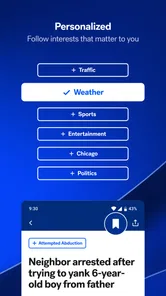
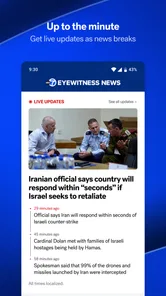
One of the standout features of this app is the real-time alert system. Now, I know what you're thinking, "Another app with notifications?" But trust me, these alerts are lifesavers. Whether it’s a weather update or breaking news, you’ll know what’s happening as it unfolds. The alerts are customizable too, so you only get notified about the topics you care about.
More From Our News Desk

Weather by Xiaomi Review: Clear at a Glance, Less Clear Up Close

X Under Pressure: Can It Recover When Posting Goes Wrong?

Clash of Clans Is Won Between the Battles

Android Auto Makes the Case for Quieter Car Software

MobiOffice: Transforming Mobile Productivity with Seamless Integration

EA SPORTS FC™ Mobile Soccer: Redefining Mobile Sports Gaming
Weather Forecasts That Matter
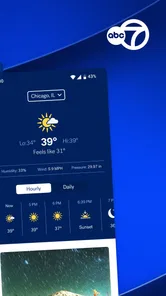
Living in a city where the weather can change in the blink of an eye, having accurate weather forecasts is crucial. The app provides detailed weather updates, including hourly and 7-day forecasts, which I find incredibly helpful. You can even watch live weather reports, which adds a personal touch to the whole experience.
Video Content for On-the-Go Viewing
If you’re someone who prefers watching the news rather than reading it, the video section will be your favorite spot. The app offers a variety of video clips from news reports to special features, and you can watch them directly within the app. It’s perfect for when you’re on the go and need a quick news fix.
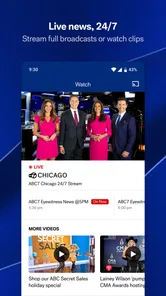
Another cool thing is the live streaming feature. You can watch live broadcasts of the news channel, which is great when you want to catch up with what’s happening live. This feature really makes you feel connected, no matter where you are.
Making video and live coverage work for you
Video is most useful when listening is easier than reading: I might play a report while getting ready or use a short clip to catch the main points between errands. Live streaming suits a different moment, such as checking in when a major local event is unfolding. I wouldn’t make it my default for every update, though. Reading is often quicker when I only need a specific fact, while a stream asks me to give it more time and attention.
That makes the app a different proposition from a broad news aggregator. Aggregators can be better when I want several publishers’ takes side by side; ABC7 Chicago is more appealing when I want a local newsroom’s reports and broadcasts in one place. If your main interest is national or international coverage, a wider-ranging news app will likely be a better everyday home, with this one reserved for Chicago stories.
Small workflow choices that improve the experience
I’d use the app in short, purposeful visits rather than trying to make it a continuous background feed. A quick scan of local coverage in the morning can help me decide what deserves more time, while video or a live broadcast fits a moment when I can listen and follow along. If I’m only checking one detail, reading is the more efficient choice. Matching the format to the moment is a simple way to get value without letting news consume the day.
For weather, I’d check conditions close to the time they matter instead of assuming a forecast looked at earlier will answer every later question. A forecast is useful planning context, but it can’t decide whether a particular trip is comfortable or sensible for me. I’d use it alongside my own plans and check again when the day changes. The live weather reports add another way to follow conditions, especially when a spoken explanation is easier to take in than a screen of details.
User Experience and Design
The user interface is sleek and intuitive, making it easy for anyone to use. I appreciate the clean design which doesn’t overwhelm you with too much information at once. Plus, the app runs smoothly without any noticeable glitches, ensuring a seamless user experience.
Keeping the habit useful month to month
The longer-term value comes down to whether Chicago news is part of your regular life. I’d keep the app if local headlines and changing weather affect my commute, family plans, or neighborhood. If I only want occasional national headlines, it may not earn a permanent spot; a general news source would cover more ground. A useful check after the novelty wears off is whether I’m opening it for a specific reason, rather than tapping through out of habit.
Maintenance is light in concept but still worth doing: revisit notification choices when they start to feel noisy, and use the app deliberately rather than letting every alert interrupt the day. Breaking news can be valuable, but too many interruptions can make me mute everything, including the weather updates I actually want. I’d keep only the alerts that change what I need to know or do, then visit the app when I have time for fuller coverage.
A realistic routine for busy days
Imagine I’m getting ready for work and deciding whether to take an umbrella or leave extra time for the trip. I can check the weather first, scan local headlines for anything likely to affect the day, and save a longer video or live report for a break when I can pay attention. If a breaking alert arrives during a meeting, I can wait until the meeting ends and open the story for context. That routine makes the app useful without expecting it to replace careful planning or other sources.
For someone who follows Chicago from outside the city, the same workflow can be useful in a different way: check in when a local story matters to family, travel, or personal interest, rather than keeping every alert enabled. Visitors can use local reporting and weather as part of trip planning, but should not assume a city-focused news app will answer every practical travel question. It is best treated as a news source, not a substitute for a dedicated tool when a specific task calls for one.
Who will appreciate it, and where it can tire you
ABC7 Chicago is best suited to people who live in or closely follow the Chicago area and want local reporting, weather, and video in a single app. Visitors may find it helpful while planning a stay or tracking conditions, but someone who rarely cares about Chicago news is unlikely to get lasting value from a city-focused source. The main trade-off is focus: that local identity is a strength for relevant stories and a limitation if you want a broad, balanced feed spanning many regions and publishers.
Notifications can also create fatigue if every breaking item feels urgent. I’d treat them as prompts, not a complete briefing, and open the app when a headline deserves context. For routine browsing, a quick check of the sections you care about is more sustainable than expecting the app to deliver every kind of news. And when you need a range of viewpoints, pairing local reporting with another source is a sensible approach.
When another news option is a better fit
If I want to compare how different outlets frame a national story, a multi-publisher aggregator is the more natural choice because its purpose is breadth rather than one local newsroom’s perspective. If I want a broad overview of events far beyond Chicago, a general news app is also likely to serve me better as my main daily source. ABC7 Chicago makes more sense as a focused companion in those cases, or as the primary choice when local coverage is what I actually need.
It may also be the wrong fit for someone who avoids video and notifications and only wants a text-only list of headlines. The app’s mix of reporting, weather, clips, and live coverage is most useful when those formats match how I follow local news. I’d try it if Chicago stories matter, then keep it only if I find myself returning for information that other sources don’t make as convenient for me.
In conclusion, the ABC7 Chicago app is a must-have for anyone wanting to stay informed about news in Chicago. With its comprehensive news coverage, real-time alerts, and user-friendly design, it’s clear that this app was made with the user in mind. So, if you haven’t already, go ahead and download it to keep your finger on the pulse of all things Chicago!
My long-term verdict
As a free news and magazines app from Disney, it has a low barrier to trying it, and its 4.1 average from around 13,000 ratings suggests many users find a reason to keep it around. It has more than 500,000 installs, and its Everyone 10+ age rating makes it suitable for a broad audience while still signaling that news content may call for some judgment from parents. It first appeared in May 2013, so its basic promise is not a passing novelty: the lasting question is whether local coverage is useful in your own routine.
I’d recommend giving it a place on your phone if Chicago is part of your daily life, then tuning alerts to protect your attention. If not, I’d choose a broader news source and return to ABC7 Chicago when local coverage matters. That is the clearest test of its staying power: it earns space through relevant reporting and practical check-ins, not simply because it is another app to open.
ABC7 Chicago Frequently Asked Questions
Is ABC7 Chicago free to download, and what is its age rating?
ABC7 Chicago is free to download, so you can try the app without paying an upfront price. It is rated Everyone 10+, which may help parents decide whether it is suitable for younger users. As with any news app, the stories and live coverage can include serious or upsetting events, so families may want to consider how children use it.
What is ABC7 Chicago and what type of content does it offer?
ABC7 Chicago is a comprehensive news application that offers real-time local news, weather updates, sports coverage, and special reports from the Chicago area. Users can access live streaming of breaking news and watch on-demand videos of top stories. The app also features interactive radar, allowing users to track weather conditions and receive personalized notifications.
How user-friendly is the ABC7 Chicago app for newcomers?
The ABC7 Chicago app is designed with user-friendliness in mind, providing an intuitive interface that makes it easy for newcomers to navigate. Users can quickly access the latest news, weather updates, and videos with just a few taps. The app also allows for customization, enabling users to set their preferences for news alerts and topics of interest, ensuring a personalized experience.
Does the ABC7 Chicago app support live streaming, and what are the requirements to access it?
Yes, the ABC7 Chicago app supports live streaming of news broadcasts, allowing users to watch live coverage of breaking news and events as they happen. To access live streaming, users need a stable internet connection, either through Wi-Fi or mobile data. The app is optimized for both Android and iOS devices, ensuring a seamless viewing experience across platforms.
Can I receive personalized weather alerts through the ABC7 Chicago app?
Absolutely! The ABC7 Chicago app provides personalized weather alerts that can be customized according to your preferences. Users can set alerts for specific weather conditions, such as severe storms or temperature changes, ensuring they stay informed about local weather developments. The app's interactive radar feature further enhances the user experience by providing detailed weather maps and forecasts.
Pros
- User-friendly interface with easy navigation.
- Real-time news updates for quick information.
- High-quality video streaming available.
- Customizable news alerts for preferences.
- In-depth weather forecasts and radar.
Cons
- Requires stable internet for optimal use.
- Limited offline content availability.
- Push notifications can be overwhelming.
- Some ads may interrupt the experience.
- Occasional app crashes reported.













