ABC7 Bay Area
- 1.57K
- 4.1
- Installs
- 100.00K
- Price
- Free

Screenshots




Analysis by Reviewed
When local news matters, I usually want something quicker than opening a full website and sorting through every section. ABC7 Bay Area is built around that simpler need: it brings ABC7 Bay Area coverage, live news streaming, breaking-news notices, and weather alerts into a mobile app. I found it most useful as a quick check-in tool rather than as a complete replacement for every other news source.
That distinction is important. This is a free news and magazine app from Disney, aimed at people who want local information without paying for access. Its audience is broad, and the Everyone age rating makes it suitable for general household use. The app has been available since May 17, 2013, and its average rating sits at 4.1 from around 4.6 thousand ratings, which suggests a generally positive experience with some room for frustration depending on the device, connection, and notification habits.
What ABC7 Bay Area is actually good at
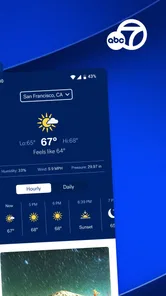
My favorite use for the app is the short, repeated visit. I can open it while getting ready for work, check whether a developing story affects my route, and look at weather information before leaving. That is a better fit than sitting down for a long news session. The combination of live ABC7 coverage and personalized breaking-news and weather alerts gives the app a clear local purpose.
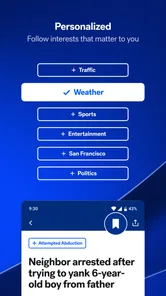
The word “personalized” is meaningful here because alerts can become either genuinely useful or irritating. If I allow every notification, a busy news day can make the phone feel noisy. If I turn everything off, I lose one of the app’s main advantages. I recommend starting with only the alerts that affect everyday decisions, especially weather and major breaking events, then adjusting after a few days of normal use.
It also works well for someone who follows the Bay Area from a distance. A former resident, a family member checking on local conditions, or a commuter moving between cities may prefer a local broadcaster’s perspective over a national news application. The app’s value is not that it covers everything happening everywhere; it is that it keeps attention on the Bay Area.
Where people commonly get stuck
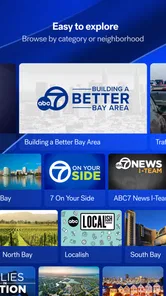
The first point of friction is deciding what the app should do after installation. Some people expect a news app to be useful immediately without changing anything. In practice, the experience depends heavily on how you handle alerts and how quickly you identify the sections you actually care about. If the opening screen feels crowded, I would spend a few minutes testing the available navigation instead of judging the whole app from the first glance.
Another common stumbling block is confusing a live stream with an on-demand library. Live news is tied to what is being broadcast at that moment, while written stories and alerts serve a different purpose. If I open the app expecting every previous broadcast to be waiting for me, I may come away disappointed even though the live-news function itself is working as intended.
More From Our News Desk

Weather by Xiaomi Review: Clear at a Glance, Less Clear Up Close

X Under Pressure: Can It Recover When Posting Goes Wrong?

Clash of Clans Is Won Between the Battles

Android Auto Makes the Case for Quieter Car Software

MobiOffice: Transforming Mobile Productivity with Seamless Integration

EA SPORTS FC™ Mobile Soccer: Redefining Mobile Sports Gaming
Connection problems can also look like app problems. A stream may pause while a written alert still loads, or a weather update may appear before video becomes usable. Those are different demands on the phone and network. I find it more useful to test each part separately: open a written story, check whether alerts arrive, and then try live video. That quickly shows whether the issue is broad or limited to streaming.
The most useful habit is to separate notification trouble, content loading, and live video trouble instead of treating them as one failure. That simple distinction saves time and prevents unnecessary reinstalling.
Setup checks that make the first session smoother
After installing ABC7 Bay Area, I would begin with a stable connection and enough time to look through the app calmly. A rushed setup often leads to accidental notification choices. If you are on mobile data, remember that live video can be more demanding than reading a headline or opening a short article. For a first test, Wi-Fi is the sensible choice because it removes one variable.
Next, decide what you want from the app. If you mainly want urgent local information, focus on breaking news and weather alerts. If you plan to watch live coverage, test that separately when your connection is reliable. If you only need occasional headlines, you may prefer a quieter notification setup and manual visits instead of allowing every alert.
I also recommend checking the phone’s notification controls after making choices inside the app. There are often two layers to manage: the app’s own preferences and the operating system’s permission for notifications. If alerts do not appear, either layer may be responsible. Turning notifications on in only one place may not be enough, while disabling them at the phone level can override the app’s settings.
For weather-related use, location expectations deserve attention. A local news application can provide Bay Area coverage, but that does not automatically mean every weather notice will match the exact neighborhood where you are standing. I would read the wording of an alert and compare it with the area it describes before making a travel or safety decision. The app is useful for awareness, but it should not be the only source for urgent instructions.
There is also a practical privacy trade-off whenever an app offers customized alerts. I prefer to grant only the access that supports a feature I genuinely plan to use. If I do not need location-based convenience, I would rather rely on manually selected local information. That keeps the setup simpler and makes it easier to understand why a particular alert appears.
A recovery workflow when something fails
When the app does not load correctly, I start with the least disruptive checks. I close and reopen it, confirm that other apps can reach the internet, and try switching between Wi-Fi and mobile data if both are available. If written content loads but live video does not, I do not immediately delete the app. I first treat it as a streaming or connection issue.
If alerts are missing, I check whether notifications are enabled both inside the application and in the phone’s settings. I also consider whether the phone is using a battery-saving or focus mode that delays notifications. These checks are general, safe steps and do not change personal content or remove anything. They are preferable to repeatedly reinstalling the app without knowing what failed.
For a frozen screen, a full app restart is a reasonable next step. If the problem continues, restarting the phone can clear a temporary system issue. I would then make sure the app and the phone are running normally before testing again. Keeping the operating system current is useful, but I would avoid installing unofficial versions or searching for questionable fixes that promise to alter the app.
Reinstalling should be a later step, not the first response. It may clear a local installation problem, but it can also reset choices and force you to configure alerts again. Before doing it, I would note the notification preferences I want so the second setup is quicker. If the same problem appears immediately after a clean installation, that points away from a simple corrupted local file.
One of my more useful troubleshooting habits is to test at two different times. A temporary interruption affecting live coverage can look like a permanent defect if I only try once. If articles and alerts work normally but the stream fails repeatedly across different connections and times, the problem is more specific. If nothing loads anywhere, the phone or network deserves attention first.
When the app is not the cause
News apps depend on more than the application installed on the phone. A weak signal, congested Wi-Fi, restricted background activity, or an aggressive battery mode can all interfere with timely updates. Notifications are especially sensitive because the phone may delay background activity to save power. If an alert arrives late, I check those system behaviors before blaming the news service.
Live video has another limitation: it is more sensitive to connection changes than text. A person traveling through areas with inconsistent reception may see pauses that disappear once the signal improves. Lowering other network activity in the home can help, but I would not assume that every buffering incident means the application is broken.
There is also a human factor. If the app sends too many notices, the problem may be the chosen alert mix rather than the quality of the information. I would reduce the categories that are not useful instead of disabling everything. On the other hand, if a user needs guaranteed emergency communication, a local news app should supplement—not replace—official emergency channels and direct instructions from local authorities.
Device age and available storage can matter as well. A phone that struggles with other video applications may not provide a smooth live-news experience here either. Testing another video service can help reveal whether the issue is specific to ABC7 Bay Area. This comparison is more informative than judging performance from one isolated stream.
How it compares with ordinary alternatives
Compared with visiting the ABC7 website in a browser, the app is more convenient for repeated checks and alerts. A browser is often better when I want to search broadly, keep several sources open, or avoid adding another application. The app makes more sense when local updates are part of my daily routine.
Compared with a national news app, ABC7 Bay Area is narrower but more relevant for Bay Area decisions. National services can provide wider context and more varied coverage, while this app keeps local news and weather closer at hand. I would choose the local app for commuting, neighborhood awareness, and regional developments, then use a broader source when I want national or international context.
Compared with social media, the app offers a more focused route to local reporting and alerts. Social platforms may surface information faster, but they also mix reliable updates with speculation, reposts, and arguments. I prefer using ABC7 Bay Area as a first local checkpoint, then looking elsewhere when I need multiple perspectives or deeper background.
Compared with a dedicated weather application, it is a convenient all-in-one option but not necessarily the best tool for detailed forecasting. Someone who needs specialized maps, long-range planning, or highly granular weather information may be better served by a weather-focused app. The strength here is combining weather awareness with local news rather than replacing every specialized tool.
Who should use it, and who should skip it
I would recommend ABC7 Bay Area to Bay Area residents who want quick local updates, commuters who care about changing conditions, and families who prefer a familiar local broadcaster. It is also a sensible choice for people who do not want to build a complicated news routine. The free price removes a major barrier, and the Everyone rating makes it easy to consider for shared household use.
I would be more cautious about recommending it to someone who wants a complete national news reader, a deep archive of every past broadcast, or highly specialized weather tools. It is also not ideal for a person who dislikes notifications and will never adjust them. The app can remain useful with alerts disabled, but that removes one of its most convenient reasons to install it.
People with unreliable internet should set expectations around live video. Written updates may be more practical than streaming in that situation. Likewise, anyone who needs information from several regions at once may find a broader news aggregator more efficient. The right choice depends less on the app’s general quality than on whether local Bay Area coverage is the main goal.
My practical verdict
After using ABC7 Bay Area as a local check-in tool, I see its strongest value in the space between a browser visit and a full news-watching session. It gives me a direct way to follow Bay Area developments, test live coverage, and receive breaking-news or weather information without paying for the app. The experience is most satisfying when I configure it deliberately rather than accepting every option automatically.
Its weaknesses are mostly tied to expectations and conditions. Live video depends on a capable connection, alerts require sensible phone settings, and a local app cannot replace a national source or official emergency communication. Those are important limitations, but they do not undermine its central purpose.
With more than one hundred thousand installs, ABC7 Bay Area has clearly found an audience, and its 4.1 average shows that many users consider it dependable enough for everyday local news. I would install it if Bay Area information affects my routine, especially if I want weather and breaking updates in one place. I would skip it only if I need broader coverage, advanced weather analysis, or a completely notification-free experience. For the right user, the best approach is to keep the alert setup selective and use the app as a fast local signal, not as the only source of truth.
ABC7 Bay Area Frequently Asked Questions
Is ABC7 Bay Area available for both Android and iOS?
ABC7 Bay Area is a news app for mobile devices, designed to bring local coverage and updates to your phone. Before downloading, check its listing in the app store for your device to confirm compatibility and the current version. The app is free, and its focus is the San Francisco Bay Area, so it is most useful for people following news and events in that region.
Who develops ABC7 Bay Area, and what kind of app is it?
ABC7 Bay Area is developed by Disney and belongs to the News & Magazines category. Its short description is simply “ABC7 Bay Area,” while its main appeal is access to local reporting and live news. If you regularly follow Bay Area developments, it offers a mobile way to keep up with coverage rather than relying only on television or a desktop browser.
What is the ABC7 Bay Area app used for?
The ABC7 Bay Area app provides local news, breaking updates, weather forecasts, traffic information, sports coverage, and video reports for communities across the San Francisco Bay Area. During major events, it can also offer live coverage, alerts, and developing stories. It is designed for users who want quick access to regional information without relying only on television broadcasts or a desktop website.
Does ABC7 Bay Area provide live news and video streaming?
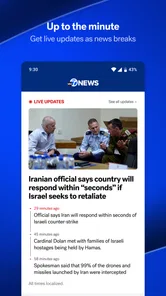
Yes, the app may provide live newscasts, breaking-news streams, video clips, interviews, and extended coverage when ABC7 is broadcasting special reports or important local events. Availability can depend on your location, broadcast schedule, internet connection, and licensing restrictions. Some content may be available on demand, while certain live streams may require an eligible television-provider login or may only appear during specific broadcasts.
Can I receive breaking-news, weather, and emergency alerts?
ABC7 Bay Area can send notifications about breaking news, severe weather, traffic disruptions, public safety issues, and other important regional developments. Alerts are useful when you need immediate information, but you can usually manage them through the app or your device settings. Before downloading, remember that frequent notifications may affect your attention and battery usage, so select only the alert categories that matter to you.
Pros
- Fast access to breaking Bay Area news and local updates.
- Live newscasts help users follow major stories as they happen.
- Weather forecasts include useful regional conditions and alerts.
- Video reports provide more context than short text headlines.
- Covers local communities
- traffic
- sports
- and public safety topics.
Cons
- Some content may require a stable connection or load slowly on mobile data.
- Frequent breaking-news notifications can feel excessive for some users.
- Coverage is focused on the Bay Area and may feel limited elsewhere.
- Advertising can interrupt browsing and video viewing.
- Certain features may depend on location permissions and device compatibility.













