ABC13 Houston
- 5.57K
- 4.1
- Installs
- 500.00K
- Price
- Free

Screenshots


Analysis by Reviewed
When it comes to staying updated with the latest news in Houston, the ABC13 Houston app is a go-to source for many of us. Whether you're a native Houstonian or a newcomer, this app provides a comprehensive insight into what's happening around town. Let me take you through my experience with it.
All About Keeping You Informed
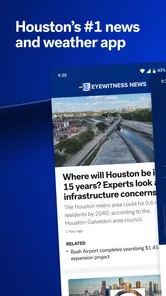
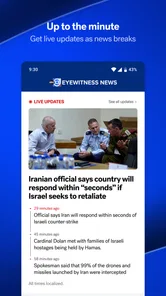
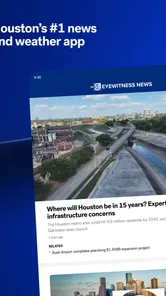
The first thing I noticed about the ABC13 Houston app is its user-friendly interface. It's like having a personal news assistant right at your fingertips. The homepage is neatly organized, making it easy to find the latest headlines, weather updates, and live streams. You know how sometimes you just want to catch up on the news without too much hassle? Well, this app gets it right.
Breaking News and Alerts
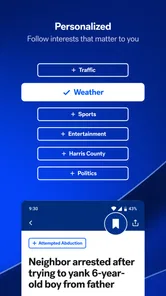
One of the standout features is the breaking news alerts. You can customize these alerts to ensure you only receive the news that matters most to you. I personally love this feature as it keeps me informed without overwhelming my phone with constant notifications. It's a real game-changer for anyone who wants to stay updated but doesn't want to deal with information overload.
Weather Updates
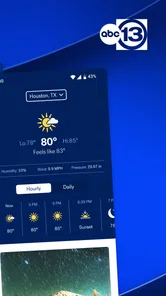
Living in Houston, we all know how unpredictable the weather can be. The app offers detailed weather forecasts, complete with radar images, which is perfect when you're planning your day or preparing for potential storms. You can even check out the video forecasts if you're in a rush and need a quick update. It's like having your own personal meteorologist in your pocket.
Live Streaming
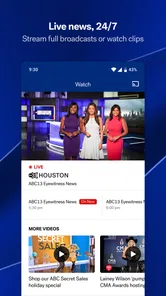
For those moments when you want to watch the news as it happens, the live streaming feature is a huge plus. Whether it's a local event or a major news story, you can catch it all live without needing to be near a TV. I found this particularly handy during the last hurricane season when staying informed was absolutely essential.
In terms of performance, the app runs smoothly with minimal lag. The videos load quickly, and the articles are easy to scroll through. I did notice a few ads here and there, but they're not intrusive enough to detract from the overall experience.
A Routine That Makes Local Coverage Useful
I get the most value by treating the app as a quick local check-in rather than trying to read every headline. In the morning, I scan the main stories, then look at the forecast before deciding whether to leave extra time for a wet commute. Later, I rely on alerts for items that may affect my plans, instead of reopening the app every few minutes. That simple routine makes the feed feel more manageable and keeps local information close at hand.
More From Our News Desk

Weather by Xiaomi Review: Clear at a Glance, Less Clear Up Close

X Under Pressure: Can It Recover When Posting Goes Wrong?

Clash of Clans Is Won Between the Battles

Android Auto Makes the Case for Quieter Car Software

MobiOffice: Transforming Mobile Productivity with Seamless Integration

EA SPORTS FC™ Mobile Soccer: Redefining Mobile Sports Gaming
For example, if rain is expected while I am arranging errands, I can check the radar before choosing when to drive, then return to the news feed if a major local update appears. The useful habit is to separate a deliberate check from an interruption: weather is something I can look up when planning, while an alert is most helpful when the news is time-sensitive. This approach is especially practical for people who want Houston coverage without letting notifications dictate their day.
Settings and Notification Trade-Offs
It is worth spending a little time deciding which alerts deserve a place on your phone. A broad stream of breaking updates can become noisy, even when every individual notification is relevant to somebody. I would begin with the subjects I genuinely need to hear about promptly, then adjust if I find myself dismissing alerts without reading them. The goal is not to receive the most news; it is to notice the local developments that could change what I do.
Weather information also works best as one part of a decision, not a guarantee. I use the radar and forecast to get a sense of conditions, then check again if the plan is important or the weather is changing. For a major storm, I would not depend on a single news app as my only source of instructions; official emergency communications are the better authority for immediate safety decisions. ABC13 is useful context, but knowing which source to trust for which question matters.
Where It Fits Among News Options
Compared with a national news app, ABC13 puts the emphasis on Houston-area coverage and local weather, which is the reason I would keep it installed. A general news service can give a broader view of national and international stories, but it may not be as convenient when I want a nearby update or a local forecast. On the other hand, someone who lives outside the area or mainly wants a wide-ranging national briefing may find a national outlet or a general aggregator a better everyday fit.
The app is free and is published by Disney. It has an Everyone age rating, an average rating of 4.2 from around 18,000 ratings, and more than 500,000 installs. Those figures suggest that it has found an audience, but they do not tell me whether its Houston-focused coverage matches every reader’s needs. I would judge it by whether the local stories and alerts are useful to your own routine.
Who Should Keep It Close
I would recommend it most to Houston residents, commuters, and people with family or regular plans in the area who want local headlines, weather, and live coverage together. It can also help a newcomer learn which local issues are shaping the day. If you only want occasional updates, opening it for a quick scan may be enough; there is no need to turn every feature into a daily habit.
It is less suited to readers who want a neutral, all-in-one view of many regions, or who prefer to build a news routine around several independent sources. A local broadcaster’s app naturally centers its own market and presentation, so I would pair it with other reporting when a story calls for wider context. That is a sensible trade-off, not a reason to expect one local app to cover everything.
Making the Most of the App
One practical pattern is to check the forecast before a commute, read the headlines during a planned break, and reserve notifications for updates you would want to know about while away from the screen. If you are following a developing local event, the live stream can be useful when you want to watch rather than piece together updates from separate articles. When the situation is no longer urgent, returning to written coverage is often easier for catching details at your own pace.
There are limits to that convenience. A live video needs a suitable moment and connection, while an alert can interrupt whatever you are doing; neither replaces a calm, focused read. Ads are part of the experience, and readers who want an entirely distraction-free feed may prefer another way to follow local reporting. I would also avoid treating a quick headline or forecast glance as a complete account when the decision has real consequences.
Daily Decisions Beyond the Morning Check
The app is most useful when I give each part a job instead of expecting one screen to answer every question. A commute check is about whether weather might affect timing; a breaking alert is about whether a local development needs my attention; a live stream is for moments when seeing a report unfold matters more than reading at speed. Keeping those purposes separate helps me choose the right format and avoid opening the app repeatedly without a clear reason.
For a realistic weekday, I might look at the forecast before leaving home, silence or dismiss updates that are not relevant to my plans, and return at lunch for a more deliberate look at local headlines. If an alert arrives while I am working, I can decide whether it changes anything now or can wait until a break. That small pause is useful: the presence of a notification does not automatically mean the story requires immediate action from me.
How to Build a More Reliable Local-News Habit
One non-obvious advantage of combining a planned check with selected alerts is that it gives the app a predictable place in the day without turning it into a constant feed. I would avoid using notifications as a substitute for checking the weather before an important trip, because a forecast glance is an active task and an alert is only an interruption when something is flagged. Conversely, I would not keep reopening the app just to see whether a developing story has changed; that is where a relevant alert can save time.
If I am following a complex local story, I also try to distinguish a quick update from a full understanding. A headline can tell me that something has happened, while an article or live report may give more context. For a decision that affects family, travel, or safety, I would pause and compare the reporting with the appropriate official guidance rather than assume that a short notification contains all the details. This is a sensible way to use local journalism without asking it to function as an emergency authority.
Who May Prefer Another Kind of App
ABC13 Houston is a better match for people whose routines are tied to the Houston area than for someone who needs one app to follow several cities. A person who has recently moved to Houston may appreciate having local headlines and weather in one place, while a visitor might only need it during a short stay or when checking conditions around a specific plan. If your main interest is national or international reporting, a broader news app will probably serve as the better home screen choice, with this one as a local companion when Houston matters.
There is also a difference between wanting local coverage and wanting an independent overview. A station-focused app makes sense when I want to follow that outlet’s Houston reporting conveniently, but I would not treat it as a replacement for every perspective on a consequential issue. Readers who value comparison can use it as one part of a small, intentional mix: local reporting for nearby developments, broader outlets for wider context, and official sources for instructions that require authority.
Small Trade-Offs That Affect Everyday Use
Free access makes it easy to try the app without making it the center of your news routine, but advertising is part of the experience. I would judge that trade-off by how often I use the local coverage, not by expecting a news app to feel like a paid, ad-free reading space. If ads or video are unwelcome when I am trying to read quickly, I can choose a quieter moment or another source for that particular check rather than forcing the app into every situation.
Likewise, radar and video forecasts are helpful formats, not promises that conditions will unfold exactly as expected. I treat them as planning aids and leave room to check again when weather is changing or a trip is important. That is especially relevant in a place where weather can affect an ordinary errand as well as a larger plan. The practical benefit is not perfect certainty; it is having local information ready when I need to make a better-informed choice.
What the App Does Best—and What It Leaves to You
The strongest case for keeping ABC13 Houston installed is the combination of local news, weather information, alerts, and live coverage in a single place. It reduces the effort of jumping between a general headline app and a separate weather check when all I want is a quick sense of what is happening nearby. Its value depends on location, though: if Houston is not part of your daily life, the local focus becomes a limitation rather than a benefit.
For me, the best approach is to customize notifications with restraint, check forecasts when making plans, and use live video selectively when watching has a clear advantage over reading. I would not expect it to replace a broad news service, official emergency guidance, or careful reading on a complicated issue. Used for the job it is suited to, it is a practical local companion rather than an all-purpose answer to every news need.
In conclusion, if you're in Houston and want a reliable, user-friendly news app, give ABC13 Houston a try. It's packed with features that cater to all your news needs, and it's designed to keep you informed without the fuss. It's like having a complete news channel right in your hand!
ABC13 Houston Frequently Asked Questions
What kind of news app is ABC13 Houston, and who might find it useful?
ABC13 Houston is a News & Magazines app for people who want news and weather updates connected to Houston. Its store summary highlights breaking news and alerts that can be customized for you, making it a potential fit for readers who want local information on their phone. It is published by Disney and has an Everyone content rating.
How much space does ABC13 Houston take up, and will it work on my device?
Before downloading ABC13 Houston, check its app-store page on your device for the current compatibility and storage details. Those can vary by phone, operating system, and app version. The app is available for Android and iOS, so users on either platform can look for it in the appropriate store and confirm that their device meets the listed requirements.
Is ABC13 Houston suitable for readers who want local news rather than general-interest coverage?
ABC13 Houston is a news app focused on keeping users informed about the Houston area. Its store summary highlights breaking news and weather, with alerts that can be customized for you. It may suit readers looking for local updates on their phone, while the app’s News & Magazines category signals that its main purpose is news and information.
What is the primary purpose of the ABC13 Houston app?
The ABC13 Houston app is designed to provide users with comprehensive news coverage for the Houston area. It offers real-time updates on local news, weather forecasts, traffic alerts, and sports events. The app's primary purpose is to keep users informed about what's happening in their community, allowing them to stay connected with the latest developments and make informed decisions.
Is the ABC13 Houston app free to download and use?
Yes, the ABC13 Houston app is free to download and use on both Android and iOS devices. Users can access a wide range of features without any cost, including live streaming of news broadcasts, breaking news alerts, and detailed weather forecasts. However, users should be aware that data charges may apply depending on their mobile carrier and plan.
Pros
- Live streaming of local news
- User-friendly interface
- Real-time weather updates
- Customizable notifications
- In-depth investigative reports
Cons
- Occasional app crashes
- Ads can be intrusive
- Limited national news coverage
- Requires internet connection
- Some features need improvement













