ABC 7 New York
- 6.44K
- 4.2
- Installs
- 1.00M
- Price
- Free

Screenshots

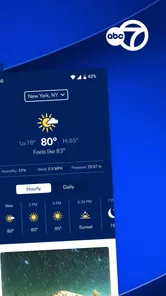
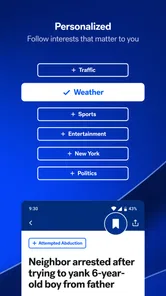

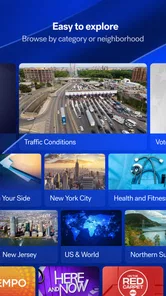
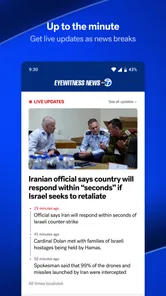


Analysis by Reviewed
When I first open ABC 7 New York, I think of it as a local news companion rather than a general-purpose news reader. It is a free News & Magazines app from Disney, aimed at people who want New York-area coverage in one place. Its live video, news updates and weather focus make it most useful when I want a quick sense of what is happening nearby, not when I am looking for a broad roundup of national or international reporting.
What to expect from a local news app
The app has an average rating of 4.3 from around 21,000 ratings, and it has been installed over 500,000 times. Those figures suggest it has found an audience, but the more important question is whether a New York-focused feed matches your routine. If you live in the area, commute through it, or have family and work interests there, local reporting can be more immediately relevant than the headlines in a national news app. If you rarely need New York updates, the narrow focus may make it less useful as your main news source.
That local emphasis changes what I would use it for. I would open it when a city-wide issue could affect a route, a neighborhood, or plans with friends, rather than expecting it to replace every publication I read. A regional app can be especially handy for people who have moved away but still follow the city closely; it gives their routine a local point of reference without requiring them to search across several unrelated feeds.
Starting out without overthinking setup
I would begin by opening the app and deciding what I actually want from it: a quick scan of local headlines, live coverage, weather information, or alerts for stories I care about. The app is rated for Everyone, so it is intended for a broad audience. Rather than enabling every notification at once, I would choose only the updates likely to matter during my day. That small bit of restraint can keep breaking-news alerts useful instead of turning them into background noise.
One practical tip is to treat alerts as a pointer, not the whole story. A notification can tell me that something is developing, while opening the app gives me a chance to read or watch more before I decide what it means for my plans. For a first-time user, that is a sensible way to test whether the app’s local coverage and alert choices fit without committing to constant interruptions.
If I am unsure what to enable, I would start with the smallest useful setup: keep the app available for deliberate checks, then allow only the notifications I would actually act on. After a few days, I can judge whether an alert helped me make a decision or merely pulled my attention away. That simple trial is more informative than turning on every option immediately, especially for someone who gets plenty of news from other sources already.
Keeping Up with the Big Apple
The ABC 7 New York app offers a seamless way to stay connected to all the latest news from around the city. From breaking news alerts that pop up just when you need them, to in-depth articles covering everything from politics to local events, it's like having a personal news assistant right in your pocket.
More From Our News Desk

Weather by Xiaomi Review: Clear at a Glance, Less Clear Up Close

X Under Pressure: Can It Recover When Posting Goes Wrong?

Clash of Clans Is Won Between the Battles

Android Auto Makes the Case for Quieter Car Software

MobiOffice: Transforming Mobile Productivity with Seamless Integration

EA SPORTS FC™ Mobile Soccer: Redefining Mobile Sports Gaming
Features that Shine
One of the coolest features of the app is its live video streaming. You can watch live broadcasts and catch up on segments you might have missed. It's like carrying a mini TV with you, but better because it knows what you want to see. Plus, the app's user-friendly design makes navigation a breeze. No one wants to fiddle with complicated menus when you're trying to catch up on the news.
Another highlight is the weather section. Let's face it, New York's weather can be as unpredictable as a plot twist in a soap opera. The app provides accurate forecasts, so you know whether to grab an umbrella or your sunglasses before heading out.
Personalized Experience
What I really love about this app is the personalized alerts. You can customize notifications based on your interests. Want to get updates on local sports events? No problem. Interested in the latest Broadway shows? Done. It's your news, your way.
But hey, it’s not just about reading. The app also features a range of podcasts and audio clips that you can listen to while on the go. Perfect for those moments when you’d rather listen than read.
Making the first check-in count
A realistic first use is to check the local headlines before leaving home, then use the weather information to think through the day’s practical details. If a story develops while you are out, an alert can prompt you to open the live coverage when you have time and a suitable connection. On a commute, audio clips can be a better fit than reading, though I would save anything requiring close attention for when I am not navigating a busy station or crossing streets.
To make that first check-in useful, I would give myself a simple sequence rather than browse without a purpose: scan the local headlines, check the forecast if it affects what I am doing, and open a live report only when I want more context. That leaves me with a clear reason to return and helps me tell whether the app is serving a real need. If the headlines are not relevant that day, there is no need to keep refreshing; a local news app is most helpful when it informs a decision, not when it becomes another feed to monitor.
For example, someone heading from home to a work appointment could use the morning glance to spot a developing local story, then decide whether to check live coverage before changing plans. The app is not a substitute for checking the details that matter directly, but it can bring relevant reporting together in a convenient place. I find that distinction useful: it helps me use news to inform my day without treating a headline as a complete practical instruction.
Choosing it over a broad aggregator
That mix is where this app differs from a standard news aggregator. Aggregators are often better for comparing many publishers or following a broad range of topics; ABC 7 New York is more focused on local reporting and broadcast-style coverage. A general weather app may be more convenient if forecasts are your only concern, while this one makes more sense when weather is one part of staying informed about the city.
The choice depends on what I want from a news app each morning. If I want a cross-section of national and international stories from several outlets, an aggregator is the more natural home. If I want one locally oriented source with a broadcast option, this app has a clearer purpose. I would not expect the two approaches to do the same job: a collection of publishers can offer more breadth, while a focused local app can reduce the work of finding city coverage.
It can also be a useful companion rather than an either-or decision. I might use a broad reader for the wider news agenda and open this app when a New York story deserves local context or when I want to follow live reporting. That division keeps each tool in its lane. For someone who wants to follow only New York, the app may be enough for a regular local check; for someone who wants multiple regions or viewpoints in one place, it is likely too narrow on its own.
Where the experience needs a little judgment
Live video and audio are useful when reading is awkward, but they are not always the best choice in a noisy place, on a limited connection, or when you need information at a glance. In those moments, a short text update is easier to use. I would also be selective with alerts: local breaking news can be valuable, but not every developing story will affect my neighborhood or plans. Personalizing notifications around what I genuinely follow is a better starting point than leaving every category switched on.
One trade-off worth considering is attention. A breaking alert may arrive at a moment when I cannot act on it, and opening a live stream can turn a quick check into a longer interruption. I would keep the app for moments when I can give a report some attention, and rely on a brief headline when I only need a quick sense of the situation. That is not a flaw unique to this app, but its emphasis on live coverage makes choosing the right moment especially important.
Audio has its own practical limits. It can make a walk or a routine task feel like a good time to catch up, but it is less useful when the setting is loud or I need to keep my focus on people and traffic around me. I would treat podcasts and clips as an option for suitable moments, not assume that every story is easier to follow by listening. Having text, video and audio available gives me choices, but it does not remove the need to pick the format that fits the situation.
Weather deserves the same common-sense check. It is convenient to see it alongside city news, especially when I am already opening the app, but if weather is the only thing I need, a dedicated forecast app may take less effort. And when a forecast could affect an important plan, I would use the information as a guide rather than assume one glance settles every detail. The benefit here is the combination of local coverage and weather, not a reason to abandon tools built for a single purpose.
There is a related trade-off in using one local outlet as a daily source. It can make city coverage easy to find, but I would still turn to other sources when I need a wider perspective or want to compare how a major story is being covered. The app works best as a convenient New York-specific layer in my news routine, not as a replacement for every kind of reporting.
Who will get the most from it
I would recommend trying it if New York is part of your everyday life, whether you live there, travel through the city, or keep up with people and events there from elsewhere. It is also a reasonable choice for someone who prefers watching or listening to some coverage instead of reading everything. The strongest fit is a person who wants a local check-in and values having news, weather and broadcast-style material close together.
I would skip it as a primary app if my main goal were to follow several cities, compare many publishers, or keep up with national and international coverage in one broad feed. It may also be more than I need if I only want a forecast or only want written headlines. In those cases, a specialist weather service or a general news reader is a better match, and there is no benefit in adding another app that I would rarely open.
For a first-time user wondering whether the app costs anything or is suitable for a family device, it is free and carries an Everyone age rating. I would still make the choice based on the app’s local focus and on how much screen or listening time suits the household. A broad age rating does not mean every alert is appropriate for every moment, so deciding when notifications are welcome remains part of setting up a comfortable routine.
Final Thoughts
In the ever-bustling world of New York, staying informed is crucial, and the ABC 7 New York app makes it ridiculously easy. Whether you're a local or just someone who loves keeping up with the city's vibe, this app is a must-have. It’s like having the heartbeat of New York in the palm of your hand. So, next time you’re wondering what's happening in the Big Apple, you know exactly where to look.
My recommendation depends on what you expect from it: if local headlines, live coverage, weather and flexible ways to follow updates sound useful, it is worth trying as a free app. If you want a single service to compare national perspectives or cover many cities, a broader news reader is likely a better match. I would start with a quick headline check, set only the alerts I care about, and see whether its New York focus earns a regular place in my day.
That low-pressure approach is the part I would emphasize to a friend: install it for a specific reason, such as keeping up with New York before a commute or following a local story, and give it a few intentional check-ins. If the local angle saves you time or makes you feel better informed, keep it in your routine. If you keep reaching for another source for the coverage you actually want, there is no need to force the fit.
ABC 7 New York Frequently Asked Questions
Is ABC 7 New York free to download?
Yes. ABC 7 New York is free to download, so you can try its news and live Eyewitness News features without paying to install the app. Watching video over a mobile connection may use data from your plan, so it is worth keeping that in mind if you stream while away from Wi-Fi.
What age group is the ABC 7 New York app intended for?
ABC 7 New York is rated for Everyone, making it suitable for a broad audience. It is a news app, so the content can include coverage of current events and breaking stories. Families may want to consider their own preferences about news exposure, but the app’s age rating indicates that it is intended for general audiences.
Can I receive breaking news and weather alerts from ABC 7 New York?
Yes. The app’s short description highlights custom ABC7 breaking news and weather alerts. These can help you keep up with significant news and changing weather without having to open the app and check manually each time. You can decide whether alerts suit your routine and manage notification permissions through your device settings.
Who is the ABC 7 New York app best suited for?
The app is a good fit for people who want news connected to New York, along with access to live Eyewitness News and breaking news and weather alerts. It may also suit readers who prefer having news and weather information in an app rather than relying only on a television broadcast. ABC 7 New York is in the News & Magazines category and is rated for Everyone.
Who develops the ABC 7 New York app?
ABC 7 New York is developed by Disney. The app’s focus is on news for the New York area, with live Eyewitness News and custom breaking news and weather alerts highlighted as key features. If you are considering installing it, the developer name can help you identify the app in your device’s app store and distinguish it from similarly named news apps.
Pros
- User-friendly interface for easy navigation.
- High-quality live streaming and video playback.
- Real-time news updates and notifications.
- Customizable news categories and alerts.
- Available on both Android and iOS platforms.
Cons
- Occasional ads can be intrusive.
- Requires a stable internet connection.
- Limited offline content availability.
- Some features require a subscription.
- App size may be large for some devices.













