6abc Philadelphia
- 7.06K
- 3.9
- Installs
- 500.00K
- Price
- Free

Screenshots


Analysis by Reviewed
I’d treat 6abc Philadelphia as a local-news companion rather than a replacement for every news source I use. It is a free news app from Disney, aimed at people who want Philadelphia-area coverage on their phone, with breaking-news customization and AccuWeather alerts. If you live nearby, commute into the region, or have family and interests there, that local focus can be more useful than a national news feed when the day’s story is happening close to home.
What to expect from a Philadelphia-focused feed
The app’s appeal is its connection to the city and surrounding area: local developments, weather, and community stories sit closer to the center of the experience than they would in a broad news aggregator. That focus is also its main trade-off. If you mainly want international headlines, analysis across many publishers, or coverage of a different city, a general news app will likely serve you better. I would use 6abc for a regional perspective and keep another source for topics beyond its local remit.
Getting started without making alerts noisy
On a first visit, I’d take a moment to decide which breaking-news notifications are genuinely useful instead of accepting every prompt by habit. A phone that buzzes for every developing story can quickly train you to ignore alerts altogether. Customized breaking news and AccuWeather alerts are most valuable when they help answer a practical question—whether a local situation affects your plans, or whether changing weather deserves a second look. You can still open the app when you want a broader catch-up rather than relying on notifications to tell the whole story.
For a first-time user, a simple test is to open the news feed when you have a few minutes, scan the local headlines, and then check whether an alert would have changed what you planned to do. That gives you a sensible basis for deciding how much interruption you want. I find this more useful than turning on every notification and trying to sort out the noise later.
Who should choose a local app over a broad aggregator
For a first meaningful success, I’d pick one practical question before opening the app: what is happening locally that might affect my day? A Philadelphia resident might check for a developing neighborhood story; a visitor could use local reporting to understand an event beyond a short social post; and someone with family in the area may want a nearby perspective when a regional story breaks. That question gives the feed a purpose and makes it easier to decide whether the app deserves a regular place on the home screen.
Compared with a national news aggregator, 6abc has a narrower editorial lens, which is a strength when the news is close to home and a weakness when you want many outlets or viewpoints in one place. Compared with a general weather app, it brings local reporting into the same news routine, while AccuWeather alerts add a weather-focused reason to check in. I would not expect either kind of alternative to do exactly the same job: use this app for Philadelphia context, and turn to a broader source when you need national or international coverage.
A calmer first setup
If you are deciding what to allow during setup, I’d separate the value of receiving alerts from the value of reading the app. Notifications are useful when a timely update could change a plan; they are less useful when every headline feels equally urgent. Start with the alerts that match your routine, then see how they feel over a normal day. You can still check the feed on your own schedule, so keeping notifications limited does not mean giving up access to local coverage.
More From Our News Desk

Weather by Xiaomi Review: Clear at a Glance, Less Clear Up Close

X Under Pressure: Can It Recover When Posting Goes Wrong?

Clash of Clans Is Won Between the Battles

Android Auto Makes the Case for Quieter Car Software

MobiOffice: Transforming Mobile Productivity with Seamless Integration

EA SPORTS FC™ Mobile Soccer: Redefining Mobile Sports Gaming
One helpful habit is to treat an alert as a doorway rather than a complete report. Read the story before relying on a short notification to explain what happened, especially if you are about to change travel plans or share the news with someone else. This simple distinction reduces the risk of acting on a headline without context and makes the app more useful even when you only have a minute to check your phone.
Stay Informed with Real-Time Updates
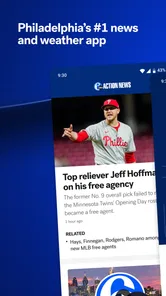
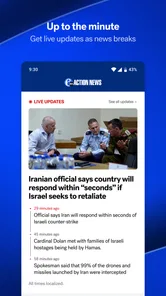
One of the standout features of the 6abc Philadelphia app is its ability to deliver real-time news updates. I’ve got to say, it’s incredibly handy to have local news alerts pinging directly to my phone. With a few taps, I’m able to get the latest on traffic, weather, and even breaking news. And let’s be honest, in today’s fast-paced world, who doesn’t want their news delivered instantly?
Weather and Traffic at a Glance
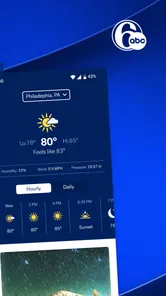
Now, let’s talk about the essentials—weather and traffic. The app provides a detailed weather forecast, which is a lifesaver when planning your day out. Plus, the traffic updates ensure you’re not stuck in the notorious Philly traffic jams. I particularly appreciate the interactive radar feature, helping you dodge those unexpected rain showers.
Using alerts as a starting point, not the whole story
A notification is a prompt to check what is happening, not a substitute for context. If a headline sounds important, I’d open the full story before changing a route or passing information along. In ordinary day-to-day use, I might glance at local news over breakfast, then check again before leaving if weather or a developing event could affect the trip. That workflow makes the app useful without turning every update into an urgent decision.
Making weather information useful in a real routine
For a realistic morning use, I’d check the weather before choosing what to carry, then look at the local news feed for anything that might change the timing or route of a trip. The two checks answer different questions: weather information helps me prepare for conditions, while a news story may provide context about a local disruption. I would still verify a significant travel change through a suitable live navigation or transit service; a news app is useful for awareness, not necessarily a substitute for a route-specific tool.
That distinction matters most when a notification arrives while I am already out. I’d avoid reading while walking through a busy area or driving, and wait until I can safely stop. A timely alert has value only if I can respond sensibly. If I am not in a position to open the story, I can leave it for later rather than letting the notification dictate an immediate decision.
Engaging Video Content
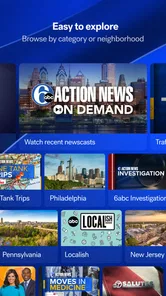
What truly makes this app pop is its video content. From live newscasts to on-demand videos, 6abc Philadelphia ensures you don’t miss any of the action. I found the video quality to be top-notch, making it a pleasure to catch up on the latest segments during my coffee breaks.
Choosing when to watch
Video is a good option when hearing a report feels more helpful than skimming a headline, but it is not always the quickest way to catch up. If I’m in a quiet waiting room, on a short break, or trying not to use sound, I’d stick with reading instead. I’d save a longer video or newscast for a moment when I can give it attention, rather than expecting it to work like a quick text briefing in every situation.
For a first-time viewer, I’d use a short break to sample one relevant report, then decide whether video is a format I’ll return to. A clip can make a local story easier to follow, but it asks for more attention than a headline and may be awkward when sound is unwelcome or connectivity is limited. Reading first and saving video for a convenient moment is a sensible way to avoid turning a quick check-in into a longer session than intended.
Community Connection
Beyond just news, the app fosters a sense of community. It’s not just about headlines; it’s about connecting with what makes Philadelphia unique. From local events to human-interest stories, the app captures the essence of the city.
Who will get the most from it
I’d recommend trying it if Philadelphia is part of your daily life, even if you are not a constant news reader. A commuter can use local updates as one input before setting out; someone with relatives in the area can check in on regional developments; and a former resident may enjoy keeping a connection to neighborhood stories. If you are outside the region and only want broad national coverage, the local emphasis may feel narrow rather than helpful.
The app is rated for Everyone, and it has an average rating of 4.0 from around 23,000 ratings, with more than 7,000 written reviews and over 500,000 installs. Those figures suggest it has found a sizeable audience, though they cannot tell you whether its particular mix of local reporting and alerts suits your routine. I’d judge that by whether its Philadelphia coverage answers questions you actually have.
What the audience numbers can and cannot tell you
The app has been available since May 17, 2013, and its long-running presence gives it a substantial base of users, but popularity is only a starting point when choosing a local source. I’d pay more attention to whether the stories feel relevant to the places and concerns I follow. Its Everyone rating is reassuring for households where different ages may use the same device, while the 4.0 average is best read as broad feedback rather than a promise that every feature will suit every reader.
It is free, so trying it does not require a purchase decision. The more meaningful trade-off is attention: whether the local coverage is useful enough to justify another news app and whether its alerts fit your habits. If I already rely on a broad aggregator, I would keep both only if 6abc adds Philadelphia reporting I routinely miss elsewhere. If that local detail is not relevant to me, another app may be the cleaner choice.
A practical first-day routine
For example, imagine checking the app before a morning trip across the city. I’d scan a local headline, look at the weather information, and use any relevant update as a reason to investigate further—not assume a brief alert contains every detail. Later, I might watch a video report over lunch or browse a community story when I have more time. The useful habit is matching the format to the moment: quick glance for orientation, fuller reading or video when context matters.
If the first visit feels busy, I would not try to explore every part of the app at once. Start with the local feed, find one story that matters to your plans, and use that as a test of whether the coverage is timely and relevant for you. After that, decide whether alerts are worth enabling. This small sequence—browse, follow up, then personalize—keeps setup manageable and gives you a clearer sense of the app’s everyday value.
Another useful way to judge it is to check whether the local focus complements the other sources you already use. If a national app tells you what is happening broadly but leaves you wondering how a story affects Philadelphia, this can fill that gap. If your main concern is comparing several publishers’ interpretations, a multi-source reader will probably be more efficient. I would choose based on the question I need answered, rather than expecting one news app to cover every angle equally well.
All in all, 6abc Philadelphia is more than just a news app; it’s a window into the life of the city. Whether you’re a news junkie like me or a casual browser, this app has something for everyone. So, if you’re keen on staying connected with Philadelphia’s heartbeat, this app is definitely worth a download.
My final take for a first-time user
I’d start with a short visit to the local feed, then keep only the alerts that would genuinely help with my day. That gives the app a fair test without letting notifications take over. Its strongest reason to stay on my phone is the combination of regional reporting, weather-related information, and video; its clearest limitation is that it is built around Philadelphia rather than serving as an all-purpose news desk. If that is the coverage you want, it is a straightforward free place to begin, and the Everyone age rating makes it suitable for a broad audience.
So, who should skip it? I would pass if I wanted one app to deliver a balanced sweep of world news, if I rarely follow Philadelphia, or if I prefer reading a range of publishers side by side. I would also keep alerts restrained if I find frequent breaking-news notifications stressful; the feed remains useful as an on-demand check. For someone who wants a local lens and is happy to use a separate source for wider coverage, the best first step is simple: open it when a real Philadelphia question comes up and see whether the answer is worth returning for.
6abc Philadelphia Frequently Asked Questions
Is 6abc Philadelphia free to download, and are there any costs to use it?
6abc Philadelphia is free to download, so you can try its local news and weather features without paying an upfront price. The app’s core appeal is having Action News, breaking news, and AccuWeather alerts in one place. If you are comparing local news apps, its free price makes it an accessible option to consider before deciding whether it fits your daily routine.
Can I use 6abc Philadelphia to follow news outside the Philadelphia area?
The app is centered on Philadelphia-area reporting and 6abc’s Action News coverage, making it most relevant to people who follow that region. Its breaking news and weather alerts can be useful when events nearby matter to you. If your main interest is news from another city or region, a local app focused there may be a better match for your regular updates.
What kind of app is 6abc Philadelphia?
6abc Philadelphia is a news app for people who want local coverage and updates in one place. It focuses on Action News, breaking news, and weather, with AccuWeather alerts available to help users keep track of changing conditions. It may suit readers who want a dedicated Philadelphia-area news source rather than a general magazine or national-news app.
Who develops the 6abc Philadelphia app, and what is its age rating?
The 6abc Philadelphia app is developed by Disney and is rated for Everyone. That broad age rating can make it suitable for a general audience interested in news and weather, though individual stories may naturally cover serious events. The app’s straightforward local-news focus is useful for households that want to follow what is happening around Philadelphia.
What platforms is the 6abc Philadelphia app available on?
The 6abc Philadelphia app is available for download on both Android and iOS platforms. Users can access it through the Google Play Store for Android devices and the Apple App Store for iOS devices. This ensures that a wide range of users can stay updated with the latest news and events in the Philadelphia area, regardless of their device preference.
Pros
- User-friendly interface for easy navigation.
- Provides real-time news updates.
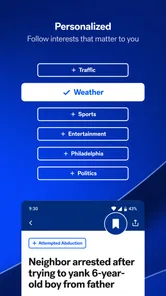
- Customizable notifications for news alerts.
- High-quality video streaming.
- Comprehensive weather updates included.
Cons
- Limited offline content access.
- Occasional ad interruptions.
- Requires stable internet connection.
- No dark mode option available.
- Doesn't support landscape mode.













