Town Building Life Simulator
- 1.18K
- 4.2
- Installs
- 100.00M
- Price
- Free

Screenshots






Analysis by Reviewed
If you’re choosing a town-building game, I’d first ask what you want from the genre: a relaxed place to arrange streets and buildings, or a demanding management game where every decision has detailed consequences. Town Building Life Simulator aims to combine both. In my experience, its appeal is the shift between shaping a town visually and thinking about how its services and resources fit together. That makes it an inviting option when I want a creative project with some strategy, rather than a pure decoration tool.
Choosing the Right Kind of Town Builder
Before installing, I’d think about what makes a building game satisfying for me. If it is seeing a neighborhood take shape, the creative side matters most; if it is optimizing a budget or responding to a complicated chain of needs, I would look for deeper management. This game is most appealing when those motivations overlap. I can make a place that feels like mine, then use the simulation elements to give the design a practical purpose.
That distinction also helps set expectations about session length. I can approach the game in short bursts by choosing one improvement, but a player who wants to min-max every service may prefer to spend longer studying the town’s needs. I would not treat every prompt or challenge as an urgent demand. Picking a single goal makes it easier to enjoy the building without turning a casual break into a checklist.
Getting Started with Your Dream Town
Once you fire up Town Building Life Simulator, you'll find yourself on a blank canvas, ready to be transformed into a thriving metropolis. The app's interface is quite intuitive, with all the tools you need neatly organized at your fingertips. You start small, placing roads and basic buildings. But don't worry, the game offers a handy tutorial that guides you through the basics without overwhelming you.
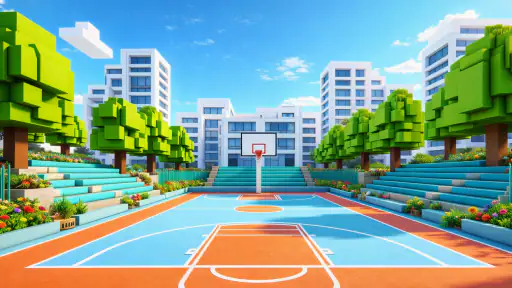
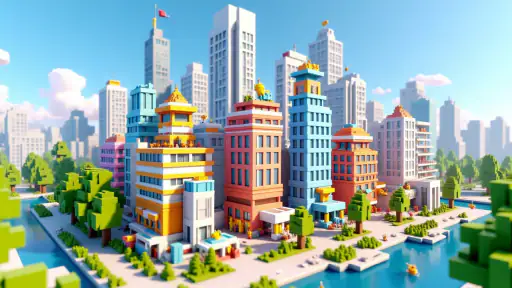
The graphics are quite pleasing, with a vibrant and colorful aesthetic that makes building your town feel like a creative adventure. As you progress, you unlock more complex structures, from parks and schools to skyscrapers and shopping malls. The satisfaction of watching your town grow is truly unmatched.
Building and Managing
One of the things I love about this app is the level of detail involved in managing your town. You’re not just placing buildings; you’re managing resources, balancing budgets, and ensuring your citizens are happy. Each decision affects your town’s growth and well-being.
For instance, if you neglect building enough schools, your town’s education level will drop, affecting the overall happiness and productivity of your citizens. It’s a delicate balancing act that requires strategy and foresight, making the game both engaging and rewarding.
More From Our News Desk

Weather by Xiaomi Review: Clear at a Glance, Less Clear Up Close

X Under Pressure: Can It Recover When Posting Goes Wrong?

Clash of Clans Is Won Between the Battles

Android Auto Makes the Case for Quieter Car Software

MobiOffice: Transforming Mobile Productivity with Seamless Integration

EA SPORTS FC™ Mobile Soccer: Redefining Mobile Sports Gaming
Making Progress Without Losing Your Layout
I find it helpful to plan the shape of a district before filling it with buildings. A road that looks convenient at the start can become awkward once the town grows, so I leave room for later development instead of using every open space immediately. That small bit of restraint makes expansion feel more deliberate and reduces the temptation to rebuild a whole area just to fit one new idea.
For a short play session, I’d choose one clear task—such as improving a neighborhood’s services or extending a road—rather than trying to fix every town issue at once. This gives each visit a satisfying endpoint. It also helps when the management side starts to feel busy: I can focus on a single priority and see how that choice affects the wider town before making another change.
Customization and Creativity
The customization options in Town Building Life Simulator are vast. You can personalize almost every aspect of your town, from the layout of the roads to the style of the buildings. Want to create a seaside resort town or a bustling urban center? The choice is yours! The game encourages creativity, allowing you to design a town that reflects your personal style and preferences.
Moreover, the app frequently updates with new themes and building options, keeping the experience fresh and exciting. You’ll never run out of ideas or inspiration for your next project.
Planning Around the Management Layer
A useful way to avoid frustration is to treat each new building as part of a district rather than a standalone decoration. I would decide what a neighborhood is meant to do, leave sensible room for roads and services, and then add to it gradually. This keeps the town readable as it grows and makes it easier to notice whether a change actually helps the area or merely fills an empty patch.
When a need appears, I would pause before making the most obvious move. A new service may be useful, but its placement can shape how the next part of town develops. Thinking one step ahead is a small but worthwhile trade-off: it takes a little more planning now, while potentially saving me from reshuffling a whole district later. Players who enjoy improvising can still do so, but the simulation is more satisfying when expansion has some intention behind it.
When Another Kind of Game Fits Better
Compared with a city-management game that emphasizes hard economic planning, this one feels more approachable because its building and visual design are central to the pleasure. If I want strict simulation, extensive spreadsheets, or a punishing chain of consequences, I would look for a more management-focused alternative. On the other hand, a purely decorative builder may suit someone who wants to arrange scenery without worrying about budgets, resources, or citizen needs. This game sits between those approaches, so it works best when you enjoy both sides rather than expecting either one alone.
That middle ground is also its main trade-off: balancing services and town growth gives the layout purpose, but it can interrupt a purely relaxed building session. I’d recommend it to someone who enjoys making a plan and adjusting it as the town develops. If you mainly want an open-ended design canvas with no management demands, the simulation layer may feel like friction rather than depth.
Who Is Likely to Enjoy It—and Who May Not
I think it suits players who like a visible creative result but want more to do than place attractive buildings. It can also work for someone who enjoys returning to a project over time, making one considered improvement at a time instead of finishing a town in one sitting. The mix of design and civic needs gives each building decision a reason to matter, which is a better fit for thoughtful tinkerers than for players who only want instant visual freedom.
I would steer away from it if my main priority were a highly technical economic simulation, or if I disliked having to consider services and resources while designing. It is also not the most natural choice for someone who wants a strictly consequence-free sandbox. In those cases, a more specialized management game or a decoration-first builder may deliver a cleaner version of the experience they want. The appeal here is precisely the compromise, and a compromise is only useful when both sides sound enjoyable.
Challenges and Achievements
To keep things interesting, Town Building Life Simulator offers various challenges and achievements that test your skills as a town planner. These challenges range from managing environmental issues to boosting your town’s economy. Successfully completing challenges earns you rewards that can be used to further enhance your town.
The achievement system not only provides a sense of accomplishment but also adds a competitive edge to the game. You can compare your progress with friends or other players, which adds to the fun and motivation to keep building and improving your town.
A Practical Way to Play
On an ordinary evening, I might open the game for a quick break, check what the town needs, and choose one manageable improvement before putting my phone away. A useful habit is to treat each challenge as a prompt for a focused project, not a reason to scatter new buildings everywhere. That keeps the town’s layout coherent while still giving me a goal beyond decorating.
If you’re deciding whether it is suitable for a younger player, its content rating is Teen, so I would check that rating against the player’s age and your family’s preferences. It is free to install, but optional in-app purchases range from $0.99 to $99.99 per item. I’d start without spending and see whether the normal pace feels enjoyable; purchases are worth considering only if they solve a specific frustration for you, not simply because progress feels slow in a particular moment.
Making a Short Session Count
For a realistic quick-play routine, I would use the first moments of a visit to inspect the town rather than immediately placing something new. I’d pick a single priority, make the smallest change that addresses it, and then check whether the surrounding layout still makes sense. That approach is especially useful when I have only a few minutes: it avoids leaving half-finished plans everywhere and gives me a clear reason to stop.
For a longer session, I would switch from solving one need to shaping a whole district. The two approaches serve different moods. Small tasks make the game easy to fit around everyday life, while district planning is more rewarding when I have time to think through roads, services, and future expansion. I would not expect every session to produce dramatic growth; sometimes keeping an existing area coherent is the better result.
Community and Social Interaction
The app also has a social component, allowing you to share your town with friends or visit others’ creations. This interaction fosters a sense of community and provides endless inspiration. You might find yourself borrowing ideas or competing in friendly town-building contests.
Additionally, the app’s developers are quite active, frequently engaging with the community and incorporating user feedback into updates. This commitment to user satisfaction is evident in the app’s ongoing improvements and new features.
Getting Inspiration Without Copying a Layout
Seeing another player’s town can be useful even if I do not want to reproduce it. I’d look at how they group buildings, use roads, or leave open space, then borrow just one principle for my own design. That keeps the visit inspiring rather than turning my town into a copy of someone else’s. It is a practical way to get unstuck when my layout feels repetitive, while still letting the final result reflect my own choices.
Social features are a bonus rather than the main reason I would choose the game. If I prefer building alone, the core appeal remains the process of arranging and managing my own town. If I enjoy exchanging ideas, other creations can provide a fresh prompt. Either way, I would treat outside designs as reference points, not as a standard my town has to match.
What to Expect Before Installing
This is a simulation game from XGame Global, first released on November 2, 2020. Its average rating is 4.2 from around 179,000 ratings, and it has been installed over 100 million times. Those figures suggest that the town-building format has broad appeal, but they don’t tell me whether its particular mix of creativity and management will suit you; the best test is whether you enjoy planning a layout and then responding to its needs.
The current version is 4.1.5, and it requires Android 8.0 or later. If you’re moving from another town builder, the main adjustment is not learning the broad idea of roads and services, but deciding how much attention you want to give the management layer. I’d avoid bringing an elaborate layout plan from a different game and instead explore the tutorial first, then adapt your design as you learn how this town’s systems interact.
Switching From Another Builder
If I am already playing a different town builder, I would not assume that a familiar genre means the same rhythm or priorities. I’d spend the opening session learning how this game presents its needs and controls before committing to a detailed master plan. That makes switching less frustrating: I can discover what deserves attention here, rather than trying to force habits from a title built around a different balance of decoration and management.
The practical cost of switching is mostly the attention needed to learn a new town’s logic and decide whether its balance suits me. I would keep expectations modest at first: try a small neighborhood, test the tutorial’s guidance, and see whether the management prompts add interest or get in the way. If I find myself wishing for either much stricter planning or a more open decorative space, that is a clear sign another subgenre may fit better.
My Recommendation
My recommendation is to try it if you want a town that is both a design project and a small management puzzle. It is a particularly sensible choice for casual players who like to make steady, visible changes, and for creative players who want services and resources to give their layouts a purpose. The free entry point makes it possible to judge that balance before deciding whether optional purchases are relevant to your play style.
I would skip it if you already know that management interruptions annoy you, or if your ideal builder is either a rigorous economic model or a completely free-form canvas. For everyone between those extremes, I’d start with the tutorial, build cautiously enough to leave room for change, and focus on one district or challenge at a time. That is where its combination of creativity and simulation makes the most sense to me.
In conclusion, Town Building Life Simulator offers a delightful blend of creativity, strategy, and community interaction. Whether you're a seasoned city planner or just looking for a fun way to pass the time, this app caters to all types of players. The satisfaction of watching your town come to life is truly rewarding and makes for hours of enjoyable gameplay. So go ahead, unleash your inner architect, and start building the town of your dreams!
Town Building Life Simulator Frequently Asked Questions
What does Town Building Life Simulator’s “infinite cube world” description mean for the way I play?
The game is presented as a town simulator set in a creative cube world, so its central appeal is shaping a virtual place rather than following a purely linear premise. That makes it a natural choice for players who enjoy building and deciding how their world takes shape. If you prefer a clearly defined story or a different style of simulation, consider whether open-ended creation sounds enjoyable to you.
Can I play Town Building Life Simulator at my own pace?
The game’s town-building focus is suited to players who like developing a place over time and making creative choices along the way. Its description emphasizes creativity, which may appeal if you enjoy taking time to shape a virtual world rather than rushing through a fixed sequence. Your enjoyment will depend on whether this style of town simulation matches the kind of play you are looking for.
What kind of game is Town Building Life Simulator, and who might enjoy it?
Town Building Life Simulator is a simulation game for players who enjoy shaping a virtual world and deciding how it develops. Its store description invites players to unleash their creativity in an infinite cube world, while its short description presents it as a town simulator. It may appeal to people who like creative, town-focused play and prefer to make progress at their own pace.
Is Town Building Life Simulator free to download, and what should I know about purchases?
The game is free to download, so you can try it without an upfront purchase. It does include optional in-app purchases, with prices ranging from $0.99 to $99.99 per item. These purchases may suit players who want to spend on extras, but they are not required to begin playing. If you prefer to avoid accidental spending, check your device’s purchase settings before handing it to a child.
What is the main objective of Town Building Life Simulator?
Town Building Life Simulator focuses on allowing players to create, manage, and expand their own virtual town. The main objective is to strategically build infrastructure, manage resources, and ensure the happiness of residents while balancing economic growth. Players can customize their town, engage with diverse characters, and complete missions to progress.
Pros
- Engaging and immersive gameplay experience.
- Wide variety of customization options.
- Regular updates with new features.
- User-friendly interface and controls.
- Offline mode available for uninterrupted play.
Cons
- In-app purchases can be pricey.
- Some features require a steep learning curve.
- Occasional bugs and glitches reported.
- Limited character development options.
- Resource management can be time-consuming.
- Category
- Simulation
- Version
- 4.1.5