Tap Color Pro: Color By Number
- 25.25K
- 4.6
- Installs
- 50.00M
- Price
- Free
Screenshots
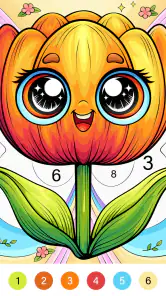
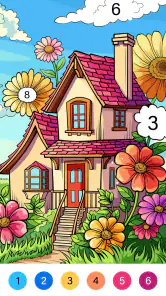

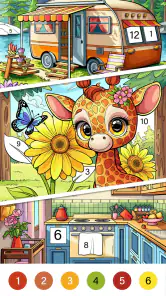

Analysis by Reviewed
I reach for a number-coloring game when I want something easy to pick up and put down, without needing drawing skills or a long stretch of free time. Tap Color Pro: Color By Number is built around that simple loop: choose a picture, match numbered areas with their colors, and watch the image take shape. It suits brief breaks and quiet evenings, though it’s best approached as guided coloring rather than a tool for making original art.
What to consider before choosing
For me, the key question is what kind of creative break you want. If you enjoy following a clear sequence and seeing a picture gradually fill in, this format is satisfying. If you would rather choose every color, sketch freely, or make changes without being guided by numbered spaces, a blank-canvas drawing app or a physical coloring book may be a better match.
Tap Color Pro is a free board game from Tap Color Studio, with optional in-app purchases ranging from $0.99 to $49.99 per item. It is rated for Everyone, has a 4.6 average from around 214,000 ratings, and has passed 50 million installs. Those figures suggest broad appeal, but the practical test is whether the tap-to-fill routine feels calming to you rather than repetitive. The game is currently at version 7.6.4 and supports Android 5.1 and later.
One useful way to judge the format is to notice what you want from a break before opening the game. If you’re looking for a small, completed task that doesn’t demand a plan, numbered coloring is a good fit. If you want to experiment with color combinations or decide how a drawing should look, the fixed palette and marked areas will feel restrictive rather than relaxing.
Why Tap Color Pro?
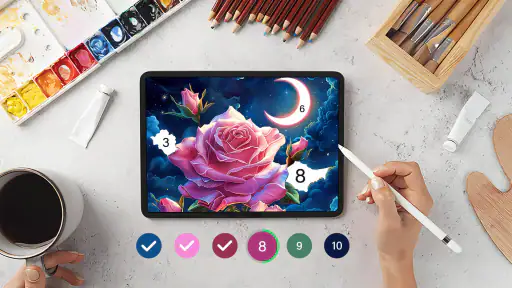
Picture this: after a long day, you’re curled up on the couch with your phone, ready to let the day’s stress melt away. With Tap Color Pro: Color By Number, you can do just that. The app features a vast array of beautiful and intricate designs, from serene landscapes to charming animals, all ready to be brought to life with a splash of color. And the best part? You don’t have to be an artist to create something stunning. The app guides you with numbers, making it as easy as tap, tap, tap!
Features That Stand Out
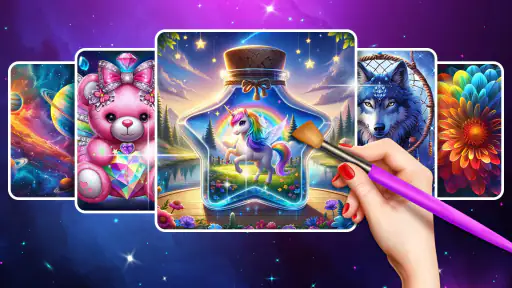
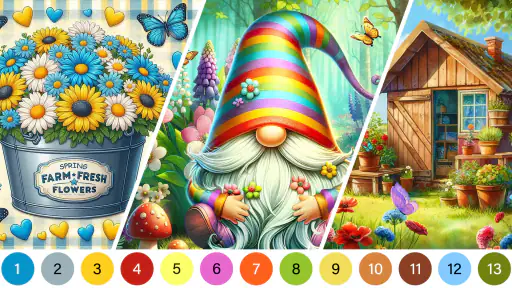
One of the first things you’ll notice is the variety. There’s an impressive selection of images to choose from, and new designs are added regularly, so you’ll never run out of options. Whether you’re into mandalas or prefer something more contemporary, there’s something for every mood.
The user interface is super intuitive. Even if you aren’t tech-savvy, you’ll find it easy to navigate. Plus, the app is optimized for both phones and tablets, which means you can enjoy a larger canvas if you prefer. The pinch-to-zoom feature is also handy for getting into those tiny details, ensuring no spot is left uncolored.
More From Our News Desk

Weather by Xiaomi Review: Clear at a Glance, Less Clear Up Close

X Under Pressure: Can It Recover When Posting Goes Wrong?

Clash of Clans Is Won Between the Battles

Android Auto Makes the Case for Quieter Car Software

MobiOffice: Transforming Mobile Productivity with Seamless Integration

EA SPORTS FC™ Mobile Soccer: Redefining Mobile Sports Gaming
A practical detail is that the same picture can suit different kinds of sessions. A design with broad, easy-to-see spaces is better when you have only a few minutes, while a more intricate image gives you a reason to slow down and return later. I’d choose based on the time and attention I actually have, rather than picking the most detailed thumbnail by default.
It also helps to remember that zoom is a tool, not a setting you need to leave on. Close in only when a small area becomes hard to tap, then pull back to see how the image is progressing. Switching views this way makes it easier to keep a sense of the whole picture instead of turning the session into a string of tiny, isolated taps.
Making it work in everyday life
A useful way to fit this game into a busy day is to treat one picture as a series of small pauses, rather than a task you need to finish in one sitting. I might color a few sections while waiting for a meeting to start, then return later when I want another low-effort break. Before beginning a detailed image, I’d zoom out and take in the full design; that helps me decide whether I want a quick, simple session or something that will hold my attention longer.
For tiny numbered spaces, zooming in can make tapping more deliberate, but it also slows the pace. I’d use that on the fiddly parts and zoom back out for broader areas, rather than staying close to the screen throughout. This small habit keeps the activity from feeling like a hunt for individual pixels. It’s also a good reason to choose a simpler-looking picture when you only have a few minutes.
A realistic use is a quiet wait at home, such as a few minutes before dinner is ready. I’d open a picture, fill a manageable section, and stop when the interruption arrives instead of treating completion as the goal. That makes the game easier to fit around real life and avoids turning a relaxing pastime into another item on a to-do list.
For a longer evening session, I’d keep the phone comfortably positioned and take a break if I notice myself leaning in to find every small area. The detailed sections can be absorbing, but they also encourage close screen attention. If your eyes feel tired or you’re trying to spend less time on your phone before bed, a paper coloring book may be a better wind-down choice that night.
Relaxation and Mindfulness
Coloring isn’t just a hobby; it’s a form of meditation. As you focus on filling in the colors, your mind gets a chance to unwind. The repetitive motion of tapping and the satisfaction of completing an image can be incredibly soothing. It’s a great way to practice mindfulness without even realizing it. Plus, there’s something so satisfying about watching a grayscale image transform into a vibrant masterpiece!
I wouldn’t treat that calming effect as automatic, though. If you find yourself rushing to clear spaces or getting annoyed when a tiny area takes several taps, the routine may feel more like busywork than a pause. I’d use it without setting a completion target and switch to another activity if the tapping stops feeling pleasant.
And if you’re someone who loves to share your creations, Tap Color Pro lets you do just that. Once you’ve completed an image, you can easily share your artwork with friends or on social media. Who knows, you might just inspire someone else to pick up the app and start their own coloring journey!
Sharing is an optional extra, not the main reason I’d choose the game. The more personal reward is seeing an unfinished image gradually become complete. If you do share, think of it as showing a small finished project; the guided nature of the coloring means it’s not the same as sharing an original drawing you designed yourself.
How it compares with other coloring choices
Compared with a physical coloring book, this is easier to carry and doesn’t require pencils, choosing a palette, or finding a clear table. The trade-off is that your choices are constrained by the numbered design, and the screen may not feel as restful as paper for someone trying to reduce phone time. Against freehand drawing apps, it asks less of you but gives you less control: I’d pick this when I want a guided, finishable activity, and a drawing tool when I want to invent a picture myself.
It may also be a poor fit if you dislike repeated tapping, prefer active competition, or want a game built around strategic decisions. This is a quiet, individual activity, not a substitute for a board game night or a creative course. The optional purchases are another consideration: the game is free to start, but spending can add up depending on what you choose to buy. I’d try the basic experience first and set a personal spending limit before considering extras.
Other number-coloring games are the closest alternative because they use the same basic idea. In that group, I’d compare the kinds of pictures you actually want to color and how comfortable the interface feels, rather than assuming every app will be different in a major way. A familiar format makes switching easy to learn, but it doesn’t guarantee that the available designs or pace will suit you better.
There’s also a meaningful choice between this and a conventional board game. A board game usually asks you to make decisions, respond to other players, or work toward a competitive or shared objective. This coloring game is more solitary and repetitive by design. I’d choose it for a low-pressure pause, not when I want conversation, strategy, or a sense of playing together.
For a child or someone new to phone games, numbered coloring can be easier to understand than freehand drawing because the picture gives a clear next step. Still, the Everyone age classification is about content suitability, not a reason to ignore purchase controls. On a shared device, I’d check that purchases are protected and agree on expectations before handing it over.
Switching, sharing, and choosing a first image
There’s little to learn before starting, so switching from another number-coloring app should feel straightforward if you already know the format. The bigger cost is personal: your progress, habits, and favorite designs may be tied to the app you currently use. I’d avoid moving solely because of a large image selection; first check whether the pictures and pace here suit you. If you do switch, try a few different image styles before judging the experience from one intricate design.
Sharing is most useful when you treat the finished image as a small personal milestone, not as a reason to complete pictures quickly. If you’re choosing it for a child or family member, its Everyone age rating is reassuring as a content classification, but I’d still supervise purchases on a shared device. For adults, it can work well during a quiet commute or a short evening wind-down, provided looking at a screen is part of the relaxation rather than something you are trying to avoid.
If you’re wondering whether it is free to try, yes: the game costs nothing to start, while optional purchases are available. I’d spend time with the basic coloring loop before paying for anything, then decide whether an extra is worth it to you. The listed purchase range runs from $0.99 to $49.99 per item, so it’s sensible to review any purchase carefully rather than tapping through without noticing the cost.
Another common question is whether it suits an older Android phone. The game supports Android 5.1 and later, which gives it a broad minimum system requirement, though I’d still keep the app updated and allow for differences in how individual devices feel. Its current version is 7.6.4, and it has been available since May 29, 2020.
On a tablet, the larger display can make small spaces easier to inspect; on a phone, the convenience of having a quick activity in your pocket is the stronger advantage. I’d choose the device that lets you hold the screen comfortably for a while. If you’re mainly interested in coloring away from a screen, neither display size fixes the basic trade-off with paper.
To make a fair first impression, try one simple picture and one more detailed one rather than judging everything by a single choice. That gives you a sense of whether you like both the quick-fill rhythm and the slower, more careful side of the activity. If neither feels enjoyable after a short trial, a different coloring format is probably a better use of your time.
Final Thoughts
In a world that’s constantly on the go, having a little pocket of calm can make all the difference. Tap Color Pro: Color By Number is more than just an app; it’s a delightful escape into a world of color and creativity. Whether you’re looking to pass the time, relieve stress, or simply enjoy a creative outlet, this app has got you covered. So go ahead, download it, and let your inner artist shine!
My recommendation is more specific: try it if numbered coloring sounds soothing and you want a low-pressure activity that can be paused between everyday tasks. Skip it if you need freehand control, dislike repetitive taps, or are deliberately limiting screen time. For the right person, the appeal is not artistic freedom but the simple satisfaction of bringing one guided picture to completion.
Overall, I’d put it in the “easy to sample” category rather than recommend it to everyone who enjoys games. Its strongest use is giving a restless moment a simple focus, with no drawing ability or elaborate setup needed. The main decision is whether following numbered spaces feels pleasantly absorbing to you; if it does, this is a straightforward choice, and if it doesn’t, paper coloring or a more open-ended creative app will likely feel better.
Tap Color Pro: Color By Number Frequently Asked Questions
What should I know about Tap Color Pro before downloading it?
Tap Color Pro: Color By Number is a free board game focused on relaxing paint-by-number coloring. You choose an image and fill its numbered sections with matching colors, making it approachable even if you do not have drawing experience. It is rated Everyone and is designed for a broad audience. Optional in-app purchases are available, so it is worth reviewing purchase settings before letting a child play.
Can I use Tap Color Pro to relax or pass a little time?
The game’s central activity is completing pictures by matching colors to numbered areas, which gives it a calm, easy-to-follow pace. You can work through an image a section at a time rather than needing to create artwork from scratch. That makes Tap Color Pro a natural choice for a short break or a low-pressure coloring session, especially if you enjoy simple activities more than competitive gameplay.
Is Tap Color Pro: Color By Number free to download and play?
Yes. Tap Color Pro is free to download and play, so you can start coloring without paying upfront. The game also offers optional in-app purchases, with items ranging from $0.99 to $49.99, so check purchase prompts carefully, especially if a child will be using the app. You can enjoy the basic coloring experience while deciding whether any paid extras are worthwhile for you.
What kind of game is Tap Color Pro, and who makes it?
Tap Color Pro: Color By Number is a board game from Tap Color Studio, built around the familiar paint-by-number format. Its short description is simply “Tap Color Pro,” while the game’s central appeal is a relaxing coloring activity: choose artwork, match numbered sections with colors, and gradually complete the picture. It is intended for a broad audience rather than a specialized group of players.
What is Tap Color Pro: Color By Number, and how does it work?
Tap Color Pro: Color By Number is a relaxing coloring app designed for both Android and iOS devices. It offers a simple and enjoyable way to unwind by filling in numbered areas with the corresponding colors. Users choose from a variety of artwork and use the number guide to complete each piece, creating stunning digital art without the need for artistic skills. The app provides a wide range of images, from animals to landscapes, ensuring there's something for everyone.
Pros
- Easy to use interface for all ages
- Wide variety of images to color
- Relaxing and stress-relieving activity
- Daily new images for continuous engagement
- Offline mode available for convenience
Cons
- Contains ads that can be intrusive
- Limited free content without subscription
- Occasional app crashes reported
- Some images can be too simple
- In-app purchases can be expensive
- Category
- Board
- Version
- 7.6.4













