Sortime - Goods Puzzle Sorting
- 802.00
- 4.4
- Installs
- 1.00M
- Price
- Free
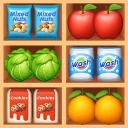
Screenshots
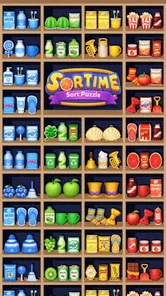
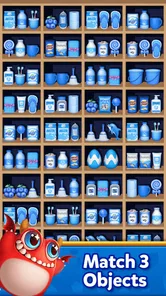
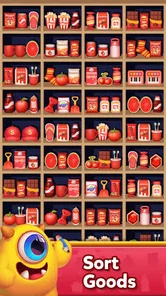
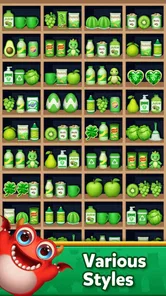
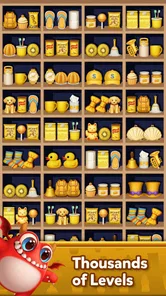
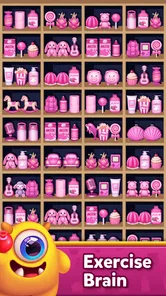
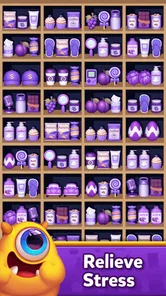
Analysis by Reviewed
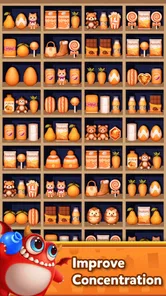
Sortime - Goods Puzzle Sorting is the kind of mobile puzzle I open when I want something easy to understand but still capable of making me slow down and think. The idea is straightforward: goods are placed in a three-dimensional scene, and I have to match and sort them into groups. That simplicity is its strongest opening move. I do not need a long tutorial or a complicated rulebook before I can start playing.
After spending time with it, I found that the real appeal is not merely spotting identical objects. The challenge comes from reading a crowded space, deciding which match is safe to make, and avoiding a move that leaves the remaining items awkwardly arranged. It feels more deliberate than a basic matching game, while remaining lighter and more approachable than a traditional logic puzzle.
How the basic sorting loop feels in practice
The baseline workflow is simple enough for a quick break. I scan the goods on screen, look for matching items, and sort them together. At first, I can play almost instinctively because the visual goal is clear. As the board becomes less convenient, I have to stop reacting to the most obvious object and start considering what the next few moves will leave behind.
That change in pace is important. The early part of a puzzle can feel like tidying a shelf: identify a group, clear it, and make room. Later, every choice affects visibility and access. A match that looks attractive may expose a less useful arrangement, while a less obvious pair can create a better route through the remaining goods. I enjoyed that gradual shift from recognition to planning.
The three-dimensional presentation gives the sorting task more character than a flat grid. Objects occupy space, and the arrangement makes me pay attention to what is visible rather than treating the board as a simple list of icons. This also creates the main source of friction: I sometimes know what I need but have to inspect the scene carefully before I can act with confidence.
For an everyday example, I can imagine playing during a short commute or while waiting for an appointment. One session gives me a focused activity without asking me to remember a story, manage a large collection, or learn a complicated control system. It is also a reasonable choice for someone who likes visual organization games but does not want the pressure of a timer-driven arcade experience.
The game is free to download, which makes trying the basic experience easy. It is rated for Everyone, so its presentation is broadly accessible. Optional in-app purchases range from around one dollar to around one hundred dollars per item, so I would advise checking the purchase flow carefully if a child may use the device. The free entry point is appealing, but the existence of higher-priced optional items is worth keeping in mind before treating the game as a completely cost-free hobby.
More From Our News Desk

 Gmail
GmailGmail in a Busy Inbox: Who Benefits Most?
From first account to crowded workday, Gmail earns its place through dependable search and flexible sorting—but its best fit depends on how much inbox maintenance you can tolerate.

 Prime Video
Switching to Prime Video: What Changes in Your Viewing Routine
Prime Video can make a compelling second home for streaming, but switching means learning a different catalog, rental layer, and route from browsing to playback.

 Universal TV Remote Control
Universal TV Remote Control Works Best as a Reliable Backup
A phone remote earns its place through quick setup and reliable habits. Here is how to get more from Universal TV Remote Control—and where its limits show.

 Weather - By Xiaomi
Weather by Xiaomi Review: Clear at a Glance, Less Clear Up Close
Xiaomi’s weather app makes everyday forecasts quick to scan, but its calm surface can leave useful details and recovery paths harder to find than they should be.

 X
XX Under Pressure: Can It Recover When Posting Goes Wrong?
A resilience-focused review of X, examining setup, mistaken posts, interruptions, weak connections, and the gaps that matter when recovery needs to be dependable.

 Clash of Clans
Clash of Clans Is Won Between the Battles
Its raids are quick; its community is a long-term project of coordination, teaching, rivalry, and shared responsibility—with all the friction that entails.
Latest News



A repeatable routine that prevents careless moves
My most reliable routine is to inspect the whole board before making the first match. I look for obvious groups, but I also notice which objects are partly hidden, which spaces are already crowded, and whether a visible match would remove something useful from the working area. This takes only a moment and reduces the number of impulsive moves that later create trouble.
I then work from the clearest matches toward the more uncertain ones. Clearing an easy group can improve visibility, but I do not automatically remove every obvious set. If two possible moves compete for the same area, I prefer the one that opens more of the board or leaves a cleaner arrangement. That small habit makes the puzzle feel more controlled without turning it into a slow, overanalysed exercise.
Another useful approach is to treat the remaining objects as a queue rather than isolated targets. I ask myself which item I am likely to need next and whether my current move keeps that route open. This is especially helpful when several goods look similar at a glance. The goal is not to memorize the entire scene; it is to avoid using a convenient match that blocks the next practical step.
I also recommend pausing after each major clear. The board can change enough that the best plan is no longer the one I had in mind. Experienced play is less about moving quickly and more about resetting attention at the right moments. That is one of the non-obvious strengths of this format: a calm rhythm often works better than frantic tapping.
Settings and device habits worth checking
There are no settings I would pretend are present without seeing them, so my advice here is practical rather than speculative. Before settling into longer sessions, I check the game’s available options on my device and make sure the screen brightness, sound level, and notification behavior suit the situation. Those choices may sound minor, but a visual sorting game is much easier to read when glare and interruptions are under control.
I prefer playing with enough brightness to distinguish similar goods, especially when the scene contains several objects with related colors. At the same time, maximum brightness is not always comfortable during a night session. A moderate level that preserves contrast is better than simply making the screen brighter. If the device has a system-level color or display mode active, I check whether it makes the goods harder to tell apart.
Sound is similarly personal. Some players enjoy feedback during every interaction, while I often lower it when playing in public or when I want a quieter concentration exercise. If the game offers audio controls on a particular device, they are worth adjusting before deciding that the experience is distracting. I also silence unrelated notifications when I want to protect a careful run, because losing focus can be more damaging than the puzzle itself.
On an older compatible phone, I would close demanding background apps before playing and keep the device in a comfortable orientation. The minimum supported operating system is Android 6.0, which makes the game accessible to a wide range of Android devices, but compatibility does not guarantee that every older handset will feel equally smooth. A crowded three-dimensional scene benefits from a screen that responds consistently, so a quick personal test is more useful than assuming performance from the operating-system requirement alone.
The current version is 1.1.6. I would keep the installed version reasonably current through the normal app-store process, particularly if I notice visual glitches or input delays. I would not expect an update number by itself to change how I play, but maintaining the current release is a sensible part of troubleshooting before blaming the puzzle design.
Faster patterns that still leave room for planning
Speed in Sortime does not come from tapping every obvious match immediately. It comes from reducing unnecessary inspection. I use a quick visual sweep in a consistent direction, then focus on the densest area or the group most likely to affect the rest of the board. Repeating the same scan pattern helps me avoid overlooking an item that is visible but easy to mentally filter out.
I also separate recognition from commitment. First I identify possible groups; then I decide which one to sort. That extra beat is valuable because a three-dimensional layout can make a match look safer than it really is. Once I have chosen, I complete the action cleanly instead of hovering between several options. This habit makes play faster over time because it cuts down on backtracking.
When several groups are available, I generally prioritize the move that improves the board’s readability. A match that removes visual clutter can be more valuable than one that merely looks convenient. This is a trade-off rather than a universal rule: if clearing a group would expose a worse bottleneck, I keep it available and work elsewhere first.
A second useful pattern is to avoid scattering attention across the whole scene after every tap. I focus on the area changed by the previous move, then perform a short full-board scan only when the local options become unclear. That gives me a balance between awareness and efficiency. It is particularly helpful during a short session, when I want to stay engaged without turning the game into a demanding mental workout.
These habits also show why the game is different from a basic match-three alternative. In a conventional grid, movement is usually governed by fixed rows and columns, and the next possibilities are easier to enumerate. Here, the sorting problem depends more on spatial reading and access. Players who enjoy arranging objects and making cautious choices may prefer this. Players who want chain reactions, elaborate combos, or constant rewards may find it comparatively restrained.
Where the challenge becomes less forgiving
The same three-dimensional presentation that makes the game distinctive can also make it tiring. When the board is busy, I may spend more time confirming what I am looking at than solving the actual matching problem. That is not a flaw for everyone, but it means the experience is better suited to deliberate play than to people who want instant, perfectly obvious feedback.
There is also a natural limit to how much strategic depth this format can provide. The core action remains sorting goods into matching groups, so players seeking a long campaign with character development, narrative surprises, or radically changing rules should look elsewhere. Sortime works best as a focused puzzle routine, not as a replacement for a large adventure game or a deep strategy title.
I would also skip it if I dislike optional purchase prompts or prefer games with no monetization at all. The free price is a good reason to try it, but the listed purchase range means that this is not the right recommendation for someone who wants every part of the experience to be detached from spending decisions. For family use, I would combine the Everyone content rating with the device’s purchase controls rather than relying on age suitability alone.
Another limitation is that careful planning can become repetitive if I play for too long in one sitting. The game’s appeal depends on the pleasant tension between order and clutter. Once that rhythm stops feeling fresh, taking a break is better than forcing another session. I get more from it when I return for several shorter rounds than when I treat it as an all-evening game.
Its audience is therefore fairly clear. I would recommend it to someone who likes visual puzzles, sorting tasks, calm concentration, and gradual improvement through better habits. I would be more cautious with a player who needs a strong story, competitive multiplayer, complex progression, or a constant stream of new mechanics. For those preferences, a richer puzzle adventure or a classic grid-based game may offer more variety.
What the ratings and developer suggest about its place
Tap Color Studio is the developer behind the game, and the app has reached over one million installs with an average rating of 4.4 from around forty-seven thousand ratings. Those figures suggest that the straightforward sorting concept has found a substantial audience, while the rating indicates generally positive reception rather than universal approval. I read that as a reason to try it, not as proof that every player will enjoy the same pace.
The game has also accumulated hundreds of written reviews, which fits the kind of product that can divide users over presentation, difficulty, and purchase expectations. A player who values an uncluttered sorting challenge may focus on the satisfying board-clearing loop. Someone else may judge it mainly by how much variety appears after the initial novelty fades. Both reactions are understandable because the central mechanic is intentionally narrow.
Compared with ordinary color-matching games, the strongest difference is the physical feel of the goods arranged in space. Compared with dedicated brain-training apps, it is more playful and less concerned with measuring a broad set of mental skills. Compared with minimalist organization puzzles, it offers a more visually populated scene, but that extra texture can make recognition slower. I would choose it when I want a middle ground between casual matching and spatial tidying.
My verdict after building a consistent play style
After developing a routine of scanning first, preserving useful matches, and checking the changed area after each clear, I found Sortime - Goods Puzzle Sorting more satisfying than its simple premise initially suggested. It rewards attention without demanding that I learn a complicated system. The best sessions feel like solving a small visual logistics problem: make space, protect the next option, and keep the board readable.
My strongest recommendation is to treat it as a focused break rather than an endless progression game. Use short sessions, adjust the device for comfortable viewing, and avoid confusing fast tapping with good play. If an optional purchase appears, decide in advance whether it fits your budget instead of making that choice in the middle of a frustrating puzzle.
The final trade-off is clear. This is a free puzzle from Tap Color Studio with an accessible Everyone rating, a low barrier to entry, and a distinctive sorting loop built around three-dimensional goods. It is not ideal for players who need deep narrative, constant novelty, or a completely purchase-free environment. For me, though, it succeeds as a compact mental reset, especially when I want a game that rewards a repeatable habit rather than reflexes alone.
My bottom line: try it if the pleasure of turning a crowded arrangement into an orderly one sounds appealing. Skip it if sorting scenes quickly becomes repetitive or if you prefer puzzle games with richer rules and stronger long-term progression. Its mastery comes from small decisions, and that modest scale is exactly what makes it useful for a calm, everyday play session.
Sortime - Goods Puzzle Sorting Frequently Asked Questions
Who developed Sortime - Goods Puzzle Sorting, and when was it released?
Sortime - Goods Puzzle Sorting is a puzzle game developed by Tap Color Studio. It was released on December 27, 2024, and offers a colorful goods-sorting challenge built around matching products and organizing them into groups. If you enjoy casual puzzles with a clear central objective, its premise is easy to understand before you begin playing.
What is the current version of Sortime, and why should I check it before installing?
The current version of Sortime is 1.1.6. Checking the version shown on your device’s app store before installing can help you make sure you are downloading the release currently offered for your device. Keeping a game updated can also give you access to its latest available build, so it is worth checking for updates if you already have Sortime installed.
Is Sortime - Goods Puzzle Sorting free to download, and what does it cost to play?
Sortime is free to download, so you can try its goods-sorting puzzles without paying upfront. The game also offers in-app purchases, with individual items ranging from $0.99 to $99.99. Those optional purchases may appeal to players who want extra help or benefits, but the central sorting challenge is the main draw. Check your device’s purchase settings if you want to prevent accidental spending.
What is Sortime - Goods Puzzle Sorting, and how is the gameplay structured?
Sortime - Goods Puzzle Sorting is a casual organization puzzle game centered on arranging colorful goods into the correct groups. Each level presents shelves, containers, or similar spaces filled with mixed items, and your objective is to sort matching products together. The controls are designed for quick tap-and-drag interactions, while later stages gradually introduce more items, tighter spaces, and trickier arrangements that require planning rather than random moves.
Is Sortime - Goods Puzzle Sorting suitable for beginners and casual players?
Yes. Sortime is easy to understand from the first level because its main mechanic is based on recognizing identical or related items and placing them together. The early puzzles work as a gentle tutorial, allowing you to learn the controls without pressure. It is particularly suitable for casual players, short play sessions, and anyone who enjoys relaxing organization games, although advanced levels can become noticeably more challenging.
Pros
- Simple drag-and-drop controls are easy to learn.
- Short levels make it suitable for quick gaming sessions.
- Sorting mechanics feel relaxing and satisfying.
- Bright visuals make the different goods easy to identify.
- Gradually harder puzzles provide a steady challenge.
Cons
- Later levels can become repetitive after extended play.
- Some puzzles may feel more trial-and-error than strategic.
- Mistakes can be frustrating when several items look similar.
- Progress may feel slow without optional boosts or hints.
- Ads may interrupt the experience between completed levels.