Song Beat: Music Game
- 9.00
- 3.4
- Installs
- 1.00M
- Price
- Free

Screenshots
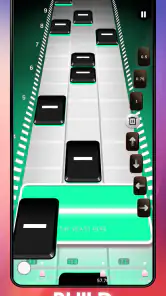
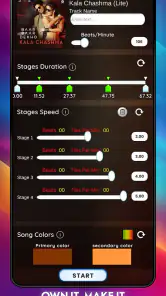
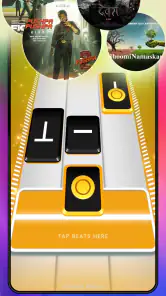
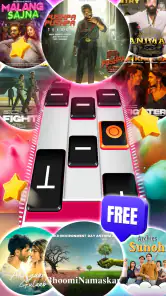



Analysis by Reviewed
Before deciding whether to install Song Beat, I’d keep one expectation in check: it is best approached as a quick music-game break, not as a reliable way to train musical skills or learn an instrument. Its appeal is immediate: listen for the pulse, follow the on-screen prompts, and see how steadily you can keep up. That makes it easy to try while waiting for a bus or winding down at home, though a small phone screen and surrounding noise can make focused play harder. If you enjoy Indian music and want a tap-based game with a musical slant, it has a clear reason to earn a place on your phone.
Where tapping can go wrong
The first hurdle in any rhythm game is learning to react to visual cues without losing the beat. I’d begin with a song that feels comfortable rather than chasing a high score immediately; that gives you room to notice how the prompts line up with the music. If a run feels unfairly difficult, try again when you can give the screen your full attention. A missed note can come from looking away at the wrong moment, not necessarily from the game failing to register your touch.
It also helps to keep your grip relaxed and use the same fingers consistently. On a crowded commute, a bump or one-handed hold can turn a manageable sequence into a string of mistakes. For a more useful comparison between attempts, play in the same posture and avoid changing how you hold the device halfway through a song. That is a simple way to separate a genuine timing challenge from awkward hand placement.
Start with a clean, comfortable setup
Song Beat: Music Game is free to download, with optional in-app purchases ranging from $0.49 to $12.99 per item. I’d start without buying anything and first decide whether the basic rhythm loop suits you. It is a music game from Hungama Game Studio, rated for Everyone, and it runs on Android 6.0 or later. The current version is 1.5.34.610, so if you run into trouble, checking that you have the latest available version is a sensible first step.
Before a longer session, make sure your device has enough charge and that you can hear the music clearly at a comfortable volume. Headphones can make the beat easier to follow in a noisy room, but they are not essential if you are playing somewhere quiet. I would also close distractions and give the game a moment to settle after opening it rather than tapping rapidly through screens. These small checks are especially useful if the first attempt feels inconsistent.
Gameplay that Strikes a Chord
Jumping right into the game, Song Beat: Music Game greets you with a simple yet engaging interface. The premise? Tap, hold, and swipe your way through a series of beats and rhythms synced perfectly to a diverse playlist. It’s like Guitar Hero but reimagined for your smartphone, and let me tell you, it's downright addictive. Each level presents a new song with varying difficulty, keeping you on your toes as you aim for that perfect score.
Make each session work for you
I’d use short sessions to learn a song’s rhythm, then replay it when I can concentrate on improving my timing. That is more satisfying than treating every round as a score chase. For example, on a lunch break, one or two attempts can make a quick diversion; at home, a quieter setting is better when you want to focus on tricky sequences. If you are playing with someone else nearby, taking turns can keep the game social without needing a long session.
More From Our News Desk

Weather by Xiaomi Review: Clear at a Glance, Less Clear Up Close

X Under Pressure: Can It Recover When Posting Goes Wrong?

Clash of Clans Is Won Between the Battles

Android Auto Makes the Case for Quieter Car Software

MobiOffice: Transforming Mobile Productivity with Seamless Integration

EA SPORTS FC™ Mobile Soccer: Redefining Mobile Sports Gaming
Compared with music-streaming apps, this is about interacting with a beat, not simply choosing a playlist and listening. Compared with instrument-learning tools, it is a casual game rather than a substitute for practice on an instrument. That distinction matters: choose it when you want an active, lightweight way to engage with music, and choose a dedicated rhythm or instrument app if you want structured lessons, detailed practice feedback, or a different kind of challenge.
Soundtrack to Your Life
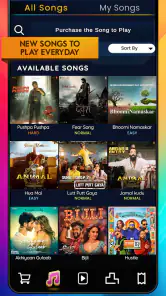
One of the standout features of the game is its killer soundtrack. From pop hits to classic rock and everything in between, the song selection is vast and frequently updated, ensuring there's always something fresh to play. And yes, you might find yourself downloading a few new tracks to your personal playlist after a session or two. The music quality is top-notch, making you feel as if you’re playing a live set.
The strongest reason to try a music game is usually whether its songs keep you interested, so I’d pay attention to that before spending on optional items. If the available music does not match your taste, polished tapping alone may not hold your attention for long. The game has an average rating of 3.4 from around 2.8 thousand ratings, which suggests opinions are mixed rather than universally enthusiastic. It has passed over a million installs, but popularity still cannot tell you whether its musical selection will fit your own listening habits.
Visuals and Interface
Visually, the game doesn’t disappoint either. It boasts vibrant graphics that are easy on the eyes but still dynamic enough to keep things exciting. The colors and animations sync beautifully with the music, enhancing the immersive experience. The interface is intuitive, allowing even the most tech-challenged individuals to navigate with ease. Trust me, you won’t need a manual to master this game.
If a screen stops responding or a session behaves unexpectedly, I’d avoid assuming the song itself is the problem. Return to the game’s main screen, try again, and, if needed, close and reopen the app. If the issue continues, restart the device and check for an available update. These are ordinary troubleshooting steps, not a guarantee that every problem will disappear, but they help rule out a temporary hiccup before you give up on a song.
It is also worth distinguishing a timing issue from an audio issue. If the music is hard to hear, first try a quieter place or adjust your device’s volume; if the phone is busy with other tasks, close what you do not need and retry. When the same passage remains difficult even in a calm setting, it may simply be a demanding part of the song. Replaying with a lighter touch and steady posture is more useful than making several changes at once.
Challenge Your Friends
What’s a game without a bit of friendly competition? Song Beat allows you to connect with friends and challenge them to beat your high score. It’s a fantastic way to engage with friends, and quite frankly, it adds a layer of excitement knowing you’re not just competing against yourself. Plus, leaderboards keep the motivation going strong as you climb your way to the top.
That competitive angle is best for players who enjoy repeating a track to improve a result. If you would rather discover new music without comparing scores, the social challenge may add little for you, and you can focus on playing at your own pace. I would also keep expectations practical: a leaderboard can make a familiar song feel fresh, but it does not change the basic appeal of the tapping itself.
Who will enjoy it most
I’d recommend it to casual players who like Indian music, quick rounds, and the satisfaction of getting a rhythm right. It is also a reasonable pick for someone curious about music games who does not want to begin with a complex setup. I’d skip it if you want a deep instrument simulator, a lesson plan, or a game whose main attraction is a carefully curated collection of music in a specific genre. Those needs call for a more specialized alternative.
Released on November 10, 2021, the game has had time to find an audience, but the most useful test is still personal: do you enjoy following its beats, and does the available music make you want another round? The small number of written reviews compared with its ratings is another reason I would make my own decision through play rather than treating public feedback as a full picture.
A few practical decisions before you settle in
If you are wondering whether you need headphones, I’d treat them as helpful rather than necessary. In a quiet room, the phone’s sound may be enough; in a shared space or on public transport, headphones can make the rhythm easier to pick out and reduce the temptation to turn the volume up too far. If touch accuracy seems unpredictable, first test a calm, repeatable setup: hold the phone securely, keep your fingers clear of the screen’s edges, and avoid playing while walking. That won’t change the game, but it makes your own attempts easier to judge.
For a family device, the Everyone age rating makes the game broadly suitable from a content-rating perspective, but I’d still keep purchases in mind. Optional items cost money, so if a child is playing, it is sensible to check the device’s purchase controls before handing it over. Since the game is free to start, there is no need to buy anything just to find out whether the music and tapping feel enjoyable. I’d only consider an optional purchase after the core experience has earned more play time.
Another useful question is whether it is a good choice for a brief offline distraction. I wouldn’t plan around access to any particular song or assume how the game behaves without a connection; instead, I’d open it before leaving home and see whether the session starts as expected. That quick check is more useful than discovering a snag when you have only a few minutes to spare. If you mainly want music that is guaranteed to be available wherever you go, a downloaded playlist in a music player is the more dependable fit.
Recovering from a rough session
When an attempt goes badly, change one thing at a time. First replay the same song with a steadier grip; if the result still feels off, move to a quieter place and listen for the beat before focusing on the prompts. If the whole app is acting oddly rather than one sequence being difficult, reopen it and check for an update before repeatedly retrying. This small sequence helps you tell apart a tough passage, distractions, and a temporary app problem without turning a casual game into a troubleshooting project.
I would also avoid judging your ability from one rushed round. A notification, a conversation, or a sudden change in how you hold the phone can interrupt timing, and then a score says more about the moment than your sense of rhythm. For a fairer test, replay under similar conditions and stop if you are getting frustrated. The game works best as a light diversion; there is little value in forcing a long session when the setting is wrong.
When another kind of music app is better
Song Beat sits between passive listening and focused practice. It asks for more attention than a streaming app, but it does not provide the kind of structured instruction you would seek from a music-learning tool. That middle ground is its point: it can make a spare few minutes more interactive, especially for someone who likes Indian music and enjoys improving through repetition. If your priority is exploring an artist’s catalogue, building playlists, or hearing uninterrupted tracks, use a music player instead. If you want technique, lessons, or a specific rhythm-game format, look for an app designed around that goal.
The game is also a weaker fit if your preferred music is absent from what you can play, or if you dislike repeating songs to sharpen a score. Rhythm games get much of their satisfaction from learning a pattern and trying again; that loop can feel rewarding to one person and monotonous to another. I’d use the free entry point to answer that question first, rather than assuming that liking music automatically means liking a tapping game.
What I would check before recommending it
For a first session, I’d choose a quiet moment, make sure the device is comfortable to hold, and try a track without worrying about the score. Then I’d ask two things: did the prompts feel understandable, and did the music make me want to replay? If both answers are yes, the game has a reasonable chance of becoming a handy short-break option. If the controls feel awkward or the songs do not appeal, more time spent tweaking your setup is unlikely to change the basic mismatch.
It is a particularly easy recommendation for a casual player who wants a music-themed game without installing a complicated instrument simulator. It is a more cautious recommendation for someone who cares strongly about a specific genre, wants a deep catalogue, or expects detailed coaching. The best way to decide is to try the no-cost starting experience and judge the actual song choices and rhythm loop for yourself, keeping purchases optional rather than part of the decision.
In conclusion, Song Beat: Music Game is a delightful way to enjoy music and rhythm gaming on the go. Whether you’re a seasoned rhythm game veteran or a newcomer looking to kill some time, this game offers something for everyone. So grab your headphones, prepare your fingers, and dive into the beat. You might just find your new favorite pastime.
Song Beat: Music Game Frequently Asked Questions
Is Song Beat: Music Game suitable for beginners?
Yes. Song Beat: Music Game is a tap rhythm game, so its central idea is easy to understand: follow the music and respond to the beats. New players can use it to try a music game without needing experience with rhythm titles, while players who enjoy timing challenges can focus on improving their play. Its content rating is Everyone.
What is Song Beat: Music Game about?
Song Beat: Music Game is a rhythm-based mobile game where players tap, swipe, and hold to the beat of various songs. The game offers a diverse song library across multiple genres, ensuring that players can enjoy their favorite tunes while challenging their rhythm and timing skills. It's designed for both casual players and music enthusiasts.
Is Song Beat: Music Game free to play?
Yes, Song Beat: Music Game is free to download and play. However, it offers in-app purchases for players who want to enhance their gaming experience. These purchases can include new songs, ad removal, or additional game features. While the core game is accessible without spending money, some premium features require payment. In-app purchase prices range from $0.49 to $12.99 per item.
What platforms is Song Beat: Music Game available on?
Song Beat: Music Game is available for both Android and iOS devices. You can download it from the Google Play Store for Android devices and the App Store for iOS devices. The game is optimized for smartphones and tablets, ensuring a smooth gaming experience across different screen sizes. On Android, it requires version 6.0 or later.
Can I play Song Beat: Music Game offline?
Song Beat: Music Game requires an internet connection to download new songs and updates. However, once the songs are downloaded to your device, you can play them offline. This feature is convenient for players who want to enjoy the game without being connected to the internet all the time. Just ensure you have downloaded the songs beforehand.
Pros
- Engaging music rhythm gameplay
- Wide variety of songs to choose from
- Intuitive and easy controls
- Regular updates with new content
- Visually appealing graphics
Cons
- In-app purchases can be costly
- Requires internet for full features
- Occasional lag on older devices
- Limited offline play options
- Ads can be disruptive
- Category
- Music
- Version
- 1.5.34.610











