Sculpt People
- 4.96K
- 4.4
- Installs
- 100.00M
- Price
- Free

Screenshots



Analysis by Reviewed
When a phone gets passed around at home, games that invite quick turns can be easier to share than ones that demand a long session. Sculpt People fits that kind of moment: one person can shape a clay-like figure, then hand the device over and let someone else try the next task. I find the appeal less about making polished art and more about seeing what a few taps and adjustments can turn into.
A natural fit for short shared sessions
This is a simulation game from CrazyLabs LTD, built around shaping figures and giving them a finished look. Its premise makes it easy to understand at a glance, which helps when a sibling, partner, or friend wants to join without sitting through an explanation. A useful household routine is to agree on one turn per person, rather than letting the first player keep tweaking a sculpture indefinitely. That keeps the activity light and makes the handoff part of the fun.
It is also a better fit for casual creative play than for a serious digital sculpting project. The game gives you a guided task and a playful result; a dedicated 3D modeling tool is the better choice if you need precise control, export-ready assets, or a working environment for art practice. I would choose this game for a relaxed break, not as a replacement for professional software or a structured drawing lesson.
Set expectations before passing over the phone
Because the game is free to download and includes in-app purchases priced from $1.99 to $4.99 per item, I would make the household rule about purchases clear before sharing a device. Free access does not mean every optional item is included, and a child who sees a purchase prompt may not understand that it involves spending. If the phone is shared, the person who owns the device should handle any payment decisions rather than leaving that choice to whoever is playing.
It is equally sensible to keep turns distinct if more than one person uses the same phone. Agree on who is playing and avoid assuming that one person’s progress or choices belong to everyone. That is ordinary shared-device etiquette, not a special feature of the game, but it prevents confusion when a quick play session turns into a regular household habit.
Age, trust, and the kind of play to expect
The game is rated for Everyone, so its general audience is broad. I would still use the same judgment I would with any app on a child’s device: explain purchase prompts, check that the experience suits the child, and decide whether shared play is appropriate for your household. A content rating is useful context, but it does not replace a parent’s own decision about screen time or spending.
Its large audience—over 100 million installs and an average rating of 4.4 from around 547,000 ratings—suggests that the simple sculpting idea has wide appeal. That doesn’t mean every player will enjoy it equally. Someone who likes tactile, low-pressure creative tasks may settle into it quickly; someone looking for deep tools, open-ended modeling, or a competitive challenge may find the guided format limiting.
More From Our News Desk

Weather by Xiaomi Review: Clear at a Glance, Less Clear Up Close

X Under Pressure: Can It Recover When Posting Goes Wrong?

Clash of Clans Is Won Between the Battles

Android Auto Makes the Case for Quieter Car Software

MobiOffice: Transforming Mobile Productivity with Seamless Integration

EA SPORTS FC™ Mobile Soccer: Redefining Mobile Sports Gaming
If you are wondering whether it works as a quick activity, that is the most natural way to approach it: play a little, finish a task, and put the phone away when the moment is over. If you want to know whether it is a full 3D art studio, I would say no; its appeal is casual, game-like sculpting rather than detailed production. The current version is 3.3.3.0, and it requires Android 7.0 or later. It is free to start, while optional purchases are separate.
For an everyday example, imagine waiting for food at a café with a child or friend. One person can try shaping the figure while the other suggests where to smooth or add detail, then you can swap roles. That kind of back-and-forth turns a small idle moment into a shared activity without needing extra materials. The trade-off is that the screen stays central, so it is not the right pick if you want a screen-free craft or a game where several people can participate at once without taking turns.
Getting Started with Sculpt People
Diving into Sculpt People is as easy as pie. Once you download the app, you're greeted with a friendly interface that gets you straight into the action. No long tutorials or complicated setups here. Just pick up your virtual tools and start sculpting. The app does a great job of making you feel like a sculptor without the mess of clay under your fingernails.
The Creative Process
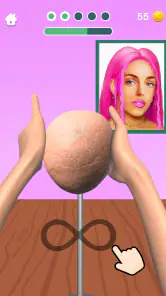
The app offers a variety of tools to shape and mold your creation. You can stretch, carve, and smooth out your sculptures with just a swipe or a tap. It's surprisingly intuitive, and even if you've never touched a piece of clay in your life, you’ll find yourself crafting some pretty cool stuff. I felt like a pro after just a few tries. The app’s responsiveness and the way it mimics real-life sculpting movements are truly impressive.
One of the features I particularly enjoyed is the color palette. You can choose from a wide range of colors to bring your sculptures to life. It’s like painting in 3D. Trust me, adding a splash of color to your sculpture makes a world of difference.
For a better result, I recommend making the main shape first and saving color for the end. Working in that order makes it easier to notice whether the form itself looks right, rather than letting a bright finish distract from uneven shaping. On a small phone screen, short, deliberate movements are also easier to judge than repeatedly swiping across a large area. It is a small change in approach, but it makes the hands-on part feel less fiddly.
Challenges and Levels
To keep things interesting, the app offers various challenges and levels. You can recreate famous sculptures, or tackle fun and quirky designs. Each level presents a new challenge, keeping you engaged and pushing your creativity to the limits. I found myself getting lost in the process, trying to perfect each detail to match the given challenge. It’s addictive, in the best way possible.
There's a sense of accomplishment when you complete a level and see your creation come together. Plus, the app provides feedback on your work, which is great for learning and improving your skills.
The guided structure is both the strongest reason to try it and the main limitation to keep in mind. A prompt gives you a clear goal when you do not know what to make, and the feedback makes each attempt feel like a small puzzle. But players who want a blank canvas every time may prefer a less directed creative app. I would treat the challenges as playful exercises in observation: compare the broad silhouette first, then spend attention on smaller details instead of trying to perfect everything at once.
Community and Sharing
One of the coolest aspects of Sculpt People is the community feature. You can share your creations with other users and get inspired by their work. It’s a neat way to connect with fellow art lovers and get feedback on your own masterpieces. I’ve seen some incredible sculptures from other users that truly blew my mind. It’s a reminder of how much talent and creativity is out there.
For a shared household phone, I would make sharing a deliberate choice rather than an automatic part of every turn. Let each player decide whether a creation is ready to show, and keep in mind that a device used by several people can blur whose work is whose. The social side can be motivating for someone who enjoys seeing different approaches, while a player who prefers private, self-paced play can simply focus on the sculpting task itself.
Making turns feel fair on one device
For a household using one phone, a simple turn rule can do more than settle who gets to play next. Give each person a clear task—one shapes, another suggests a small adjustment, then the device changes hands. This makes the activity collaborative without implying that everyone is controlling the game at once. It also gives quieter players a way to contribute ideas without needing to take over the screen.
I would avoid treating a shared device as though it automatically creates separate player spaces. Decide in advance whether the phone’s owner is the person who starts and ends each session, and let others know before they make choices or share a result. That little bit of coordination matters more than any elaborate household rule, especially when players have different ages or expectations.
Where it sits beside other creative games
Compared with open-ended drawing apps, this game puts more emphasis on shaping a three-dimensional figure and responding to a task. That structure is helpful when someone wants to make something but would rather not invent a subject from scratch. Compared with a full 3D modeling app, it is much more approachable, but the trade-off is less control and a less suitable workflow for creating assets you intend to use elsewhere. I would choose based on the goal: quick guided play here, detailed production in a dedicated tool.
It also differs from a traditional craft activity in a practical way: there is no physical material to prepare or clear away, so it can fill a brief wait or quiet moment. But the screen is still the center of attention, and the tactile feedback of real clay is not the same as swiping on glass. If the point is to keep hands busy away from a device, modeling clay is the better option; if the point is a low-mess creative game while waiting, this is a reasonable fit.
Choosing the right moment to play
I would recommend it most to people who enjoy small, visual tasks and are comfortable with a guided goal. It can suit a child and adult taking turns, friends looking for a light distraction, or an individual who wants a short creative break. It is less compelling for someone who expects an extensive art tool, a competitive multiplayer game, or a long-form story. Knowing that distinction before installing it helps set a fair expectation: this is a casual sculpting game, not a studio or a group party game.
One useful way to keep a session satisfying is to stop when a task feels finished rather than chasing a perfect result. The game’s prompts and feedback invite another attempt, but repeated fine adjustments can become more work than fun, especially on a small screen. For a quick shared session, agree that each person gets one pass at a sculpture; for solo play, take a break if the shaping starts to feel like correcting tiny flaws rather than enjoying the process.
Final Thoughts
In a nutshell, Sculpt People is a fantastic app for anyone looking to explore their creative side. Whether you’re an experienced artist or just looking to try something new, this app offers a fun and engaging way to dive into the world of sculpting. The user-friendly interface, combined with the variety of tools and challenges, makes it a must-try for anyone with an artistic itch to scratch.
My household verdict is that it works best as a low-pressure, turn-taking game for people who enjoy making things but do not need professional controls. It is easy to pick up, has enough direction to get a casual player moving, and gives friends or family a simple subject to talk about while they play. I would skip it if your priority is detailed 3D modeling, an entirely screen-free activity, or a game built around simultaneous group play. For everyone else, it is a friendly way to fill a spare few minutes with a little creativity.
So, why not give it a shot? Download Sculpt People, get your hands "dirty," and start creating some art! Who knows, you might just discover a hidden talent.
Sculpt People Frequently Asked Questions
What do you do in Sculpt People?
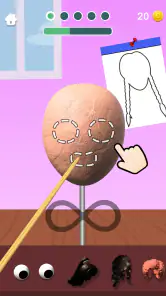
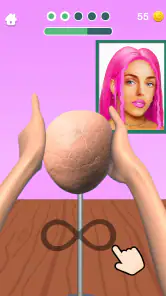
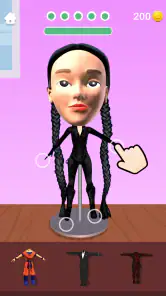
Sculpt People is a hands-on creative game centered on shaping clay into 3D figures and faces. You work with a model, sculpt it, and pose it to bring the creation to life. The store describes clay modeling and face sculpting alongside moving people in slow motion, making it a fit for players who enjoy casual, visual activities rather than competition-focused gameplay.
Is Sculpt People suitable for someone who has never played a sculpting game?
The game’s premise is easy to understand: shape a figure from clay and work toward the requested result. Its focus on creative, tactile play may suit newcomers as well as people who already enjoy art or design games. If you prefer games built around detailed strategy, fast reactions, or complex systems, this more relaxed sculpting concept may feel quite different.
Who developed Sculpt People, and what kind of game is it?
Sculpt People is a simulation game developed by CrazyLabs LTD. Its central idea is hands-on creative play: you shape clay into 3D figures and faces, using sculpting and posing to bring each creation to life. If you enjoy casual games that focus on making things rather than competing in complex battles, its artistic premise may appeal to you.
What devices can run Sculpt People?
Sculpt People is available for Android and iOS devices. On Android, it requires version 7.0 or later, so it is worth checking your device’s operating system before downloading. The game is designed for mobile play, with sculpting and posing controlled on the screen. Its current version is 3.3.3.0, and compatibility can depend on the device and platform.
What is the main objective of Sculpt People?
Sculpt People is a creative simulation game where players are tasked with sculpting 3D models based on specific client requests. The objective is to accurately carve and shape the models using various tools to match the given references. It's a relaxing and engaging experience that challenges your artistic skills and creativity.
Pros
- Intuitive controls make sculpting easy.
- Wide variety of tools for customization.
- Regular updates with new features.
- Engaging challenges to improve skills.
- Suitable for all age groups.
Cons
- Occasional in-app ads interrupt gameplay.
- Limited free content without purchases.
- Some tools require a learning curve.
- Graphics could be more detailed.
- Requires internet for full features.
- Category
- Simulation
- Version
- 3.3.3.0