Popscene
- 4.33K
- 3.8
- Installs
- 5.00M
- Price
- Free

Screenshots
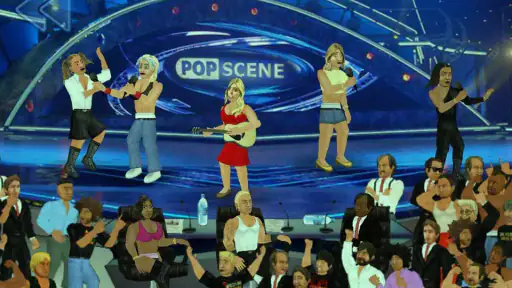
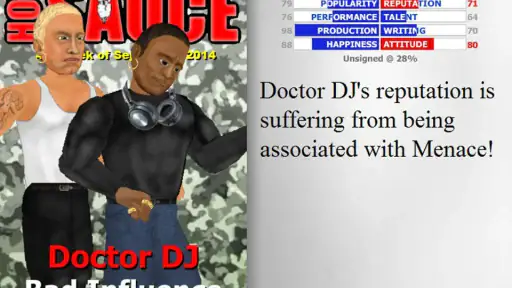
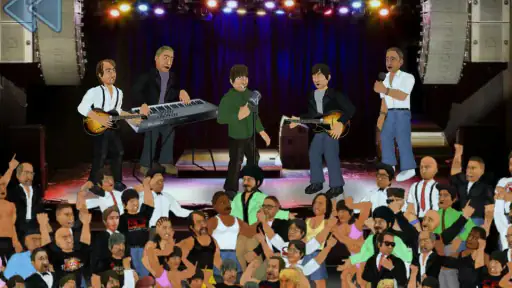
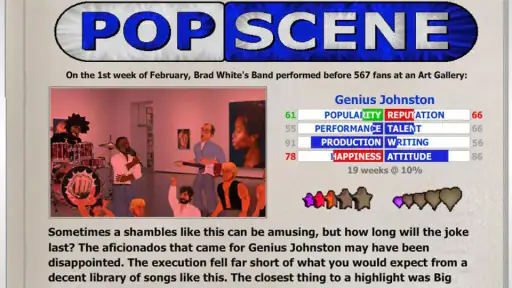
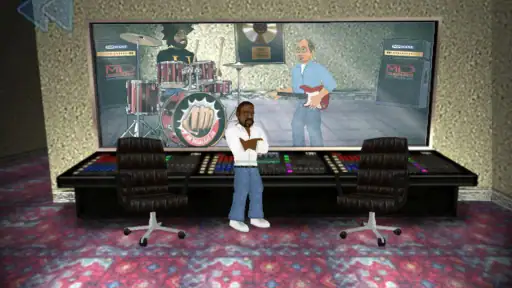
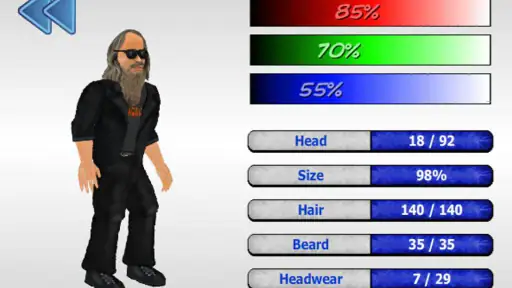

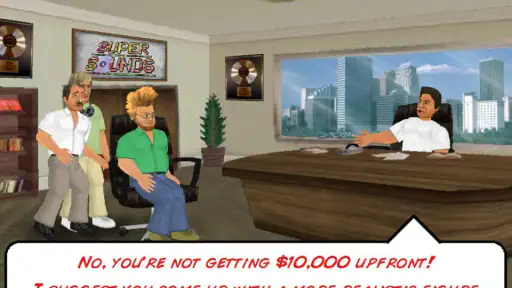
Analysis by Reviewed
I approached Popscene expecting a light music game, but its appeal is a little more specific than that. It presents the music industry as a career playground, where the fun comes from making choices, managing momentum, and seeing how an artist’s path develops. It is not a rhythm game built around tapping perfectly to a song, and it is not a full music-production tool. Instead, it sits somewhere between a music-themed simulation and a compact career experiment.
That distinction matters before you install it. If you want to create finished tracks, mix vocals, or play along with licensed songs, this will not replace a studio app or a conventional rhythm title. If you enjoy watching decisions produce unexpected consequences, however, the concept has more staying power than the short store description suggests. I found myself treating each attempt as a small experiment: try a different approach, notice what changes, and decide whether to protect a promising run or take a risk.
What the game is trying to do
MDickie is the developer behind this free music game, which has been available since January 30, 2014. Its basic idea is to bring a personal music collection into a fictional career setting rather than asking you to simply listen in the background. That gives the experience a playful, slightly unpredictable character. The music is not just decoration; it helps shape the mood of a session and makes the career feel more personal.
The strongest part of the concept is the sense of ownership. You are not merely completing isolated levels and moving on. You are following a path and judging whether the next decision is worth the possible setback. That makes it particularly suitable for short sessions when you want something more involving than a passive music player but less demanding than a long strategy game.
I would describe the presentation as deliberately game-like rather than polished in the style of a major label simulator. The charm comes from experimenting with the systems, not from expecting a detailed industry model. Once you accept that, the rougher edges become easier to tolerate.
Where players are most likely to get stuck
The first source of friction is understanding what the game expects you to do next. A music-career concept sounds immediately familiar, but the practical rhythm of play can take a little time to read. New players may look for a clear sequence of conventional levels, while the experience is better approached as a chain of choices and outcomes. I recommend spending the first session learning the flow instead of trying to optimize every move.
Another common stumbling block is treating an early result as a final judgment on your ability. A disappointing start does not necessarily mean the game is broken or that your device is struggling. It may simply reflect a poor decision, an unhelpful combination of choices, or a career path that has become less favorable. Restarting with a different plan is part of the appeal, although players who dislike repetition may find that process tiring.
More From Our News Desk

Weather by Xiaomi Review: Clear at a Glance, Less Clear Up Close

X Under Pressure: Can It Recover When Posting Goes Wrong?

Clash of Clans Is Won Between the Battles

Android Auto Makes the Case for Quieter Car Software

MobiOffice: Transforming Mobile Productivity with Seamless Integration

EA SPORTS FC™ Mobile Soccer: Redefining Mobile Sports Gaming
The custom-music angle can also create confusion. Bringing your own collection into an experience is attractive, but it changes how you should prepare. If you expect the game to behave like a full media library, with the same browsing and organization tools as a dedicated player, you may be disappointed. I found it more useful to think of personal music as a way to give sessions atmosphere, not as a replacement for a serious audio-management app.
The most useful mindset is to treat each run as a test rather than a performance review. Make one meaningful change at a time, observe the result, and avoid changing everything at once. That approach makes it easier to tell whether a new choice helped or whether the outcome was simply part of the game’s unpredictable career structure.
Setup checks that prevent avoidable frustration
Popscene is free to download and is rated for Everyone, so it is easy to try without making a major commitment. It requires Android 5.0 or later, which covers a broad range of devices, but compatibility on paper does not guarantee an equally comfortable experience on every phone. Before blaming the game, I would close other demanding apps, make sure the operating system is reasonably stable, and leave enough free storage for normal app operation.
If the game does not start correctly after installation, the safest first steps are simple: fully close it, restart the phone, and launch it again. If the problem remains, check that the installation completed properly and that the device is not in an aggressive battery-saving mode. These checks sound basic, but they solve many launch and loading problems without risking local progress.
Audio deserves its own check. Make sure the phone is not muted, verify the media-volume setting rather than only the ringtone volume, and test with headphones disconnected if sound behaves strangely. Bluetooth devices can also redirect audio unexpectedly. When music appears absent, I first test another app, then reconnect or remove the external audio device, and only afterward investigate the game itself.
Because the game can involve your music collection, organization helps. I would begin with a small, uncomplicated selection rather than trying to make the entire library available at once. Keep track of which files or playlists you intended to use, and avoid changing their location while testing. A controlled setup makes it much easier to identify whether the issue comes from the game, the phone’s media handling, or the collection itself.
There is also a financial point worth keeping in mind. The game is free, while optional in-app purchases are listed at $2.99 per item. I would play long enough to decide whether the core loop suits you before buying anything. A purchase cannot fix a career strategy you do not enjoy, and it will not turn the title into a different kind of music game.
Recovering a workflow after something goes wrong
When a session stops behaving as expected, resist the urge to delete and reinstall immediately. Reinstallation can create more uncertainty, especially if you are unsure how local progress is handled. Start by recording what happened: whether the issue occurred during launch, after selecting music, during a career decision, or when returning to a previous screen. That small note can reveal whether the problem is repeatable or was a one-time interruption.
If the game feels stuck, leave it alone for a moment, then try a normal exit and reopen it. On a phone with limited available memory, closing unrelated apps before relaunching is worthwhile. If the same action causes trouble repeatedly, change only one variable for the next attempt. For example, use a different audio selection, remove a connected accessory, or begin a fresh session rather than changing every setting simultaneously.
A practical recovery routine is to separate progress testing from music testing. First confirm that the career flow works with the simplest available setup. Then introduce your preferred collection and see whether the problem returns. This two-stage approach is more informative than repeatedly opening the same problematic session, because it tells you whether the trouble follows the game state or the media environment.
Players should also avoid making rapid repeated taps when a screen appears slow. Touching the same control several times can make it difficult to know which action the game actually received. I prefer waiting briefly, then using one deliberate input. If the interface remains unresponsive, closing and reopening the game is cleaner than building up a queue of accidental commands.
For a long-term routine, I would keep the game updated through the normal app store process and restart the device occasionally if performance gradually worsens. I would not use unofficial downloads or random “fix” tools. They add risk without offering a reliable solution, particularly when the original issue may be a phone setting or a damaged local state.
When the app is not the cause
Not every bad experience points to Popscene. If other apps also lose sound, crash, or load slowly, the phone is the more likely source. Low free storage, overheating, an aging battery, or an operating system problem can affect games first because games often demand more active resources than simple reading apps.
Network conditions can be misleading too. Even when the main play experience feels self-contained, store checks, downloads, or device services may behave poorly during a weak connection. If installation or updating fails, test the connection with another service and try again later. Do not assume that a failed download means the game itself is incompatible.
Music-library problems are especially easy to misdiagnose. A track that works in one player may still be unavailable to another app because of its location, format handling, indexing state, or access restrictions. The useful test is comparison: try a different, ordinary audio file and see whether the game responds differently. If only a particular part of the collection causes trouble, focus on that collection rather than repeatedly resetting the whole game.
Bluetooth and wired accessories can introduce their own delays and volume behavior. If controls feel normal but sound is missing or out of sync, test the phone speaker. If the issue disappears, the accessory or its connection is the likely explanation. This is a small but important distinction for a game whose atmosphere depends heavily on music.
Finally, expectations can create a false impression of failure. Someone coming from a traditional rhythm game may expect immediate scoring, visible note patterns, and a tightly timed challenge. Popscene’s career-oriented approach is different. If you are waiting for a conventional song-by-song structure, the game may feel unclear even while working exactly as intended.
How it fits into everyday play
A realistic use case is a short evening break. I can imagine opening the game after commuting, choosing a familiar piece of music, and making a few career decisions without committing to a lengthy campaign. The personal soundtrack makes the session feel less repetitive, while the career framing gives me a reason to continue beyond simply pressing play.
It also works for players who enjoy comparing outcomes. You might follow a cautious route one day, then repeat the situation with a bolder choice and see how the career develops. That makes it a good fit for people who enjoy experimentation, especially those who like games with room for imperfect runs rather than a single correct solution.
It is less suitable for someone who wants a relaxing music player with no interruptions. The career layer asks for attention, and the game’s value comes from interacting with it. It is also not ideal for a player seeking a deep business simulation with precise financial planning, realistic industry contracts, or professional production tools. The concept is lighter and more playful than that.
Compared with a standard rhythm game, Popscene offers more personal context and less emphasis on reflex accuracy. Compared with a music player, it offers more interaction and less control over library management. Compared with a management simulator, it is easier to pick up but not as detailed. Those trade-offs explain both its distinctiveness and its limits.
What the audience numbers suggest, and what they do not
The game has passed five million installs and holds a 3.8 average from roughly fifty-six thousand ratings, alongside about four thousand three hundred written reviews. Those figures suggest a substantial audience and a concept that has reached well beyond a small niche, but they also fit my impression that the experience is appealing in a particular way rather than universally smooth.
Its age rating of Everyone makes it approachable for a broad audience, although “accessible” should not be confused with “immediately obvious.” Younger or casual players may enjoy the music theme, while experienced simulation fans may want clearer explanations of how each choice affects the wider career. I would give new players a little time to learn the game’s language before deciding whether it is for them.
The long availability of the title is another reason to judge it on its actual style rather than modern presentation standards. If you prefer contemporary interfaces, extensive tutorials, and highly polished animations, the older design may feel dated. If you value unusual ideas and replayable experiments more than visual refinement, that same age is less of a concern.
Who should try it, and who should skip it
I would recommend it to players who enjoy music-themed games but do not need a strict rhythm challenge. It is especially interesting for anyone who likes making choices, replaying a scenario with a different approach, and using familiar music to personalize a session. The free entry point makes it easy to test that combination without first committing money.
I would suggest skipping it if your main goal is audio creation. You will be happier with a dedicated digital audio workstation or an instrument app. I would also steer away from it if you want a highly guided campaign with constant rewards and obvious objectives. The game asks you to discover its rhythm, and that can feel like unnecessary friction if you prefer direct instructions.
Players with older phones can try it because the minimum requirement is Android 5.0, but I would still keep expectations realistic. A supported operating system is only the starting point; storage, memory, audio routing, and the condition of the device can matter just as much. If your phone already struggles with other games, this may not be the best title to use as a performance test.
My practical verdict
Popscene is an unusual free game with a clear identity: it turns a personal music collection into the backdrop for a playful career experience. I like that it does not simply copy the usual rhythm-game formula. Its best moments come from trying a different path, accepting an imperfect result, and seeing how the next attempt feels.
The setup and troubleshooting process rewards patience. Start with a simple music selection, check the phone’s audio and storage, test one change at a time, and avoid reinstalling before you understand the problem. Those habits make the experience less frustrating and help separate genuine game issues from device or library issues.
My recommendation is straightforward: try it if you want a light, experimental music-career game and enjoy discovering systems through play. Keep your expectations modest about production depth, modern polish, and traditional rhythm mechanics. For the right player, the trade-off is worthwhile because the game offers personality instead of following a familiar template. For everyone else, a dedicated rhythm game, music player, or production app will be the better choice.
After spending time with Popscene, I see it as a title to revisit in short bursts rather than a game that demands a single marathon campaign. Its free price makes that relationship easy: install it, test the career loop with your own music, and decide based on how much you enjoy the experiments. That is where its real value lies.
Popscene Frequently Asked Questions
Can I shape the music and identity of my band in Popscene?
Yes. Popscene gives you creative choices as well as career-management responsibilities, so you can help shape songs and decide how the band develops. The appeal is not just watching a career unfold; your decisions about the music and the people performing it contribute to the band’s direction. Players who enjoy having creative input alongside planning may find this especially engaging.
What choices can affect a band’s success in Popscene?
Success depends on balancing several parts of a music career rather than relying on one decision. You can guide song creation, choose performers, manage relationships, arrange releases, and respond to touring and promotion demands. These systems make the game a mix of creative judgment and practical planning, and the results of your choices can influence popularity as well as longer-term progress.
Does Popscene focus more on managing a band or performing music?
Popscene leans toward management and career planning rather than asking you to perform songs through a rhythm-based tapping challenge. You make decisions about the band’s creative and professional direction, including its members, releases, and career activities. If you are looking for a game about running a music act and guiding its progress, that focus may be a better match than a performance-focused music game.
How large is Popscene’s player audience, and what do ratings suggest?
Popscene has reached over five million installs and has an average rating of 3.8 from around fifty-six thousand ratings. Those figures suggest that many players have tried it, while the rating reflects a range of reactions rather than a guarantee that every player will enjoy it. Its unusual music-industry simulation style is likely to appeal most to people who enjoy management games.
What kind of experience is Popscene, and is it different from a rhythm game?
Popscene is a music-industry simulation game, rather than a rhythm game built around tapping notes in time. Its focus is on building a career in the music business and making decisions about a band’s creative and professional direction. If you enjoy planning, management, and seeing the consequences of your choices unfold, its approach may suit you better than a game centered on musical performance skills.
Pros
- Deep music-management gameplay with plenty of strategic decisions
- Large range of artists
- songs
- and genres to experiment with
- Satisfying progression as your label grows in influence
- Simple controls make it easy to manage tours and releases
- Works well for players who enjoy numbers and long-term planning
Cons
- The interface feels dated and may take time to understand
- Some outcomes depend heavily on statistics and random events
- Limited visual variety compared with modern management games
- Progress can become repetitive after mastering the main systems
- Best features may require patience and frequent menu navigation
- Category
- Music
- Version
- Varies with device













