PawBlock! - Sort Color Puzzle
- 37.00
- 4.9
- Installs
- 10.00K
- Price
- Free
Screenshots
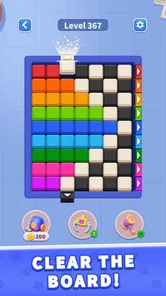
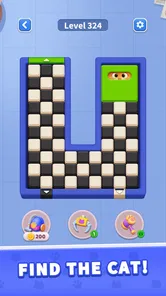
Analysis by Reviewed
I like small puzzle games that are easy to open for a few minutes, but I’m wary of ones that look simple and then rely on unclear rules or relentless pressure. PawBlock! caught my attention because it puts cats at the center of a color-sorting challenge. It is a free trivia-style game from UniRise Studio, though its hands-on appeal is more about noticing patterns and planning moves than answering general-knowledge questions. My first impression is that it suits players who enjoy a compact visual puzzle and don’t need a sprawling game to make a break feel satisfying.
A cat puzzle built around careful moves
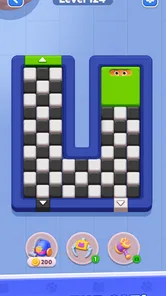
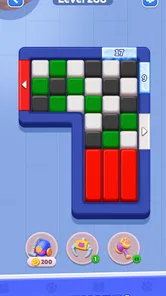
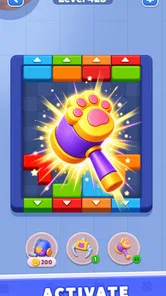
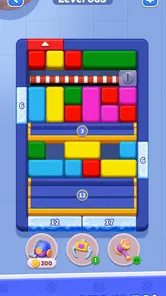
The central idea suggested by PawBlock! is straightforward: slide pieces and find the cats. That gives the game a more tactile feel than a typical quiz, where progress depends on recalling facts or choosing an answer from a list. Here, the interest comes from looking at the board, spotting what belongs together, and deciding what to move first. The theme makes that process approachable, while the puzzle framing gives it a little more purpose than simply matching colors for its own sake.
I’d describe it as a good fit for short sessions. A round of a sliding puzzle can be satisfying without demanding the kind of uninterrupted attention that a long story game needs. It also gives your eyes and hands something to do, which makes it a natural choice while waiting for a ride or taking a quick pause between chores. The trade-off is that a visual puzzle asks for a different kind of attention than a trivia quiz: if you prefer answering questions from memory, this may not scratch the same itch.
The cat theme is more than a decorative label in the sense that it gives the search a clear subject. Still, players should approach it as a puzzle experience rather than expecting a broad cat encyclopedia or a conventional quiz about animals. The appeal lies in interpreting the arrangement and working toward a solution. That distinction matters if you are choosing the game for someone who specifically wants factual trivia.
How I would play it in an everyday break
For a realistic use case, imagine having a few minutes before an appointment. I’d open the game, take a moment to inspect the pieces, and avoid sliding immediately just because a move looks obvious. In this kind of puzzle, a move that clears space can be more useful than one that appears to make instant progress. Thinking one or two steps ahead helps keep the board readable and reduces the chance of making a sequence of impulsive moves that leaves the target harder to reach.
A useful habit is to pause whenever the board starts to feel visually confusing. Rather than moving several pieces quickly, I’d identify the cat or color I’m trying to uncover, then work backward: what must be out of the way first, and which move preserves room for the next one? That small change in approach can turn a frustrating shuffle into a deliberate puzzle. It is also a practical way to keep a short session relaxing instead of turning it into a rushed test.
Because the play concept is compact, I would also use it as a shared, low-pressure challenge. One person can suggest a move while another checks whether it blocks a later path. That works especially well for a game that can be understood by watching the board, rather than needing a long explanation of its world or controls. It is not the same as a multiplayer feature; it is simply a way to make a brief puzzle more social when someone is sitting beside you.
More From Our News Desk

Weather by Xiaomi Review: Clear at a Glance, Less Clear Up Close

X Under Pressure: Can It Recover When Posting Goes Wrong?

Clash of Clans Is Won Between the Battles

Android Auto Makes the Case for Quieter Car Software

MobiOffice: Transforming Mobile Productivity with Seamless Integration

EA SPORTS FC™ Mobile Soccer: Redefining Mobile Sports Gaming
Who will enjoy it—and who may want something else
I’d recommend it to players who like visual sorting, sliding puzzles, and cat-themed games, especially if they want an activity that can be picked up without learning a large set of systems. Its Everyone content rating makes it suitable for a broad audience, and the gentle premise is easy to share with younger players. For a family, I’d treat it as a small cooperative brain teaser rather than assume it offers a deep progression or a long-running competition.
It may be less appealing if you want a traditional trivia game with questions about history, science, or pop culture. It is also not my first choice for someone looking for a complex strategy game, a rich narrative, or a puzzle with elaborate mechanics. Players who dislike trial-and-error movement may find sliding boards irritating, particularly when they prefer a single clear answer rather than a sequence of spatial decisions. In those cases, a standard quiz app or a more structured logic game would be a better match.
Compared with the usual alternatives in the trivia category, this title appears to lean on visual reasoning rather than a bank of facts. That is a meaningful difference: it can feel more accessible when you are tired or playing with someone who has different interests, but it offers less of the knowledge-building appeal that makes question-and-answer games rewarding. Compared with other color-matching puzzles, the cat-finding hook gives the task a specific goal, though players who want elaborate chain reactions or elaborate board systems may prefer a more feature-heavy puzzle title.
Small decisions that make a session smoother
I’d treat each attempt as a chance to test a plan, not as a race to move every piece. Before committing to a slide, check whether it opens a route you will need later or merely shifts the visual clutter elsewhere. This is a useful distinction when a board looks nearly solved: a move that appears to tidy things up can still make the next step less convenient. When I feel stuck, I find it more productive to look for the move that preserves options than to chase the most satisfying-looking immediate result.
For a short break, it also helps to decide in advance what counts as a satisfying stopping point. If I have only a minute, I can inspect the layout and make one considered move rather than beginning a sequence I may not have time to finish. If I have longer, I can stay with the board and revise my approach. That makes the game easier to fit around real interruptions, though anyone who wants a continuous, story-led session may find this stop-and-start rhythm too slight.
Another practical consideration is who is holding the phone. A younger player may enjoy searching for the cat, while an adult can help by asking questions about space and order instead of taking over the puzzle. That keeps the challenge shared without turning it into a lesson or assuming the child needs a hint at every step. For someone who gets frustrated by visual clutter, though, solving together may not help; a direct-answer quiz or a calmer single-question game could be a better way to pass time.
What the current version means for players
The current release is version 1.5.0, and the game was released on August 21, 2026. Those are useful points of context, but they do not tell me by themselves how the game has changed between versions. I would not assume that a particular mechanic, level set, or quality-of-life option arrived in an update without a clear account of that change. For someone already playing, the practical takeaway is simply that the build to look for is 1.5.0; any expectations about future additions should remain expectations, not promises.
That distinction is important for a small puzzle game. A version number can mark ongoing development, but it does not guarantee that every player will notice a major difference or that a favorite feature has been revised. If you are returning after a break, I’d judge the current experience by the puzzles and controls you can actually use now, rather than by what a later update might bring. If you are new, there is no need to wait for a hypothetical overhaul before deciding whether the core sliding-and-search idea suits you.
UniRise Studio is the developer, and the game has a 4.9 average from around 600 ratings, alongside 37 written reviews and over 10K installs. That reception is encouraging, but I treat ratings as a signal of broad satisfaction rather than proof that every puzzle style will work for me. A player who loves visual sorting may rate it highly for exactly the qualities that a trivia enthusiast finds too light. The best decision is to match the game’s central activity to your own preferences.
Practical details before installing
The game is free and requires Android 7.0 or later. That makes it easy to consider if you have a compatible Android device and want to try a casual puzzle without an upfront purchase. I would still think about the kind of session you want: a free title can be a convenient option, but the value for you depends on whether you enjoy the actual board-solving loop, not simply on the fact that it costs nothing.
One helpful way to evaluate it is to give the first few puzzles your full attention rather than judging it while half-watching something else. Sliding and sorting challenges can seem trivial when played on autopilot, then become more engaging once you start planning moves. Conversely, if you give it a fair try and still find the board work repetitive, there is little reason to force yourself through it. A quick puzzle should feel like a pleasant change of pace, not another task on a to-do list.
I would also avoid treating a stuck moment as proof that the game is unfair. With spatial puzzles, the difficulty can come from overlooking a path or moving a piece too early. Step back, identify the goal, and reconsider the order of moves before restarting or abandoning a round. That approach is especially useful when playing with a child: asking what needs to move first can be more rewarding than simply taking control and solving it for them.
What I’d watch as the game develops
For existing players, the most useful future changes would be ones that make the puzzle flow clearer without removing the need to think. Better guidance for a confusing board, a smoother way to understand a mistaken move, or fresh challenges could all help, but those are wishes rather than claims about what the game currently includes. I would watch for concrete notes about what changes in later releases before deciding that an update solves a particular frustration.
For new players, the main question is simpler: do you enjoy looking at a crowded arrangement and patiently working out the order that reveals the target? If yes, the cat-focused theme and short-session format give PawBlock! a clear reason to earn a place on your phone. If you mainly want rapid-fire factual questions, a conventional trivia app will serve you better. If you want a larger strategic challenge, choose a puzzle game with more depth in its systems.
My overall view is positive but specific. PawBlock! is most appealing as a light, visual brain teaser with a friendly cat premise, not as an all-purpose trivia package. Its strongest use is filling a small pocket of downtime with a puzzle that rewards slowing down and planning. I’d try it if that sounds enjoyable, while keeping expectations focused on the sliding-and-finding idea rather than assuming it will offer a quiz library or extensive strategic progression.
PawBlock! - Sort Color Puzzle Frequently Asked Questions
What is PawBlock! - Sort Color Puzzle?
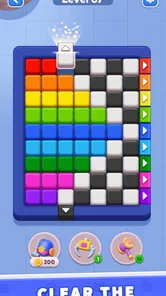
PawBlock! - Sort Color Puzzle is a casual puzzle game built around organizing colored blocks. The main challenge is to sort pieces by color and make room for new ones, with each level testing your planning and attention. It is designed for short play sessions and straightforward controls, so it can suit both puzzle newcomers and players looking for a low-pressure way to pass the time.
How do you play PawBlock! - Sort Color Puzzle?
Gameplay centers on moving or arranging colored blocks so matching colors are grouped together and the puzzle’s sorting goal is met. The exact choices available can vary by level, so it helps to look ahead before making a move: a seemingly useful placement may leave too little space for later pieces. The rules are simple to learn, but careful planning becomes more important as the puzzles grow more demanding.
Is PawBlock! - Sort Color Puzzle free to download?
The game may be available to download without an upfront purchase, but the price and business model can differ between the Android and iOS versions and may change over time. Free-to-play puzzle games can include advertising or optional in-app purchases, such as items that help with progression. Check the listing for your device before downloading, and review purchase settings if a child will be playing.
Can I play PawBlock! - Sort Color Puzzle offline?
Offline availability depends on the version and on which features you want to use. Basic puzzle play may work without a continuous internet connection, while advertisements, purchases, online events, or other connected features may require access. If playing offline is important, try launching the game after disconnecting from Wi-Fi or mobile data, and consult the app-store listing for any stated connection requirements.
Is PawBlock! - Sort Color Puzzle suitable for children, and what should I check before downloading?
The color-sorting premise is accessible and does not require advanced gaming experience, but suitability depends on a child’s age, patience, and comfort with ads or optional purchases. Before installing, check the age rating, privacy details, permissions, and current user reviews in the relevant app store. Also note that difficulty can rise as levels progress, so younger players may appreciate occasional help with planning moves.
Pros
- Simple controls make sorting colors easy to learn.
- Short levels work well for quick play sessions.
- Colorful visuals make the puzzle board easy to read.
- Gradual challenges help introduce new sorting puzzles.
- No complex story or setup gets in the way of playing.
Cons
- Later puzzles may feel repetitive if you play for long stretches.
- Small containers can make color groups harder to distinguish.
- Some levels may require trial and error to solve.
- Ads or optional purchases may interrupt the experience.
- The puzzle format may not appeal to players seeking action or variety.