Music Monster: Horror DIY
- 2.00
- 3.4
- Installs
- 1.00M
- Price
- Free
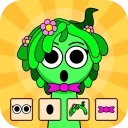
Screenshots
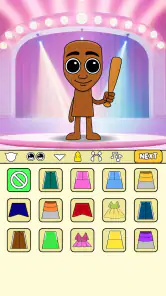
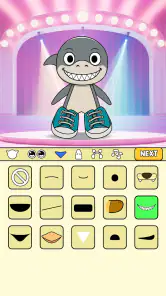
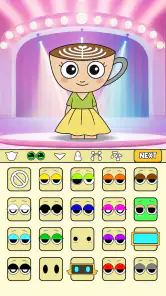
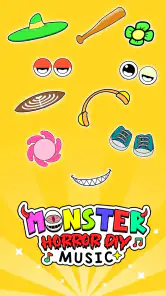
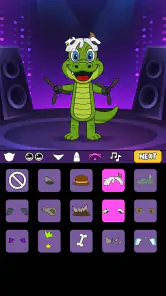
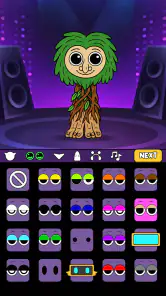
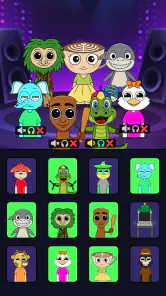
Analysis by Reviewed
If you’re deciding whether to try Music Monster: Horror DIY, I’d think of it as a small creative diversion rather than a music studio or a conventional rhythm challenge. The pleasure is in pairing monster-themed sounds and seeing what sort of eerie character your mix takes on. You don’t need to arrive with musical training or a finished idea; a few curious choices are enough to get started.
A good fit for short, playful experiments
This game is best suited to people who enjoy making things by trial and error. I can see it working well for a teen who wants a music-themed activity, a horror fan who likes playful creature designs, or anyone looking for a light creative break. It is free, and its Teen age rating is worth keeping in mind when choosing a game for a younger player.
It is less suited to someone who wants to compose a polished song, record vocals, or learn a detailed production workflow. The distinction matters: Music Monster makes a narrow, characterful corner of music play accessible, while a full music editor gives you broader tools and more room to shape a finished track. If your aim is simply to experiment with spooky sounds, that narrower focus can be a strength rather than a drawback.
What to expect from a monster-themed music game
I’d approach this as a playful music game rather than a serious production tool. Its appeal is the combination of creepy character-making and beat-box-style sounds, so the fun is in trying combinations and seeing whether they create a mood you enjoy. If you want a polished song editor for recording vocals or arranging a full track, a conventional music-making app is a better fit.
It is free to try, and the Teen content rating makes it a more sensible pick for older kids and teens than a game aimed at very young children. I’d still expect the horror presentation to be a matter of taste: someone who enjoys silly, spooky designs may find it charming, while a player who dislikes monster imagery may not settle in. The game comes from Amusing Critters Game, and its music focus gives it a different feel from a standard rhythm game built around hitting prompts in time.
Unleashing Your Inner Monster Maestro
When I first downloaded Music Monster: Horror DIY, I was intrigued by the concept. The app promises to deliver a DIY music-making experience with a horror twist, and it certainly doesn't disappoint. Right from the get-go, you're greeted by a spooky interface that sets the tone for what’s to come.
Getting Started
Starting with the app is a breeze. The user interface is intuitive enough for beginners yet detailed enough to keep seasoned music creators engaged. You have a wide array of horror-themed sound effects at your disposal, from eerie howls to chilling whispers. The app also offers a vast library of background beats that you can mix and match to create your own spooky symphony.
More From Our News Desk

Weather by Xiaomi Review: Clear at a Glance, Less Clear Up Close

X Under Pressure: Can It Recover When Posting Goes Wrong?

Clash of Clans Is Won Between the Battles

Android Auto Makes the Case for Quieter Car Software

MobiOffice: Transforming Mobile Productivity with Seamless Integration

EA SPORTS FC™ Mobile Soccer: Redefining Mobile Sports Gaming
One of the standout features is the drag-and-drop functionality. It makes mixing and matching sounds incredibly straightforward. You just drag your chosen sound onto the timeline, and voilà, you're on your way to creating your own horror masterpiece.
First setup: start with a simple sound palette
On a first visit, I’d resist the temptation to fill every available space immediately. Start by identifying the main sound you want to hear, then add a supporting beat and listen to how they sit together. This gives you a clear starting point and makes it easier to tell whether the game’s spooky sound palette is actually enjoyable to you.
Think of the first mix as a quick sketch, not a performance. If you are using a phone in a shared room, keep the volume low at first and listen for whether the layers blur together. Headphones can help you pay attention to the detail, while the phone speaker gives a more casual sense of how a short idea will come across when you share it. Either way, make one adjustment at a time so you can tell what changed.
Making your first mix feel manageable
For a first session, I’d keep the goal small: choose one sound that feels like the main character, then add only a couple of supporting beats. Listen to that combination before layering anything else. This simple order makes it easier to notice which element gives the mix its identity, rather than ending up with a busy jumble where every sound competes for attention.
If a result feels too loud or crowded, adjust the individual volumes before changing everything at once. That gives you a clearer sense of what each sound contributes. The useful trick here is to treat each addition as a test: add it, listen, and keep it only if it improves the mood. That approach is more satisfying than trying to build a complicated track immediately.
What counts as a first success
I wouldn’t measure a good first session by whether the result sounds like a complete song. A more realistic win is finding a short combination that has a clear mood: perhaps one unsettling sound in front, with a steadier beat behind it. If you can hear a difference when you add or remove a layer, you are already learning how the game’s ingredients work together.
That small target also makes the experience less intimidating for someone who has never made music. There is no need to understand formal rhythm or know what instrument a sound imitates. Listen for simple things instead: does the mix feel playful or tense, does one sound drown out another, and would you want to hear the result again? Those questions are enough to guide a first attempt.
A Hauntingly Good Time
What makes this app particularly enjoyable is its customization options. You can tweak every little aspect of your creation, from the tempo to the volume of each sound effect. If you're someone who loves to have complete control over their music projects, you'll definitely appreciate the flexibility here.
Another cool feature is the ability to share your creations with friends. You can directly upload your tracks to social media platforms or send them via messaging apps. It's a fun way to showcase your spooky tunes and maybe even give your friends a little scare!
A useful workflow for sharing
When I make something I might send to another person, I’d listen through once before sharing and check that the main sound is still easy to hear. It is tempting to keep adding effects because each one is amusing on its own, but a crowded mix can lose the joke or atmosphere that made it worth sending. A short, recognizable idea is often more effective as a message than a busier arrangement.
Sharing also works best when the recipient understands the playful context. I’d use a spooky loop as a quick greeting or an inside joke with a friend who enjoys horror, rather than expecting it to function as a polished music release. That’s a useful expectation to set: the social payoff comes from the unusual sound and the personal gesture, not from professional production.
Where it fits into an everyday routine
I can imagine opening it during a short break, making a quick eerie loop, and sending it to a friend as a playful message instead of scrolling through another feed. It also works as a light creative activity when you want to experiment without needing musical training or a detailed plan. The payoff is immediate: you can focus on how a few sounds work together, rather than learning a complex arrangement workflow.
Compared with rhythm games, the emphasis here is on shaping a sound rather than following a fixed sequence of notes. Compared with general-purpose beat-making tools, the horror identity makes the experience more focused and approachable, but less suitable for building a broad range of musical styles. That trade-off is the point: it gives you a distinctive playground, not a replacement for a full studio app.
When a different kind of music app is better
If you want a challenge with a clear pass-or-fail goal, a typical rhythm game is likely a better choice: it puts timing and reacting to prompts at the centre. If you want to record, arrange a song across many parts, or work in a less theatrical style, a general music-making app is the more practical option. Music Monster sits between those expectations only in the broad sense that it involves sound; its monster identity and exploratory feel are what make it distinct.
That focus is helpful for someone who freezes when faced with a blank, complicated editor. Instead of planning a full composition, you can make a small arrangement around the sounds that catch your ear. But the same simplicity may feel limiting once you want a more exact result. I’d treat it as a place to play with mood and combinations, then move to a broader tool if your interest turns into a serious music project.
Room for Improvement?
While the app is a blast to use, it does have its limitations. The free version offers limited access to some of the more advanced features, which might nudge you towards a premium subscription. Additionally, the horror theme might not be everyone's cup of tea, especially if you're looking for something more traditional in music creation.
For that reason, I’d skip it if you need precise control for a finished song, want a neutral set of sounds, or prefer a game with clear score-based challenges. It’s also worth keeping expectations modest if you mainly want a conventional beat-making workflow; the monster concept, rather than technical depth, is what gives this game its personality. The average rating is 3.4 from 495 ratings, so I’d treat it as a niche amusement to try for yourself rather than assume its particular style will suit everyone.
Small points that can shape your first session
One practical trade-off is that experimentation can be more enjoyable than aiming for a perfect result. If you have only a few minutes, decide on a mood before you begin—comic, eerie, or somewhere between—and stop once the sounds support it. That little constraint helps avoid spending the whole break changing details without knowing what you are trying to make.
If you are choosing it for someone else, consider both the age rating and their taste in horror imagery. A teen who likes spooky characters may find the theme inviting, while a younger child or someone sensitive to monster visuals may prefer a gentler music game. I’d also make the first try a shared activity if you are unsure: making a silly sound together is a low-pressure way to see whether the style clicks.
Taking the next step
If your first mix works, try changing just one element at a time on your next attempt: keep the same basic arrangement, swap a sound, and compare the mood. It’s a practical way to learn which choices matter to you without losing a version you already like. When you find a combination worth sharing, the built-in sharing option makes it easy to turn that small experiment into a joke or a spooky greeting for someone else.
The game is free, has passed 1 million installs, and is currently at version 1.0.7; its release date was February 6, 2025, and it requires Android 7.0 or later. Those details make it easy to identify, but I’d choose it for the quick creative play rather than for a long-term music project. Music Monster: Horror DIY remains a novel and entertaining app for anyone interested in blending music with a spooky twist. The creativity it inspires is worth every eerie note.
So, if you’re in the mood to unleash your inner monster maestro, give this app a try. It’s a unique way to explore music creation, and who knows, you might just find yourself hooked on those spine-chilling sounds!
Who I’d recommend it to
I’d recommend giving it a try if you like horror aesthetics, enjoy experimenting with sound, or want a casual activity that can produce a shareable result without demanding music theory. The developer, Amusing Critters Game, has built its appeal around a very specific combination, so it makes most sense for players who are curious about that combination rather than people searching for a general-purpose creative suite.
The game has more than a million installs, which suggests plenty of people have at least tried its unusual premise, but popularity alone does not tell me whether it will suit your taste. Its 3.4 average from 495 ratings is a reason to approach it with realistic expectations: try a short session, see whether the sound choices make you want to experiment, and decide from that experience rather than expecting a deep music tool.
How I’d decide whether to keep playing
After the first mix, I’d ask two questions: did I enjoy choosing and combining the sounds, and can I imagine making another variation? If both answers are yes, there is a simple reason to return—try a different mood or make a second version for a friend. If the process feels repetitive or the horror look is not for you, there is little need to force it; another music game may give you more structure, while a proper editor will offer a wider creative range.
For a first-time user, the most reassuring way in is to keep the session short and the goal concrete. Pick a sound, support it with a couple of layers, make one useful adjustment, and listen again. That is enough to find out whether this particular monster-themed music game has the kind of playful spark you want from a mobile break.
Music Monster: Horror DIY Frequently Asked Questions
Is Music Monster: Horror DIY free to download, and what should I expect when I start?
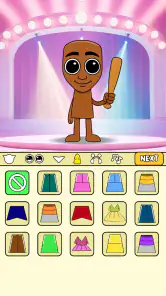
Music Monster: Horror DIY is a free music game from Amusing Critters Game. Its central idea is to build a scary monster, add a unique beat box, and work toward rewards. The Teen age rating is worth keeping in mind when deciding whether the game is appropriate for you or someone you’re choosing it for.
Will Music Monster: Horror DIY work on my phone or tablet?
The game requires Android 7.0 or later, so check your device’s operating system before downloading. It is listed as a mobile game, but the supported platform information here specifically gives the Android minimum. Music Monster: Horror DIY is currently version 1.0.7, so checking the version shown on your device’s app store can help you make sure you are looking at the same release.
What is Music Monster: Horror DIY and what can I do with it?
Music Monster: Horror DIY is a creative and entertaining mobile application that allows users to craft their own horror-themed music tracks. It's designed for music enthusiasts who enjoy mixing and matching different horror sound elements to create unique and spooky compositions. Whether you're a professional musician or a hobbyist, this app provides a wide range of tools and sound effects to help you unleash your creativity.
How user-friendly is the Music Monster: Horror DIY app for beginners?
The app is designed with an intuitive interface that caters to both beginners and experienced users. It includes an easy-to-follow tutorial that guides new users through the basic functionalities, ensuring they can start creating music quickly. With drag-and-drop features and pre-set templates, even those with no prior music production experience can enjoy making horror-themed tracks effortlessly.
Can I share the music I create on Music Monster: Horror DIY with others?
Yes, Music Monster: Horror DIY allows users to share their creations seamlessly. After crafting your horror music masterpiece, you can easily export and share it on various social media platforms or with friends via messaging apps. The app supports multiple file formats to ensure compatibility with different sharing mediums, making it easy to showcase your work.
Pros
- Unique horror-themed musical experience.
- Customizable soundtracks.
- Engaging and challenging gameplay.
- Visually appealing graphics.
- Frequent updates with new content.
Cons
- Limited music genre selection.
- Occasional in-app purchase prompts.
- Requires stable internet connection.
- High battery consumption.
- Some features locked behind paywall.
- Category
- Music
- Version
- 1.0.7











