MONOPOLY: Bingo!
- 5.17K
- 4.7
- Installs
- 1.00M
- Price
- Free
Screenshots


Analysis by Reviewed
I can see MONOPOLY: Bingo! working best as a shared-room diversion: one person can play while others chat, watch, or take turns with the device. Its mix of bingo and property collecting gives the familiar board-game theme a mobile spin, but it is still a solo screen activity rather than a replacement for sitting around a physical board together. I’d treat it as a quick casual game to pass around, not assume that progress or purchases are shared between players.
Taking turns on one device
If you’re thinking of letting a child or another household member use the same phone, decide whose game account and store settings are in use before handing it over. A shared device can make a game feel communal, but it can also blur who is playing and who is responsible for any in-app purchase. I’d keep that boundary clear and supervise purchases rather than treating the game as a family account or a formal multiplayer setup.
For a low-key evening, it may suit the person who enjoys bingo and likes seeing familiar Monopoly properties appear along the way. If your household prefers direct conversation, cooperative play, or a game where everyone can participate without taking turns on a screen, a physical board game is a better fit. This one is most appealing when the player is happy to focus on their own rounds.
A realistic place for it in the day
I’d use it when I have a little uninterrupted downtime rather than open it while cooking, helping someone, or keeping an eye on a conversation. Several cards can ask for quick attention, so a round is not ideal as background entertainment. On a quiet commute or during a wait when I can look at the screen, the short-session feel makes more sense; in a setting where I need to respond immediately to other people, I’d choose something less demanding.
That distinction is useful in a household, too. Passing the phone over for a turn can work when everyone understands that the active player is the one controlling the screen. It is less comfortable if people expect to call out numbers together, make joint decisions, or share one continuous game. I’d treat the device as a turn-taking activity, not as a digital table game that automatically includes everyone nearby.
Oh wow, if you're a fan of both classic board games and the thrill of bingo, you're in for a treat with MONOPOLY: Bingo! I recently had the chance to dive into this app, and let me tell you, it’s just as fun as it sounds. You get to combine the strategy and charm of Monopoly with the fast-paced excitement of bingo. Intrigued? Let’s break it down.
Mixing Up the Classics
Right off the bat, the game brings a fresh twist to two beloved games. The app basically takes the best of both worlds and merges them into an engaging experience. Imagine collecting properties, earning money, and all the while, marking off bingo numbers. It's like a hybrid game night rolled into one app!
More From Our News Desk

Weather by Xiaomi Review: Clear at a Glance, Less Clear Up Close

X Under Pressure: Can It Recover When Posting Goes Wrong?

Clash of Clans Is Won Between the Battles

Android Auto Makes the Case for Quieter Car Software

MobiOffice: Transforming Mobile Productivity with Seamless Integration

EA SPORTS FC™ Mobile Soccer: Redefining Mobile Sports Gaming
The Gameplay Experience
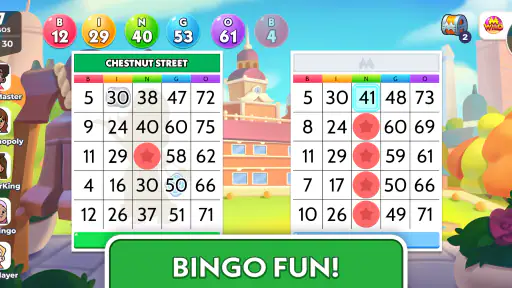
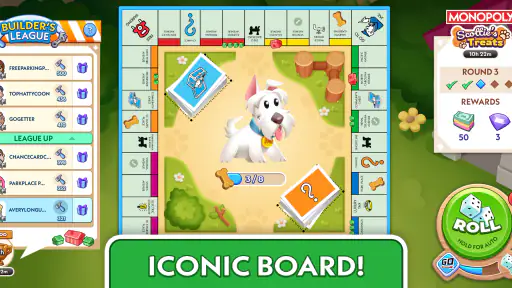
When you first launch the app, you’re greeted with vibrant graphics that bring the Monopoly world to life. You’ll find all your favorite Monopoly properties, like Boardwalk and Park Place, seamlessly integrated into the bingo cards. The aim is simple: complete bingo patterns to claim properties and earn Monopoly money.
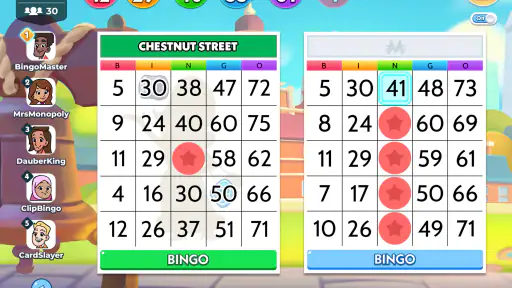
What’s cool is that the game offers multiple bingo cards to play at once, and you can switch between them as you go. It keeps you on your toes and makes each session feel dynamic and lively. Plus, the app throws in some nifty power-ups like free daubs and extra time, which can really turn the tide of the game in your favor.
How I’d approach the faster rounds
Keeping several cards in view is part of the appeal, but it also changes what “relaxed” means here. I’d start by scanning the cards in a repeatable order, then check the same areas again after a new number appears. That simple routine is more useful than tapping quickly without a plan: it reduces the chance that I overlook a match when attention is split across cards. If I’m tired or distracted, I’d play fewer rounds rather than trying to compensate by rushing.
Power-ups are another reason not to tap on autopilot. I’d hold a free daub or extra time until it can make a meaningful difference to a pattern, instead of spending it just because it is available. The value depends on the board and the moment, so there isn’t one perfect move to repeat every round. This is a small but practical trade-off: the game gives you decisions to make, yet the bingo draw still means those choices cannot turn every round into a strategy puzzle.
Features that Stand Out
One thing that I particularly enjoyed is the variety of themed rooms. Each room has its own unique board, and you get to travel through the Monopoly cityscape as you progress. It adds a layer of depth and makes it feel like you’re on a little adventure each time you play.
The social aspect is also worth mentioning. You can play with friends, and there's a leaderboard to see how you stack up against others. It’s always fun to boast a little when your name’s at the top, right?
Where it sits beside other board and bingo games
Compared with a standard bingo game, the property theme and room progression give this one a stronger sense of destination: completing patterns is tied to a Monopoly-flavored journey rather than being only about marking a card. That extra framing can keep me interested if I like the setting, but it may feel like clutter if all I want is a straightforward bingo round. A conventional Monopoly session is the opposite trade-off: it gives more room for negotiation, planning, and table talk, while this game puts the focus on quick number marking.
So I wouldn’t call it a substitute for either activity in its pure form. It is best understood as a casual blend for someone who already enjoys bingo and wants Monopoly scenery around it. If the people I’m with want to bargain over properties together, I’d bring out a physical board game. If I simply want bingo without themed progression or several cards competing for attention, a simpler bingo option would be a more direct fit.
Making the most of a round
With several cards in play, I’d focus on checking each one in a consistent order instead of tapping whichever number catches my eye first. That small habit helps me avoid overlooking a match when the pace picks up. I’d also save a power-up for a moment when it can help complete a pattern, rather than using it automatically; the useful choice depends on how the current round is unfolding.
The bingo format is luck-led, even with those quick decisions, so it won’t scratch the same itch as a traditional Monopoly session built around negotiating and long-term planning. Compared with a basic bingo app, the property theme and room progression give this version a stronger sense of place. If you mainly want pure bingo with fewer layers, a simpler alternative may feel less busy.
Who it suits, and what to expect
I’d recommend it to someone who likes short, lively rounds, enjoys the Monopoly setting, and doesn’t mind juggling several cards. It is less suited to players looking for deep strategy, a fully shared household experience, or a quiet game that never asks for attention. Because rounds can reward quick marking, it may also be a poor choice when you need to keep your eyes on something else.
It is free to download, while optional in-app purchases range from about fifty cents to around two hundred dollars per item. That wide spread makes it sensible to check purchase prompts carefully, especially on a shared device. The game is rated Teen, so I’d consider that age guidance alongside a child’s maturity and your household’s rules about mobile games and spending.
Age, trust, and purchase boundaries
The Teen rating is a useful starting point for deciding whether it belongs on a younger player’s device, but I’d still make the decision in the context of that person and the household. I would explain that the game is free to install but includes optional purchases, then make sure the player knows not to treat a purchase prompt as part of a required turn. That conversation is more practical than assuming a shared phone will keep spending decisions separate by itself.
If more than one person uses the same device, I’d also agree on who is allowed to approve a purchase and who owns the account being used. A leaderboard and friends features can make scores feel social, but they don’t make the game a reliable substitute for direct coordination at home. For children, I’d keep play and spending expectations explicit; for adults sharing a phone, I’d still avoid leaving unclear whose progress or purchase choices are involved.
User Interface and Accessibility
The user interface is clean and intuitive, making it easy for anyone to pick up and play. The app is designed to be user-friendly, meaning you don't have to be a tech whiz to navigate through the options. Everything is laid out clearly, from the bingo cards to the power-ups.
I also appreciate that the app is accessible and works smoothly on both Android and iOS devices. It doesn't lag, and the touch response is spot on, which is crucial when you’re trying to daub those numbers quickly!
Practical details before installing
Clipwire Games Inc developed this board game, which has a 4.7 average from around 89,000 ratings and more than a million installs. It was released in January 2025, and version 1.11.3 supports Android 9 or later. Those details make it easy to check basic compatibility, but I’d still make sure the device has enough available space and that its operating system is up to date before installing.
For household use, I’d agree in advance whether the phone is available for one round or a longer session, and whether the player can use purchase options. There’s no need to turn a casual game into a complicated schedule; a simple turn-taking rule can prevent the familiar “just one more round” from monopolizing a shared screen. The leaderboard can add a competitive nudge, so it may be better to treat scores as entertainment rather than a household contest everyone has to join.
What to decide before handing over the phone
A useful routine is to separate three questions: whose turn it is, how long the device is available, and whether purchases are permitted. This avoids putting a child or another family member in the position of guessing what the account holder expects. I’d also close the game or hand the phone back when the agreed turn ends, instead of letting an open session become an unspoken invitation to keep playing.
For coordination, a quick spoken handoff is enough for most casual use: tell the next person that the round is theirs, and make clear whether they are continuing the same session or simply using the game on the device. I would not assume that a leaderboard makes household turns fair or that different people’s progress is automatically separated. When those distinctions matter, use separate arrangements that you already trust rather than relying on the game to manage them.
Why You'll Love It
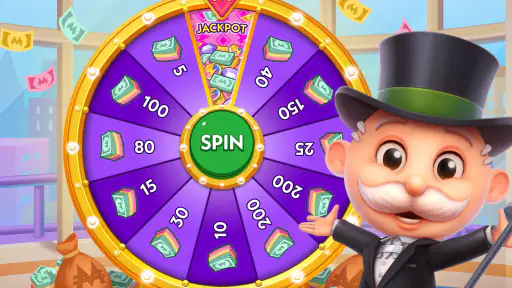
Honestly, the main charm of the game is its ability to keep you engaged for hours. Whether you're a casual gamer or a competitive one, there’s something here for everyone. The blend of strategy, luck, and the occasional surprise ensures that no two games are the same. And let’s be real, who doesn’t love a bit of friendly competition over some classic board game action?
When I’d choose something else
I’d skip it if the main goal is a shared family activity where everyone has an equal role at the same time. A physical board game is better for that kind of evening because the conversation, bargaining, and turns happen around the table rather than through one person’s screen. I’d also choose a calmer, less attention-heavy game if I wanted to play while doing another task, and a plain bingo game if I wanted fewer Monopoly-themed layers.
It is also not my pick for someone who expects the original Monopoly’s deeper decisions to carry over unchanged. The familiar properties provide atmosphere, but the central action remains bingo, so luck and quick observation matter more than negotiation. Knowing that before downloading helps set the right expectation: this is a themed casual game, not a portable version of a full board-game night.
Overall, it’s a lively mix of nostalgia and mobile bingo that I’d suggest to someone who wants a themed, easy-to-enter game for spare moments. I wouldn’t pick it for a device-free family night or for anyone who wants Monopoly’s negotiation and table talk to be the main event. But if the person playing enjoys bingo, likes checking several cards, and is comfortable with optional purchases being present, it makes a pleasant casual choice. On iOS or Android, I’d set clear shared-device expectations first, then let the player decide whether the fast rounds and property theme are their kind of fun.
MONOPOLY: Bingo! Frequently Asked Questions
What type of game is MONOPOLY: Bingo!?
MONOPOLY: Bingo! is a board game for mobile devices that brings together Bingo and familiar Monopoly themes. Its store summary describes a mix of playing Bingo and rolling dice, with a relaxed, brain-boosting feel. If you enjoy casual board-game ideas with a Bingo focus, this may be a different way to spend time with the Monopoly theme than a traditional tabletop match.
What is the latest version of MONOPOLY: Bingo!?
The current version of MONOPOLY: Bingo! is 1.11.3. Before installing or updating, check the version shown in your device’s app store, since the version available to you can depend on when that store receives an update. Keeping the game up to date can help ensure you are using its current release, and it is sensible to leave enough free storage for the app and its updates.
When was MONOPOLY: Bingo! released?
MONOPOLY: Bingo! was released on January 21, 2025. That date can help you place the game’s launch in context, but it does not determine whether the current version will suit your device or playing preferences. Before downloading, consider its Bingo-and-Monopoly-style gameplay, Teen age rating, and optional purchases, then review the app page for your device to make sure it is compatible.
Is MONOPOLY: Bingo! suitable for younger players?
MONOPOLY: Bingo! is a board game built around Bingo and familiar Monopoly themes, with an age rating of Teen. Parents may want to review that rating and the game’s optional in-app purchases before a younger player downloads it. The game is free to download, but purchases can be made while playing.
How much storage space should I have available before downloading MONOPOLY: Bingo!?
It’s sensible to make sure your device has enough free storage for the game and its updates before installing. The amount required can vary by device and may change as the app is updated. MONOPOLY: Bingo! is available for Android and iOS, so check the requirements shown for your device in its app store before downloading.
Pros
- Engaging blend of bingo and Monopoly.
- Vibrant graphics enhance gameplay.
- Frequent updates with new content.
- Simple to learn
- hard to master.
- Multiplayer mode for social fun.
Cons
- In-app purchases can be pricey.
- Requires constant internet connection.
- Ads can be intrusive at times.
- Limited offline play options.
- Occasional connectivity issues.
- Category
- Board
- Version
- 1.11.3












