Meme Cute Beats
- 15.00
- 4.6
- Installs
- 1.00M
- Price
- Free

Screenshots





Analysis by Reviewed
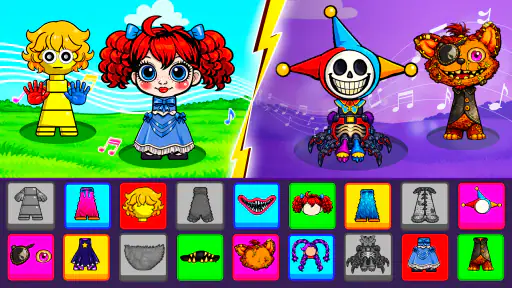
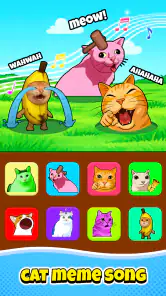
I like small music games best when they make it easy to try an idea without turning the moment into a lesson. Meme Cute Beats is built around that kind of casual appeal: it invites you to combine cute sounds and humorous beats into playful tracks. I’d reach for it when I want a light creative distraction, not when I need a serious music-making tool or a structured rhythm challenge.
This is a free music game from VGP Studio, with an Everyone age rating. Its premise makes the most sense for quick experiments: pick sounds, see how they feel together, and enjoy the result. The fun is less about producing a polished song than about finding a combination that makes you smile. That distinction matters if you’re deciding between this and a full digital audio workstation, a rhythm game, or a simple soundboard.
What you get without paying
I’d use the free starting point to find out whether the game’s playful sound-making suits me before thinking about optional purchases. That keeps the decision grounded in what I actually enjoy, rather than treating the available price range as a reason to spend. From there, the next section looks at what this casual way of making music can offer in an ordinary short session.
Free access, with optional purchases
You can start playing without an upfront price, which makes it easy to try the game before deciding whether it belongs on your phone. The tradeoff is that in-app purchases are available, priced from $0.99 to $19.99 per item. I’d treat those as optional spending rather than assume they are needed to enjoy the basic idea. The listed prices tell you the range, but not what each purchase unlocks, so I wouldn’t buy anything until you’ve played enough to know what you actually want.
That’s a useful way to approach any free creative game: first find out whether its central activity holds your attention, then consider paying only if a specific option improves how you use it. Here, the core appeal is making amusing sound combinations. If that already gives you a satisfying few minutes, the free entry point may be all you need. If you’re expecting a deep production suite, paying more should not be your first response; this is presented as a playful game, not professional audio software.
Playful ideas rather than studio promises
The value is in lowering the barrier to making something. You don’t need to arrive with a melody, an instrument, or a plan. A cute sound can be the starting point, and a funny beat can change the mood of the result. I find that kind of prompt helpful when I want to create casually but don’t want the blank-screen feeling that comes with a more complex music app.
It also gives the game a different purpose from a conventional rhythm title. Many music games ask you to follow a fixed pattern and reward timing; Meme Cute Beats is about assembling sounds into your own playful track. That makes it a better fit for improvising than for practicing rhythm-game precision. Conversely, if you want a score to chase, a defined song list, or a challenge that tests your timing, a standard rhythm game is likely to serve you better.
More From Our News Desk

Weather by Xiaomi Review: Clear at a Glance, Less Clear Up Close

X Under Pressure: Can It Recover When Posting Goes Wrong?

Clash of Clans Is Won Between the Battles

Android Auto Makes the Case for Quieter Car Software

MobiOffice: Transforming Mobile Productivity with Seamless Integration

EA SPORTS FC™ Mobile Soccer: Redefining Mobile Sports Gaming
A low-pressure everyday use
One realistic use is a short break between tasks. I’d open it while waiting for a friend or winding down after work, try a few combinations, and stop when I’ve found a sound that feels amusing. The creative task is small enough to suit an unplanned pause, and the light tone makes it less demanding than sitting down to compose a full track.
For a shared moment, it could also work as a simple pass-around activity: one person makes a combination, then someone else tries to make it funnier or sweeter. That’s a use case where the game’s playful premise matters more than technical control. I would not choose it for a group that wants a competitive music quiz or a multiplayer rhythm contest; the appeal here is experimenting with sounds, not proving who can play best.
How to get more from each session
A useful habit is to change one element at a time rather than piling sounds together immediately. Starting with a single cute sound, then adding a beat, makes it easier to notice which choice gives the track its character. If every layer is added at once, it can be harder to tell whether the result feels funny, catchy, or simply busy. This is a general listening approach rather than a claim about a special in-game feature, but it helps make short experiments feel more intentional.
Another good approach is to give each attempt a tiny goal: make something that sounds cheerful, odd, or deliberately silly. That keeps the session focused without making it feel like homework. If you’re sharing the phone, taking turns choosing the next sound can also make the creative process more interesting than having one person make every decision. The point is to treat each mix as a quick sketch, not to judge it against a finished song.
Where the tradeoffs show up
The same simplicity that makes the idea approachable can limit its appeal. If you want control over detailed recording, editing, arranging, or exporting, you may find a dedicated music-making app more appropriate. Meme Cute Beats is framed as a game for building fun tracks, so I would not rely on it for a serious project, a rehearsed performance, or a polished piece intended for release.
There’s also a difference between enjoying a playful sound and wanting to return to it for a long session. People who like open-ended experimentation may appreciate the freedom to try combinations, while players who need clear levels, goals, or a steady increase in difficulty may prefer a more structured music game. Before spending on optional items, ask yourself whether you want more of the game’s particular style or are actually looking for a different kind of music app altogether.
For parents, the Everyone rating makes the stated age category straightforward, and the silly, cute concept is naturally accessible. Still, I’d keep the purchase range in mind if a child will use the device: optional in-app purchases are part of the offering. The sensible choice is to review purchase settings on the device and make clear that free access does not mean every item is free.
Who is most likely to enjoy it?
I’d recommend trying it if you enjoy playful sound combinations, casual creative apps, or games that let you make something without demanding musical experience. It may also suit someone who wants a quick, cheerful activity to share with a friend or family member. The draw is the freedom to experiment with a funny musical idea, not a promise of professional controls or a formal course in music.
I’d skip it if your main goal is learning an instrument, composing with precise control, or competing for high scores in timed levels. In those cases, a music-learning app, a production tool, or a conventional rhythm game is a closer match. It may also be a poor fit if you dislike open-ended play and need the game to tell you exactly what to do next. Choosing the right alternative depends on whether you want to create, learn, or compete.
Popularity and practical details
The game has an average rating of 4.6 from around 11,000 ratings, and it has passed one million installs. That suggests it has found a substantial audience, but popularity alone can’t tell you whether its style will click with you. The most useful test is whether you enjoy the sound-making loop during your first few sessions.
It was released on September 23, 2025, and the current version is 0.0.38. It requires Android 8.0 or later. Those details are worth checking against your device before downloading, especially if you keep an older phone in service. The game is free to install, while optional purchases range from $0.99 to $19.99 per item; that is enough to set a spending boundary, but the value of any particular item depends on what you want from the game.
My verdict: try it before you spend
Meme Cute Beats has a clear, modest appeal: it turns sound-mixing into a playful activity rather than asking you to treat music like a serious project. I like that its basic premise is easy to understand and that free access lets you test whether the humor and creative freedom suit your taste. The strongest reason to try it is not the promise of a finished song; it’s the chance to make a quick, personal sound experiment.
My advice is to start with the free version and decide based on your own sessions. If you keep coming back to make new combinations, optional purchases may be worth considering one item at a time. If you find yourself wishing for deeper editing, lessons, or competitive challenges, don’t spend in the hope that this game will become those things. For casual music play, it’s an easy low-cost experiment; for serious creation, choose a tool built for that job.
Choosing the right kind of music play
The most useful comparison is not simply “game versus app,” but what you want your time to produce. A soundboard is quicker when you only want to trigger a funny effect, while a music-making app makes more sense if you want to shape a longer arrangement. A rhythm title offers clearer goals and measurable timing challenges. This game sits in between those habits: it gives you room to combine sounds, but its appeal is the playful result rather than a finished composition or a score.
That middle ground can be a strength if you’re introducing someone to making music. I’d let them choose the mood first—sweet, silly, or strange—then build around that choice. It gives an otherwise open-ended session a simple direction without turning it into a lesson. If the person wants to learn why notes fit together or practice an instrument, though, this is only a light creative diversion, not a substitute for guided instruction.
Making a short session feel worthwhile
On a commute or in a waiting room, I’d keep the goal small: make one combination that sounds different from the last, then decide whether to keep experimenting or put the phone away. That approach suits a game whose premise is immediate and playful better than trying to force a long session out of it. It also helps avoid spending simply because a short burst of novelty has worn off; a purchase makes sense only if you already know what kind of extra content or option you want.
If you’re deciding whether the game is suitable for a younger player, the Everyone rating is reassuring as a broad age classification, but it doesn’t replace your own device-level purchase controls. I’d also explain that free access and optional paid items are separate things. That small conversation prevents a child from assuming that every choice they encounter is included at no cost, while leaving the game available for casual experimentation.
My final recommendation
VGP Studio’s music game is best approached as a compact creative toy: useful for a quick laugh, a shared sound-making break, or a low-pressure first step for someone curious about mixing. It is less convincing as a long-term destination for players who need progression, precise controls, lessons, or finished tracks. I’d try it when the mood is playful, and move to a more specialized alternative as soon as your goal becomes more specific.
Meme Cute Beats is worth a no-cost trial if its light, open-ended style sounds appealing. Keep optional spending separate from the decision to install, and let your own enjoyment—not the popularity figures—decide whether it earns a place on your phone.
Meme Cute Beats Frequently Asked Questions
What is Meme Cute Beats?
Meme Cute Beats is presented as a music and rhythm game built around cute, meme-inspired characters and upbeat tracks. Players generally tap or interact in time with the music, aiming to follow the rhythm and earn a better score. The exact songs, characters, and modes can vary by version, so check the app listing and in-game descriptions to confirm what is included before downloading.
How do you play Meme Cute Beats?
The main idea is to pay attention to the music and on-screen prompts, then tap at the right moment to keep up with the beat. Accurate timing is typically important for achieving higher scores, while missed or late inputs may affect your performance. Spend a little time learning the controls and pace of each track, since the difficulty and interaction style may differ between songs or stages.
Is Meme Cute Beats free to download, and does it include purchases or ads?
The download price and monetization can depend on the platform, region, and current version. Some games are free to install but display advertisements or offer optional purchases, while others may charge upfront. Review the Google Play or App Store listing for the latest pricing and in-app purchase details, and check the app’s settings or store disclosures for information about ads before deciding whether it suits you.
Does Meme Cute Beats work offline, and what device does it need?
Offline availability and device compatibility depend on the version you install. Rhythm games may let you play some content without an internet connection, while downloads, updates, online features, or advertisements may require connectivity. Before installing, check the app-store listing for supported operating-system versions and device requirements. If offline play matters to you, test a track after installation with your connection disabled rather than assuming every feature works offline.
Is Meme Cute Beats suitable for children, and what privacy details should I check?
Its cute, playful presentation may appeal to younger players, but appearance alone does not establish whether an app is appropriate for every child. Check the age rating, content description, and any communication or purchase features shown on the store page. Also review the privacy disclosures to understand what data may be collected and whether the app includes ads, analytics, or optional purchases; parental supervision can help younger users.
Pros
- Cute visuals give the game a cheerful
- playful feel.
- Beat-based stages make timing and rhythm central to play.
- Short levels are convenient for quick play sessions.
- Meme-inspired presentation adds a lighthearted twist.
- A simple premise makes it easy to understand what to do.
Cons
- Precise timing may take practice for new players.
- Repeated beat patterns can feel predictable over time.
- Fast sections may be challenging on smaller touchscreens.
- Meme humor may not appeal to every player.
- Enjoyment depends heavily on liking rhythm-based gameplay.
- Category
- Music
- Version
- 0.0.38











