Meme Color Pro:Color by Number
- 1.21K
- 4.8
- Installs
- 500.00K
- Price
- Free

Screenshots
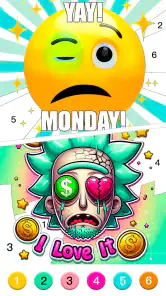

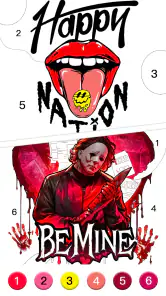
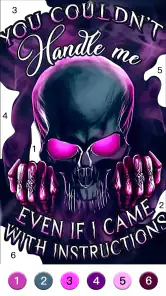
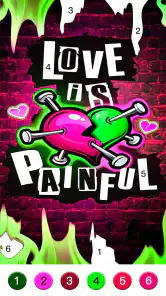
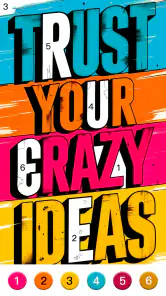
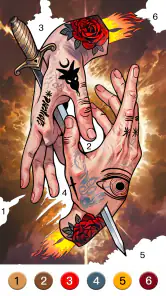
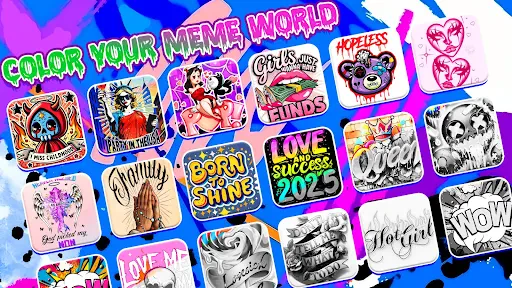
Analysis by Reviewed
I tend to judge a coloring game by how quickly it lets me settle into a page, and Meme Color Pro: Color by Number has an easy premise: choose a meme illustration and fill numbered spaces by matching them to colors. That makes it approachable when I have a few spare minutes and don’t want to learn complicated rules. It is a free board game from Excellent Coloring Pages, with optional in-app purchases, so I’d treat it as a casual pastime rather than a full-featured art studio.
What a quick session feels like
The number-guided format should suit short breaks because it gives each tap a clear purpose. I would pick a page, work through a few color groups, and stop whenever I needed to; there is no need to plan a composition or choose every shade myself. That convenience is also the main trade-off. If I want freehand drawing, precise control over a palette, or a blank canvas, a conventional drawing app is a better fit. This game is about completing prepared pictures, not making an original illustration from scratch.
For a realistic use case, I can see it fitting a quiet wait at an appointment or a few minutes on the couch after dinner. I’d choose a page that looks manageable, finish one color at a time, and avoid treating the timer as a goal if I’m trying to relax. The numbered approach can make the activity feel orderly, while the meme subject gives the finished image a playful payoff. It is less suitable when I’m looking for a social game with other players or a deep strategy challenge; coloring is the central activity.
Choosing pages and making the most of them
A practical tip with number-color pages is to follow one number across the picture rather than bouncing between colors. The app highlights matching areas, so using that cue can help me keep track of the next places to fill and make a small session feel less fiddly. I’d also start with a simpler-looking image when I have only a short break, saving a more detailed one for a longer stretch. That is a useful way to avoid leaving a page unfinished just because I underestimated how much tapping it would involve.
The store description identifies meme-inspired artwork and trendy slang as part of its appeal, but the humor may not land equally for everyone. Meme references can date quickly, and a collection centered on them may feel less appealing to someone who prefers landscapes, patterns, or traditional coloring-book subjects. In that case, a general color-by-number app is the safer choice. If the joke is part of the fun for you, though, this theme gives the familiar coloring routine a more specific personality.
Speed, stability, and device fit
I would set expectations around a lightweight style of play rather than assume the game is designed for demanding action. Its basic loop is selecting a template and filling numbered areas, so it should be easy to understand even if someone rarely plays mobile games. Actual responsiveness can vary with the device and its condition, and I wouldn’t promise that every page or session will feel equally smooth. If an image seems slow to respond, I’d close other demanding apps and try again before deciding the game itself is the problem.
It runs on Android 7.0 or later, which makes it an option for some older devices, though minimum compatibility does not guarantee identical performance everywhere. As with any coloring app, a page with many small areas can mean more repeated taps and closer screen work. I’d use a larger display if fine details are uncomfortable to hit, and take a break if a long session starts to feel tiring. The game’s relaxed premise works best when the device isn’t making the interaction frustrating.
More From Our News Desk

Weather by Xiaomi Review: Clear at a Glance, Less Clear Up Close

X Under Pressure: Can It Recover When Posting Goes Wrong?

Clash of Clans Is Won Between the Battles

Android Auto Makes the Case for Quieter Car Software

MobiOffice: Transforming Mobile Productivity with Seamless Integration

EA SPORTS FC™ Mobile Soccer: Redefining Mobile Sports Gaming
For reliability, I’d keep progress expectations modest: finish a page before switching tasks if I don’t want to risk interrupting my flow, and make sure the app has settled after opening before tapping rapidly. I can’t assume recovery behavior will be the same on every phone, so a cautious workflow is sensible. This matters most during a longer coloring session, when losing a partly completed image would be more annoying than stopping after a few minutes.
The Art of Coloring Memes
First off, let me just say that Meme Color Pro: Color by Number is incredibly user-friendly. You don’t need to be a tech whiz or an artist to start creating. The app provides a huge collection of meme templates, each with numbered sections that guide you in coloring. It’s like paint-by-numbers but with memes, which is as entertaining as it sounds!
Why It’s a Must-Try
What I absolutely loved is the variety of memes available. From classics like the “Distracted Boyfriend” to newer gems, there’s something for everyone. The interface is super intuitive – just tap on a number, and the app highlights all the areas with that number, making it easy to color within the lines. Plus, the app sports a soothing color palette, which makes the whole experience quite relaxing.
Another highlight? The app is perfect for unwinding. Whether you’re waiting for a friend or just want to chill on your couch, this app provides the perfect distraction. It’s therapeutic, almost like meditation, but with a humorous twist. And, for those who love sharing their creations, the app allows you to save and share your finished works of art with friends and family.
Features That Stand Out
One feature I found particularly impressive is the daily updates. The app refreshes its meme gallery regularly, so you’re never left with the same old templates. This keeps things exciting and ensures there’s always something new to color. Also, the app doesn’t bombard you with ads, which is a huge plus in my book.
For those who love a challenge, the app includes a unique “challenge mode” where you can race against time to complete a meme. It’s a fun way to test your speed and precision while enjoying some quality meme time.
Final Thoughts
In conclusion, Meme Color Pro: Color by Number is a delightful app that combines creativity and humor in a seamless package. It’s perfect for meme enthusiasts and anyone looking to indulge in some digital coloring therapy. If you’re looking for a fun, casual app to pass the time, give it a shot. You might just find yourself addicted to coloring memes!
Who I’d recommend it to
I’d point meme fans toward it first, especially anyone who likes a guided activity more than an open-ended creative tool. It can also work for a parent looking for an age-rated Everyone game to share with a child, though I’d still preview the humor and imagery together rather than assume every meme will appeal to every age. The game has a 4.8 average from around 8.8 thousand ratings, and more than 500 thousand installs, suggesting it has found an audience; those figures are useful context, not a guarantee that its particular humor will click for you.
I would skip it if I mainly wanted to draw, design my own meme, or compete through complex board-game decisions. It is also worth considering the optional purchases before settling in: the game is free to start, but individual in-app items range from $0.99 to $59.99. I’d avoid making a purchase just to keep a casual session going unless I already knew the extra content was worth it to me. Its Everyone content rating describes the broad age classification, not a promise that all references will be familiar or funny to every player.
How it sits among coloring alternatives
Compared with a standard paint-by-number app, the main distinction is the meme theme and its comic context, rather than a fundamentally different kind of coloring. Compared with a sketching app, it removes the pressure of choosing colors and drawing outlines, but gives up creative freedom. That makes it a good middle ground for someone who wants to make something without needing artistic confidence. If I were choosing between it and a general coloring collection, I’d base the decision on whether meme culture makes the finished pictures more enjoyable; the numbered workflow alone is not a reason to prefer one theme over another.
Version and overall value
The current release is version 1.0.75, and the game was released on May 27, 2022. Its rating and install count indicate that it is not an obscure experiment, while the 1.2 thousand reviews offer more player feedback to explore before downloading. I’d still judge it by the core question: do I enjoy completing meme pictures at my own pace? If yes, the free entry point makes trying it straightforward, provided I keep optional spending in mind.
My performance verdict is deliberately modest: this is a simple, focused coloring game, not something I’d choose to test a phone’s power. It suits quick downtime and meme fans who enjoy guided coloring; it is less compelling for players who need original drawing tools, guaranteed uninterrupted progress, or a deep challenge. I’d give it a try for a short, low-pressure session, then decide from the page variety and tapping feel whether it earns a place on my device.
A practical way to fit it into the day
I’d treat a page as a small, self-contained activity rather than something that needs a long uninterrupted evening. For example, if I’m waiting for a ride, I can open the game, pick an illustration with visible larger regions, and work on a single color group. That gives me a natural stopping point if I’m called away. On a longer break, I’d choose a busier picture and take it in stages, instead of trying to finish every detail in one sitting.
There’s also a useful distinction between coloring to relax and coloring to finish quickly. The challenge mode described in the game gives time-focused play a place, but I wouldn’t use it when my goal is to unwind; racing makes the activity feel more like a task. I’d save that option for a moment when I want a little pressure and stick with the ordinary pace when I want something calm. The same image can serve different moods depending on whether I focus on speed or on filling it carefully.
Small choices that reduce friction
Before starting a detailed page, I’d check whether its smallest spaces look comfortable on the screen I’m using. This quick visual check helps avoid discovering halfway through that the picture demands more precision than I want to give it. If I’m using the game one-handed, I’d favor pages that don’t require constant repositioning or close inspection. That’s not a special technique so much as a way to match the image to the moment and the device.
When I have a choice of color groups, finishing one group before changing to another can also make it easier to notice any missed patches. I’d use the number highlighting as a guide rather than tap hurriedly around the whole picture. That approach is especially useful when I pause midway: returning to the same number gives me a simple point of re-entry instead of making me remember where I left off. It keeps the routine organized without turning coloring into a checklist.
Where expectations should stay realistic
The game’s appeal depends on the artwork and its references, so a large collection does not automatically mean every page will suit every player. If I don’t recognize or enjoy the joke behind an illustration, the coloring itself may still be pleasant, but the finished result will have less personal payoff. Someone who wants a timeless subject they can return to repeatedly may be happier with flowers, scenery, or abstract patterns in another coloring app.
I’d also separate a simple interface from a promise of uninterrupted performance. Coloring is not graphically demanding in the way a fast action game can be, but that alone cannot tell me how an individual phone will behave, especially if it is low on resources or running several apps. If responsiveness becomes uneven, pausing, closing other active apps, and reopening the game is a sensible first check. I would avoid beginning a long challenge when I know I may need to switch apps frequently.
Who may prefer another kind of game
This is a poor match for anyone who wants multiplayer interaction, strategic decisions, or a sense of progression built around mastering complicated rules. Its board-game category should not be mistaken for a conventional board-game experience: the main draw here is completing pictures, not planning moves against an opponent. Players who want to compete socially should look for a game designed around shared play, while artists who want control over linework and color mixing will get more from a drawing tool.
For a family, I’d make the choice together rather than relying only on the Everyone age classification. The subject is meme-oriented, and the humor can be unfamiliar or uneven across ages. A quick look at the available pictures before handing over the device helps a parent decide whether the references feel suitable and whether the child is comfortable with repeated tapping. It can be a low-pressure shared activity, but it is not a substitute for an open-ended creative app if the aim is to make original pictures.
My closing take on performance and value
For me, the strongest reason to install it is the combination of guided coloring and meme-themed artwork, not a promise of advanced tools or demanding gameplay. I’d start with a short session, see whether the number cues feel comfortable on my screen, and check that the humor keeps me interested after the novelty of the first page. If both parts work for me, it offers an easy way to fill spare time without needing drawing skill.
My practical advice is to keep expectations proportionate: choose a manageable image, use a relaxed pace unless I specifically want the timed challenge, and finish or pause deliberately before switching away. The free starting point makes trying the game straightforward, while the optional purchases mean I’d decide separately whether any extra content is worth paying for. For meme fans who like orderly, tap-by-tap coloring, I can see it earning a place in a casual rotation; for everyone else, a broader coloring collection or a more creative app may be the better fit.
Meme Color Pro:Color by Number Frequently Asked Questions
Does Meme Color Pro: Color by Number work on my device?
Meme Color Pro: Color by Number is a game in the Board category, and its current version is 1.0.75. It supports devices running Android 7.0 or later. The game is free to download, so you can check whether it suits your device and try its coloring experience without an upfront purchase.
Is Meme Color Pro: Color by Number free to download?
Yes, Meme Color Pro: Color by Number is free to download. It also offers optional in-app purchases, priced from $0.99 to $59.99 per item, so some content or features may cost extra. You can enjoy the basic coloring experience without purchasing anything, and review any purchase options shown in the game before deciding whether they are worthwhile for you.
What is Meme Color Pro: Color by Number?
Meme Color Pro: Color by Number is a digital coloring app designed for both Android and iOS devices. The app offers a unique coloring experience by allowing users to fill in images with numbered colors, creating vibrant and artistic representations of popular memes and illustrations. It's an engaging way to relax, unwind, and enjoy the art of coloring, whether you're a beginner or an experienced artist.
How do I use Meme Color Pro: Color by Number?
Using Meme Color Pro is simple and intuitive. Once you download and open the app, you can browse through a collection of meme-themed images. Choose an image you like, and you'll see a numbered grid overlaying it. Select a color from the palette and fill in the corresponding numbered sections on the image. This step-by-step process continues until the entire image is colored, offering a relaxing and rewarding experience.
Is Meme Color Pro suitable for children?
Yes, Meme Color Pro is suitable for children, providing an engaging and educational experience. The app helps improve number recognition and fine motor skills as children match colors with numbers. However, parental guidance is recommended to ensure that the content is appropriate for the child's age, as some memes or illustrations might contain humor intended for older audiences. Its content rating is Everyone, but parents may still want to look through the artwork with younger children.
Pros
- Easy to use for all ages
- Variety of images to color
- Offline mode available
- Regular updates with new images
- No intrusive ads
Cons
- Limited free content
- Premium version is pricey
- Occasional app crashes
- In-app purchases necessary
- Some images lack detail
- Category
- Board
- Version
- 1.0.75













