Golden Autumn: Color by Number
- 1.51K
- 4.7
- Installs
- 500.00K
- Price
- Free
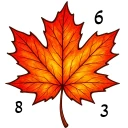
Screenshots



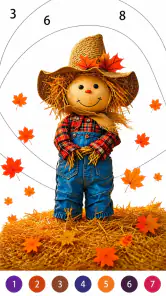
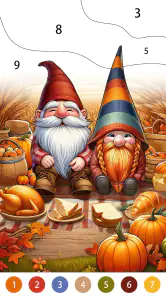
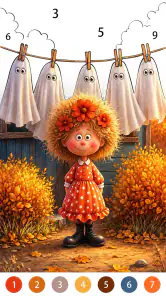
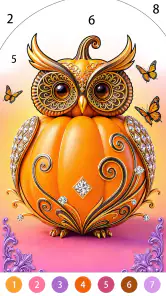
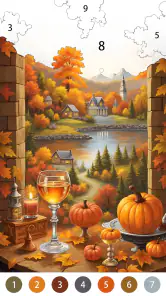
Analysis by Reviewed
I spent time with Golden Autumn: Color by Number as a quiet board game rather than treating it like a conventional puzzle challenge. Its appeal is straightforward: choose a numbered area, match the color, and gradually turn an autumn-themed illustration into a finished picture. That familiar format makes it easy to start, but the seasonal presentation gives it a more specific mood than a plain coloring utility.
This is a free game from Excellent Coloring Pages, designed for Everyone and available on Android devices running version 7.0 or later. It sits in the board category, although I would describe the actual experience as a relaxed digital coloring book with light puzzle structure. The store summary focuses on fall and Thanksgiving artwork, and that seasonal identity is important: this is not trying to be an all-purpose competitive board game or a story-driven adventure.
My overall impression is positive, especially for short breaks, winding down before bed, or keeping your hands busy while listening to a podcast. The game is less convincing for anyone who wants demanding logic, fast reactions, social play, or a large sense of progression. Its strength is concentration without pressure. Its weakness is that the basic interaction can become repetitive if you expect each picture to introduce a new kind of challenge.
How the current experience feels in everyday use
I find the everyday appeal lies in how easily this turns a spare moment into a small, finished task: I can pick up an illustration, make visible progress, and stop without losing a complicated thread. In the next section, I’ll look at the current release as a practical point of reference, including what it can—and cannot—tell a player deciding whether to settle into that routine.
A calm routine rather than a traditional board match
The first thing I noticed is how little preparation the game demands. I can open it, pick up a picture, and begin coloring immediately. There is no need to learn a complicated ruleset, remember a campaign, or compete against another player. The numbered spaces provide just enough direction to keep the activity purposeful, while the coloring theme keeps the tone gentle.
That makes it a useful choice for a very specific everyday situation. After a busy day, I might have ten minutes before dinner or want something less stimulating than scrolling through social media. A single illustration gives me a small task with a visible result. If I stop halfway through, I can return later without having to reconstruct a strategy or remember a chain of decisions.
The format also suits people who enjoy coloring but do not want to choose colors from scratch. The number system removes the pressure of deciding whether a leaf should be dark orange or muted yellow. I can focus on finding the matching spaces and watching the composition develop. For some players, that structure will feel satisfying; for others, it may feel too controlled because creative color choice is limited.
More From Our News Desk

Weather by Xiaomi Review: Clear at a Glance, Less Clear Up Close

X Under Pressure: Can It Recover When Posting Goes Wrong?

Clash of Clans Is Won Between the Battles

Android Auto Makes the Case for Quieter Car Software

MobiOffice: Transforming Mobile Productivity with Seamless Integration

EA SPORTS FC™ Mobile Soccer: Redefining Mobile Sports Gaming
What makes the autumn theme matter
Seasonal art can easily become superficial, but here it gives the activity a consistent emotional setting. Warm foliage, harvest-style scenes, and Thanksgiving-related imagery create a cozy atmosphere that feels more intentional than a random collection of unrelated pictures. I would particularly recommend it to someone who likes autumn décor, seasonal crafts, or gentle visual activities.
The trade-off is that the theme may narrow the audience. If you want animals from many environments, fantasy worlds, portraits, or abstract designs, a broader coloring app could offer more variety. This game’s identity is clearer because it commits to golden-season imagery, but that same focus may reduce its long-term appeal once the mood no longer matches what you want.
The right way to approach the numbered artwork
I found that the experience works best when I stop treating each image as a race to completion. The numbered areas can vary in size and visibility, so rushing encourages unnecessary tapping around the screen. A slower approach is more comfortable: I scan one section, fill the obvious spaces, then move toward the smaller details.
One practical habit is to work from large, easy-to-see regions toward tiny shapes near the edges. This gives the picture form quickly and makes the remaining uncolored areas easier to notice. It also reduces the frustration of repeatedly searching for a very small numbered patch while the rest of the illustration is still unfinished.
For users with less patience, the best sessions may be short rather than complete-picture marathons. Finishing a small portion can still feel rewarding, and the game does not need to replace a full hobby. I see it more as a pocket activity: something to use during a quiet pause, on a commute when appropriate, or while taking a break from more demanding games.
Who will enjoy it most
I think the strongest audience includes casual players, people who enjoy digital coloring, families looking for an accessible activity, and anyone who prefers low-pressure entertainment. The Everyone age rating reinforces that approachable positioning. It is also suitable for someone who wants a visually soothing game without learning complex controls.
It may work well for older relatives who enjoy pictures and simple matching, provided the screen size and visibility are comfortable on their device. The numbered format can be easier to follow than freehand coloring because the player receives clear guidance. Still, I would not assume that every user will find small areas equally easy to tap; display size and eyesight can make a noticeable difference.
I would skip it if your main reason for downloading a board game is competition. There is no reason to approach this as a substitute for chess, checkers, digital card games, or online board matches. Those alternatives offer planning, opponents, and changing outcomes. Golden Autumn is about completing an illustration, not outthinking another player.
How it compares with familiar alternatives
Compared with a physical coloring book, the digital format is cleaner and more convenient. I do not need pencils, a sharpener, a table, or a place to store unfinished pages. The game also guides the color placement, which makes it easier to produce a polished-looking result. The downside is that digital tapping does not provide the same tactile feeling as paper and colored pencils.
Compared with freehand drawing apps, it is much less expressive. I cannot use the numbered structure to experiment freely with my own palette in the same way. The reward comes from accuracy and completion, not personal interpretation. If your favorite part of coloring is making unusual choices, a drawing app is probably the better fit.
Compared with more demanding puzzle games, the mental load is deliberately light. There is no complex deduction to master, so it can feel repetitive to experienced puzzle fans. On the other hand, that simplicity is exactly why it works when I want to relax rather than solve something difficult.
What the current release tells me about the product
I treat the current release as a useful snapshot of a focused, established color-by-number game, rather than a promise of major changes to its play style. That perspective helps set realistic expectations about familiarity, optional spending, and what a returning player might want from a session; the next section considers how those details shape the product’s longer-term fit.
The present version and its place in the app’s life
The current version is 1.57.280, while the game was released on November 8, 2023. That gives the product a defined history rather than making it feel like a brand-new experiment. I view the version number as a sign that the developer, Excellent Coloring Pages, has continued maintaining the app after its initial launch, although a version number alone does not tell me exactly which individual changes were made.
That distinction matters. I can discuss the current build as the version a new user encounters, but I would not promise a particular feature based only on the release number. What I can say is that the game’s core identity remains clear: seasonal color-by-number artwork presented as a free board-category game for a broad audience.
Its reception also suggests that the concept has found a substantial audience. It has an average rating of 4.7 from around 8.5 thousand ratings, alongside roughly 1.5 thousand written reviews. More than 500 thousand installs indicate that it is not an obscure side project with only a handful of users. Those figures do not guarantee that every player will enjoy the same pacing, but they do make the game easier to approach with confidence than an untested download.
What the release history means for existing users
For someone already playing, the current version is best understood as a maintained snapshot of the same relaxing idea, not a dramatic change of genre. Existing users who enjoy the artwork and tap-to-color routine should feel at home. New players do not need to understand earlier releases to begin, and the low-pressure design makes it easy to return after a break.
The practical benefit of a continuing release cycle is familiarity. If I build a small habit around the game, I want to know that opening it will still feel recognizable. At the same time, familiarity can become a limitation if I am waiting for a deeper change in how the game is played. A new version does not automatically solve the repetition built into color-by-number mechanics.
One useful approach for returning players is to change the purpose of each session. Instead of always trying to finish the next picture as quickly as possible, I might use one session to complete only large areas, another to focus on details, or another to choose images that match the season or my mood. This does not alter the software, but it can make the existing content feel less mechanical.
Free to download, with a cost decision inside the experience
The game is free, which makes it easy to try without committing money first. That is a meaningful advantage for a casual activity: I can see whether the art style, tapping accuracy, and pace suit me before deciding whether it deserves a place on my device.
There are in-app purchases ranging from $1.99 to $59.99 per item. That wide range deserves attention before spending. I would treat optional purchases as a personal convenience decision, not as part of the basic reason to install the game. Anyone who prefers a completely purchase-free experience should be prepared to examine each offer carefully and avoid buying impulsively during a relaxing session.
For families, I would make the payment situation part of the setup conversation. A child may understand the coloring activity without understanding the financial meaning of an in-game offer. Since the game is rated Everyone, its accessibility is a strength, but age suitability and purchase supervision are separate questions. I would keep those decisions clear before handing the device to a younger player.
Small workflow choices that improve the experience
My first tip is to use a consistent stopping point. Completing a whole illustration is not always necessary, and forcing a finish can turn a calming activity into a chore. I prefer stopping after a recognizable section has been colored, especially when I am using the game during a short break.
My second tip is to avoid judging the game by the first few minutes alone. The appeal is cumulative: the image becomes more readable as the colors appear. If the initial tapping feels basic, give one artwork enough time to develop before deciding that the entire format is too simple.
My third tip is to match the game to your attention level. It is a good companion to quiet audio because it does not demand constant strategic thought, but it still requires enough visual attention to locate numbered areas. I would not use it when I need to watch a video closely or when divided attention could cause careless taps.
A fourth insight is that the fixed palette is both a guide and a boundary. It helps users who want dependable results, but it removes the creative uncertainty that makes physical coloring feel personal. Knowing which side of that trade-off you prefer will tell you more about whether this game fits than the seasonal artwork alone.
Where the experience still has limits
The largest limitation is repetition. Matching numbers to colors is pleasant, but the fundamental action does not change much from one picture to the next. Players who need new rules, escalating strategy, or meaningful choices may lose interest even if they like the artwork.
The game is also not the ideal answer for someone seeking a strong sense of achievement through skill. Completing an image can be satisfying, but success mainly depends on patience, visual searching, and accurate tapping. That is different from mastering a difficult board puzzle or defeating an opponent through planning.
Another potential friction point is the relationship between detail and screen comfort. Tiny areas can make progress slower, especially on a smaller phone. I would choose a larger display when possible and take breaks rather than treating every small region as something that must be cleared immediately. This is a practical concern for anyone with limited screen comfort, even though the underlying controls are simple.
What I would watch in future updates
If I were following the product over time, I would watch how Excellent Coloring Pages balances seasonal focus with long-term variety. The autumn identity is its clearest differentiator, but returning players may eventually want fresh ways to engage with the pictures rather than only more of the same interaction.
I would also pay attention to how the current version handles the relationship between free access and optional purchases. A free starting point is valuable, especially for families and casual users, while a broad purchase range makes transparency and restraint important. The best future direction would preserve the relaxed core without making the player feel pushed away from the simple coloring routine.
Finally, I would look for improvements that help with detailed artwork without changing the game’s gentle character. Better comfort for longer sessions, clearer handling of small spaces, or thoughtful ways to organize seasonal pictures would matter more to me than adding competitive systems. This game does not need to become a different genre to improve; it needs to make its existing calm workflow feel increasingly polished.
My recommendation after using it
Golden Autumn: Color by Number is worth trying if you want a quiet, guided coloring activity with a strong fall atmosphere. The free entry point, Everyone age rating, approachable controls, and substantial player response make it an easy recommendation for casual users who already know they enjoy color-by-number games.
I would recommend it to a friend who wants a low-pressure way to fill small pockets of time, particularly during the autumn season or around Thanksgiving. I would not recommend it as a replacement for a strategic board game, a creative drawing tool, or a puzzle with deep mechanical variety. Those are different needs, and this game is at its best when it does not pretend to satisfy them.
My final view is that the product succeeds through focus. It offers a recognizable routine, a warm seasonal style, and enough structure to keep a simple activity engaging. The main question is not whether it has complicated gameplay; it does not need that. The real question is whether you enjoy the calm rhythm of finding numbered spaces and watching an illustration come together. If the answer is yes, this is a pleasant free download with room for regular short sessions. If you need constant novelty or creative freedom, I would choose another option instead.
Golden Autumn: Color by Number Frequently Asked Questions
What devices and operating systems can run Golden Autumn: Color by Number?
Golden Autumn: Color by Number is available for Android and iOS, so check the app’s store page on your device before downloading. The Android version requires Android 7.0 or later. Making sure your operating system meets that requirement can help avoid installation problems and lets you know whether your phone or tablet is compatible.
Who develops Golden Autumn: Color by Number, and how popular is it?
The game is developed by Excellent Coloring Pages and has built a substantial player base. It has over 500,000 installs, with an average rating of 4.7 from around 8,500 ratings. Those figures offer a useful snapshot of its reach and reception, though individual preferences can still vary depending on the artwork and coloring experience you enjoy.
What is Golden Autumn: Color by Number?
Golden Autumn: Color by Number is a relaxing digital coloring game centered on warm seasonal artwork. After selecting an illustration, you fill numbered sections with the matching colors to gradually complete the image. The app is designed for casual play rather than competition, making it suitable for short breaks or longer creative sessions. Its autumn-themed pictures typically include forests, leaves, landscapes, animals, and cozy seasonal scenes.
How does the coloring gameplay work?
The gameplay is straightforward and easy to learn. Choose a picture, zoom in on the smaller sections, and tap areas marked with a number to apply the corresponding color. If a section is difficult to locate, assistance features may help you find it, depending on the version installed. As the image becomes more complete, the finished artwork provides a satisfying sense of progress without requiring traditional drawing skills.
Is Golden Autumn: Color by Number free to download and play?
The app is free to download, but the exact free content and monetization options may vary by platform and version. Some artwork, tools, or additional features may be unlocked through advertisements, optional purchases, or premium access. In-app purchases range from $1.99 to $59.99 per item, so check the current store page and purchase settings before spending.
Pros
- Relaxing coloring sessions suited to short breaks.
- Large selection of autumn-themed illustrations.
- Simple controls make it accessible for beginners.
- Offline play is useful when traveling or without Wi‑Fi.
- Completed artworks can be saved and shared easily.
Cons
- Some pictures and tools may require in-app purchases.
- Frequent ads can interrupt the coloring experience.
- Small areas may be difficult to select on compact screens.
- Limited creative freedom compared with freehand coloring apps.
- Progress may not transfer reliably between devices.
- Category
- Board
- Version
- 1.57.280













