Kids Telling Time
- 12.00
- 4.2
- Installs
- 10.00K
- Price
- $1.99
Screenshots
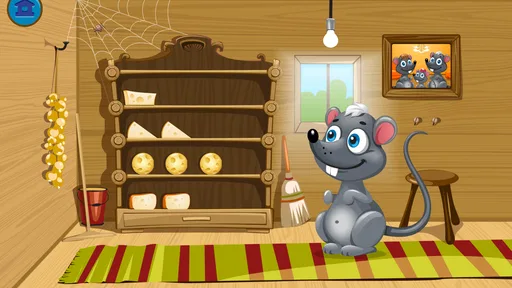
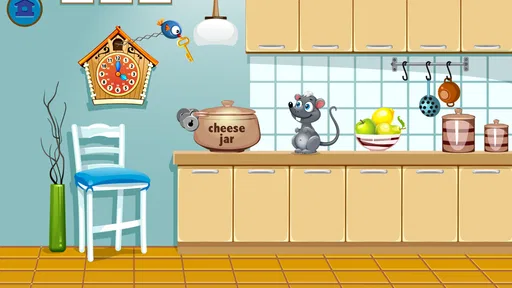
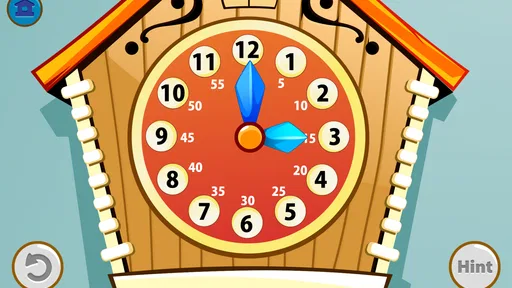
Analysis by Reviewed
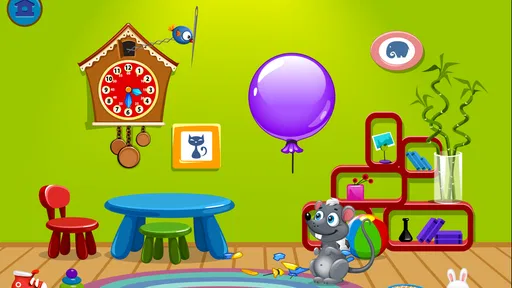
Learning to read a clock is one of those skills that seems simple until a child has to connect the hands on a round clock with the numbers on a digital display. Kids Telling Time focuses tightly on that connection. Rather than trying to be a broad collection of school activities, this educational game from Intellijoy Educational Games for Kids is built around practicing time on both analog and digital clocks. I found that narrow focus useful: it gives children a clear subject to work on without surrounding it with unrelated distractions.
The game is aimed at Everyone and costs $1.99, which places it in the paid, straightforward learning-tool category rather than the free app space filled with advertising or extra content offers. It has reached over ten thousand installs and holds a 4.2 average from more than a hundred ratings. Those figures suggest a modest but established audience, not the visibility of a huge mainstream children’s game. The current version is 1.2.10, and it was released on October 3, 2014, so I approach it as a focused practice tool rather than a modern, constantly expanding learning platform.
Turning clock faces into understandable time
I like to begin with the small, visible goals this lesson can support: identify the hands, read a clock face, and connect that reading with digital time. That gives a child a concrete target for each practice session instead of the vague aim of “getting better at time.” From there, I look at what counts as progress when the game keeps attention on one skill.
The central capability is the important part
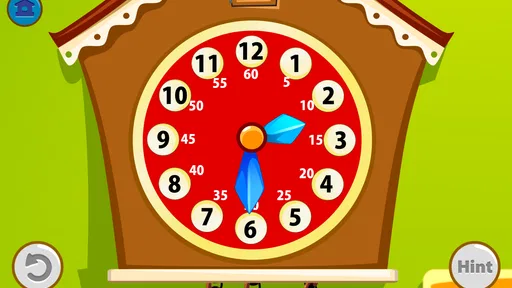
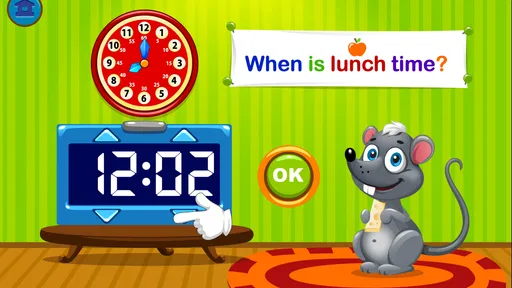
The strongest idea here is the relationship between two ways of showing the same time. A digital clock gives a child a direct number, while an analog clock requires interpretation: the short hand points toward the hour, the long hand shows the minutes, and the position of each hand changes the meaning of the face. Kids Telling Time puts those forms together so practice can move between recognition and interpretation.
That matters because memorizing digital times alone does not necessarily prepare a child to read a clock on a wall, watch, classroom, or kitchen appliance. In my experience, the analog-to-digital connection is where many children need repeated, low-pressure practice. Seeing a digital display and then working out where the hands belong encourages them to treat the clock as a system rather than as a picture to guess from.
I also like the fact that the subject stays concrete. A child is not being asked to understand an abstract explanation of minutes and hours before doing anything. The clock face gives an immediate visual problem, and the digital display gives an immediate answer format. That makes the game suitable for short sessions when a child is willing to practice but does not want a long lesson.
The real value is the bridge between visual reading and number reading. That bridge is more useful than simply drilling isolated number sequences, especially for children who can recite numbers but still hesitate when faced with the hands of a real clock.
More From Our News Desk

Weather by Xiaomi Review: Clear at a Glance, Less Clear Up Close

X Under Pressure: Can It Recover When Posting Goes Wrong?

Clash of Clans Is Won Between the Battles

Android Auto Makes the Case for Quieter Car Software

MobiOffice: Transforming Mobile Productivity with Seamless Integration

EA SPORTS FC™ Mobile Soccer: Redefining Mobile Sports Gaming
Why both clock styles matter
Digital time can feel easier because the numbers are already arranged in a familiar form. Analog time asks for several small judgments at once. The child has to notice which hand is which, estimate its position, and connect that position to minutes or hours. Practicing both formats helps reveal where the difficulty actually is.
For example, a child may recognize a digital display quickly but struggle to reproduce it on a round clock. Another child may understand the hands but hesitate when converting that position into digits. A focused tool like this gives parents a way to notice that difference. Instead of saying that a child is simply “bad at telling time,” I would watch which direction of the conversion causes the hesitation and use the next practice session accordingly.
This is one of the less obvious benefits of a narrowly designed game. It can act as a small diagnostic activity. The app is not a substitute for a teacher’s assessment, but a parent can learn a lot by observing whether the child looks first at the hour hand, counts around the minute marks, or relies on guessing. That observation can shape how the parent explains the next real-world example.
What the game does not replace
I would not use the app as the only way to teach time. Children still need to hear phrases such as “quarter past,” “half past,” and “ten to,” and they need to connect those phrases with daily routines. A game can provide practice, but it cannot fully replace pointing at a real clock before school, discussing how long dinner will take, or asking when a favorite activity begins.
That limitation is not a flaw in the central activity. It is simply the boundary of a focused digital exercise. Kids Telling Time is most useful when it reinforces a lesson that already has a place in ordinary life. If a child plays without ever looking at a physical clock, the skill may remain tied to the screen rather than transferring naturally to the world outside it.
Using it as short, deliberate practice
With a focused activity, progress is often easier to spot in a child’s reasoning than in a streak of quick answers. I’d listen for the child naming the hour hand and minute hand, then explaining how the displayed time matches the clock face; that tells me more than a fast tap. Those signs also help me decide whether to repeat the same kind of practice or make the next step a little harder.
A practical routine for parents
I would introduce the game in brief sessions rather than handing over the device for an open-ended stretch. A useful routine is to begin with a quick question about the current time, let the child practice in the game, and then finish by checking a real clock together. The opening question activates what the child already knows, while the closing check tests whether the digital exercise has transferred beyond the app.
For a younger learner, I would avoid correcting every mistake immediately. If the child chooses an answer too quickly, I would ask, “Which hand did you look at first?” That question encourages a process instead of turning the activity into a series of right-or-wrong reactions. Once the child explains the approach, it becomes easier to correct a misunderstanding about the hour hand or minute hand.
A second useful routine is to separate recognition from production. First, ask the child to read the time shown. Later, ask the child to create or identify the matching form. This prevents the child from relying only on one familiar direction. The important learning moment often comes when a child must move from a digital number to an analog position, because that requires understanding rather than simple recognition.
Making the analog clock less intimidating
Some children see the analog clock as a circle crowded with marks. I found it helpful to describe the face in layers: first the hour, then the minutes, then the relationship between the two hands. The game’s focus on both formats supports this method because the digital display can serve as a reference while the child studies the analog face.
Parents should also watch for the common mistake of reading the hour hand as if it always sits exactly on the number. At times between hours, the hour hand moves gradually, and a child may choose the next number simply because the hand is pointing closer to it. When that happens, I would use a physical clock with movable hands alongside the app. Moving the hands slowly makes the transition visible in a way a static screen may not.
Another good tip is to ask the child to say the time aloud after answering. Speaking turns a visual answer into language and exposes uncertainty that a quick tap might hide. If the child can select an answer but cannot explain it, the skill probably needs more guided practice rather than faster rounds.
An everyday use case that makes the practice stick
Imagine a child getting ready for school while a parent says there are ten minutes before leaving. The child checks a digital display and then looks at an analog wall clock. This is exactly the sort of moment where the two representations have to agree. After a short session with Kids Telling Time, the parent can ask the child to show where the hands would be when ten minutes have passed, then compare that prediction with the real clock later.
The same approach works before bedtime or while waiting for an activity to begin. Instead of treating the game as isolated screen time, I would connect one exercise to a real event: “When the long hand reaches the next number, we will start.” That gives the child a reason to understand elapsed minutes, not just identify a displayed answer.
This transfer is where I think the app earns its place. The game itself is not the final goal. Its best use is as a rehearsal space before a child has to read time independently in a less controlled setting.
What to expect from the device experience
Because the game is an older release, I would keep expectations realistic about presentation. Its appeal is the learning task, not the novelty of a current entertainment game. Children who need animated rewards, a large story world, or frequent changes of activity may lose interest sooner than children who are comfortable repeating a clear exercise.
That can actually help in a supervised learning routine. There are fewer reasons to wander away from the topic, and the paid format avoids making the lesson feel like a vehicle for unrelated promotions. Still, parents should be nearby at first to see whether the child understands the interaction and whether the activity feels appropriately challenging.
Where the focused design helps and where it falls short
A clock-reading lesson can feel easy at first and then become demanding when a child must coordinate both hands and interpret minutes. I’d keep the pace gentle, pausing to work through a confusing answer rather than turning practice into a speed test. That approach makes it easier to judge whether the challenge is productive, and it raises a practical question: what will bring a child back without making practice feel like a chore?
The main trade-off is concentration versus variety
The narrow subject is both the reason to choose this game and the reason some families will outgrow it quickly. If a child needs practice specifically with clocks, concentrating on analog and digital time is efficient. If the child needs broader support with numbers, calendars, money, spelling, or reading, this game will not cover those areas.
Compared with a general children’s learning suite, this title offers less variety but also less subject switching. A broad app may keep a child entertained for longer, yet it can make it harder to tell whether the child has actually improved at telling time. Here, the parent can focus on one skill and notice whether hesitation decreases.
Compared with worksheets, the game is more interactive and easier to use when a child resists paper practice. Worksheets can be better for writing time expressions, showing working, or keeping a record of mistakes. I would use a worksheet when the child needs to practice language such as “twenty past” or “five to,” and use this game when the child needs repeated visual conversion between clock formats.
Compared with a real teaching clock, the app is more convenient for presenting repeated questions, but the physical clock is better for demonstrating movement. A child who keeps confusing the hour hand may benefit more from turning hands manually than from answering another screen prompt. The best choice depends on the source of the difficulty, not on which tool looks more entertaining.
Who may find the price worthwhile
At $1.99, the cost is small enough to make sense for a family that already knows time is the current learning priority. I would be less likely to recommend buying it for a child who has already mastered analog and digital conversion, because the focused subject may not offer enough new challenge. The paid price also means the decision is easier when the app has a clear place in a short learning plan rather than being purchased impulsively.
The Everyone rating makes it suitable for a broad family audience, but age suitability is not the same as skill suitability. A very young child may need an adult to explain the clock vocabulary, while an older child who is still struggling may need a slower explanation and a physical demonstration. Parents should judge the child’s understanding, not assume that the age label guarantees independent use.
Questions I would settle before installing
Will it help a child who knows digital time but not analog time? That is the clearest reason to try it. The two formats are central to the experience, so it is more relevant than a general number game for a child who can read a digital display but freezes at a clock face.
Is it suitable for independent practice? I would say it can support independence once the child understands the basics, but I would begin with an adult nearby. The valuable learning often comes from explaining why an answer is correct, and a parent can catch misunderstandings that a simple score cannot reveal.
Can it teach elapsed time by itself? I would not rely on it alone for that. Use it to strengthen clock reading, then add real routines such as calculating how long until leaving home or how many minutes remain before bedtime. Those situations give meaning to the numbers.
Is it a good alternative to a broad educational app? Only when telling time is the immediate target. A larger suite is a better purchase for families seeking many subjects in one place, while this game makes more sense when variety would distract from a specific weakness.
Does the older release make it unsuitable? Not automatically. For a basic clock-reading activity, the age of the release matters less than whether the child can use it comfortably on the intended device. I would test the interaction early and keep the sessions purposeful rather than expecting the app to feel like a newly released game.
Who gains the most from this focused lesson
For me, the best reason to return is a useful connection to the day ahead, not pressure to keep playing. A quick session before school can lead into checking the kitchen clock together, giving the child a real-world reason to use what they just practiced. That kind of routine helps clarify who will benefit most from a narrowly focused lesson—and who may need a different kind of support.
A good fit for children between recognition and confidence
I think the strongest audience is children who understand some time vocabulary but still need repeated practice connecting the analog face with digital numbers. They may know that the long hand relates to minutes and the short hand relates to hours, yet still make inconsistent choices. For them, a focused game can provide enough repetition to turn a fragile skill into a more dependable one.
It can also help parents who want a simple activity for a specific learning gap. The developer, Intellijoy Educational Games for Kids, has kept the concept centered on a familiar early-learning challenge rather than turning it into a large collection of unrelated tasks. That makes it easier to fit into a home routine, especially when the parent wants ten focused minutes instead of a long entertainment session.
Who should choose something else
I would skip it if the child needs a full curriculum, detailed progress reporting, or lessons that move beyond reading clock faces. I would also choose a physical teaching clock first for a child who cannot yet distinguish the two hands. In that situation, tactile movement and face-to-face explanation may solve the underlying confusion faster.
Children who become frustrated by repetition may prefer a broader game with more varied activities, while children who already read both clock types comfortably may find the practice too basic. The app is not trying to be a complete mathematics program, and judging it by that standard would be unfair. Its value depends on whether its one central capability matches the child’s current need.
My recommendation
I recommend Kids Telling Time as a small, purposeful learning purchase for families working on the transition between analog and digital clocks. I would use it alongside real clocks, spoken time phrases, and everyday questions about schedules. That combination turns the app from a disconnected quiz into a practical rehearsal tool.
Its 4.2 average from over a hundred ratings reflects a generally positive reception, but I would still make the decision based on the child’s exact difficulty. If the problem is recognizing and connecting clock formats, this game’s focused design is its biggest strength. If the goal is broad educational coverage, richer interaction, or advanced time concepts, another option will likely serve better.
For the right learner, the modest price and clear purpose make it easy to recommend. I would not present it as a complete solution to learning time. I would present it as a focused practice partner: useful for building confidence, most effective in short sessions, and strongest when the child closes the app and checks the next real clock independently.
Kids Telling Time Frequently Asked Questions
What devices and operating systems can run Kids Telling Time?
Kids Telling Time is available for devices running iOS 7.1 or later. Before downloading, check that your device meets this minimum requirement and has enough free space for the installation. The game is made for mobile use, so children can practice reading and setting times on a phone or tablet, with a parent nearby to help them get started.
What does Kids Telling Time teach children to do?
Kids Telling Time is an educational game focused on practicing how to set and tell time on both digital and analog clocks. That makes it useful for children who are beginning to connect clock displays with the times they encounter during the day. It can complement lessons at home or school, though regular practice and a parent’s guidance can help children understand the ideas more confidently.
What is Kids Telling Time, and who is it designed for?
Kids Telling Time is an educational app designed to help young children learn how to read and understand analog and digital clocks. It typically introduces concepts such as hours, minutes, half hours, quarter hours, and daily routines through simple exercises and visual activities. The app is best suited to early learners, although the ideal age may vary depending on the child’s current math and reading skills.
What learning activities are available in Kids Telling Time?
The app generally teaches time through interactive clock faces, quizzes, matching exercises, and questions that ask children to identify or set a specific time. Some activities may connect time with familiar routines, such as waking up, eating lunch, or going to bed. This variety can make practice more engaging, while also helping children gradually move from recognizing clock hands to solving more advanced time-reading questions.
Does Kids Telling Time work without an internet connection?
Many of the core lessons and practice activities in Kids Telling Time may be available offline once the app has been installed, which is useful for travel, school practice, or situations without reliable Wi-Fi. However, features such as advertisements, updates, support pages, analytics, or optional purchases may require an internet connection. It is worth checking the app’s current store description for the exact offline limitations.
Pros
- Colorful interface keeps young learners engaged during practice.
- Covers both analog clocks and digital time formats.
- Short activities make lessons easy to fit into daily routines.
- Simple controls allow children to practice with little assistance.
- Helpful repetition supports memorization of common time expressions.
Cons
- Some activities may feel too basic for older children.
- Limited customization options for difficulty and learning goals.
- Practice can become repetitive after extended use.
- Full access may require payment or include in-app advertisements.
- Children may need guidance when learning quarter-hour concepts.













