Kids Learn Letter Sounds
- 178.00
- 4.3
- Installs
- 50.00K
- Price
- $2.99
Screenshots
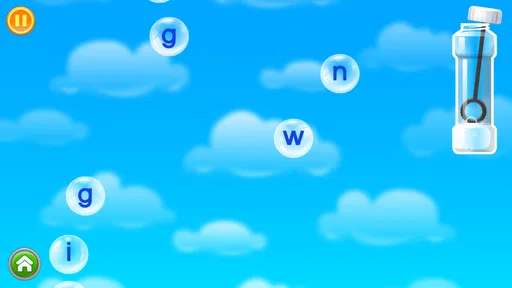
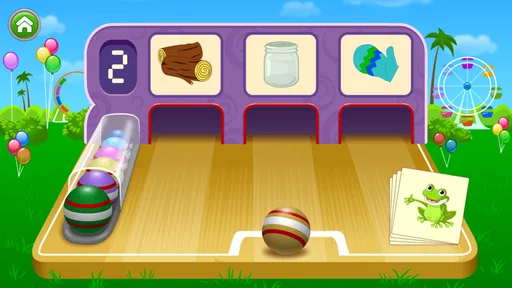
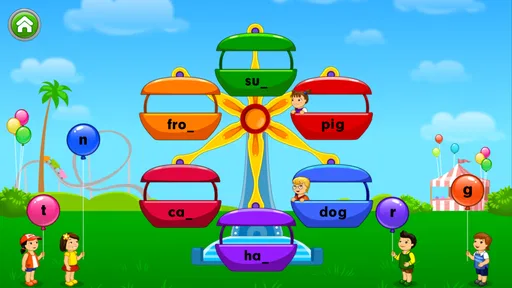
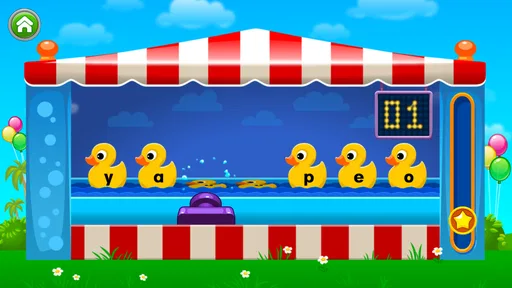
Analysis by Reviewed
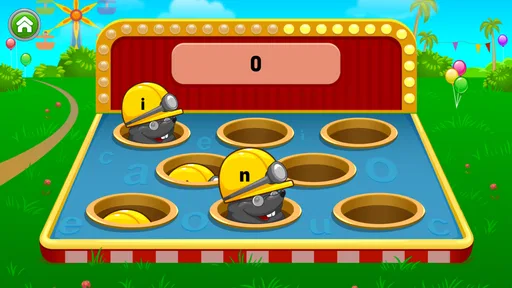
When I try an early-learning game with a child, I look past the cheerful surface. The important questions are whether the child can understand what to do, whether the activities suit different ways of learning, and whether an adult can step in without turning play into a lesson at a desk. Kids Learn Letter Sounds is a focused educational game from Intellijoy Educational Games for Kids that concentrates on the connection between written letters and their sounds. In my experience, that narrow purpose is both its main strength and the reason some families may eventually want something broader.
The game belongs to the educational category and is aimed at Everyone. It costs $2.99, which places it in the paid-app group rather than the free, advertising-heavy side of children’s learning games. Its average rating is 4.3 from around 1,000 ratings, and it has passed 50,000 installs. Those figures suggest a reasonably established product, but they do not tell me whether it will suit every child. The better way to judge it is to look at how its letter-sound practice fits into real routines and different learning needs.
How the game supports early reading in everyday use
I find the game most useful when I treat its letter-sound focus as a starting point, not a whole reading lesson. A short turn can give a child a clear prompt to listen, notice a letter, and respond, while an adult helps connect that moment to speech and print beyond the screen. That everyday role also makes it easier to judge which children are likely to benefit most.
A clear starting point for children who are beginning phonics
The central idea is easy to understand: children learn letter sounds through a game rather than through a worksheet. That makes it especially suitable for a child who recognizes that letters exist but has not yet built a reliable link between a symbol and the sound it represents. It can also work as a gentle refresher for a child who has started learning phonics elsewhere and needs short, low-pressure practice.
I would not treat it as a complete reading course. Knowing individual letter sounds is only one part of reading. Children also need to blend sounds, recognize common words, build vocabulary, and develop listening comprehension. This game is most useful when it occupies the first step of that chain, not when it is expected to replace story time, conversation, handwriting, or a fuller phonics program.
The connection to the earlier Captain Cat title is worth noting because this game is presented as a sequel to Intellijoy’s earlier letter-learning release. That gives the product a clear place in the developer’s early-literacy line, but a new user does not need to know the previous game to understand the purpose here. I could introduce it directly as a letter-sound practice tool without asking a child to complete another app first.
Readability and navigation for young learners
For a preschool or early-primary child, readable presentation matters as much as the lesson itself. A young learner may not be able to read instructions, so the activity needs to communicate through familiar symbols, spoken guidance, and obvious choices. In a game built around letter sounds, the letter should remain the visual anchor rather than being buried beneath decorative menus or long explanations.
More From Our News Desk

Weather by Xiaomi Review: Clear at a Glance, Less Clear Up Close

X Under Pressure: Can It Recover When Posting Goes Wrong?

Clash of Clans Is Won Between the Battles

Android Auto Makes the Case for Quieter Car Software

MobiOffice: Transforming Mobile Productivity with Seamless Integration

EA SPORTS FC™ Mobile Soccer: Redefining Mobile Sports Gaming
That is where a dedicated app has an advantage over a general children’s learning platform. A broad app may place letters beside counting, puzzles, colors, songs, and unrelated rewards. Kids Learn Letter Sounds has a narrower educational identity, so it is easier for an adult to explain what the child is practicing. I can imagine opening it before school and saying, “Let’s do a few sounds,” instead of navigating through several unrelated areas.
Still, parents should watch the first session rather than assuming that a child will understand every screen immediately. Young children vary widely in their ability to follow visual sequences. A child who is comfortable tapping familiar game elements may move through it independently, while another may need an adult to model the first activity. That is not a failure; it is a reminder that independent navigation is a separate skill from recognizing letters.
A useful approach is to separate learning the controls from learning the sounds. I would sit beside the child for the first few minutes, name the action calmly, and then let the child try. Once the child knows where to look and what kind of response is expected, the adult can stop giving answers and switch to encouragement. This keeps the app from becoming an adult-led quiz.
Motor and sensory considerations
Touchscreen learning can be helpful for children who find pencil work tiring or frustrating. Selecting an answer with a finger removes the fine-motor demand of forming letters neatly, and that lets the child concentrate on listening and recognition. For a child who understands a sound but struggles with handwriting, this distinction can make practice feel more successful.
At the same time, tapping is not effortless for every learner. A child with limited precision, tremors, reduced coordination, or difficulty judging small targets may need the device held steady and positioned comfortably. I would avoid placing it on a slippery surface and would give the child enough time to respond instead of rushing in to correct a missed tap. A stylus might help some children, although whether it is practical depends on the device and the child’s preference.
Audio is central to a letter-sound game, so the listening environment matters. In a quiet room, a child may be able to distinguish the spoken sound more easily than in a busy kitchen or a moving car. If the child is sensitive to sound, I would begin at a comfortable volume and keep sessions short. Headphones may make the audio clearer in some situations, but they are not automatically the best choice for every child, particularly when an adult needs to hear what the game is saying and respond.
Children with hearing differences may need additional support from an adult who can reinforce the sound visually or verbally. The app’s subject makes listening important, so it should not be presented as the only route to progress for a child who cannot access spoken audio comfortably. Pairing the activity with mouth movement, a written letter, a picture, or a familiar word can make the practice more meaningful, depending on the child’s communication style.
Situational access at home and on the go
The $2.99 price is a practical advantage for families who prefer a one-time purchase over an app that constantly asks for upgrades or displays commercial interruptions. It also makes the decision fairly simple: if the child needs focused letter-sound practice, the cost is modest; if the child needs a complete curriculum, paying for this game alone will not solve that larger need.
I would use it in short sessions rather than leaving it available as background entertainment. For example, after breakfast, a parent could choose one brief practice period before the child moves on to blocks or a book. The same routine could work after school when the child has enough energy for a small challenge but not for a long worksheet. The key is to stop while the child is still engaged, because repeated drills can lose their value when the child is tired.
Its focused design also suits shared use between siblings, with some planning. An older child may move quickly and answer before a younger one has processed the sound. I would give each child a turn and ask the listener to repeat the sound rather than simply watching the answer. That turns a potential competition into a listening activity, although families wanting separate progress paths may find a more comprehensive learning platform easier to manage.
For travel, the game can be convenient when a child wants a familiar activity, but I would not make it the default solution for every quiet moment. A child benefits from hearing sounds in real words, talking with adults, and looking at printed letters away from the screen. I see the app as one tool in a small routine, not as a substitute for the surrounding language environment.
Three ways to get more from a narrow letter-sound game
First, I would connect each session to objects already around the child. If the game presents a sound, the adult can ask the child to find something nearby that begins with that sound. This turns recognition into a small scavenger hunt and helps prevent the activity from becoming a purely screen-based memory exercise.
Second, I would occasionally reverse the direction of practice. Instead of pointing to a letter and asking for its sound, the adult can say a sound and ask the child which letter they remember. The app may provide the structured prompt, but the adult can add this second step afterward. It reveals whether the child is remembering the symbol-sound relationship or merely following the game’s sequence.
Third, I would use error patterns to decide what to do next. If the child taps quickly but cannot repeat the sound, the issue may be attention or listening rather than letter knowledge. If the child says the sound correctly but repeatedly misses the visual choice, the adult can slow down and emphasize the letter shape. This is more useful than simply celebrating a high number of correct responses.
Where it differs from common alternatives
Compared with alphabet videos, this game is more interactive because the child has to respond rather than only watch. That can make practice more active and can show an adult whether the child is paying attention. Videos are often better for introducing a playful rhythm or reinforcing sound through repetition, while this game is better suited to a short turn-taking activity.
Compared with paper flashcards, it offers spoken presentation and immediate interaction without requiring an adult to invent every prompt. Flashcards remain valuable because they work away from a screen and can be adapted to a child’s pace. They also make it easy to mix letters with real objects or words. I would choose the app when I want a ready-made practice moment and cards when I want flexible, hands-on review.
Compared with large all-in-one literacy subscriptions, this title is less overwhelming. A child who becomes distracted by badges, side activities, or a crowded menu may benefit from its narrower purpose. The trade-off is breadth: families seeking phonemic blending, spelling, stories, handwriting, or progress tracking may prefer a larger learning system. The right choice depends on whether the immediate problem is letter-sound exposure or a wider reading curriculum.
Remaining barriers parents should plan around
The biggest limitation is scope. A child can become familiar with individual sounds and still struggle to combine them into a word. I would follow the game with simple oral blending, such as stretching two or three sounds and asking what they make, but I would not assume the app itself covers that next stage. A parent looking for a single solution from first letters through independent reading should keep searching.
Another barrier is the difference between recognition and transfer. Children sometimes answer correctly inside a familiar game but cannot identify the same letter in a book, on a sign, or in their own name. To reduce that gap, I would occasionally pause after a session and point out the practiced letter in printed material. That small bridge is important because the goal is not to win an activity; it is to notice letters in ordinary life.
Attention span can also change the experience. A child who enjoys repeating sounds may benefit from frequent short visits, while a child who dislikes repetition may lose interest quickly. I would avoid turning the app into a reward that must be earned through unrelated behavior, because that can make the learning feel like a chore. It is better used when the child is ready for a brief, predictable activity.
Families should also consider device context. A small screen, glare, poor positioning, or competing background noise can make a simple task feel unnecessarily difficult. Before deciding that the child cannot learn from the game, I would adjust the environment: sit close enough to see the letter, reduce distractions, and let the child hold or touch the device in a stable way. These changes do not add features, but they can change whether the existing activity is accessible.
Who should choose it, and who should skip it
I would recommend it to a family that wants a straightforward introduction to letter sounds, especially if the child is at the beginning of phonics learning and responds well to touch-based activities. It is also a sensible companion for parents who already read with their child and want a short, structured way to reinforce the sounds that appear during those reading sessions.
I would be more cautious for a child who needs extensive visual customization, alternative input methods, or a curriculum that adapts across several literacy skills. The app may still be usable with adult support, but the family should not expect a focused letter-sound game to provide every accommodation or teaching method. A specialist tool, teacher guidance, or a more flexible literacy platform may be a better fit in that situation.
I would also skip it as the main choice for an older learner who already knows basic letter sounds. That child may gain more from blending practice, spelling, decodable stories, or vocabulary work. The game’s educational value is strongest when the letter-to-sound connection is still being formed or needs gentle reinforcement.
Version, longevity, and the buying decision
The current version is 2.5.1, and the game was released on March 25, 2011. That long presence can be reassuring for parents who prefer an established children’s title, but it also encourages realistic expectations. I would approach it as a focused, mature learning activity rather than as a modern all-in-one platform with every recent classroom feature.
It supports Android from version 7.1 onward, so compatibility should be checked against the device before buying. The age rating of Everyone makes it appropriate for a broad family audience, but an age label does not tell me whether the difficulty matches a particular child. A younger child may need guidance, while an older beginner may find the content comfortable but limited.
The purchase makes sense when the family values a simple, dedicated exercise and already has other ways to build reading skills. It makes less sense when the goal is extensive content, detailed learning reports, or a single app that keeps developing with the child. In that case, the lower price does not compensate for the need to add several other resources.
My inclusive verdict
Kids Learn Letter Sounds is a useful, clearly targeted educational game for the earliest part of reading instruction. I like that its purpose is easy to explain and that touch interaction can remove some of the frustration associated with pencil-based work. The paid model may also appeal to families who want a children’s activity without the feel of a free app built around distractions.
Its inclusive value depends on how it is introduced. A quiet setting, comfortable volume, patient turn-taking, and adult connections to real letters can make the experience work for more children. Those supports are especially important for learners who need extra processing time, have motor challenges, or do not learn well from spoken prompts alone. The game can contribute to an accessible routine, but it should not be treated as proof that every child will access the same activity in the same way.
My final view is positive but specific: I would recommend it as a small, affordable part of a phonics routine, not as a complete reading solution. If your child is just beginning to connect letters with sounds, this focused approach is worth considering. If your child already has that foundation or needs broad customization and advanced literacy practice, a different option will likely serve them better. Used with real conversation, books, objects, and patient adult guidance, it can turn a few minutes of screen time into meaningful early-reading practice.
Kids Learn Letter Sounds Frequently Asked Questions
How much does Kids Learn Letter Sounds cost, and is it a one-time purchase?
Kids Learn Letter Sounds costs $2.99. If you are comparing it with free learning games, consider whether its focused practice with letter sounds suits your child’s needs before downloading. The price alone does not determine whether it will be a good fit: children benefit most when the app is paired with conversation, books, and other opportunities to hear and use letter sounds.
What should parents know about the developer and age rating?
Kids Learn Letter Sounds is an educational game from Intellijoy Educational Games for Kids, and its content rating is Everyone. It is designed around early letter-sound learning, making it a natural option to consider for young children beginning phonics. As with any app a child uses, parents can preview the activities and decide whether the presentation and learning approach suit their child.
What is Kids Learn Letter Sounds, and who is it designed for?
Kids Learn Letter Sounds is an early-learning app designed to help young children connect letters with their corresponding sounds. It is mainly intended for preschoolers and children beginning to learn English phonics. The activities are generally simple enough for independent practice, while parents and teachers can also use the app as a supplementary tool alongside reading, speaking, and hands-on alphabet activities.
How does Kids Learn Letter Sounds help children learn phonics?
The app introduces letters through visual and audio interactions, allowing children to see a letter, hear its sound, and repeat the association through playful exercises. This approach can support early recognition, pronunciation, and listening skills. It is most effective when children use it regularly for short sessions and when an adult reinforces the sounds with real words and everyday examples.
Is Kids Learn Letter Sounds suitable for complete beginners?
Yes, the app is aimed at children who are just starting to recognize the alphabet and learn basic letter sounds. Its beginner-friendly format does not usually require previous phonics knowledge. However, children develop at different speeds, so younger users may still need help understanding instructions, holding the device, or repeating sounds correctly. Adult guidance can make the first sessions more productive.
Pros
- Short lessons are easy for young children to complete independently.
- Clear letter pronunciation helps build early phonics confidence.
- Bright visuals and simple interactions keep practice approachable.
- Useful for reinforcing sounds learned at preschool or school.
- Progress can be practiced in brief sessions without much setup.
Cons
- Some children may find the activities repetitive after regular use.
- Content may feel too basic for children who already know phonics.
- Limited challenge can reduce engagement as reading skills improve.
- Audio quality and pronunciation may vary by device settings.
- Parents may need to supervise practice and explain unfamiliar words.













