Hidden Objects Game: Find & Go
- 100.00
- 5.0
- Installs
- 50.00K
- Price
- Free

Screenshots






Analysis by Reviewed
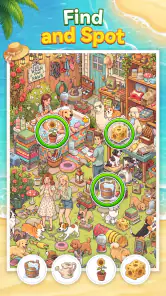
I started Hidden Objects Game: Find & Go expecting a simple way to pass a few quiet minutes, and that is exactly where it fits best. The game places me in illustrated scenes and asks me to locate objects hidden among the visual clutter. I scan, tap when I spot something, and move through the search at my own pace. The appeal is immediate because the first action is easy to understand, yet the picture gives me enough detail to make each discovery feel earned.
Published by Guru Puzzle Game, this free puzzle title is aimed at Everyone and runs on Android devices using version 7.0 or later. Its store summary describes a search-and-find experience across varied scenes, but the more useful question is how that loop feels after the first few taps. In my experience, the game works best as a relaxed visual exercise rather than as a demanding brainteaser or a story-driven adventure.
The listing shows a 5.0 average from around 1.9 thousand ratings, with over 50 thousand installs. Those figures suggest that the straightforward format has found an audience, although they do not change the basic nature of the experience: this is a focused hidden-object game for players who enjoy looking carefully, not a broad collection of unrelated puzzle modes.
How the search begins and why the first tap matters
The opening move is uncomplicated. I look across the scene, compare shapes and colors, and tap an item that matches the search objective. There is no complicated control scheme to learn, so the challenge comes from visual attention. That makes the game approachable when I want something I can start immediately, including during a short break when learning rules would feel like work.
What makes the first action more interesting than a basic picture quiz is the need to switch between broad scanning and close inspection. I first divide the scene into areas instead of staring randomly at the whole image. Then I check edges, crowded groups, unusual color patches, and objects that blend into the background. This simple routine is more effective than repeatedly sweeping the same area with my eyes.
I also found that the game rewards changing my viewing distance. Looking at the entire scene helps me recognize an obvious silhouette, while focusing on one small section helps with objects that share the background’s colors. On a phone, this matters because a busy image can feel visually compressed. Rather than tapping everywhere, I use a slow grid-like scan from one corner to the next. It reduces missed details and keeps the search feeling deliberate.
That approach gives the game a gentle learning curve without requiring a tutorial-heavy structure. A new player can simply tap what looks familiar, while someone who enjoys observation puzzles can develop a more efficient method. The difference is subtle but important: the game does not need complicated mechanics to give careful players a reason to improve.
Scenes that turn looking into a small investigation
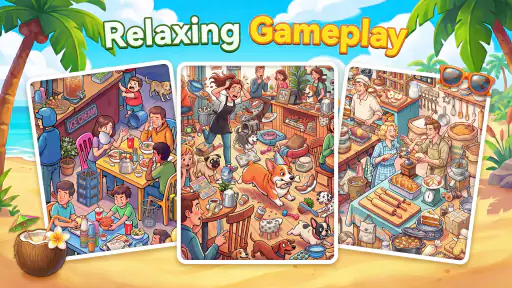
The variety of scenes is central to the experience. Each setting changes the visual language of the search, so I cannot rely on one memorized trick for every round. A bright area may make color matching useful, while a crowded scene may require more attention to outlines and object placement. This keeps the action from becoming a completely automatic tap routine.
I prefer treating each picture like a small investigation. Instead of asking only, “Where is the next item?” I ask which parts of the image are likely to hide it. A decorative corner, a pile of similar shapes, or a region with several competing colors deserves a second look. This habit makes the game more satisfying because progress comes from better observation rather than from tapping faster.
There is also a useful trade-off in the visual design of hidden-object puzzles. If an item stands out too clearly, the round ends before the search becomes enjoyable. If it blends in too aggressively, the experience can feel like pixel hunting. The best moments here are the discoveries that become obvious only after I notice the right shape or color relationship. The weaker moments are the ones where I know I have searched carefully but still feel that the answer is hidden by visual noise rather than clever placement.
For that reason, I would recommend playing with the screen comfortably visible and avoiding a rushed environment. This is not a game I would choose while walking, multitasking, or trying to finish something quickly. Its main pleasure comes from giving the image enough attention to reveal what is already there.
The feedback rhythm keeps the search moving
Every successful find creates a small moment of confirmation: I spot the object, tap it, and receive feedback that the search has moved forward. That rhythm is the heart of the game. The action is looking, the feedback is recognition and progress, and the reward is the satisfaction of reducing the remaining visual problem.
I like that the feedback arrives directly after the tap because it prevents uncertainty about whether I found the correct detail. A hidden-object game would feel flat if discoveries disappeared without acknowledgement. Here, each correct choice gives me a reason to continue scanning instead of wondering whether I should have tapped somewhere else.
The rhythm also explains why the game is easy to pick up but not always easy to stop. A scene presents an unfinished task, a successful tap removes one piece of that task, and the reduced list makes the next find feel closer. Even when I begin with no strong goal beyond passing time, the unfinished search creates a mild pull to continue.
My most useful technique is to avoid chasing only the easiest objects. I collect obvious finds early, but I then deliberately search the areas I have ignored. This prevents the final items from becoming a frustrating mystery. I also pause after a few successful taps instead of letting my eyes rush. Short pauses reset my attention and make small differences in texture easier to notice.
Another practical tip is to remember the scene’s visual categories rather than the exact location of every object. If I notice that several targets share a certain shape, I can scan for related silhouettes. If the remaining target seems to blend into a similarly colored area, I stop looking for a bright contrast and start checking boundaries. This is a more reliable strategy than tapping based on vague familiarity.
When the feedback feels satisfying and when it loses force
The strongest feedback comes after a find that I genuinely worked for. I compare the image, recognize the detail, and feel that my attention produced the result. The weaker moments happen when the scene is so crowded that success depends on repeatedly checking tiny regions. At that point, the loop can shift from relaxing observation to visual persistence.
This distinction matters for choosing the game. Players who enjoy calm searches and incremental completion will probably appreciate the steady confirmation. Players who want dramatic rewards, fast reactions, or a strong competitive score may find the feedback too quiet. The game’s pleasure is cumulative rather than spectacular: one correct discovery, then another, until the picture is complete.
I would also avoid judging the experience by the first few minutes alone. The basic control is immediately clear, but the quality of a session depends on whether the current scene gives me a fair balance between obvious and subtle targets. When that balance works, the game feels focused. When it does not, I notice the limits of the format more quickly than I would in a puzzle with several different mechanics.
What counts as a reward in a quiet puzzle game
The main reward is completion, but it is not only the final screen. I get smaller rewards from narrowing the search, recognizing a misleading shape, and correcting my own scanning habits. That makes the game suitable for people who enjoy progress without needing a large narrative payoff. I can finish a scene and feel that I used concentration productively, even if the session was brief.
For me, the most rewarding moments happen when an object has been visible all along but hidden by context. A shape may blend into a group, or a familiar item may look unusual because of its placement. Finding it changes the whole scene for a second: I see not only the object but also why I missed it. That little shift in perception is more memorable than simply tapping a large, isolated target.
The reward structure is also useful for different moods. When I am tired, I can search slowly and let the pictures occupy my attention. When I want a slightly more active challenge, I can set myself a personal goal of reducing random taps and relying on systematic scanning. The game does not need to become competitive for me to make it more engaging.
There is a practical consideration around the free model. The game is free to download, while in-app purchases range from around two dollars to nearly ninety-seven dollars per item. That is a wide range, so I would approach optional spending carefully and check each purchase before confirming it. A player who wants a completely uncomplicated free experience should be prepared to pay attention to the purchase flow rather than assuming every part of progression will remain cost-free.
This is one reason I see the game as better for casual, controlled sessions than as an endless background activity. If I play with a clear limit, I can enjoy the search without feeling pressure to spend for convenience. If I dislike in-app purchase systems altogether, a paid puzzle with a single upfront cost may be a better match, even if it offers fewer scenes.
Who gets the most from the reward loop
The game is a good fit for visual thinkers, casual puzzle players, and anyone who likes a quiet task with a clear finish. It can also work for families because its Everyone age rating makes the overall audience broad, although younger players may still need help with difficult scenes or with understanding optional purchases. The simple tap-to-find structure is easier to share than a puzzle built around complicated rules.
I would be less likely to recommend it to someone seeking wordplay, logic grids, match-three chains, or physics-based problem solving. Those alternatives create different kinds of feedback. A word puzzle rewards vocabulary, a logic puzzle rewards deduction, and a match game rewards planning combinations. This title rewards visual search specifically, so its appeal depends on whether that mental activity sounds relaxing or repetitive to you.
It is also not my first choice for a player who wants a strong story or character progression. The scenes are the focus, and the satisfaction comes from finding what is hidden rather than from following a plot. That narrow focus is a strength when I want clarity, but it is a limitation when I want variety in the form of gameplay.
Why a session resets naturally instead of becoming a chore
After a scene is complete, the search loop reaches a natural stopping point. I have examined the picture, received the final confirmation, and no longer have an unfinished visual problem demanding attention. That reset is important because it gives the game a clean structure for short sessions. I can put it down after one completed search without feeling that I abandoned a complicated campaign.
At the same time, finishing one scene creates the reason to begin another. The next picture offers a fresh arrangement of colors, shapes, and distractions, so I am not simply repeating the exact same visual scan. The reset changes the problem while preserving the familiar action. That combination is why I often feel comfortable starting “just one more” search.
A realistic use case is a short break between tasks. I might have a few quiet minutes after lunch, open the game, complete part of a scene, and return later when I am ready to focus again. It also suits a wind-down routine because the pace is calmer than an action game. I would not use it when I need to keep my attention on another responsibility, though; the unfinished-search effect can make a supposedly brief break last longer than planned.
For longer play, I recommend changing the way I search between scenes. If I use the same frantic method every time, eye fatigue arrives quickly. I alternate between broad scanning and focused area checks, and I stop when the image stops feeling comfortable to inspect. That is not a weakness unique to this title; it is an important trade-off of screen-based hidden-object play, where concentration can turn into strain if I ignore it.
The reset also helps reveal whether the core loop is enough for a particular player. If completing a scene leaves me satisfied and curious about the next one, the structure is doing its job. If I finish and immediately want a different type of challenge, the game has probably delivered what it can for that session. I appreciate that it does not pretend every player will want endless searching.
How it compares with familiar puzzle alternatives
Compared with match-three games, this experience is slower and more observational. There is less emphasis on rapid combinations and more on noticing relationships inside one image. Compared with crossword-style games, it asks for visual patience rather than language knowledge. Compared with object-finding games that rely heavily on story scenes, its attraction is more direct: the search itself is the reason to play.
That makes it a useful choice when I want low-pressure concentration. I can play without memorizing a large ruleset or planning several moves ahead. However, players who enjoy strategic depth may prefer a logic puzzle, while players who want constant novelty may prefer a game that alternates between several puzzle types. Hidden-object play is intentionally narrow, and this title should be chosen for that narrowness rather than despite it.
The developer, Guru Puzzle Game, presents a recognizable format here: a scene, a search, confirmation, completion, and a fresh opportunity to look again. The current version is 1.6.0, so the practical decision is simple: if the basic loop sounds appealing, the free entry point makes it easy to try, but the purchase range means I would still stay attentive during setup and progression.
My verdict on the complete find-and-reset loop
After spending time with Hidden Objects Game: Find & Go, I see it as a focused relaxation puzzle rather than a game that tries to do everything. The first action is accessible, the feedback arrives at the right moment, and each discovery gives the search enough forward motion to make another tap feel worthwhile. The reward is modest but genuine: I notice more, miss less, and complete a scene through attention.
Its best quality is the clean connection between action and response. I search, I identify, I tap, and the remaining task becomes clearer. Then the scene ends, my attention resets, and a new picture gives me a reason to start again. The loop works because every successful find changes what I see next.
There are clear boundaries. This is not the right pick for intense competition, deep deduction, narrative progression, or players who dislike optional purchase systems. Visual fatigue can also become a concern during long sessions, especially when a scene relies on small details. I would choose a different puzzle category when I want more strategic variety or a stronger sense of long-term development.
For a friend who enjoys quiet searches, I would recommend giving it a try, especially for short breaks and relaxed evening play. I would use a systematic scan instead of random tapping, take pauses between crowded areas, and treat the free download as a chance to test whether the visual style suits me before considering any purchase. With that expectation, this Everyone-rated puzzle game delivers a pleasant, repeatable search experience and knows exactly what it wants each session to be.
Pros
- Relaxing gameplay suitable for short breaks
- Large variety of hidden-object scenes to explore
- Simple controls make it accessible for most players
- Helpful hints can assist when a scene becomes difficult
- Works well for players who enjoy visual observation challenges
Cons
- Some scenes may feel repetitive after extended play
- Small objects can be difficult to spot on smaller screens
- Hints or extra attempts may be limited during tougher levels
- Progress can feel slow without frequent play sessions
- Ads may interrupt the experience between scenes

- Category
- Puzzle
- Version
- 1.6.0