Differences - Find & Spot It
- 6.97K
- 4.9
- Installs
- 10.00M
- Price
- Free

Screenshots
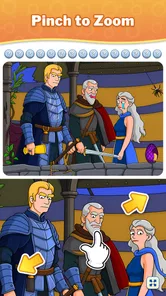

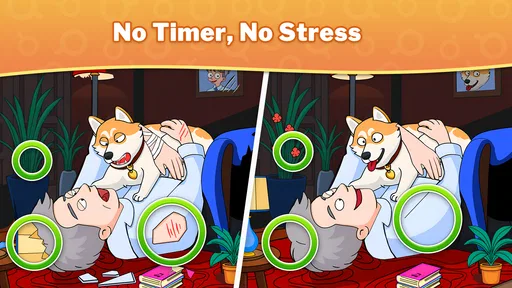
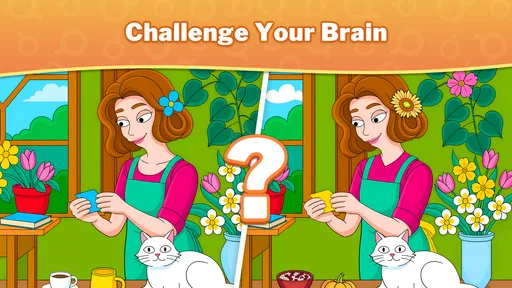
Analysis by Reviewed
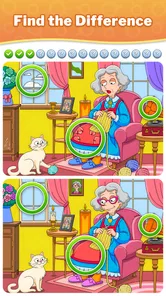
I like puzzle games that give me something to focus on without asking me to learn a complicated system first. Differences - Find & Spot It gets straight to the point: compare two pictures, tap what looks different, and keep looking until the scene is complete. That clear first action makes it easy to pick up during a quiet moment, though the appeal depends on enjoying close visual attention rather than quick reflexes or a story.
Picking Up the First Puzzle
The first useful question is whether this kind of looking feels relaxing or like work to you. There is no elaborate setup to understand: the central task is to examine a pair of pictures and select the details that do not match. I like that the goal is visible immediately. If I have only a short pause, I can begin without first remembering a storyline, building a strategy, or learning a set of controls.
That simplicity makes the game particularly easy to share with someone who does not usually play mobile games. I would describe the task in one sentence, then let them try rather than walking them through a tutorial. It can suit a quiet moment with a family member, too, as long as everyone is comfortable taking turns looking at the same screen. The focus is on noticing, not on gaming experience.
There is a practical trade-off in that straightforward start. Players who want each new round to teach a different mechanic may find the basic comparison task familiar very quickly. Its interest comes from what is hidden in each image and how carefully you look, not from mastering a complicated rule set. I would approach it as a small observation challenge, rather than expecting a puzzle campaign with a long arc.
Spot the Differences Like a Pro
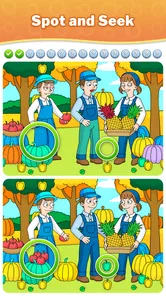
The core idea of this app is pretty straightforward. You’re presented with two images side by side, and your task is to find the differences between them. Sounds simple, right? But don’t let that fool you. As you progress, the game ramps up the difficulty, and you’ll find yourself peering at the screen, analyzing every nook and cranny of the pictures. It’s a test of patience and perception, and it’s incredibly satisfying when you spot that tiny, elusive difference.
How the Search Feels in Practice
The game’s feedback rhythm is what makes a small puzzle feel complete: scan, spot a detail, tap it, then return to comparing the two images. When a difference is subtle, I find it useful to compare one area at a time instead of sweeping my eyes across the whole picture. Start with prominent shapes, then check edges, colors, and small objects. This method cuts down on random tapping and makes the search feel more deliberate.
That approach is especially handy when a picture contains several busy areas. I usually pause briefly after finding a difference, reset my attention, and move to a different corner rather than repeatedly checking the same spot. The game rewards careful observation, but that also means it may feel slow if you prefer puzzles with a constant stream of new mechanics or action.
More From Our News Desk

 Gmail
GmailGmail in a Busy Inbox: Who Benefits Most?
From first account to crowded workday, Gmail earns its place through dependable search and flexible sorting—but its best fit depends on how much inbox maintenance you can tolerate.

 Prime Video
Switching to Prime Video: What Changes in Your Viewing Routine
Prime Video can make a compelling second home for streaming, but switching means learning a different catalog, rental layer, and route from browsing to playback.

 Universal TV Remote Control
Universal TV Remote Control Works Best as a Reliable Backup
A phone remote earns its place through quick setup and reliable habits. Here is how to get more from Universal TV Remote Control—and where its limits show.

 Weather - By Xiaomi
Weather by Xiaomi Review: Clear at a Glance, Less Clear Up Close
Xiaomi’s weather app makes everyday forecasts quick to scan, but its calm surface can leave useful details and recovery paths harder to find than they should be.

 X
XX Under Pressure: Can It Recover When Posting Goes Wrong?
A resilience-focused review of X, examining setup, mistaken posts, interruptions, weak connections, and the gaps that matter when recovery needs to be dependable.

 Clash of Clans
Clash of Clans Is Won Between the Battles
Its raids are quick; its community is a long-term project of coordination, teaching, rivalry, and shared responsibility—with all the friction that entails.
Latest News



Feedback, Hints, and the Pace of a Round
Finding a difference gives the search a small punctuation mark: I make a choice, see the result, and then have to direct my attention somewhere else. That cycle is more engaging than simply staring at two images, but it still depends on my own patience. If I tap carelessly, I am not really solving the picture; I am just hoping the screen will do the work for me. Slowing down is usually the better move.
A useful habit is to change the kind of comparison I am making when I get stuck. Instead of looking for another whole object, I can compare the outline of a familiar shape, then the nearby color, then the space around it. This is not a hidden game feature; it is a way to avoid letting one missed detail dominate the round. I find it especially helpful when a scene has several visually similar areas.
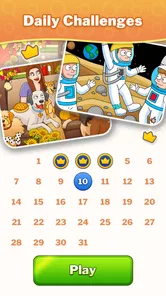
What makes Differences - Find & Spot It particularly appealing is the variety of images it offers. From landscapes and cityscapes to everyday objects and abstract art, the diversity keeps things fresh and exciting. Plus, the app introduces timed challenges, adding a layer of urgency and excitement. There’s something thrilling about racing against the clock to find all the differences before time runs out.
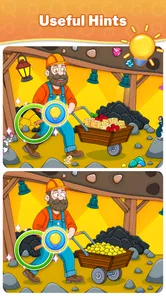
Another standout feature is the hint system. If you’re stuck, you can use hints to nudge you in the right direction. It’s a lifesaver when you’re on the verge of frustration, ensuring that the game remains fun and not an exercise in futility.
I’d treat a hint as a way to get past one stubborn patch, not as my default move. Giving the picture one more structured scan first can make the eventual discovery more satisfying. In a timed challenge, though, the balance changes: if the clock is making you rush, a hint can help preserve the pace. That trade-off is useful to keep in mind if you want a relaxed session one day and a sharper test the next.
When It Fits Into an Ordinary Day
The joy of Differences - Find & Spot It lies in its simplicity and the way it exercises your brain. It’s a game that doesn’t demand a huge time commitment, making it perfect for quick sessions during your commute or a short break. The interface is user-friendly, with intuitive controls that make it easy to jump right in and start playing.
For example, I can imagine opening it while waiting for a friend at a café, finishing a short stretch of play, and putting the phone away when they arrive. It also suits someone who wants a low-pressure puzzle before bed, provided the timed mode doesn’t make that feel too intense. I would avoid playing while walking or doing anything that needs attention; comparing picture details is precisely the sort of task that pulls your eyes onto the screen.
It is also a reasonable choice for a brief pause between tasks at home: one round can give your attention a clear target without requiring you to keep track of a complicated game state. I would still choose a moment when I can look at the screen properly. If I am half-watching a conversation or trying to hurry through a chore, the repeated visual checking is more likely to frustrate me than relax me.
Compared with a crossword or number puzzle, this is more about visual scanning than recalling words or working through a sequence of deductions. Compared with fast match games, it offers a calmer pace and fewer rapid decisions, but it can become repetitive if you want changing rules, character progression, or a narrative. I’d choose it for a brief observation challenge, not as a substitute for a deeper puzzle game.
That comparison also helps set expectations about where it sits among picture puzzles. The appeal is not a sprawling collection of puzzle formats; it is the direct act of checking one image against another. If you enjoy visual spot-the-detail activities, that focus is a strength. If you want to alternate between logic grids, wordplay, and other kinds of problems in a single session, a broader puzzle app will likely be a better fit.
Image Clarity and Looking Comfortably
Furthermore, the game’s design is visually appealing. The images are crisp and clear, which is crucial when you’re trying to spot minute details. The developers have done a stellar job in curating a collection of images that are both challenging and pleasing to the eye.
That clarity matters because tiny distinctions can be tiring to inspect on a small phone screen. If your eyes feel strained, taking a break is better than tapping at random; returning with fresh attention often makes a missed detail easier to notice. A larger screen may be more comfortable for some players, but the game’s simple side-by-side format is naturally suited to a quick phone session.
One practical way to keep the search comfortable is to avoid treating every image like a speed test. I would first look at the whole scene to get its layout, then inspect it in sections, taking a moment to shift focus between the left and right pictures. That reduces the temptation to stare at one tiny patch for too long. It also makes it easier to notice when I have already checked an area and should move on.
Guru Puzzle Game is the developer behind this free puzzle game. It is rated for Everyone, and the game has a 4.9 average from around 176,000 ratings, with over 5 million installs. Those figures suggest it has found a broad audience, but they don’t change the basic question for me: do you enjoy slowly comparing images? If not, a word puzzle or a game with more varied interactions will probably hold your attention better.
The game is currently at version 1.12.0 and requires Android 7.0 or later. Optional in-app purchases range from $0.99 to $99.99 per item, so I’d check the purchase details before confirming anything, especially if a child will be using the device. The free entry point makes it easy to try the central puzzle loop, while the presence of purchases is worth keeping in mind if you prefer games with no optional spending.
For someone deciding whether to try it, the practical answer is that the core activity is available to approach as a free game, while optional purchases are a reason to use ordinary care around confirmations. I would be especially mindful if a child has access to the device: the Everyone rating makes the content broadly suitable, but it does not remove the need for an adult to manage spending choices. That is a sensible distinction for any family deciding what to install.
Why Another Session Starts
A round has a natural reset built into the way I play: once I have finished comparing a scene, the next picture offers a fresh set of details to inspect. That is enough to make another short session tempting without needing a dramatic reward or a complicated progression system. The satisfaction is local and immediate—the answer was there, I noticed it, and now I can try again with a new visual problem.
That loop is also where I see the main limitation. The next round still asks for the same kind of attention, so a new image may feel refreshing but it does not change the fundamental activity. I would stop when I catch myself scanning without really seeing. Taking a break is not a failure; it is often the best way to return with enough concentration to enjoy the next search.
If I wanted more pressure, I could choose the timed challenge; if I wanted a calmer pace, I would stay with a less hurried approach and use a hint only after a careful second look. Those choices change how the same basic task feels, rather than turning it into a different genre. For me, that is a useful option for adjusting a short session to my mood, though players seeking a major shift in mechanics may still want another game alongside it.
Who Should Give It a Try?
In a world overflowing with complex games that require hours of dedication, Differences - Find & Spot It offers a refreshing change of pace. It’s a simple yet addictive game that promises to keep you entertained while sharpening your observational skills. Whether you’re a casual gamer or someone who loves a good puzzle, this app is sure to provide hours of enjoyment. So, why not give it a try and see how keen your eyes really are?
My verdict is more specific: I’d recommend it to people who enjoy visual details, want a puzzle they can start without a long tutorial, or need a compact way to fill an idle pause. I’d skip it if repeated picture comparisons sound tedious, if you need a game that works well while multitasking, or if you mainly want complex strategy. The satisfying loop is simple—look, identify, get feedback, and start scanning again—but that simplicity is also its main limitation. When the next image feels like a fresh little challenge, it’s easy to begin another round; when your eyes are tired, stopping is the better call.
Differences - Find & Spot It Frequently Asked Questions
What kind of gameplay does Differences - Find & Spot It offer?
Differences - Find & Spot It is a picture-based puzzle game built around comparing two similar images and finding the details that do not match. Its central challenge is straightforward to understand, making it easy to pick up for a quick session while still asking you to look carefully. The store summary captures the relaxed focus of the experience: spot the differences and have fun.
Can Differences - Find & Spot It be a good game for short play sessions?
The basic spot-the-difference format suits players who want a puzzle they can approach casually: look at the images, search for mismatched details, and focus on what catches your eye. It is a simple concept to return to when you have a little time. Whether you prefer brief sessions or longer stretches of play, the game’s appeal comes from careful observation rather than a complicated set of rules.
What age group is Differences - Find & Spot It suitable for?
Differences - Find & Spot It is rated for Everyone, making it suitable for a broad range of players. Its puzzle format centers on comparing pictures and spotting details, so it can be an approachable choice for casual play. As with any game, parents can decide whether its content and play style are right for their child.
What is Differences - Find & Spot It?
Differences - Find & Spot It is a popular puzzle game that challenges players to find differences between two similar images. It's designed to test and improve your attention to detail and observation skills. Available on both Android and iOS, the game offers a variety of picture puzzles across different themes and difficulty levels to keep players engaged and entertained.
Is Differences - Find & Spot It free to play?
Yes, Differences - Find & Spot It is free to download and play. However, it does offer in-app purchases to enhance the gaming experience, with purchases ranging from $0.99 to $99.99 per item. These purchases might include hints or additional levels. While you can enjoy the game without spending money, some players opt for in-app purchases to progress faster or unlock special features.
Pros
- Engaging and challenging puzzles.
- Enhances attention to detail.
- Suitable for all age groups.
- Frequent updates with new levels.
- User-friendly interface.
Cons
- Ads can be intrusive.
- Limited hints available.
- Requires internet connection.
- In-app purchases for extra features.
- Some levels are repetitive.