HATSUNE MIKU: COLORFUL STAGE!
- 10.22K
- 4.5
- Installs
- 10.00M
- Price
- Free

Screenshots




Analysis by Reviewed
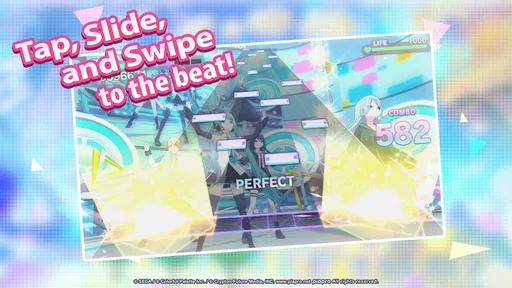
When a rhythm game feels harder than it should, the first thing I check is whether I’m comfortable with the timing and controls—not whether I’ve somehow missed a secret setting. HATSUNE MIKU: COLORFUL STAGE! puts a lot of emphasis on precise taps, so a little patience during the first sessions makes a real difference. I’d start on an easier chart, get used to how notes meet the judgment line, and only raise the difficulty when the beat feels natural rather than rushed.
Getting comfortable before a difficult song
One common source of frustration is jumping straight into a chart that looks exciting but asks for more coordination than you have built up. I find it more useful to repeat a manageable song and focus on clean timing than to treat every miss as a reason to tap faster. On tougher difficulties, notes can demand more attention from both hands, and fatigue can make accuracy slip. A short break is often more productive than replaying the same section while tense.
It also helps to play somewhere you can hold the device steadily and see the notes clearly. If you’re using headphones, keep the volume at a comfortable level; the goal is to follow the rhythm, not to make the music overpower everything around you. For a quick session during a commute or between tasks, choose a difficulty that leaves room to enjoy the song instead of turning the whole break into a test of reflexes.
Before you blame the game
If the app feels sluggish or a session does not go as expected, I’d first close other demanding apps, check that the device has enough free storage, and make sure its operating system is compatible. The game is free to download, but it includes in-app purchases, so I’d also review purchase controls on a shared device before handing it to a younger player. Its Everyone age rating makes it broadly approachable, though the spending side still deserves a quick family check.
For a timing problem, change one thing at a time: steady your grip, reduce distractions, and try another song before deciding the game itself is at fault. That simple routine helps distinguish an awkward setup from a chart that is genuinely beyond your current comfort level. If the same issue persists across sessions, restarting the app and checking for an available update are sensible basic steps rather than assuming a particular fix will work.
Small adjustments that make practice more useful
I get more out of a session when I treat each retry as an experiment instead of a verdict on my reflexes. If a song feels off, I keep the chart difficulty steady and change just one practical factor: how firmly I hold the phone, where it rests, or how much background noise is competing with the beat. That makes it easier to notice whether the problem is hand position or simply a demanding passage. Changing several things at once may make the next attempt feel different, but it won’t tell me why.
For practice, I’d also avoid choosing a song only because it is familiar. A track I know well can make me anticipate notes instead of responding to them, especially when the chart’s rhythm asks for a different pattern than I expect. Switching to a less familiar selection can be a useful check: if timing improves, anticipation may have been part of the trouble. The reverse is true too—when I’m tired, a familiar song is a kinder choice than treating every session as a skills test.
More From Our News Desk

Weather by Xiaomi Review: Clear at a Glance, Less Clear Up Close

X Under Pressure: Can It Recover When Posting Goes Wrong?

Clash of Clans Is Won Between the Battles

Android Auto Makes the Case for Quieter Car Software

MobiOffice: Transforming Mobile Productivity with Seamless Integration

EA SPORTS FC™ Mobile Soccer: Redefining Mobile Sports Gaming
Choosing the right kind of break
This game suits short, focused bursts better than distracted play. If I have only a few minutes, I pick a manageable chart and enjoy finishing it; if I have longer, I can spend that time building consistency rather than rushing through songs. It is less convenient when I need to keep stopping to answer messages or move around, because rhythm play rewards steady attention. In that situation, I’d save the harder chart for later instead of turning a relaxed break into a frustrating series of interrupted attempts.
Someone who wants a low-pressure way to engage with Vocaloid music may enjoy the performance as much as the score. Someone who mainly wants a passive soundtrack, or a rhythm game centered on a different musical identity, is likely to be happier elsewhere. That distinction matters more than whether a player considers themselves skilled: the strongest reason to try this particular game is interest in its music and presentation, not a desire for a generic tapping challenge.
Have you ever dreamed of diving into a world where your favorite virtual idols come to life? Well, look no further than HATSUNE MIKU: COLORFUL STAGE! This rhythm game is not just another tap-to-the-beat app; it's a full-on concert experience right in the palm of your hand. Let me take you through my journey as I explored this vibrant world.
Stepping into the Virtual Concert
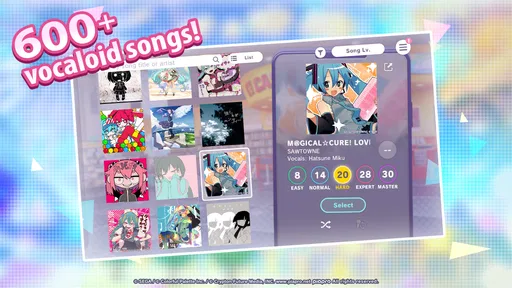
From the moment I launched the app, I was greeted with dazzling visuals and an upbeat soundtrack that got me hyped up instantly. The game features a plethora of Hatsune Miku songs, along with tracks from her Vocaloid companions. The interface is smooth, intuitive, and, dare I say, pretty addictive. You find yourself grooving to the beat without even realizing it.
Gameplay and Features
Diving into the gameplay, it offers a variety of modes to keep you entertained. Whether you are a beginner or a rhythm game master, there's something for everyone. The game challenges you with different levels of difficulty, and trust me, the harder modes are no joke! You really need to be on your toes, or should I say, fingertips?
One feature that stands out is the customization. You can deck out your favorite characters in stylish outfits, adding a personal touch to your concert experience. Plus, the ability to create and share your own stages with friends adds a layer of creativity and community that many other games lack.
Getting more from the performance
The concert presentation is a big part of what separates this from a stripped-back note-tapping game. I’d pay attention to the performance without expecting every play to feel equally easy to watch and play at once: when a chart gets demanding, my eyes need to stay on the notes, so the visual spectacle becomes more of a backdrop. On a relaxed replay, I can enjoy the character animations more. That makes the same song serve two purposes, depending on whether I’m practicing or just taking in the show.
Customization is best approached as personal flavor rather than a checklist. I’d pick a character or outfit I enjoy and then get back to the music, instead of assuming collecting or changing appearances is necessary to improve at a chart. The presentation gives fans a reason to spend time between performances, but players who only care about rhythm may prefer to focus on songs and difficulty rather than explore every decorative option.
Visual and Audio Extravaganza
Now, let's talk about the visuals and audio, because wow, they are a treat! The graphics are vibrant, colorful, and perfectly capture the essence of a live concert. Each character is meticulously designed, and their animations are fluid and captivating. Pair that with a killer soundtrack featuring some of the most iconic Vocaloid hits, and you've got yourself an audiovisual feast.
The developers did a fantastic job in ensuring that every song feels like a unique experience, both visually and audibly. It's like having a front-row seat to a Miku concert whenever you want.
How it compares with other music games
Against a minimal rhythm game that puts little on screen beyond the notes, this one trades some visual simplicity for the feeling of watching a character-led performance. That is a worthwhile exchange if the Vocaloid setting appeals to you, but it may be less appealing if you want an uncluttered practice tool. When accuracy is the priority, I’d keep my attention on the note lanes and treat the stage visuals as atmosphere; when I’m playing casually, I can give the performance more attention.
It also differs from simply opening a streaming app: here, listening is tied to active play, and your hands have to follow the chart. That makes it a more engaging way to spend time with these songs, but not a substitute for music you can leave running while doing something else. I would choose a regular player for background listening and this game when I’m ready to focus on a song rather than just have it on.
Who it suits—and who may want something else
My favorite way to use it is as a small music break: I can play a song while waiting for a friend or unwind with a few charts after dinner. That makes the game a good fit for Vocaloid listeners who want more than passive playback, and for rhythm-game fans who enjoy seeing performances alongside the notes. If your main goal is simply to listen to music with the screen off, a regular music player is a better fit. If you prefer rhythm games built around a different musical style, this one’s Vocaloid identity is a real commitment, not a minor theme.
Compared with simpler tap games, the appeal here is the combination of performance presentation, character customization, and the challenge of improving at songs. That extra layer also means it may feel busier than a bare-bones rhythm game. I’d treat outfit and character choices as a way to personalize the experience, not as a reason to spend. The game is free, while optional purchases range from under a dollar to around eighty dollars per item, so I’d keep spending firmly separate from the fun of learning a chart.
Practical checks for a smoother session
The game is from SEGA CORPORATION, has been available since late 2021, and its current version is 3.6.0. It requires Android 8.0 or later. I’d check that requirement before installing, especially on an older phone, and leave room for the app to run comfortably rather than filling the device completely. The game has an average rating of 4.3 from around 130,000 ratings, with over five million installs; that popularity is reassuring, but it doesn’t guarantee identical performance on every device.
For an everyday routine, I’d use a few minutes to warm up on an easier chart, then try one harder song while I’m still focused. If a session is interrupted, I wouldn’t assume progress or timing has been lost for a particular reason; I’d reopen the game and see what state it returns to before repeating anything. This is a useful habit in mobile games generally: check first, then retry, rather than making extra changes that could create more confusion.
When the trouble may be outside the game
A touch screen can feel less dependable when my fingers are damp, the device is moving, or I’m trying to play while walking. Those are ordinary conditions, but they can make a precise chart feel unfair. If taps seem inconsistent, I’d first try a stable surface and a calm setting before concluding that the app is misreading input. A crowded commute may be fine for an easy song, while a difficult chart is better saved for when I can hold the phone still.
If the app is slow to open or a session behaves oddly, I’d keep troubleshooting conservative: close it and reopen it, check the device’s available storage, and see whether an update is available. I would not repeatedly reinstall or alter several device settings without a clear reason, especially if I’m unsure what state the game will restore afterward. The useful question is whether the same problem occurs again under simpler conditions, not whether I can force a quick fix by changing everything at once.
Making it work for a real routine
A realistic use case for me is a short wait at a café: I choose a song at a comfortable difficulty, keep the volume considerate, and play one focused round instead of beginning a long practice session I may have to abandon. At home, I can give a challenging chart more attention and take a break if my hands tense up. That flexibility is a strength, but the game is still most satisfying when I can devote at least a little uninterrupted attention to the rhythm.
For families, the Everyone rating is a useful starting point, while the presence of optional purchases is a separate practical consideration. I’d set purchase controls before a child uses a shared device and explain that spending is not required to enjoy a song or practice. For anyone deciding whether it is worth installing, the key questions are simpler: do you like Vocaloid music, do you enjoy active rhythm play, and does the performance-focused style appeal to you? If the answer is no to most of those, another music game or a standard player will likely be a better match.
Wrapping Up the Experience
In conclusion, it is more than just a game; it's an experience. Whether you're a die-hard Vocaloid fan or just someone looking for a fun and engaging rhythm game, this app delivers on all fronts. The combination of addictive gameplay, stunning visuals, and a killer soundtrack makes it a standout in the world of mobile games.
So, if you're ready to hit the stage and show off your rhythm skills, grab your headphones and dive into this colorful world. Who knows, you might just find yourself getting lost in the music, just like I did!
HATSUNE MIKU: COLORFUL STAGE! Frequently Asked Questions
What should I know about the game’s age rating before downloading it?
HATSUNE MIKU: COLORFUL STAGE! has an Everyone content rating, which may make it suitable for a broad audience. It is a music game focused on rhythm play, virtual singers, and story content. Parents and players should still consider whether fast-paced tapping gameplay and the game’s online features are a good fit for the person using the device.
Can I install HATSUNE MIKU: COLORFUL STAGE! on an older Android device?
The Android version requires Android 8.0 or later. Before downloading, check the operating system on your device and make sure it meets that minimum. The game also downloads additional data and connects to online features, so it is sensible to have a reliable internet connection and enough available storage for the installation and later updates.
Is HATSUNE MIKU: COLORFUL STAGE! suitable for new rhythm-game players?
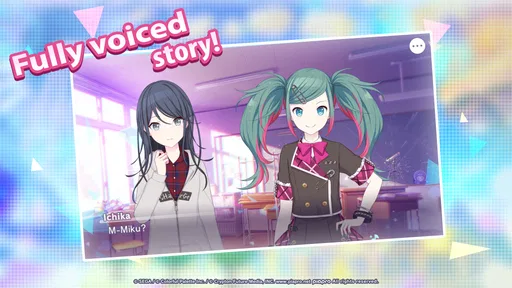
It can be a good choice if you are curious about rhythm games, since its central activity is tapping along with music. The game also includes story content and different gameplay modes, giving you more to explore than a single repeating challenge. Its content rating is Everyone, though the pace and timing demands of rhythm play may take practice.
Who developed HATSUNE MIKU: COLORFUL STAGE!, and what kind of app is it?
HATSUNE MIKU: COLORFUL STAGE! is a music game developed by SEGA CORPORATION. It brings rhythm gameplay together with storylines and virtual singers, including Hatsune Miku. The game has an average rating of 4.3 from around 130,000 ratings, and has been installed over 5 million times. If you enjoy music-focused games, its mix of songs and stories may appeal to you.
What type of game is HATSUNE MIKU: COLORFUL STAGE!?
HATSUNE MIKU: COLORFUL STAGE! is a rhythm game that combines music with engaging storylines. Players tap along to the beat of popular Vocaloid songs performed by virtual singers, including Hatsune Miku. The game features vibrant graphics and a variety of gameplay modes, offering both solo and collaborative experiences.
Pros
- Stunning visuals make gameplay immersive.
- Wide range of songs from various artists.
- Engaging storyline keeps players hooked.
- Customizable characters add personal touch.
- Frequent updates with new content.
Cons
- Requires constant internet connection.
- Limited offline play options.
- In-app purchases can be expensive.
- Some songs are locked behind paywalls.
- Occasional server issues disrupt gameplay.













