Coloring games for kids: 2-5 y
- 3.58K
- 4.3
- Installs
- 5.00M
- Price
- Free
Screenshots
Analysis by Reviewed
I like Coloring Games for Kids: 2-5 y best as a short, hands-on activity for preschoolers: it puts drawing and color exploration in an approachable format, while its sounds and animations can make a finished page feel rewarding. I would treat it as a creative diversion rather than a complete learning program, though. Young children may enjoy exploring independently, but a parent nearby can turn tapping colors into a more thoughtful activity.
A calmer way to fill a small gap in the day
For a realistic use, I’d bring it out while waiting for dinner or during a quiet stretch at home, rather than relying on it to occupy a child for a long period. A simple prompt—“Which color would you choose for this?”—can make the screen time more interactive and give a child practice naming colors and describing choices. Keeping the session brief also makes it easier to end on a positive note instead of negotiating over one more page.
This is a free educational game from Bebi Family: preschool learning games for kids. It is rated for Everyone, has a 4.7 average from around 14,000 ratings, and has passed one million installs. The current version is 1.04.05, and it requires Android 6.0 or later. The game is also available with in-app purchases, so I’d check the purchase options before handing over a device if accidental taps are a concern.
What the coloring format does well
Coloring is a useful fit for children who like choosing and experimenting but are not ready for more demanding drawing tools. Compared with a blank-canvas art app, ready-made pictures offer an easier starting point; compared with a basic paper coloring book, touch-based coloring can respond with sound and animation. That extra feedback may hold a young child’s attention, though it is not a substitute for crayons, paper, or the sensory experience of making marks by hand.
I would also use it as a prompt for activities away from the screen. After a page, a child can look for the same colors around the room or try drawing a favorite subject on paper. That small follow-up makes the app feel less like passive entertainment and more like a bridge to everyday observation. It is particularly handy when a caregiver wants a low-preparation activity, but it will not suit a family looking specifically for open-ended art-making or a structured lesson with clear progress goals.
Unleashing Creativity with a Splash of Color
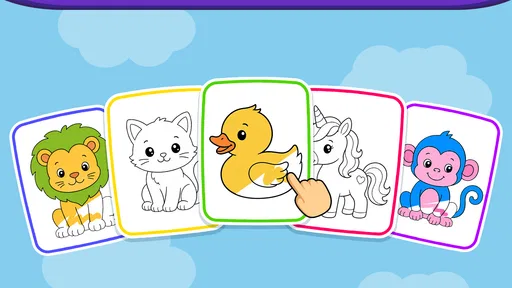
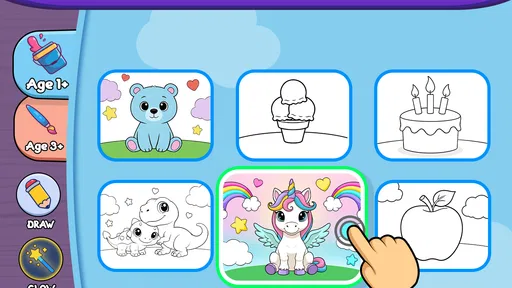
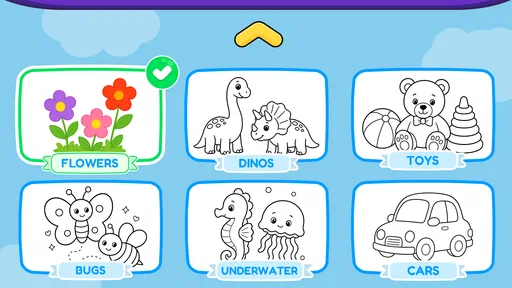
The first thing that caught my eye was the sheer variety of coloring pages available. From animals to vehicles, the app boasts a diverse range of themes that kept my kiddo entertained for hours. The interface is incredibly intuitive, which is a big plus. Kids can easily navigate through the app, pick their favorite picture, and start coloring without any fuss. It's a seamless experience that feels just right for tiny fingers.
Features that Stand Out
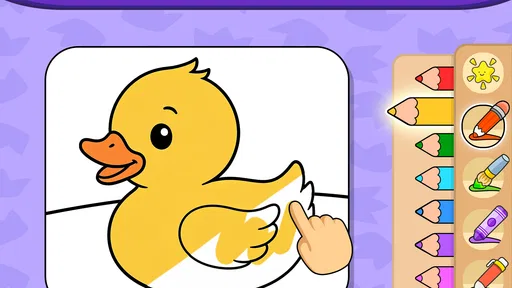
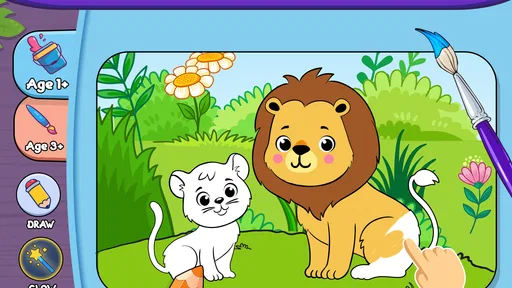
What impressed me the most were the interactive elements incorporated into each coloring page. Not just a static canvas, the app includes sounds and animations that spring to life with every touch. Imagine coloring a lion and suddenly hearing it roar! It’s these little touches that make Coloring Games for Kids: 2-5 y so engaging.
More From Our News Desk

Weather by Xiaomi Review: Clear at a Glance, Less Clear Up Close

X Under Pressure: Can It Recover When Posting Goes Wrong?

Clash of Clans Is Won Between the Battles

Android Auto Makes the Case for Quieter Car Software

MobiOffice: Transforming Mobile Productivity with Seamless Integration

EA SPORTS FC™ Mobile Soccer: Redefining Mobile Sports Gaming
Moreover, the app is designed to be educational. It's not just about coloring within the lines; it’s about recognizing colors, improving fine motor skills, and even learning basic shapes and numbers. As a parent, I appreciate this multi-faceted approach to learning.
Parental Controls and Safety
Let’s talk about something every parent cares about—safety. The app has no ads, which is a huge relief. I don’t have to worry about my child accidentally clicking on something inappropriate. Plus, there are parental controls that allow me to customize the experience. I can set time limits, and even choose which categories are available for my child to explore. This level of control gives me peace of mind.
One practical habit I recommend is setting the boundaries before a child starts: decide on a stopping point, choose the categories together, and keep the device within reach. That makes the controls part of a routine rather than a surprise when it is time to stop. The no-ad experience is a welcome advantage for a child-operated game, but I would still supervise younger kids and keep purchase access in mind. No-ads does not mean every decision can be delegated to a preschooler.
Why Your Little One Will Love It
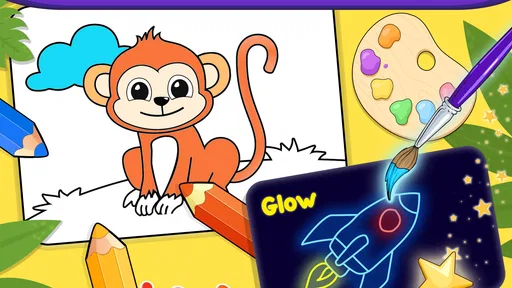
If your child is anything like mine, they’ll love the freedom this app provides. It’s like having an entire art studio at their fingertips. The variety of colors and tools available ensures that no two artworks look the same. Plus, they can save their masterpieces, which is perfect for those "Look what I made!" moments.
It is most likely to click with children who enjoy repeating a familiar activity while making small choices of their own. A child who wants exact control over brush texture, layers, or a fully open-ended canvas may outgrow this style quickly; a physical coloring book is also a better choice when you want a screen-free activity or a child needs help practicing pencil grip. I’d choose this game for accessible, low-mess color play, not as a replacement for those alternatives.
A sensible fit, with a few trade-offs
The game is free to start, while optional in-app purchases cost between $1.99 and $2.99 per item. That makes it worth checking what is available before a child uses the device alone, and deciding whether any paid content is appropriate for your household. I also would not assume a preschooler will stay engaged for hours just because the pages are varied; attention, mood, and familiarity matter, and a short activity may be the better experience.
Its strongest case is practical: a young child can get into coloring without a complicated setup, and a caregiver can use the pictures as conversation starters. Its weaker case is depth. If you want a detailed curriculum, progress tracking, or a serious digital drawing toolkit, I would look elsewhere. This is a light creative game, and judging it by that role gives a fairer picture than expecting it to teach independently.
Making the session work for different ages
The age range in the title points to preschoolers, but children within those years can have very different patience and coordination. I would let a younger child explore one picture with me close by, offering just one choice at a time instead of asking them to manage several decisions. An older preschooler may enjoy choosing a subject, naming colors, and explaining what they are making. The useful measure is not how neatly a page is filled; it is whether the child can make choices and stay comfortable with the activity.
If a child taps rapidly through colors or leaves a picture unfinished, I would not turn that into a correction exercise. The game works best as low-pressure play. A caregiver can model a simple action—choose a color, fill a section, pause, and notice the result—without demanding that the child copy it. That approach preserves the appeal of digital coloring while keeping the adult involved in a way that suits the child’s mood.
Small routines that make the game more useful
A helpful way to avoid endless browsing is to agree on the picture before beginning, then give the child a small goal that is about noticing rather than finishing. For example, ask them to find one object in the image that resembles something at home, or to choose a color they can spot outside later. This turns the page into a starting point for conversation without adding a lesson plan or making the game feel like homework.
I would also alternate between choosing for the child and letting the child choose. If every session starts with an open-ended “What do you want?”, a young player may spend more time deciding than coloring. Offering two possible themes can make the start smoother, while occasional free choice gives the child room to lead. This is a small practical distinction, but it can make a short session feel settled rather than scattered.
How it compares with other ways to color
Against a standard coloring app with a blank canvas, this game’s ready-to-color pictures lower the barrier to starting. That matters for a child who enjoys filling shapes but does not yet know what to draw. Against paper and crayons, the app is tidier and can respond with sound and animation, but paper is better for physical mark-making and gives a child more direct practice holding and moving a tool. I would keep both options available rather than treating either as the universal winner.
Other preschool learning games may put more emphasis on puzzles, matching, or a sequence of tasks. That can be a better fit when a caregiver wants a child to practice a specific skill through clear steps. Here, the appeal is the coloring activity itself and the chance to talk about what appears on the page. If a child is asking for a challenge with rules or measurable progression, I would choose a different kind of game; if they want a gentle creative pause, this format makes more sense.
What to consider before handing over the device
The game is free to download, but in-app purchases are available, so I would set up device purchase protections before letting a child use it without close supervision. That is a sensible precaution even when a game has no ads: advertising and purchase prompts are different concerns. The age rating is Everyone, but a rating does not tell a parent whether a particular child is ready to navigate a device alone, so I would make that call based on the child’s habits and the family’s settings.
It is also worth thinking about the device itself. A young child may press more forcefully or move between screens unpredictably, so I would keep the device on a stable surface and stay close enough to help if they get stuck. If you are looking for something that can occupy a child entirely independently, I would be cautious about relying on any coloring game for that role. The strongest experience here is shared or nearby play, with the adult available to guide a choice or bring the activity to a natural close.
Who is most likely to enjoy it
I would recommend it to caregivers looking for a simple digital coloring option for a preschooler who likes pictures, color choices, and immediate feedback. It can be handy during a short wait, on a quiet afternoon, or when paper supplies are not close at hand. It is also a reasonable choice for an adult who wants to join in briefly, ask a question about the image, and then move on to a real-world drawing or color hunt.
I would skip it if your priority is a structured course, detailed drawing controls, or an entirely screen-free activity. It may also be a poor match for a child who becomes frustrated by touchscreens or who finds sound and animation distracting. In those cases, a physical coloring book, a simple drawing activity with an adult, or a learning game built around clearer tasks would likely be more satisfying. The best fit is a child who enjoys light, guided-by-interest play rather than a tool expected to deliver a full lesson.
A final word on its place in a child’s day
As an educational game from Bebi Family: preschool learning games for kids, it has a clear and modest role: give young children an easy way to explore coloring, with a caregiver ready to turn a few taps into conversation. It is free, rated Everyone, and currently on version 1.04.05; those basics make it easy to consider, while the optional purchases are a reason to prepare the device first. The reported average is 4.7 from around 14,000 ratings, and it has more than one million installs, but those figures matter less than whether this style of play suits your child.
In conclusion, Coloring Games for Kids: 2-5 y is more than just a coloring app. It’s a gateway to creativity and learning, wrapped up in a safe and engaging package. If you're in the market for an app that combines fun with education, this one is definitely worth checking out. Your little artist will thank you!
Coloring games for kids: 2-5 y Frequently Asked Questions
Who is the developer of Coloring Games for Kids: 2-5 Y?
Coloring Games for Kids: 2-5 Y is made by Bebi Family, a developer focused on preschool learning games for kids. Its educational approach and coloring theme make it a child-oriented choice for families looking for a simple creative activity. As with any app for a young child, parents can try the experience first and decide whether its activities and controls suit their family.
How popular is Coloring Games for Kids: 2-5 Y among families?
The game has more than 1 million installs and an average rating of 4.7 from around 14,000 ratings, with about 2,300 written reviews. Those figures suggest that many families have tried it, but they cannot determine whether it will suit every child. A parent can preview the app and see how its coloring activities fit a child's interests and comfort with touch controls.
Is Coloring Games for Kids: 2-5 Y free to download, and are there in-app purchases?
The game is free to download, with optional in-app purchases priced between $1.99 and $2.99 per item. Since it is intended for toddlers and preschoolers, it is sensible for a parent or caregiver to check the purchase settings before handing over a device. That way, children can enjoy the coloring activities while adults remain in control of any optional spending.
What devices and operating systems can run Coloring Games for Kids: 2-5 Y?
Coloring Games for Kids: 2-5 Y is available for Android devices running Android 6.0 or later. Before downloading, check the operating system on the device your child will use to make sure it meets that requirement. The game is categorized as educational and is developed by Bebi Family, known for preschool learning games for kids.
What age group is Coloring Games for Kids: 2-5 Y designed for?
Coloring Games for Kids: 2-5 Y is specifically designed for young children aged between 2 to 5 years old. The app focuses on providing a safe and engaging environment for toddlers and preschoolers to explore their creativity and develop their motor skills through interactive coloring activities. Parents can rest assured that the content is age-appropriate and educational, making it a perfect choice for early childhood development.
Pros
- Engaging and colorful interface.
- Easy for young children to use.
- Wide variety of coloring pages.
- Enhances creativity and focus.
- No ads to distract children.
Cons
- Limited free content available.
- Requires internet for some features.
- No parental controls included.
- Occasional app crashes reported.
- In-app purchases can be costly.













