Chess
- 28.75K
- 4.5
- Installs
- 100.00M
- Price
- Free

Screenshots
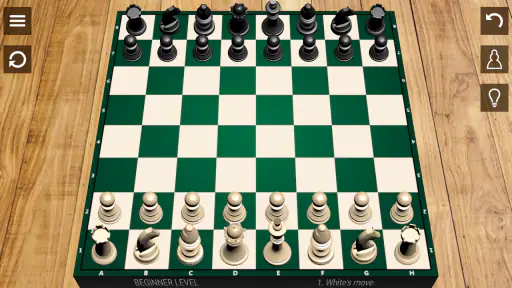
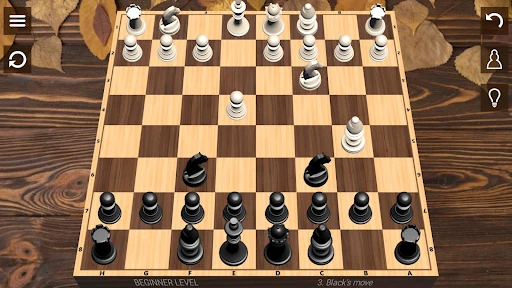
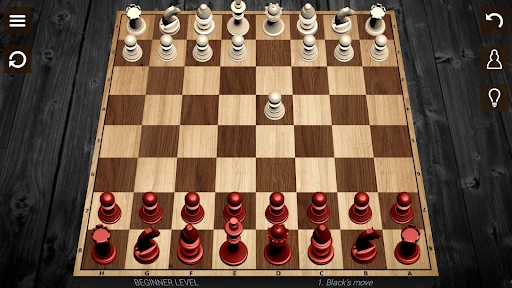
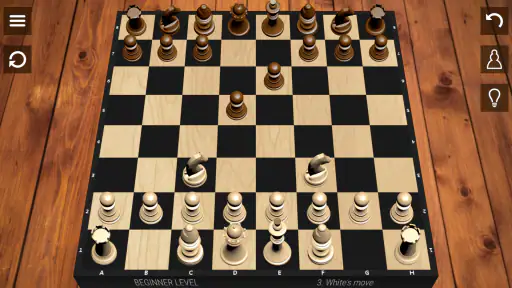

Analysis by Reviewed
Have you ever wanted to dive into the world of strategic battles and intellectual challenges right from your smartphone? Well, let me introduce you to the classic yet ever-thrilling game of Chess. This app takes the ancient board game and brings it to your fingertips, providing a platform to hone your skills or simply enjoy a casual match with friends or other enthusiasts from around the globe.
A familiar board, with a few things to consider
For me, the best way to approach this game is to treat it as a straightforward digital chessboard rather than assume it will guide every step of learning. Chess Prince makes this free board game, which is rated for Everyone, and its simple focus is useful when I want to get to a move without navigating a large collection of unrelated activities. The game has a 4.5 average from around two million ratings and over 100 million installs, signs that many people use it, though popularity alone cannot tell you whether its style fits your needs.
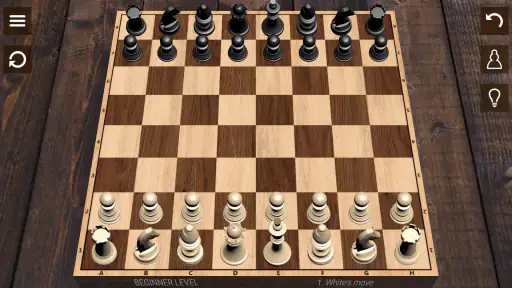
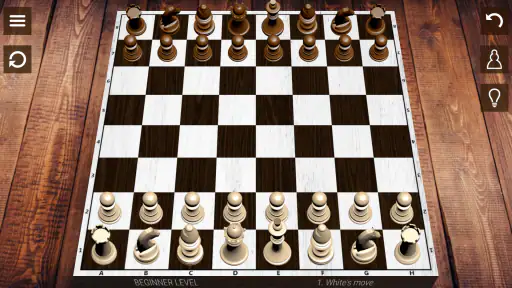
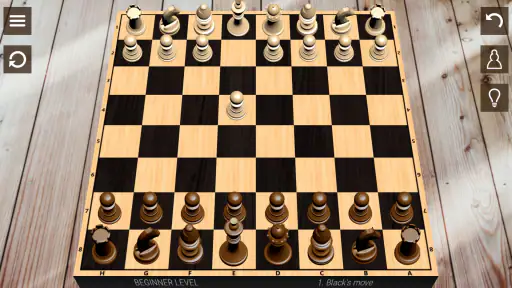
On a phone, the board’s clarity matters more than decorative detail: players need to distinguish pieces and squares at a glance, then follow the position as it changes. The app’s presentation is aimed at making the board inviting, but anyone who finds small pieces difficult to see should try a few moves on their own device before settling in. Screen size, brightness, and personal vision all affect comfort. A larger phone or tablet can make a long game easier to follow, while a compact screen may feel cramped once pieces cluster around the center.
Who benefits from a focused chess app?
This is most appealing if you want the rules and decisions of chess to be the main event. I would choose it over a general board-game collection when I already know I want a chess match and do not want to browse through unrelated games first. It also suits someone starting to explore the game who would rather learn through actual positions than begin with a book full of notation. The trade-off is that a focused mobile game is not automatically a substitute for a dedicated study setup: players who want a highly structured training plan or extensive analysis may be better served by a tool built around those needs.
A practical way to judge whether it fits is to play a few low-pressure games before treating it as a serious practice routine. Notice whether you can see the whole board without repeatedly zooming or changing how you hold the device, and whether selecting a piece feels reliable. Those small checks matter more than the number of options a game claims to offer. If the basics feel comfortable, try one learning resource and then apply that idea in a match; if the board itself feels awkward, more practice will not fix the physical mismatch.
Unleashing the Power of Strategy
When I first downloaded the Chess app, I was eager to see how well it could recreate the experience of a traditional chess game. Boy, was I in for a treat! The app is incredibly user-friendly, making it super easy for both newcomers and seasoned players to jump right in. The interface is clean, with a visually pleasing board layout that doesn't overwhelm your senses. You can tell that the developers really put thought into balancing aesthetics with functionality.
Playing at your own pace
Chess is a useful choice for short breaks because a game can be picked up whenever you have a little time, but I would not start a serious match just before an appointment. Chess rewards attention, and interruptions can make it hard to remember what you were planning. In a realistic everyday use, I might play a quick game while waiting for a ride, then choose a longer session at home when I can concentrate. If you tend to be interrupted, a physical board or a game with an explicit, convenient pause-and-resume flow may suit you better.
More From Our News Desk

Weather by Xiaomi Review: Clear at a Glance, Less Clear Up Close

X Under Pressure: Can It Recover When Posting Goes Wrong?

Clash of Clans Is Won Between the Battles

Android Auto Makes the Case for Quieter Car Software

MobiOffice: Transforming Mobile Productivity with Seamless Integration

EA SPORTS FC™ Mobile Soccer: Redefining Mobile Sports Gaming
The game comes from Chess Prince, and its current version is 2.8.9. It is free to download, with optional in-app purchases priced from $0.99 to $4.99 per item. That makes it easy to try without paying upfront, but I would check the purchase prompts carefully if a child is playing or if you want to keep spending controlled. It supports Android 5.0 and later, so an older compatible device may be able to run it; performance and readability still depend on the device itself.
Features That Make It Stand Out
One of the standout features for me is the option to play against the AI. Let me tell you, the AI is no pushover! It offers multiple levels of difficulty, so whether you're a grandmaster in training or someone who just wants to pass the time, there's a level that suits you. I particularly enjoyed testing my mettle against the higher difficulty levels—it’s like having a tough sparring partner who never gets tired.
When practicing, I find it more useful to choose an opponent level that lets me think through each move than to keep selecting the hardest challenge. A tougher game can expose careless habits, but losing repeatedly without understanding why is a poor lesson. After a match, replaying the position where a plan went wrong—rather than starting another game immediately—can help turn a vague feeling of “I blundered” into a specific question about a piece, threat, or square. That deliberate approach is valuable even without a formal coaching routine.
Making practice useful between games
A small routine can make the difference between simply filling time and getting something from a session. Before moving, I try to ask what my opponent could do in reply, especially when a tempting capture appears. Afterward, I focus on one turning point rather than judging the whole game as a win or loss. This is a useful habit with any chess opponent, but it is particularly convenient when I can start a game without setting up a board or waiting for another person to be available.
If I am playing in a noisy waiting room, I keep the goal modest: one complete game or a few thoughtful moves, not a deep study session. Chess is quiet compared with many mobile games, but concentration still depends on the setting. A crowded commute can make it harder to calculate a sequence, and a notification or conversation can pull attention away at exactly the wrong moment. At home, a longer session gives me room to pause mentally between moves, even if the app itself is not a replacement for a dedicated analysis workspace.
Another fantastic feature is the multiplayer mode. You can challenge your friends or match with random opponents online. It’s a great way to engage with a community of chess lovers and even learn new strategies. There's also a chat feature, which adds a nice social element as you can exchange thoughts or friendly banter during the game. Trust me, nothing beats the thrill of outsmarting a real person on the other side of the screen!
Choosing between a person and the computer
The computer is the convenient choice when I want a match without coordinating schedules, and adjusting the challenge can help me keep a practice session at a manageable level. A human opponent brings a different kind of uncertainty: their decisions may be surprising in ways that make a game feel more social and less like a solo exercise. If I want chess to be a shared activity, playing a friend is the more natural fit; if I only have a few minutes and no one is available, the AI has the practical advantage.
Online play also asks for a steadier connection to the experience than a casual game against the computer. I would avoid starting a match with a friend or stranger when I know I may have to put the phone away suddenly. The social option is a genuine reason to use the app, but it is not always the most flexible choice for an unpredictable day. For a quick, interrupted session, I would choose a low-pressure solo game instead.
Learning and Improving
If you’re new to chess or looking to improve your skills, the app has a plethora of resources to help you out. There are tutorials and strategy guides that break down complex moves and tactics into easy-to-understand lessons. It’s like having a chess coach in your pocket! Plus, the app tracks your progress and provides feedback on your games, offering insights into your strengths and areas for improvement.
For a beginner, I would use lessons alongside actual games rather than trying to memorize a large set of rules or tactics first. Learn one idea, then look for it in a match; this makes practice feel connected to decisions on the board. If feedback points out a recurring weakness, focus on noticing that situation in your next few games. Players who already study chess through books or a dedicated analysis tool may prefer those deeper resources, while this app’s blend of play and learning is more convenient for casual practice.
Using the historical games as a study prompt
Another cool aspect is the historical game database. You can replay famous matches, analyze moves, and even try different strategies to see how they might have changed the outcome. It’s a delightful feature for anyone interested in the rich history of chess.
I would approach those games as examples to question rather than moves to copy blindly. Pause at a decision and ask what each side seems to be trying to achieve; then compare your guess with what happens next. That makes a replay active, even if you only have time to examine a short stretch. It is also a nice change of pace when I do not feel like playing a full match but still want to think about chess.
Comfort, access, and trade-offs
Chess asks for little in the way of rapid movement, which can make it more comfortable than action games for someone who prefers deliberate taps and time to consider a choice. Still, moving pieces on a touchscreen relies on accurate touch input, and that can be frustrating for players with limited dexterity or a device that does not respond reliably. I would test a few moves before beginning an online game, where a mistaken touch can matter more than it does during a practice session.
There is also a sensory trade-off: a calm board can be easier to focus on than a busy game screen, but a digital board is not the same as a tactile one. Someone who benefits from physically handling pieces may prefer a real set; someone who values portability may find the phone more practical. If you have difficulty reading the board, try adjusting the device’s general display settings and viewing angle. These are practical workarounds, not a guarantee that the game will meet every individual access need.
When the setting makes a difference
For someone with limited time, a phone makes chess easier to carry into small gaps in the day, but those gaps are not all equally suitable. Waiting for a ride may be calm enough for a short game; walking, crossing a street, or handling another task is not a safe or sensible time to concentrate on a board. I treat the portability as a chance to choose a convenient place to play, not as a reason to play in every spare moment.
Players who use a larger display may find it easier to keep the entire position in view, while people who rely on tactile feedback may get more from a physical set. That comparison is not about one option being universally better. A board on a table is easier to share and touch, whereas a phone is easier to bring along and start quickly. The right choice depends on whether portability or physical comfort matters more in the moment.
Who will enjoy it most
I would recommend this app to people who want chess available in their pocket, especially learners who like alternating between practice and lessons, or experienced players who want a quick opponent. Compared with a physical board, it removes the need to set up pieces or find someone in the same room. Compared with a broad strategy-game collection, its focused chess experience is the point: there is no need to switch between unrelated game types to get a match going. On the other hand, players seeking a highly specialized study environment, hands-on play, or a screen-free pastime may be happier with a dedicated chess tool or a physical set.
The game has been available since June 25, 2015, and its continuing reach is reflected in around 29,000 written reviews. I would still judge it by how comfortably it works on your own screen and whether its style of play matches your goals, not by its history or audience size. For someone curious about chess, trying a few low-pressure games is a sensible way to decide whether the format clicks.
Final Thoughts
In a nutshell, the Chess app is a fantastic blend of traditional gameplay and modern technology. Whether you’re looking to kill some time, engage your brain, or seriously up your chess game, this app has got you covered. It's an accessible way to enjoy chess without needing a physical board or opponent in the same room.
So, if you’re ready to embark on a journey of strategic mastery, or simply want a fun and challenging game to play, download the Chess app. You won’t be disappointed!
My inclusive verdict is positive, with a clear caveat: the familiar rules make chess approachable, but a touchscreen and small display will not work equally well for everyone. I’d start with a short practice session, see whether the board is comfortable to read and operate, and then decide whether the learning and opponent options fit your routine. If they do, this is an easy way to keep a thoughtful game close at hand.
Chess Frequently Asked Questions
What kind of game is Chess?
Chess is a board game focused on logic, with beautiful graphics and progressive levels. It brings the familiar strategy game to a mobile format, making it an option for players who want to practice or enjoy chess on a phone or tablet. The app is developed by Chess Prince and is free to download.
How much storage space does Chess need?
Before installing Chess, it is sensible to check the available space on your device, as with any game. The app is a board game with graphics and progressive levels, but its storage requirements can vary with the device and installation. Checking the app’s download details in your store and leaving room for updates can help avoid installation problems.
What age rating does Chess have?
Chess has an Everyone content rating, so it is presented as suitable for a broad audience. Its chess format and progressive levels can make it approachable for people with different levels of experience. Parents may still want to review the app’s store page and their device settings to decide whether it is the right choice for a particular child.
Is Chess free to download, and are there in-app purchases?
Chess is free to download, so you can try the board game without an upfront purchase. It also offers optional in-app purchases, with items ranging from $0.99 to $4.99. Those purchases are separate from the basic download, so review the purchase details shown in your app store before confirming anything.
Will Chess run on my Android device?
The Android version requires Android 5.0 or later, which makes checking your device’s operating-system version a useful step before downloading. Chess is a board game with a focus on logic, presented with beautiful graphics and progressive levels. If your device meets the minimum requirement, you can install it and see how its chess experience suits you.
Pros
- Enhances strategic thinking skills
- Improves problem-solving ability
- Accessible for all ages
- Offline play available
- Promotes concentration
Cons
- Steep learning curve for beginners
- Can be time-consuming
- Requires strong focus
- Limited social interaction
- May cause frustration
- Category
- Board
- Version
- 2.8.9