Category Sort
- 437.00
- 4.8
- Installs
- 1.00M
- Price
- Free

Screenshots






Analysis by Reviewed
I picked up Category Sort expecting a simple way to pass a few quiet minutes, and that is exactly where it fits best. It is a free puzzle game from Lion Studios Plus built around sorting categories, with a relaxed presentation that makes it easy to understand without a tutorial-heavy introduction. I can see why it works well on a shared phone or tablet: one person can play for a moment, hand the device over, and another person can continue without needing a complicated setup.
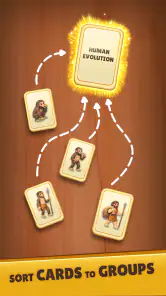
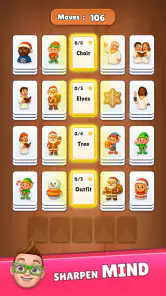
The important thing is to approach it as a light, casual game rather than a deep strategy title. Its appeal comes from the small decisions involved in placing items into the right groups, not from a long story, competitive ranking system, or demanding campaign. The store summary describes it as a relaxing Solitaire game with Emoji, while the short description points to Category Sort. In practice, I found the category-based idea to be the part that defines the experience most clearly: look at the available items, recognize their relationship, and sort them carefully.
That simplicity is both its strength and its boundary. I could start a session without preparing anything, and the game suited short breaks better than longer, concentrated play. At the same time, anyone looking for a large puzzle adventure, sophisticated logic problems, or a substantial multiplayer experience will probably find it too modest. My overall impression is of a friendly, approachable time-filler that makes the most sense when several people may use the same device but each person wants a quick, self-contained activity.
How Category Sort works on a shared device
A good fit for passing the phone around
The clearest household use case is a shared device during a quiet wait. Imagine a family sitting together while dinner is being prepared, or two people sharing a tablet on a short trip. One person can open a puzzle, sort for a while, and stop when they are done. The next person can take a turn without needing to understand a complicated control scheme. That low barrier matters more than it may sound: a game that requires a long explanation often becomes a game that only one person in the household actually uses.
Category Sort feels suitable for this kind of handoff because its central task is visible. Someone watching can usually understand what the player is trying to do simply by looking at the screen. That makes it more sociable than a game that depends on private progress, lengthy dialogue, or a large collection of controls. I enjoyed the fact that another person could comment on a choice or suggest a category without needing to become an expert first.
Still, it is not a true pass-and-play party game. The shared-device value comes from taking separate turns, not from simultaneous participation. There is no reason to expect two people to solve the same puzzle together in real time, so I would not choose it for a group that wants a competitive activity with scores, teams, or a clear winner. It works better as a calm object to pass around than as the main entertainment at a busy gathering.
Why the emoji presentation helps
The emoji-based presentation gives the sorting task an immediately familiar visual language. Instead of asking me to learn an elaborate fictional world, it presents a style that feels casual and easy to read. That is particularly useful when someone else in the household is trying the game for the first time. A younger player can often recognize the visual idea before understanding every rule, while an older player can begin without feeling that the game is aimed only at children.
There is also a practical benefit when the device is being shared in a room. The screen is easier to discuss because the symbols are recognizable at a glance. A parent, partner, or sibling can ask what category is being considered without taking the phone away. That creates a small amount of social interaction around an otherwise solo puzzle.
However, familiar symbols do not automatically make every decision obvious. The interesting moments come when an item could seem related to more than one group, or when I had to slow down and consider the intended relationship rather than making a quick visual guess. That is where the game becomes more than simply tapping matching pictures. My advice is to treat the emoji as clues, not as complete instructions.
Short sessions are where it feels strongest
I would use this game while waiting for an appointment, taking a break between chores, or sitting beside someone who is watching television. It does not demand the kind of uninterrupted attention that a story-driven game needs. If I put the device down, the activity still feels easy to resume because the basic objective remains familiar.
That makes it convenient for a household device that is not always available to one person. A child might use it briefly before the tablet is needed for another task. An adult might play while waiting for a call. Someone who does not normally play games can try it without committing to a large download-and-learn routine. The experience is especially appropriate for people who prefer gentle mental activity over fast reactions.
The trade-off is that the same relaxed pace may feel underpowered during a long solo session. I would not rely on it as my only game for a flight or an entire afternoon unless I already knew that sorting puzzles held my attention for a long time. For extended play, a traditional solitaire app may offer more familiar card variety, while a larger puzzle title may provide more progression and challenge.
Setting expectations before others use it
Because the game is free, it is easy to suggest as a low-risk trial on a shared device. The listed content rating is Everyone, which matches the accessible tone I would expect from a casual category puzzle. That does not mean every household should hand over a device without discussion. The game is still installed on a real phone or tablet, and the person using it may encounter the normal choices associated with a free game, including optional purchases.
The available in-app purchase range runs from $1.99 to $99.99 per item. I would explain that clearly before letting a child or guest play, especially if the device is connected to a payment method. The safest household habit is simple: the device owner should handle any purchase decision, and younger players should know that tapping a tempting option is not the same as receiving permission to buy it.
This is not a criticism of the sorting concept itself. It is a reminder that “free” describes the download price, not every possible action inside the game. On a shared phone, that distinction is more important than it is on a personal device used by one informed adult.
Boundaries matter more than a complicated setup
I would begin by deciding who is actually using the device and what kind of access is appropriate. If the phone belongs to one adult and is occasionally handed to a child, the owner should stay nearby for the first session and explain the purchase boundary. If the game is on a family tablet, the household should agree whether everyone is simply taking casual turns or whether one person is treating it as personal progress.
That conversation prevents a common shared-device problem: one player assumes the game is theirs, while another person expects to use it whenever the tablet is free. Category Sort is easy to pass around, but easy access does not create separate identities or separate expectations by itself. I would avoid presenting it as a private account-based space unless the household has independently arranged that boundary outside the game.
For a younger player, I would also make the time rule explicit. The game’s calm nature can make “just one more puzzle” feel harmless, but short activities can still stretch when a player wants to finish a challenge. A simple agreement—play during a particular break, then return the device—works better than assuming the relaxed design will manage the schedule for you.
How I would coordinate turns
For two people, the easiest arrangement is to take turns by completed puzzle or by a short agreed period. I prefer the first option when the game naturally gives a clear stopping point, because it avoids interrupting someone in the middle of a decision. If the household is busy, a timer or a simple “one round each” rule keeps the game from becoming an argument about who has had the device longest.
With more than two players, I would keep the rules even simpler. The game is not the right place to create an elaborate tournament unless everyone genuinely wants one. A rotating order is enough, and spectators can offer suggestions only if the current player welcomes them. Sorting puzzles can become less enjoyable when several people call out answers at once, so the best shared experience leaves the player in control of the final choice.
Another useful habit is to say aloud when a turn is finished before handing over the device. That sounds obvious, but it avoids confusion if one person thinks the next puzzle belongs to them while another person has already started it. On a shared tablet, a small routine like this makes the game feel cooperative even though the play itself remains individual.
What happens when players have different abilities
The category format gives households a natural way to accommodate different comfort levels. A confident player can make decisions quickly, while a less experienced player can pause and discuss the visual relationships. I like that the game does not require fast reflexes to be approachable. Someone who is not used to mobile gaming can focus on interpretation rather than memorizing buttons.
That does not mean every age group will find the same puzzles equally easy. A child may recognize emojis quickly but need help understanding why an item belongs in one category rather than another. An adult may reason carefully but take longer to interpret a playful visual clue. Rather than treating speed as the measure of success, I would encourage players to explain their thinking. That turns a solitary sorting task into a small language and observation exercise without pretending it is an educational curriculum.
For older relatives or anyone who finds dense screens tiring, I would test the game on the actual device they will use. The experience depends on seeing and tapping the presented items comfortably, and a phone screen may feel less inviting than a larger tablet. I would not promise that the game solves every accessibility need, but its simple premise is less intimidating than a control-heavy action game.
Age suitability and trust in the household
The Everyone rating makes Category Sort an easy candidate for a mixed-age home, particularly when the goal is a gentle puzzle rather than intense competition. I would still distinguish between age suitability and supervision. A game can be broadly appropriate while the device itself contains payment details, personal messages, or other apps that the owner does not want explored.
That is why I see trust and device boundaries as separate questions. If I lend someone my phone, I am not only sharing the game; I am sharing a piece of hardware that may contain unrelated information. The sensible approach is to open the game for the player, keep the device within the agreed area, and make it clear that the activity is limited to the game. This is especially important with younger users who may naturally explore whatever is visible on screen.
I would also avoid treating the Everyone label as a guarantee that every player will enjoy it. Some children want fast movement and immediate rewards, while some adults prefer traditional card layouts or harder logic problems. The rating tells me the general content is accessible; it does not tell me that the puzzle style will suit every personality.
Where it differs from ordinary solitaire
Compared with a conventional solitaire game, Category Sort asks me to think about relationships between items rather than arrange cards according to established suits, colors, or sequences. That makes it feel more visual and conversational. A person watching can understand the broad question even if they do not normally play solitaire, and the emoji style gives the activity a lighter, less traditional mood.
Traditional solitaire is usually the better choice when I want a familiar card routine, a predictable ruleset, or a longer session built around repeated layouts. It can also be more satisfying for players who enjoy planning several moves ahead within a known structure. Category Sort is better when I want something that feels less formal and more immediately readable to a mixed group.
The comparison also highlights the game’s limitation. Its identity depends heavily on the category task and presentation, so anyone who does not enjoy visual classification may lose interest quickly. It is not a replacement for every solitaire app; it is an alternative for people who like the calm rhythm of solitaire but want the decisions framed around sorting rather than cards.
Where it differs from larger puzzle games
Against a full puzzle adventure, this game is much easier to enter and easier to share. There is no need for a new player to learn a long backstory before making a useful move. That makes it a strong choice for a household where people have different gaming habits. Someone can participate for a few minutes without feeling behind.
The cost of that accessibility is depth. Larger puzzle games often build a stronger sense of progress through varied mechanics, maps, characters, or increasingly demanding systems. Category Sort is more focused. I appreciate that focus when I want a calm break, but I would choose another title if my priority were a long-term challenge that continually introduces new forms of problem-solving.
It also differs from competitive puzzle apps because the satisfaction is personal rather than social. If your household enjoys comparing times, collecting scores, or challenging one another directly, you may want a game designed around those features. Here, the best interaction is discussing a category or taking turns, not expecting the app itself to organize a competition.
Device and version details worth knowing
Category Sort is available free of charge, and it requires Android 7.1 or later. That makes it a practical option for some older Android devices, although I would still install it on the actual shared phone or tablet before promising that it will become a household favorite. Compatibility is only the first step; screen size, responsiveness, and who can comfortably see the symbols matter just as much in a shared setting.
The current version is 1.1.1. When several people use one device, keeping the app updated through the normal device process is sensible, because everyone should be playing the same installed version. I would not make the update itself part of a child’s routine, though. The device owner should manage installation and updates, while other players simply use the game when it is ready.
The game has passed one million installs and holds a 4.8 average from roughly fifteen thousand ratings. Those figures suggest that the basic concept has found a substantial audience, but they should not replace personal testing. A popular casual game can still be the wrong match for a household that wants deep strategy, direct multiplayer, or a completely purchase-free environment.
Small tactics that make shared play smoother
My first practical tip is to let the current player explain the category before spectators start suggesting moves. This keeps the puzzle from turning into a shouting match and gives less confident players a chance to reason independently. If someone is stuck, offer a question such as “what do these items have in common?” rather than immediately giving the answer.
My second tip is to use the game as a transition activity, not as background noise during a task that needs attention. It is tempting to hand a phone to a child while preparing food or managing a busy room, but a shared-device game works best when the owner can still keep track of what is happening. The content rating is reassuring, yet responsible supervision still depends on the situation and the child.
A third useful approach is to separate play from purchase decisions. If the device is shared, I would tell every player that optional items are for the owner to review later, not something to investigate during a turn. This avoids accidental taps and removes pressure from children who may think they need to ask for an upgrade to keep playing.
Finally, I would keep expectations flexible. If one person finds the sorting enjoyable and another loses interest after a few minutes, that is normal. The game is valuable precisely because it can be picked up casually; it does not need to become a permanent shared hobby to justify its place on the device.
Who should choose it, and who should skip it
I would recommend Category Sort to someone who wants an approachable puzzle with a relaxed pace, especially if the same phone or tablet is used by several people. It is a good match for casual players, emoji fans, and households that enjoy discussing answers while taking separate turns. It also suits anyone who wants a game that can be understood quickly without asking a new player to absorb a large rulebook.
I would be more cautious if your main goal is competitive play. The game’s shared value comes from conversation and handoffs, not from an obvious head-to-head structure. I would also point frequent solitaire players toward a more traditional card app if they want classic layouts and familiar strategic patterns. And if you need a game with substantial long-session depth, a larger puzzle adventure is likely to hold your attention better.
Parents and device owners should consider the purchase range before installing it for children. The Everyone rating supports the game’s broad accessibility, but it does not remove the need for household rules around payments and device use. Adults who want a completely controlled, distraction-free experience may prefer an app with a clearly defined offline or purchase-free environment, depending on their priorities.
My household verdict
After using it as a casual puzzle rather than expecting a full-scale game, I found Category Sort easy to recommend in the right setting. Its strongest quality is not complexity; it is how quickly another person can understand what is happening and join the conversation. On a shared device, that makes a real difference. A family member can try one turn, a partner can take over for a moment, and nobody needs to learn a complicated control system first.
The game is also honest about its own appeal through its focused design. It gives me a calm sorting activity with an emoji-led presentation, rather than trying to be a story game, a competitive platform, and a traditional solitaire table at the same time. That focus helps during short breaks, but it also means the experience may feel limited if I play for long periods or want a stronger sense of progression.
My final advice is to install it when you want an easygoing, visually familiar puzzle that can live comfortably on a household phone or tablet. Set the device and purchase boundaries first, agree on how turns will work, and let each player decide whether the category challenges hold their attention. For that specific use, the best reason to try Category Sort is its low-friction shared play, not the promise of deep competition or endless strategic variety.
With its free entry, Everyone rating, broad installation reach, and strong average rating, it is a sensible trial for casual homes. I would keep it available for waiting rooms, quiet evenings, and brief handoffs, while choosing a traditional solitaire game or a deeper puzzle title when the household wants something more specialized. That balance is where Category Sort feels most successful: a friendly, accessible game that gives people a simple way to think, chat, and pass a device around without turning the activity into a major commitment.
Pros
- Quickly organizes apps into clear categories
- Simple interface that is easy to understand
- Useful for keeping large app collections tidy
- Helps locate apps faster from one place
- Lightweight design should use minimal storage
Cons
- Category accuracy may depend on the app’s database
- Limited value for users with only a few installed apps
- Some apps may need manual sorting or correction
- Organization features may feel basic for power users
- Could require permissions that privacy-focused users may question
- Category
- Puzzle
- Version
- 1.1.1