

Beat Duet
- 49.00
- 4.3
- Installs
- 500.00K
- Price
- Free

Screenshots
Analysis by Reviewed
I tend to get the most out of a rhythm game when I can start playing without a long setup, and Beat Duet is appealing on that front. Its colorful presentation and music-focused play make it easy to try during a short break. I would still approach it as a casual game rather than assume it will suit every rhythm-game fan: timing, comfort, and the kind of music experience you want all matter.
What to expect from a quick first session
The most useful way to judge this game is to treat the first few minutes as a test of fit, not a test of skill. I would start when I can give the screen and sound my attention, try a few sequences, and notice whether following the beat feels enjoyable or like work. That distinction matters: a simple control scheme can be easy to understand while still demanding concentration once notes arrive more quickly.
As a music game from Jingmao Tec, it sits in a different lane from apps meant mainly for listening, collecting tracks, or learning an instrument. Its appeal is the small challenge of responding to music in the moment. If I have only a short pause between errands, that can be more satisfying than opening a larger game with a longer session rhythm. If I want to relax with music in the background, though, I would choose a player instead.
Getting into the Groove
From the moment you download Beat Duet, you are greeted by an inviting interface that screams fun. The setup is a breeze, and before you know it, you’re plunged into a world where rhythm is your best buddy. The main premise is simple: tap, swipe, and groove to the beats. But don’t be fooled by its simplicity; the game ramps up in complexity as you progress, challenging even the most seasoned rhythm game enthusiasts.
The Gameplay Experience
Once the game kicks off, you're greeted with a selection of tracks ranging from indie pop to heart-thumping EDM. The music selection is one of the game’s biggest highlights, always keeping things fresh and exciting. As you play, you're required to hit notes in time with the music, which is both thrilling and nerve-wracking. It’s like Guitar Hero, but on your phone and without the need for a plastic instrument.
The controls are intuitive, which makes it easy for anyone to pick up and play. Yet, mastering it is a whole different story. As you delve deeper, new elements are introduced, such as swipes and holds, which add layers to the gameplay. I found myself bobbing my head along to the tunes, totally immersed in the experience.
Making a Short Session Work
For a practical first try, I’d play somewhere quiet and give myself a few minutes to learn how taps, swipes, and holds line up with the music. That makes it easier to tell whether a missed note came from my timing or from rushing through an unfamiliar sequence. On a commute or in a waiting room, I’d keep sessions short until I knew how well I could follow the beat amid distractions.
More From Our News Desk

 Instagram
Instagram’s Power Comes From Its Place in Your Phone
A close look at how Instagram turns Meta’s reach, recommendation systems and everyday camera habits into durable platform power—and what that costs users.

 Gmail
GmailGmail in a Busy Inbox: Who Benefits Most?
From first account to crowded workday, Gmail earns its place through dependable search and flexible sorting—but its best fit depends on how much inbox maintenance you can tolerate.

 Prime Video
Switching to Prime Video: What Changes in Your Viewing Routine
Prime Video can make a compelling second home for streaming, but switching means learning a different catalog, rental layer, and route from browsing to playback.

 Universal TV Remote Control
Universal TV Remote Control Works Best as a Reliable Backup
A phone remote earns its place through quick setup and reliable habits. Here is how to get more from Universal TV Remote Control—and where its limits show.

 Weather - By Xiaomi
Weather by Xiaomi Review: Clear at a Glance, Less Clear Up Close
Xiaomi’s weather app makes everyday forecasts quick to scan, but its calm surface can leave useful details and recovery paths harder to find than they should be.

 X
XX Under Pressure: Can It Recover When Posting Goes Wrong?
A resilience-focused review of X, examining setup, mistaken posts, interruptions, weak connections, and the gaps that matter when recovery needs to be dependable.
Latest News



One useful habit is to focus on the visual cue and the sound together instead of relying only on either one. If a sequence feels difficult, I’d slow my own movements and watch for the pattern before trying to react faster. This is a rhythm game, so tapping frantically is unlikely to help as much as finding a steady rhythm. Headphones can make the music easier to follow, but they are a preference, not a requirement for deciding whether the controls feel comfortable.
Making practice useful rather than frustrating
When I get stuck on a pattern, I find it more helpful to identify the part that breaks my rhythm than to replay it with more force. A run of taps asks for a different kind of attention from a swipe or a held input, so I would watch for the point where the gesture changes and prepare for it instead of staring at every cue equally. This is a small adjustment, but it can keep a tricky passage from turning into random tapping.
I would also avoid judging a track by one rough attempt. The first pass often combines unfamiliar music with unfamiliar visual timing, and those two things compete for attention. On another try, the melody may feel more predictable, leaving more focus for the controls. If it still feels uncomfortable after a few calm attempts, that is useful information too: not every rhythm game’s pace or presentation suits every player.
When Timing or Sound Feels Off
If inputs seem inconsistent, I’d first check the simple things: make sure the screen is clean, avoid covering the area where I need to tap, and close distractions that could interrupt a session. I’d also try playing in a quieter setting and compare how the timing feels. Those checks don’t assume a particular technical fault; they help separate a difficult chart or noisy environment from a genuine device issue.
If the game behaves unexpectedly, I’d exit and reopen it, then check that the device has enough free space and that the installed version is current. The game is listed as version 1.5.7 and supports Android 7.0 or later. If the problem continues, restarting the device is a sensible basic step before deciding the game itself is at fault. I would avoid changing several settings at once, since that makes it harder to tell what helped.
Setup checks that save a little frustration
Before a longer attempt, I would make sure the phone is resting securely in my hands and that my thumbs can reach the places where the prompts appear without an awkward stretch. A grip that works for messaging may not be comfortable for repeated swipes and holds. Trying a short session in a seated position first can reveal whether I need to adjust how I hold the device before I take the game into a crowded or moving environment.
Sound is another practical choice rather than a rule. If I use headphones, I would keep the volume comfortable and make sure I can still hear what is happening around me; in a shared space, the phone speaker may be more considerate, while a noisy room can make the beat harder to pick out. For an early timing check, I would keep the audio arrangement consistent between attempts. Changing where I play and how I listen at the same time makes it difficult to tell what actually improved the experience.
Aesthetics and Sound
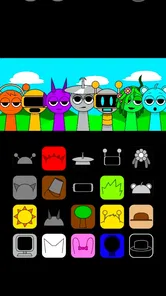
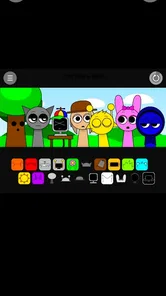
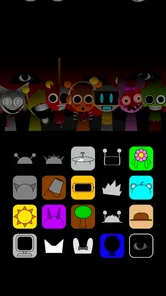
Visually, Beat Duet is a feast for the eyes. The developers have done a stellar job in creating a visually appealing environment that complements the music perfectly. Each level is uniquely designed with vibrant colors and dynamic backgrounds, making every session feel like a new adventure.
But what truly sets the game apart is the sound quality. You can tell that a lot of effort has gone into ensuring each beat is crisp and clear. Using a good pair of headphones elevates the experience to a whole new level, allowing you to catch every nuance of the tracks.
How it compares with other ways to enjoy music
Compared with a music player, this is an active pastime: I am not choosing a playlist and letting it run, but responding to cues as a track plays. Compared with a conventional mobile game that relies on aiming, building, or long-term planning, the immediate appeal is the connection between what I hear and what I do. That makes it a handy change of pace for someone who wants a little interaction with music rather than passive listening.
The trade-off is that a rhythm game cannot replace either alternative. A player gives me more control over what I hear and lets me listen without concentrating on a screen; a broader game may offer more varied goals and a different kind of progression. I would pick Beat Duet when the point is to follow a beat with my fingers, not when I need background audio, music discovery, or a deep strategy session.
Who Will Enjoy This Kind of Rhythm Game?
I’d recommend it to someone who likes following music with quick touch controls and wants a compact alternative to rhythm games built around a console controller or dedicated instrument. It can suit a brief break because the core idea is easy to grasp, while the added swipes and holds give practice a purpose. If you prefer listening without reacting, or want a music app focused on building playlists rather than playing, this is not the right fit.
It is also worth separating rhythm-game challenge from music discovery. The tracks are part of the play experience, so I would not choose it as a substitute for a streaming service or assume its selection will match my personal favorites. The game is free, rated Teen, and developed by Jingmao Tec; it has an average rating of 4.3 from around three thousand ratings and over five hundred thousand installs. Those figures suggest a sizable audience, but they cannot tell you whether its music or timing style will click for you.
A realistic place for it in the day
Imagine having a few minutes to spare while waiting for a friend. I would open the game, play a short stretch with my attention on the screen, and stop when the friend arrives rather than trying to turn the wait into a marathon. That is where its compact, hands-on format makes sense: a small burst of concentration with music at the center. In a busy commute, by contrast, I would be cautious about playing while walking or when I need to watch my surroundings. Rhythm cues reward focus, and safety is more important than keeping a streak of attention going.
For younger players or families choosing a game together, the Teen content rating is worth taking into account before installing. I would also consider whether the player enjoys timed responses; the rating alone does not say whether the pace will feel comfortable. If someone wants a gentle musical activity without pressure to react, listening together or choosing a different type of music game may be a better match.
When the app may not be the cause
A missed cue can feel like a touch problem, but I would first repeat the same section under similar conditions before drawing that conclusion. If it happens only when I am rushing, distracted, or holding the phone awkwardly, the issue may be my setup rather than the game. If the whole device is responding slowly in other tasks too, I would treat that as a broader phone-performance concern and try basic housekeeping before blaming one title.
For a problem that continues, I would make one change at a time: close other open apps, reopen the game, and see whether the behavior changes before moving on to a device restart. I would not delete the game as a first reaction, especially if I have not checked whether anything I care about could be lost. This measured approach keeps troubleshooting simple and avoids turning a one-off interruption into a bigger hassle.
Wrapping It Up
All in all, Beat Duet has quickly become one of my go-to apps for a quick gaming fix. It manages to combine music and gaming in a way that is both engaging and entertaining. Whether you’re a hardcore rhythm game fan or someone looking for a fun way to pass the time, this app is a solid choice.
So, if you're in the mood to tap into your musical side and test your reflexes at the same time, give Beat Duet a shot. Just a little warning: you might find yourself tapping to the beat long after you've put your phone down!
My practical verdict
My recommendation is strongest for casual players who want a touch-based music challenge they can try in small portions, and for rhythm-game fans willing to judge the timing and track feel for themselves. The game is free, and its 4.3 average rating across around three thousand ratings, along with over five hundred thousand installs, suggests many people have given it a try. I would still make the decision based on the first session, not popularity: comfort with its cues and enjoyment of the music matter more than a broad audience figure.
I would skip it if I mainly wanted a hands-off soundtrack, a reliable way to discover new music, or a game that does not ask for quick visual attention. For everyone else, the sensible approach is simple: install it on a compatible Android device, try it in a calm setting, and see whether the tap-and-swipe rhythm feels rewarding rather than stressful. That is a low-pressure way to decide whether this particular kind of music game belongs in your regular rotation.
Beat Duet Frequently Asked Questions
Who developed Beat Duet, and what kind of game is it?
Beat Duet is a music game developed by Jingmao Tec, presented as a character music game. Its rhythm-focused format is aimed at players who enjoy responding to music through timed actions. The game is rated Teen, so that age guidance is worth considering before downloading, especially when choosing games for younger players.
Is Beat Duet suitable for someone new to rhythm games?
Beat Duet is built around keeping time with music, making rhythm and timing central to play. Its range of difficulty levels gives players room to begin at a more manageable pace and improve as they become more comfortable. If you are new to rhythm games, expect practice to be part of learning how accurately to respond to the beat.
What is Beat Duet and how does it work?
Beat Duet is a rhythm-based music game available on both Android and iOS platforms. Players are required to tap to the beat of the music as notes fall on the screen. The game features various levels of difficulty, allowing players to progress as they improve their rhythm and timing skills. It also includes a wide range of music tracks, from pop to classical, providing an engaging experience for music lovers.
Is Beat Duet free to play?
Yes, Beat Duet is free to download and play, but it offers in-app purchases. These purchases can enhance the gaming experience by unlocking additional music tracks, removing ads, or obtaining special features. While the core game is accessible without spending money, some players may prefer to invest in these extras for a more enriched gameplay experience.
Can I play Beat Duet offline?
Beat Duet can be played offline, allowing users to enjoy the game without an internet connection. However, some features, such as downloading new music tracks or competing in global leaderboards, require an internet connection. Offline play is ideal for those who want to enjoy the game during commutes or in areas with limited connectivity.
Pros
- User-friendly interface for beginners
- Varied music genres to choose from
- Engaging and interactive gameplay
- Regular updates with new features
- Offline mode available
Cons
- Limited free version features
- Occasional ads interrupt gameplay
- Requires high storage space
- Some bugs in multiplayer mode
- Battery consumption is high













