

Xtool Anyscan
- 89.00
- 4.0
- Installs
- 100.00K
- Price
- Free
Screenshots
Analysis by Reviewed
I approached Xtool Anyscan as a practical companion for vehicle diagnosis rather than as a general car-maintenance app. It is an Auto & Vehicles app from XTOOL, built around the company’s Anyscan OBD diagnostic tool for technicians and DIY enthusiasts. That distinction matters: the app is most useful when paired with compatible diagnostic hardware, connected to a vehicle, and used by someone prepared to interpret what the car is reporting.
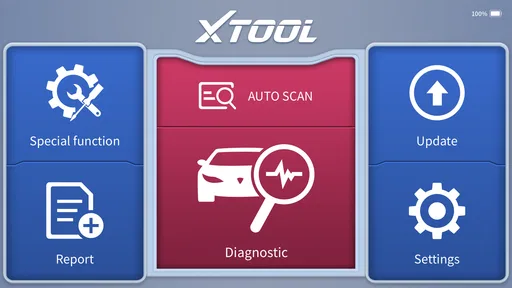
My first impression was that its value comes from turning a phone or tablet into part of a repeatable workshop routine. Instead of treating a warning light as a mystery, I can use the app to connect, scan, inspect fault information, clear codes when appropriate, and then check whether the original problem returns. It does not replace mechanical knowledge, but it can make the first stage of investigation much more organized.
How I use Xtool Anyscan in a normal diagnostic routine
The most reliable way to use it is to begin before touching the vehicle. I keep the ignition state, battery condition, and connection hardware in mind, then make sure the diagnostic adapter is properly connected before opening the app. A rushed connection can create misleading communication errors, so I prefer to let the vehicle settle and avoid starting with several unrelated tasks at once.
Once connected, I treat the first scan as a record rather than an invitation to erase everything immediately. A fault code is a clue, not automatically a failed component. I note which systems report an issue, look at the accompanying description or available data, and consider whether the warning appeared after a recent repair, battery problem, intermittent starting issue, or change in driving conditions.
This is one of the app’s most useful qualities for DIY work: it encourages a sequence. Scan first, inspect the vehicle, perform a sensible repair or test, and scan again. Clearing a code before recording it may make the dashboard look cleaner, but it removes useful context. I would much rather keep a simple note of the original result and use the app to verify whether the fault has actually been resolved.
For a realistic everyday example, imagine a car that displays an engine warning on the way home. I would connect the Anyscan tool after parking safely, run the scan, and save the code information in my own maintenance notes. If the code points toward an area that needs a physical inspection, I would check wiring, connectors, hoses, fluid levels, or other relevant parts before deciding what to replace. After the repair, a second scan is more valuable than simply assuming the first part changed the outcome.
The app is also useful when preparing to visit a garage. I can arrive with a clearer description of what happened and avoid relying only on a dashboard symbol. That does not mean I would challenge a professional diagnosis based on one code. Instead, I see the app as a way to communicate better and ask more informed questions.
More From Our News Desk

 Gmail
GmailGmail in a Busy Inbox: Who Benefits Most?
From first account to crowded workday, Gmail earns its place through dependable search and flexible sorting—but its best fit depends on how much inbox maintenance you can tolerate.

 Prime Video
Switching to Prime Video: What Changes in Your Viewing Routine
Prime Video can make a compelling second home for streaming, but switching means learning a different catalog, rental layer, and route from browsing to playback.

 Universal TV Remote Control
Universal TV Remote Control Works Best as a Reliable Backup
A phone remote earns its place through quick setup and reliable habits. Here is how to get more from Universal TV Remote Control—and where its limits show.

 Weather - By Xiaomi
Weather by Xiaomi Review: Clear at a Glance, Less Clear Up Close
Xiaomi’s weather app makes everyday forecasts quick to scan, but its calm surface can leave useful details and recovery paths harder to find than they should be.

 X
XX Under Pressure: Can It Recover When Posting Goes Wrong?
A resilience-focused review of X, examining setup, mistaken posts, interruptions, weak connections, and the gaps that matter when recovery needs to be dependable.

 Clash of Clans
Clash of Clans Is Won Between the Battles
Its raids are quick; its community is a long-term project of coordination, teaching, rivalry, and shared responsibility—with all the friction that entails.
Latest News



What I check before trusting a scan
I pay attention to whether the vehicle has enough battery power and whether the adapter remains connected during the entire process. A weak battery or interrupted connection can turn a straightforward session into a confusing one. If communication fails, I restart the process calmly rather than repeatedly tapping scan and assuming the car has a serious electronic fault.
I also separate stored, pending, and current-looking problems whenever the app presents that distinction. A code may have been recorded during an earlier event and may not represent an active failure now. The practical habit is to compare the scan with the symptoms: a rough idle, hard starting, reduced power, unusual noise, or no noticeable change all affect how seriously I interpret the result.
The best workflow is scan, understand, inspect, repair, and verify—not scan and erase. That simple order prevents one of the most common mistakes with consumer diagnostic tools: using code clearing as a substitute for diagnosis.
Settings and preparation that deserve attention
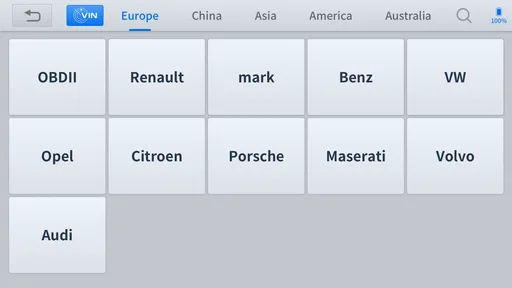
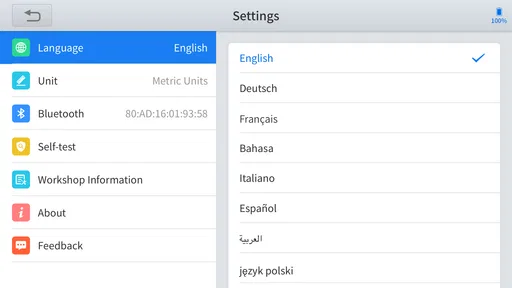
There is no benefit in changing settings simply to make the app feel more advanced. I focus on the vehicle selection, connection method, display preferences, and any available report or diagnostic options that make the results easier to review. Choosing the correct vehicle information is especially important because a generic selection can lead to an incomplete or less relevant diagnostic experience.
I keep the phone charged, close apps that might interrupt the session, and make sure the screen will stay usable while I am working beside the vehicle. This sounds basic, but diagnostic work often involves moving between the cabin, the engine bay, and the phone. A session that times out or loses connection at the wrong moment is frustrating and can force me to repeat the scan.
It is worth checking the app version before an important job. The current version is 4.40.61, and keeping software current is sensible when the app is responsible for communicating with vehicle systems. I would not wait until a customer’s car is in the driveway to discover that the application needs attention, the adapter is not recognized, or the phone has changed its connection behavior.
I also prefer a consistent naming habit in my own notes. I record the vehicle, date of the scan, warning symptoms, and codes before clearing anything. The app becomes far more useful when it is part of a maintenance history rather than a one-time button press. Even a basic text note can reveal whether the same fault keeps returning after several weeks.
Small habits that make repeated scans faster
Experienced users can save time by standardizing the order of operations. I connect the hardware, switch the ignition to the required state, open the app, select the vehicle, and wait for communication before beginning the full scan. Repeating that sequence reduces the temptation to troubleshoot several variables simultaneously.
For a car I maintain regularly, I keep the adapter and phone ready together, but I do not leave the diagnostic hardware connected when it is not needed. That keeps the tool from becoming a permanent part of the vehicle’s electrical routine and makes each session deliberate. When I work on more than one vehicle, I double-check the selected vehicle rather than assuming the previous session’s choice is still appropriate.
Another useful pattern is to run a short confirmation scan after a repair instead of waiting for the dashboard to decide whether the issue is gone. If the code returns immediately, I know the repair needs more investigation. If it does not, I still continue observing the vehicle rather than declaring victory after one successful screen.
When a warning appears intermittently, I avoid clearing it just because the light has disappeared. I record the circumstances: whether the engine was cold, whether the car was accelerating, and whether other symptoms were present. A later scan may then be easier to interpret because the code is connected to a real driving event rather than viewed in isolation.
These habits are more valuable than hunting for a single shortcut. The app can speed up access to diagnostic information, but the real time saving comes from avoiding repeated guesswork. A tidy process means fewer unnecessary part replacements and fewer scans performed without a clear question in mind.
Where the app helps more than a basic code reader
A simple code reader can be enough for someone who only wants to see an engine fault code. Xtool Anyscan makes more sense when the user wants a broader diagnostic workflow and is willing to work with a dedicated tool rather than a tiny plug-in reader. The phone interface is easier to inspect than many small handheld screens, especially when reviewing several results during a repair.
That does not mean every driver needs it. If I only want to check a warning once and have no interest in investigating the cause, paying attention to a professional technician may be the better choice. The app is aimed at people who want to participate in diagnosis, whether they are maintaining their own vehicle, learning automotive troubleshooting, or working in a technical environment.
Its free price makes trying the application less of a financial commitment, but the complete usefulness still depends on the compatible XTOOL hardware and the user’s ability to interpret results. “Free” does not turn a phone into a universal workshop scanner. I would evaluate the tool and vehicle compatibility before buying or relying on the setup for an urgent repair.
Important limits for advanced users
The biggest limitation is not the phone interface; it is the boundary between information and certainty. A diagnostic code can identify a circuit, system, or condition, but it does not always identify the exact failed part. Replacing the first component suggested by a code is an expensive habit, and the app cannot remove the need for voltage checks, visual inspection, service procedures, and mechanical testing.
I would also be cautious with functions that can alter vehicle settings or clear information. Erasing codes can hide evidence, and any action that changes vehicle behavior deserves a clear reason and a stable power supply. For a modern vehicle, an incorrect step can create more work than the original warning. If I am unsure what a function does, I stop and consult reliable vehicle-specific guidance rather than experimenting.
Another trade-off is that the app’s usefulness varies with the vehicle, the connected hardware, and the diagnostic access available for that model. A user expecting the same depth on every car may be disappointed. This is where a dedicated professional platform, manufacturer-level equipment, or an experienced garage can be a better option for complex electronic faults and programming-related work.
The app should also not be treated as a safety tool while driving. I use it when the vehicle is parked and secure. Live diagnostic information can be helpful during controlled testing, but interacting with a phone near a moving vehicle is not worth the risk. For road tests, I would have another person handle observation or rely on safe, professional procedures.
Privacy and device management are practical considerations too. I would avoid lending a logged-in phone with vehicle history casually, and I would keep my own records organized separately if several people use the same device. Those habits are not glamorous, but they matter when diagnostic notes include multiple vehicles and recurring faults.
Who will get the most from it
I think Xtool Anyscan is a strong fit for a DIY enthusiast who already performs basic maintenance and wants a more structured way to investigate warning lights. It is also appealing to a technician who values a mobile interface and wants diagnostic work to follow a repeatable routine. The app’s Everyone age rating makes it broadly accessible, but accessibility should not be confused with simplicity: automotive diagnosis still requires care.
I would recommend it less enthusiastically to someone who expects a one-tap answer such as “replace this exact part.” It is also not my first choice for a driver who has no compatible Anyscan hardware, no interest in learning what codes mean, or a vehicle with a fault that affects braking, steering, fuel safety, or drivability. In those cases, professional inspection is the sensible route.
The public response gives the app a 4.0 average from around 865 ratings, with roughly 89 written reviews, and it has passed 100K+ installs. I read those figures as evidence of a real user base rather than proof that every setup will be effortless. The rating feels consistent with a specialized tool: useful for the right audience, but dependent on hardware, vehicle compatibility, and the operator’s expectations.
My verdict after building a repeatable routine
After using it as part of a disciplined diagnostic process, I see Xtool Anyscan as a practical bridge between a basic consumer code reader and a full professional workshop system. Its strongest point is not a flashy promise; it is the ability to bring scan results into a workflow I can repeat, document, and verify. That is especially helpful when a warning is intermittent or when I want to check whether a repair genuinely changed the situation.
I like that the app can make a DIY user more methodical, provided that user resists the urge to erase codes blindly. The combination of correct vehicle selection, stable connection, careful notes, and a follow-up scan turns a vague dashboard warning into a series of manageable questions. That is the kind of progress a diagnostic app should provide.
My reservations are equally clear. It depends on compatible XTOOL equipment, it cannot replace mechanical testing, and its results require judgment. Someone looking for a universal answer machine will probably find the experience less satisfying than expected. Someone willing to learn, check symptoms, and treat codes as evidence rather than verdicts will get much more from it.
Released on June 25, 2023, and available free for Android devices running Android 7.0 or later, it is easy to approach without a large initial app cost. I would still prepare the hardware and vehicle before relying on it, especially for an urgent fault. For my own recommendation, the deciding question is simple: do you want to understand and verify vehicle problems, or only make a warning light disappear?
If the answer is the first, this Auto & Vehicles app is worth considering. Its real strength is repeatable diagnosis in the hands of a careful user, not replacing the careful user. Used that way, it can save time, improve conversations with repair professionals, and help DIY owners make decisions based on evidence instead of guesswork.
Xtool Anyscan Frequently Asked Questions
Is Xtool Anyscan free to download, and what does that include?
Xtool Anyscan is free to download and is intended to work with compatible xTool diagnostic scanners and interfaces. The app itself is only one part of the setup: access to particular vehicle coverage and advanced diagnostic functions may depend on the connected hardware, included licenses, software updates, or subscription plans. Check the terms for your device and the functions you need before buying or renewing anything.
What devices can I install Xtool Anyscan on?
Xtool Anyscan requires Android 7.0 or later. It is an Auto & Vehicles app from XTOOL, designed for technicians and DIY enthusiasts using compatible diagnostic equipment. Before installing, check that your phone or tablet meets the operating-system requirement and that it can use the connection method supported by your scanner. The app is free, but some diagnostic capabilities may depend on the device and software access.
What is Xtool Anyscan used for?
Xtool Anyscan is a vehicle diagnostic application designed to work with compatible xTool diagnostic scanners and interfaces. It can help users read and clear diagnostic trouble codes, view live data, perform selected system tests, and access service functions, depending on the vehicle, scanner model, and software subscription. It is mainly intended for automotive diagnostics rather than general vehicle monitoring.
Is Xtool Anyscan compatible with every car and scanner?
No. Compatibility depends on the xTool hardware being used, the vehicle’s make, model, year, control modules, and the functions supported by the purchased software package. Before downloading, users should check the official compatibility list and confirm that their scanner supports the required connection method, such as Bluetooth or Wi-Fi. Some advanced functions may also be unavailable on certain vehicles.
Does Xtool Anyscan require payment or a subscription?
The application may be free to download, but access to diagnostic coverage and advanced functions can depend on the connected xTool device, included licenses, software updates, or subscription plans. Basic features may be available with compatible hardware, while functions such as coding, adaptations, resets, or manufacturer-level tests may require additional authorization. Check current pricing and renewal terms before purchasing.
Pros
- Supports many vehicle brands and common OBD-II diagnostic functions.
- Provides live data readings for monitoring sensors and engine parameters.
- Can display and clear diagnostic trouble codes from compatible vehicles.
- Wireless connection makes testing more convenient than using a wired scanner.
- Useful for both home mechanics and professional workshop diagnostics.
Cons
- Full functions may depend on the specific scanner model and vehicle coverage.
- Some advanced features may require in-app purchases or paid subscriptions.
- Bluetooth or Wi-Fi pairing can be unreliable with certain phones or adapters.
- The interface may feel complex for users without automotive diagnostic experience.
- Vehicle-specific functions may not work consistently across all supported models.











